
You might wonder, how does a 4 wire axial ac fan work? It uses four separate wires to control power, speed, and monitoring, making it both powerful and precise. At fanacdc, you get top-notch ac fans built by experts who know cooling inside and out. When you learn how each wire and component works, you can use your fan safely and get the best performance every time.
Key Takeaways
- A 4 wire axial AC fan uses four wires for power, speed control, and monitoring.
- The fan’s motor, blades, and housing work together to create strong airflow.
- The capacitor helps the motor start quickly and run efficiently.
- Tachometer output allows real-time monitoring of fan speed.
- Proper installation and maintenance ensure long-lasting performance.
Axial AC Fan Components
Rotor, Stator, and Blades
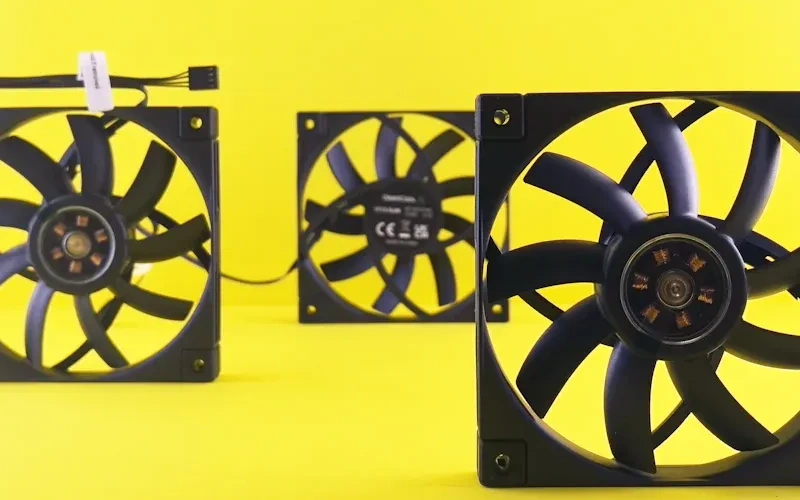
When you look inside an axial ac fan, you see several important parts working together. The ac fan motor sits at the heart of the system. This motor uses electricity to spin the rotor, which is the moving part. The stator stays still and creates a magnetic field that helps the rotor turn. You also find blades attached to the rotor. These blades push air in a straight line, which is why people call it an axial fan. The ac fan motor relies on ball bearings to keep everything moving smoothly. You might notice impellers, which help direct airflow. The motor drive controls how fast the ac fan motor spins. Accessories like connecting points, protection grills, and vibration controllers make the fan safer and easier to install.
- Motor
- Ball bearings
- Blades
- Impellers
- Housing or enclosure
- Motor drive
- Accessories (connecting points, silencer, protection grill, counter flange, vibration controller, feet for positioning, variable inlet vane)
Housing and Build Quality
The housing of an axial ac fan protects the ac fan motor and other parts. You get strong frames made from die-cast aluminum or tough plastic. These materials resist heat and reduce noise. The fan frame supports the motor and blades, helping direct airflow. Some designs include mounting brackets or vibration dampeners, making installation easier and quieter. Dual-ball bearings inside the ac fan motor boost reliability and efficiency. When you choose a fan from fanacdc, you get products that meet UL and RoHS standards, so you know they are safe and built to last.
| Feature | Impact on Durability and Performance |
|---|---|
| Die-cast aluminum housing | Provides strength and longevity, suitable for heavy use. |
| Thermoplastic impeller/blades | Ensures compatibility with various voltages and durability. |
| Dual-ball bearings | Enhances reliability and operational efficiency. |
| Compliance with UL and RoHS | Ensures safety and high-quality standards for long-term use. |
The Four Wires Explained
You might wonder what makes a 4 wire axial ac fan different from other fans. The answer is in the wiring. A basic fan uses two wires for power. A three-wire fan adds simple speed control. The four-wire design gives you power, speed control, and feedback for precise operation. Each wire connects to a specific part of the ac fan motor. One wire supplies power to the motor. Another wire lets you adjust the speed. The third wire sends feedback to help you monitor performance. The fourth wire can connect to a tachometer or controller for even more control. This setup helps you get the most out of your ac fan motor, making it perfect for demanding jobs.
| Fan Type | Number of Wires | Functionality |
|---|---|---|
| 2 Wire | 2 | Basic power supply, no speed control |
| 3 Wire | 3 | Power supply with basic speed control |
| 4 Wire | 4 | Power supply, speed control, and feedback for precise operation |
Tip: If you want a fan that gives you more control and better monitoring, go with a 4 wire axial ac fan. The advanced wiring helps you fine-tune the ac fan motor for your needs.
How Does a 4 Wire Axial Ac Fan Work
Wiring and Electrical Operation
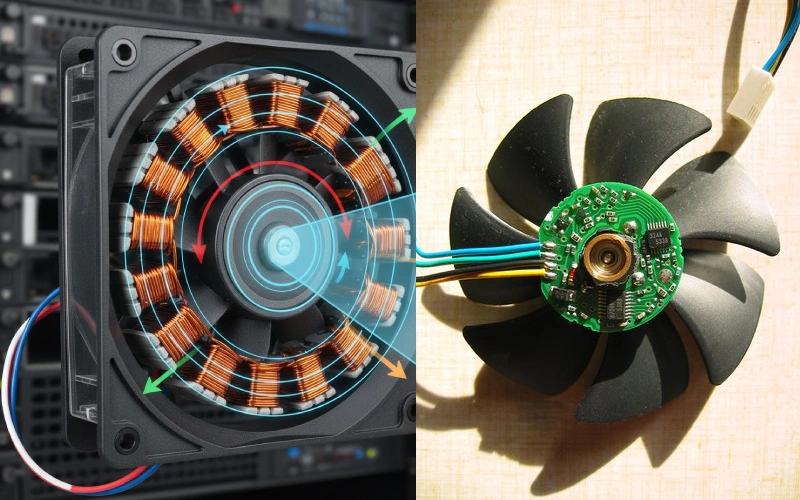
If you want to know how does a 4 wire axial ac fan work, you need to start with the wiring. The extra wires in a 4 wire setup give you more control and feedback than a basic fan. You get one wire for power, one for ground, one for speed control, and one for monitoring. This setup lets you adjust the ac fan motor speed and check how it’s running in real time.
Here’s what happens inside the fan when you turn it on:
- The ac fan motor converts electrical energy into mechanical energy. This is what spins the blades and moves air.
- The motor works using electromagnetic induction. It creates a rotating magnetic field that makes the rotor spin.
- The four wires allow you to control the speed with a PWM (pulse-width modulation) signal and monitor the fan’s performance with a tachometer output.
- The constant power supply keeps the tachometer working all the time, so you always know the exact speed.
The wiring in a 4 wire axial ac fan gives you advanced features that you won’t find in a simple 2 wire fan. You can fine-tune the ac fan motor speed and get instant feedback, which is great for keeping your equipment cool and running smoothly.
Tip: If you want more control and better monitoring, a 4 wire axial ac fan is the way to go. The extra wires make a big difference in performance.
Capacitor and Speed Control
Now, let’s talk about how does a 4 wire axial ac fan work when it comes to starting up and changing speeds. The ac fan motor uses a capacitor to help it start and run efficiently. The capacitor gives the motor an extra push when you first turn it on. This helps the blades overcome resistance and start spinning right away.
Here’s how the capacitor helps the ac fan motor:
- It gives the motor a boost of torque at startup, so the fan blades move quickly.
- It improves the power factor, making the motor use energy more efficiently.
- It reduces current losses, which means less wasted energy.
- It keeps the motor from overheating, so your fan lasts longer.
- It helps the motor run smoothly, cutting down on noise and vibration.
- It lets the motor reach its starting speed faster, so you get airflow right when you need it.
When you want to change the speed, the ac fan motor uses PWM speed control. You send a PWM signal through one of the wires. This signal tells the motor how fast to spin. You can set the speed anywhere from low to high, depending on your cooling needs. The fan can handle high-frequency PWM signals, usually between 15kHz and 30kHz, which helps keep noise levels down.
Here are some common ways to control the speed of an axial fan:
| Method | Description | Pros | Cons | When to Use |
|---|---|---|---|---|
| Constant Speed (On/Off) | Fan is either on or off, simplest method. | Lowest first cost, simple controls. | Coarse control, highest average power use. | Small systems with simple needs. |
| Two-Speed Motor | One motor with two speeds using pole switching. | Low/medium cost, fewer starts than on/off. | Only two speed options. | Moderate load changes. |
| Dual Motors / Dual Fans | Two smaller fan-motor assemblies. | Redundancy, finer control. | More complex setup. | Critical systems needing backup. |
| Variable Frequency Drive (VFD) | Electronic speed control with smooth rpm changes. | Best energy savings, smooth operation. | Higher cost, needs special motor insulation. | Most medium/large systems. |
You can see that a 4 wire axial ac fan gives you the flexibility to pick the right speed control method for your application. The ac fan motor responds quickly to changes, so you always get the cooling you need.
Tachometer and Monitoring
One of the best things about a 4 wire axial ac fan is the tachometer output. This feature lets you monitor the speed of the ac fan motor in real time. You get instant feedback on how fast the fan is spinning, which helps you keep your equipment safe and efficient.
Here’s how does a 4 wire axial ac fan work with tachometer monitoring:
| Feature | Description |
|---|---|
| Tachometer Output | Lets you check the fan’s RPM (rotations per minute) as it runs. |
| PWM Control | Lets you adjust the fan speed for the best cooling performance. |
The tachometer wire sends a signal that tells you the exact speed of the ac fan motor. You can use this information to spot problems early, like if the fan slows down because of dust or worn bearings. In industrial settings, tachometers track speed changes that might mean trouble. This helps you plan maintenance before something breaks.
You can use the tachometer output to:
- Monitor the rotational speed of the ac fan motor.
- Detect speed drops that could signal a problem.
- Schedule maintenance before a breakdown happens.
- Keep your cooling system running at its best.
When you use a 4 wire axial ac fan from fanacdc, you get advanced monitoring and control features. These fans meet global standards like UL, CE, and RoHS. You can trust them to deliver reliable performance in any industrial or commercial setting.
So, how does a 4 wire axial ac fan work? It gives you power, speed control, and real-time monitoring, all in one package. The ac fan motor, capacitor, and advanced wiring work together to keep your equipment cool, efficient, and safe. If you want to know how does an axial fan work in demanding environments, this is the answer—smart design, strong components, and total control.
Working of an Axial Fan: Airflow and Performance
Airflow Mechanics
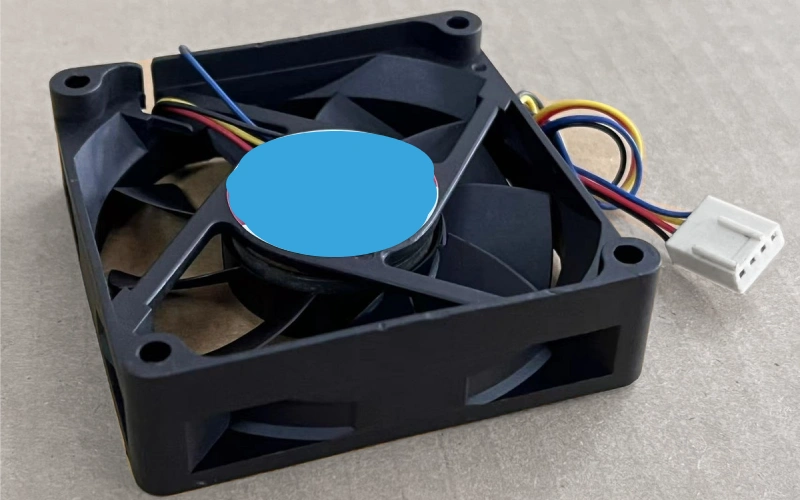
When you look at the working of an axial fan, you see how the blades and ac fan motor team up to create strong air flow. The blades spin because the motor drives them. Air moves in a straight line, entering from one side and exiting from the other. This design lets you push air through tight spaces or across large surfaces. You get consistent airflow, which helps with cooling in control cabinets, server racks, and telecom equipment. The ac fan motor keeps the blades turning at a steady speed, so you always get reliable air flow. If you need more cooling, you can adjust the motor speed to increase airflow. The shape and angle of the blades also affect how much air flow you get. Fanacdc axial fans use aerodynamic blades and powerful motors to deliver high airflow for demanding cooling jobs.
Efficiency and Noise
You want your cooling system to work hard without making too much noise. Axial fans from fanacdc use efficient ac fan motors that keep energy use low and cooling efficiency high. The motor design and blade shape help reduce wasted energy and keep air flow smooth. You get strong airflow with less power, which means lower operating costs. Noise matters in many settings, especially if you work near the fan. Here’s a look at typical noise levels for axial fans:
| Model | Airflow (CFM) | Voltage (V) | Noise Level (dB(A)) |
|---|---|---|---|
| ebm-papst 4656Z-853 | 105 | 230 | 40 |
| ebm-papst 4656ZW | 94.2 | 230 | 40 |
| ebm-papst AC3200JHU | 84.8 | 115/230 | 55 |
Most axial fans run quietly, with noise levels around 40 dB(A). Some models with higher airflow may reach 55 dB(A). Fanacdc ac fan motors use ball bearings and reinforced frames to keep vibration and noise low, so you get cooling without distractions.
Tip: If you want quiet cooling, choose a fan with aerodynamic blades and a well-built motor.
Key Performance Parameters
When you pick an axial fan for cooling, you need to check a few key numbers. Airflow, measured in cubic feet per minute (CFM), tells you how much air the fan moves. The ac fan motor speed, usually in RPM, affects both airflow and cooling efficiency. You also want to look at static pressure, which shows how well the fan pushes air through filters or tight spaces. Noise level matters if you need a quiet workspace. Service life tells you how long the ac fan motor will last. Fanacdc axial fans offer high airflow, strong motors, and long service life for tough cooling jobs. You can find models with different sizes, speeds, and airflow ratings to match your cooling needs.
- Airflow (CFM)
- Motor speed (RPM)
- Static pressure
- Noise level (dB(A))
- Service life (hours)
If you want reliable cooling, choose an axial fan with the right airflow and motor specs. Fanacdc ac fan motors deliver steady air flow and cooling efficiency for industrial and commercial use.
Installation and Applications with fanacdc AC Fans
Installation Steps
Ready to install your axial fan? You want to get the most out of your motor and keep your cooling system running smoothly. Start by reading the manufacturer’s instructions. Always wear protective gloves and goggles. Disconnect the power supply before you touch any wires. Use a dedicated disconnect switch for extra safety.
Here’s a step-by-step guide to help you:
- Check the location. Make sure there’s enough space for airflow and maintenance. Place the fan near openings for easy air exchange.
- Plan the layout. Avoid bends or tight spots in the ductwork close to the fan.
- Attach the fan firmly. Make sure it blows air in the right direction.
- Use flexible connections. These reduce vibrations between the fan and the ductwork.
- Follow the wiring diagrams. Connect the motor wires correctly and check compatibility with your building’s power system.
- Test the fan. Make sure the motor runs smoothly and the fan is safe to use.
Tip: Use vibration-dampening mounts to cut down on noise and stress on the motor and blades. A stable mount helps your axial fan last longer.
Industrial and Commercial Uses
You’ll find axial fans in all kinds of places. They work well in control cabinets, server racks, telecom equipment, and renewable energy systems. The motor design lets them handle tough jobs and keep things cool. When integrated into a cooling system, these fans move air efficiently and keep temperatures steady.
| Benefit | Description |
|---|---|
| Energy Efficiency | Axial fans use aerodynamic blades and direct airflow to reduce power use. |
| High Airflow Rates | The motor pushes large volumes of air, perfect for big spaces. |
| Compact Design | The simple motor and fan structure fit easily in tight spots. |
Troubleshooting Tips
Sometimes, things don’t go as planned. If your axial fan isn’t working right, check for unbalanced mounting. Make sure the motor is attached securely. Incorrect wiring can cause problems, so double-check all connections. Using the wrong wire size can affect how the motor runs. If you notice the fan speed isn’t matching the control room feedback, the actuator might be installed incorrectly.
- Always disconnect power before inspecting the motor.
- Look for dust or debris blocking the blades.
- Listen for unusual noises from the motor or fan.
- If you need help, reach out to fanacdc’s support team. They offer technical advice and service to keep your motor and fan running strong.
Note: Proper installation and regular maintenance help your axial fan deliver reliable performance for years.
Conclusion
You now know how a 4 wire axial AC fan works. The four wires give you control, monitoring, and reliable power. The motor sits at the heart of the system. It takes electrical energy and turns it into airflow that keeps your equipment cool. You use the motor to adjust speed, check performance, and make sure everything runs smoothly. The capacitor helps the motor start strong and run efficiently. You can send signals to the motor for precise speed control. The tachometer wire lets you track the motor’s speed in real time. If you want to keep your system safe, you need to watch the motor and respond to any changes.
When you choose a fan from fanacdc, you get more than just a cooling device. You get a motor built for long life and tough jobs. The motor meets strict global standards. It works in harsh environments and keeps your equipment safe. You can trust the motor to deliver steady airflow, low noise, and high efficiency. Installation is simple when you follow the right steps. Always connect the motor wires as shown in the manual. Test the motor before you finish the job. If you have questions, fanacdc offers technical support and custom solutions.
Ready to upgrade your cooling system? Visit the fanacdc website for more details. You can find the right motor for your needs and get expert advice. Keep your equipment running strong with a reliable motor and smart installation. Your next project starts with the right motor and the right support.
You now understand how a 4 wire axial AC fan works. The motor takes electrical power and turns it into airflow. Each wire connects to a different part of the motor, giving you control and feedback. The motor starts strong, runs efficiently, and keeps your equipment cool. You can adjust the motor speed and monitor its performance. When you choose fanacdc, you get a motor built for reliability and long life. Proper installation and wiring help the motor deliver top results. Need help? Visit fanacdc for expert support and custom motor solutions.
FAQ
How do I know if my 4 wire axial AC fan is working correctly?
You can check the fan speed using the tachometer wire. Listen for smooth operation and steady airflow. If you notice strange noises or reduced cooling, inspect the wiring and clean the blades.
Can I control the speed of my fan without special equipment?
You need a compatible controller or a PWM signal to adjust the speed. Basic switches only turn the fan on or off. For precise control, use the recommended speed control method from the manufacturer.
What should I do if my fan makes unusual noises?
Turn off the power first. Check for loose mounting, debris, or worn bearings. Clean the blades and inspect the housing. If the noise continues, contact technical support for help.
Is it safe to install a 4 wire axial AC fan myself?
You can install the fan if you follow the instructions and safety guidelines. Always disconnect power before wiring. If you feel unsure, ask a professional or reach out to fanacdc for support.
How often should I clean or maintain my fan?
Clean the blades and housing every few months. Inspect the wiring and bearings during routine checks. Regular maintenance helps your fan run efficiently and last longer.

