
You want to know how to test 12 volt dc fan at home? It’s easy. You just need a few basic tools and a safe space. If you have a cooling fan, you can check how to test 12 volt dc fan by connecting it to a power supply and watching it spin.
You can also learn how to test 12 volt dc fan using a multimeter for quick checks. If you’re unsure how to test 12 volt dc fan, this guide shows you the steps. fanacdc stands out as a trusted manufacturer with reliable DC fans and expert support. When you follow how to test 12 volt dc fan, you get results you can count on.
Key Takeaways
- Gather essential tools like a multimeter, DC power supply, and connecting wires to test your 12V DC fan safely.
- Always double-check your connections and ensure the power is off before handling wires to avoid accidents.
- Use a multimeter to check voltage and continuity, ensuring your fan is receiving the correct power.
- Observe the fan’s operation for smooth spinning and strong airflow; unusual noises may indicate a problem.
- If issues arise, troubleshoot by checking connections, testing voltage, and inspecting for physical damage.
Test 12 Volt DC Fan Tools Needed for Testing
Request Test Report Request Technical Support (Free) Click Text
Essential Tools List
You don’t need a lot of fancy equipment to test a 12 volt DC fan at home. You can grab a few basic tools and get started right away. Here’s what you need:
- Multimeter: This tool helps you check voltage, continuity, and current. You can use it to see if your fan is getting power and if the wiring is good.
- DC power supply: You need a stable 12V source to power the fan. You can use a bench power supply or even a 12V battery if you have one.
- Connecting wires: These let you hook up the fan to the dc power supply. Make sure the wires are insulated and long enough to reach your workspace.
- Alligator clips: These clips make it easy to connect wires to the fan terminals without soldering.
- Screwdriver: Sometimes you need to open the fan housing or tighten connections.
- Safety gloves: Protect your hands when handling wires and tools.
Tip: Always double-check your connections before turning on the dc power supply. This keeps you safe and prevents accidental shorts.
About fanacdc DC Fans
When you test a fanacdc DC fan, you get more than just a regular cooling fan. You get a product built with strict quality control and advanced manufacturing. The factory uses high-grade materials and precision-balanced rotors. This means your fan runs smoothly and lasts longer.
- Quiet operation keeps your workspace peaceful. You won’t hear loud buzzing or humming.
- Intelligent speed control lets you adjust fan speed with PWM. You can set the airflow and noise level to match your needs.
- Reliable performance ensures your electronics stay cool. The fans work well in sensitive environments like telecom equipment and industrial systems.
Fanacdc stands out because of its technical expertise and strong customer support. If you ever need help, you can count on the factory’s team to guide you. Testing a fanacdc DC fan is easy because the design makes wiring and checks straightforward. You get consistent results every time.
Safety Tips Before You Start
Basic Safety Steps
Before you test your 12V DC fan, you need to set up a safe workspace. Safety matters, especially when you work with electrical components. You want to avoid accidents and protect your equipment. Here’s what you should do:
- Disconnect power: Always make sure the fan and power supply are off before you touch any wires or terminals.
- Check insulation: Use wires with proper insulation. This prevents shocks and keeps your hands safe.
- Secure connections: Attach wires firmly. Loose connections can cause sparks or shorts.
- Ground your workspace: If possible, use a grounded mat or surface. This reduces the risk of static discharge.
- Wear gloves: Safety gloves protect your hands from sharp edges and electrical contact.
- Ventilate the area: Good airflow keeps heat and fumes away. You don’t want to test in a cramped space.
- Label everything: Mark wires and terminals clearly. This helps you avoid mix-ups.
Note: fanacdc DC fans are built with high-quality materials and strict safety standards. You get reliable performance and peace of mind when you follow these steps.
Here’s a quick look at recommended safety guidelines for handling 12V DC components:
| Category | Guidelines |
|---|---|
| Storage | Store in a cool, dry place; Keep away from flammable materials; Separate terminals to prevent short circuits; Monitor for swelling or leakage. |
| Transport | Use certified packaging; Label packages with hazard symbols; Provide safety data sheets; Train logistics partners. |
| Testing | Conduct electrical safety tests, thermal tests, mechanical tests, and chemical tests before market release. |
| Best Practices | Use proper insulation; Secure the battery; Include ventilation; Add fuses or circuit breakers; Label everything clearly. |
Common Mistakes to Avoid
You might feel eager to start testing, but rushing can lead to trouble. Watch out for these common mistakes:
- Skipping power checks: If you don’t check the power supply voltage, you risk damaging the fan.
- Ignoring wire labels: Mixing up wires can cause shorts or reverse polarity.
- Testing in a cluttered area: Messy spaces increase the chance of accidental contact or dropped tools.
- Touching terminals while powered: This can cause shocks or burns.
- Forgetting to ground: Static discharge can harm sensitive electronics.
Tip: fanacdc’s technical support team can help if you run into problems. Their expertise makes troubleshooting easier and safer.
When you follow these safety tips, you protect yourself and your equipment. You also make sure your fanacdc DC fan delivers the reliable performance it’s known for.
Inquire for Samples Request Technical Support (Free) Click Text
How to Test 12 Volt DC Fan Step by Step
Ready to get hands-on? This step-by-step guide will walk you through testing your 12V DC fan at home. You’ll use a multimeter, check wires, and connect to power—all with confidence. Let’s dive in.
Identify Fan Wires and Terminals
Start by figuring out which wire does what. Most 12V DC fans use standard color codes. Here’s a quick reference:
| Color Code | Description |
|---|---|
| RED | +Ve (L+) |
| BLACK | -Ve (L-) |
| GREEN | Protective Ground “PG” |
| WHITE | Mid-Wire as Center Tapped (N) |
| BROWN | +Ve (L+) (Australia & New Zealand) |
| LIGHT BLUE | -Ve (L-) (Australia & New Zealand) |
| GREEN/YELLOW | Protective Earth “PE” (Australia & NZ) |
Check your fan’s label or datasheet if you’re unsure. If you’re testing a fanacdc DC fan, you’ll notice clear markings and high-quality connectors. This makes setup simple and reduces mistakes.
Tip: Take a photo of the wiring before you disconnect anything. This helps you reconnect everything correctly.
Connect to 12V Power Source
You need a safe and reliable way to power your fan for testing. Here are some options:
- Use a battery jump starter pack. It’s portable and easy to use.
- Try an old low voltage landscape lighting transformer that outputs 12V.
- Use a dedicated 12V power supply with current and voltage limiting features.
Always double-check the polarity before connecting. Connect the red wire to positive (+) and the black wire to negative (–). Secure the wires with alligator clips for a solid connection.
Note: fanacdc DC fans are designed for easy wiring and safe operation. Their robust terminals help prevent accidental shorts during testing.
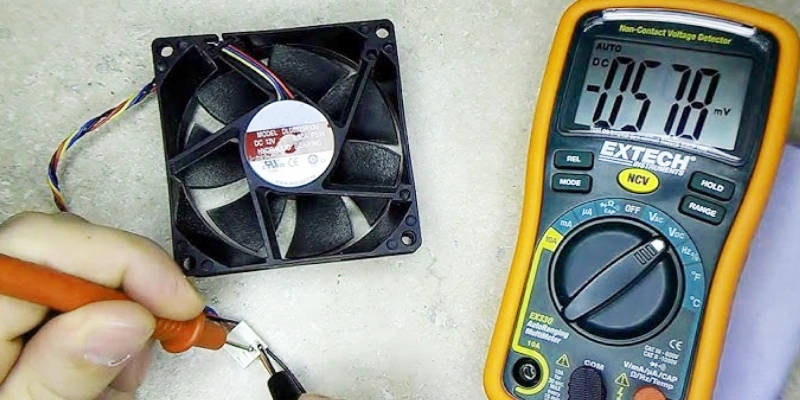
Use a Multimeter for Checks
Your multimeter is your best friend during testing. Here’s how you can use it:
- Set your multimeter to the continuity mode.
- With the fan disconnected from power, touch the probes to the fan’s terminals.
- If you hear a beep, the circuit is complete. No beep means an open circuit.
- Switch your multimeter to voltage mode. Connect the fan to the power source and measure across the terminals to confirm you’re getting 12V.
- For current draw, set your multimeter to the appropriate current range and connect it in series with the fan.
Always turn off your multimeter when you finish to save battery life.
Tip: fanacdc DC fans have consistent wiring and reliable construction, so you’ll get accurate readings with your multimeter every time.
Observe Fan Operation
Turn on the power and watch the fan. Here’s what you should look for:
- The fan should spin up smoothly and reach full speed.
- Listen for any unusual noises like grinding or rattling.
- Feel for strong airflow coming from the fan.
- Check for any vibration or wobbling.
If you notice loud noises, reduced airflow, or erratic speed, there may be a problem. A fanacdc DC fan usually runs quietly and smoothly, thanks to its precision-balanced rotors and advanced bearings.
Troubleshoot Issues
If your fan doesn’t work as expected, don’t panic. Here’s what you can do:
- Double-check all connections and make sure the power supply is set to 12V.
- Use your multimeter to test for voltage at the fan terminals.
- Try a continuity test to check for broken wires or open windings.
- Swap out the power supply or wires to rule out external issues.
Note: If you’re using a fanacdc DC fan and still have trouble, their technical support team can help you troubleshoot quickly.
Visual and Mechanical Inspection
Look closely at your fan. Check for:
| Defect Type | Description |
|---|---|
| Overheating | Excessive heat generated by the fan. |
| Excessive Vibration | Noticeable shaking during operation. |
| Unusual Noise | Sounds that are not typical for normal operation. |
| Reduced Airflow | Decreased airflow output from the fan. |
| Bearing Failure | Deterioration of the fan’s bearings. |
| Electrical Faults | Issues with the electrical components. |
| Fan Not Starting | Failure to initiate due to power or motor issues. |
A fanacdc DC fan rarely shows these issues, thanks to strict quality control and high-grade materials.
Continuity Test (Winding Integrity)
Use your multimeter to check the fan’s windings:
- Disconnect the fan from power.
- Set your multimeter to continuity mode.
- Touch the probes to the motor terminals.
- A beep means the winding is intact. No beep means a break in the winding.
This test helps you spot internal faults quickly.
Voltage Test (Power Supply Verification)
You want to make sure your fan is getting the right voltage:
- Set your multimeter to DC voltage mode.
- With the fan powered, touch the probes to the fan’s terminals.
- You should see a reading close to 12V.
If the voltage is too low, the fan may run slowly or not at all.
Current Draw Test (Power Consumption)
To check how much power your fan uses:
- Set your multimeter to the correct current range.
- Connect the multimeter in series with the fan and power supply.
- Turn on the fan and read the current draw.
Compare the reading to the fan’s datasheet. A fanacdc DC fan will match its rated specs, showing efficient power use.
Functional Spin Test
Give the fan blades a gentle spin by hand (with power off). The blades should move freely without resistance or noise. If they stick or grind, the bearings may be worn.
Tip: fanacdc DC fans use extended-life bearings for smooth, long-lasting operation.
RPM / Speed Measurement (For 3-Wire Fans)
If your fan has a tachometer wire (usually yellow or blue), you can measure speed:
- Connect the tachometer wire to a compatible RPM meter or use your multimeter if it supports frequency measurement.
- Compare the RPM reading to the fan’s rated speed (often around 3500 RPM for 12V models).
Consistent speed means your fan is healthy.
Airflow Performance Test
You can estimate airflow at home:
- Hold a strip of paper or tissue near the fan’s output. The stronger the airflow, the better the cooling.
- Compare your fan’s airflow to its rated value. For example, a typical 12V DC fan might deliver 11.5 to 20 CFM.
A fanacdc DC fan will deliver strong, steady airflow, matching its published specs.
PWM Speed Control Test (For 4-Wire Fans)
If your fan supports PWM speed control:
- Connect the PWM control wire to a PWM signal generator.
- Adjust the duty cycle and observe the fan’s speed response.
- Make sure the fan speeds up and slows down smoothly.
If you notice erratic speeds or noise, check the connections and PWM voltage. fanacdc DC fans feature smart speed control for precise adjustments.
Noise Level Measurement
Noise matters, especially in quiet spaces. Here’s how to check:
- Use a smartphone app or sound level meter.
- Place the meter about 1 meter from the fan.
- Acceptable noise levels for 12V DC fans range from 22 to 27 dBA for quiet operation.
A fanacdc DC fan stays within this range, thanks to its aerodynamic blade design.
Bearing and Longevity Test
Listen for bearing noise during operation. A healthy fan runs quietly. If you hear grinding or clicking, the bearings may be worn. fanacdc DC fans use advanced bearings for long service life—up to 70,000 hours.
Environmental / IP Rating Test
If you need to test your fan in tough conditions:
- Check the fan’s datasheet for IP rating and temperature range.
- fanacdc DC fans are tested for high temperature, humidity, and vibration, so you can trust their durability.
Note: If you need help with advanced testing, fanacdc’s technical support can guide you.
You’ve now completed a full step-by-step guide for testing your 12V DC fan at home. With a multimeter and a few simple tools, you can diagnose most issues and keep your equipment running smoothly. fanacdc DC fans make the process even easier with their reliable design and expert support.
Request Technical Support (Free) Click Text
Understanding Test Results
So, you’ve finished testing your 12V cooling fan. Now, let’s break down what your results mean and how you can use them to keep your equipment running smoothly.
Fan Runs Normally
When your cooling fan spins up right away, stays quiet, and pushes out a steady stream of air, you know things are working as they should. You might also see a green LED light up on your device, which is a great sign. Here’s a quick guide to what those LED indicators mean:
| LED Status | Condition Description |
|---|---|
| Green (Steady On) | The fan is functioning normally. |
| Amber (Off) | Normal operation. |
If you’re using a fanacdc DC fan, you’ll notice how the brushless motor and smart control features help the fan run efficiently and quietly. These advanced features give you reliable cooling and peace of mind.
Fan Runs Slowly or Noisily
If your cooling fan turns on but runs slower than usual or makes odd noises, something isn’t right. You might hear grinding, rattling, or notice weak airflow. This could mean low voltage, dust buildup, or worn bearings. Sometimes, a fault indicator like an amber LED will turn on:
| LED Status | Condition Description |
|---|---|
| Amber (Steady On) | A fault has been detected with the fan. |
| Green (Off) | Chassis 3.3V_Standby power is off or there is a fan fault. |
With fanacdc DC fans, you get advanced control functions and longer service life. These features help you spot issues early and keep your cooling fan running at its best.
Fan Doesn’t Run
If your cooling fan doesn’t spin at all, check your connections and power supply first. No movement or sound usually means a wiring problem, a dead power source, or a failed motor. The LED might stay off or show a fault. Here’s what makes fanacdc DC fans stand out in these situations:
| Feature | Impact on Test Results and Interpretation |
|---|---|
| Brushless Motor | Higher energy efficiency and more accurate cooling performance. |
| Smart Control | Real-time thermal management for better reliability. |
| Quieter Operation | Easier to notice abnormal sounds or failures. |
| Longer Service Life | Consistent performance, even after many hours of use. |
| Advanced Control Functions | Precise feedback and system protection. |
If you ever get stuck, fanacdc’s technical support team is ready to help you troubleshoot and get your cooling fan back in action.
Common Problems and Troubleshooting Guide
You might run into a few issues when testing your 12 volt DC fan. Don’t worry—most problems are easy to spot and fix. Let’s walk through the most common symptoms, their causes, and how you can use troubleshooting to get your fan working again.
Symptom
Here’s a quick table to help you identify what’s going on:
| Symptom | Possible Cause | Diagnostic Test | Solution |
|---|---|---|---|
| Fan doesn’t spin | No power, open winding | Voltage, continuity | Check connections, replace fan |
| Fan spins slowly | Low voltage, bearing | Voltage, manual spin | Verify power, replace bearings |
| Fan noisy / grinding | Debris, bearing wear | Visual, listen | Clean debris, replace fan |
| Fan stops intermittently | Loose connection, thermal protection | Check terminals, monitor current | Re-seat connectors, check for overheating |
| High current draw | Short circuit, binding | Current, mechanical | Inspect for obstruction, replace |
| RPM not matching spec | Voltage, PWM signal | Voltage, RPM | Verify voltage, check PWM |
Possible Cause
You might see your fan not spinning, spinning slowly, or making strange noises. These issues usually come from power problems, worn bearings, or debris inside the fan. Sometimes, loose wires or overheating can cause the fan to stop and start.
If you’re using a fanacdc DC fan, you’ll notice fewer issues thanks to superior manufacturing and strict quality control. The factory’s advanced brushless motors and extended-life bearings make troubleshooting easier.
Diagnostic Test
Grab your multimeter and start with a voltage test. If the fan doesn’t spin, check for power at the terminals. Run a continuity test to see if the windings are intact. For slow or noisy fans, try a manual spin test and listen for grinding. If the fan stops randomly, check all connectors and monitor the current.
Quick tip: fanacdc DC fans have clear wiring and robust terminals, so you can perform troubleshooting with confidence.
Solution
You can fix most problems with simple steps. Tighten loose connections, clean out debris, and verify your power supply. If you find a seized bearing or broken winding, replace the fan. For fans with PWM control, check the signal and adjust as needed. fanacdc’s technical support team is always ready to help you with troubleshooting and repairs.
Reliable products and expert support make troubleshooting stress-free. You get peace of mind knowing your fanacdc DC fan is built to last.
Common Problems and Solutions
Wiring and Connection Issues
Wiring problems can stop your fan in its tracks. You might see the fan not spinning, running slowly, or stopping and starting. Loose wires, poor connections, or reversed polarity often cause these headaches. Always check the wires for damage or wear. Make sure the connectors fit snugly. If you use a fanacdc DC fan, you get robust terminals and clear markings, which make wiring simple and safe.
Tip: Label your wires before disconnecting anything. This helps you reconnect everything the right way.
Power Supply Problems
A weak or unstable power supply can cause all sorts of trouble. Your fan might overheat, slow down, or even stop working. Here’s a quick table to help you spot and fix common power supply issues:
| Symptoms | Resolutions |
|---|---|
| Overheating | Improve ventilation, install active cooling |
| Voltage fluctuations | Use high-quality components, robust designs |
| Component degradation | Regular maintenance checks, replace faulty parts |
If you choose a fanacdc DC fan, you benefit from advanced designs that handle voltage changes and keep your system running smoothly.
Fan Motor or Physical Damage
Physical damage can happen if the fan takes a hit or collects too much dust. You might hear grinding noises or see the fan wobble. Sometimes, the motor windings break or the bearings wear out. Clean the fan blades and housing often. If you spot cracks or broken parts, replace the fan right away. fanacdc DC fans use high-grade materials and extended-life bearings, so you get fewer problems and longer service life.
Quick Fixes for fanacdc DC Fans
You can solve many issues with a few simple steps:
- Clean regularly. Remove dust and debris from the fan and vents.
- Lubricate bearings with high-quality grease if needed.
- Improve ventilation by clearing airflow paths.
- Check wiring for faults or loose connections.
- Choose quality fans like fanacdc for better reliability.
Stick to a regular maintenance schedule. Listen for odd noises and make sure the airflow direction is correct. If you ever feel stuck or notice a problem you can’t fix, reach out to fanacdc’s support team. They offer expert advice, fast solutions, and energy-efficient options. You get peace of mind knowing you have a reliable partner for your cooling needs.
Conclusion
You’ve just learned how to test a 12 volt DC fan at home. The process is simple and safe. You only need basic tools and a little patience. When you follow each step, you can spot problems early and keep your equipment cool.
Let’s recap the key points:
- Identify the fan wires and terminals.
- Connect the fan to a 12V power source.
- Use a multimeter to check voltage, continuity, and current.
- Observe the fan’s operation for smooth spinning and strong airflow.
- Troubleshoot issues with quick tests and visual inspection.
Remember: Safety comes first. Always double-check your connections and keep your workspace organized.
If you use a fanacdc DC fan, you get more than just cooling. You get a product built with advanced technology and strict quality control. The factory’s brushless motors, smart speed control, and extended-life bearings make your fan reliable and efficient. You also get expert support whenever you need help.
Here’s a quick table showing why fanacdc DC fans stand out:
| Feature | Benefit |
|---|---|
| Superior Manufacturing | Long-lasting performance |
| Technical Expertise | Easy troubleshooting |
| Reliable Products | Consistent cooling |
| Strong Support | Fast answers and guidance |
You can feel confident testing and maintaining your fan. If you ever run into trouble, fanacdc’s technical team is ready to help. Their support makes the process stress-free.
Choose fanacdc DC fans for your next project. You’ll enjoy quiet operation, stable cooling, and peace of mind. Visit fanacdc.com to explore more options and get expert advice.
Testing your 12V DC fan at home is easy. With fanacdc, you get quality you can trust and support you can count on.
You can test a 12V DC fan at home with just a few tools and a little patience. Identify the wires, connect to power, check with a multimeter, and observe the fan’s operation. Stay safe and trust your troubleshooting skills. If you want reliable cooling and strong support, choose fanacdc DC fans.
Fanacdc delivers superior manufacturing, technical expertise, and dependable products. You get peace of mind and expert help every step of the way.
FAQ
How do I know if my 12V DC fan is faulty?
You can check for faults by testing voltage, continuity, and airflow. If the fan doesn’t spin or makes strange noises, it’s likely faulty. fanacdc DC fans rarely fail because of strict quality control and advanced manufacturing.
Can I use any 12V power supply to test my fan?
You should use a stable 12V DC power supply. Avoid cheap adapters that fluctuate. fanacdc DC fans work best with reliable power sources, ensuring consistent performance and safe operation.
What makes fanacdc DC fans different from other brands?
fanacdc DC fans feature brushless motors, smart speed control, and extended-life bearings. You get quiet operation, strong airflow, and expert support. The factory’s technical expertise and superior manufacturing set them apart.
How often should I clean or maintain my DC fan?
You should clean your fan every few months. Remove dust and debris from blades and housing. fanacdc DC fans require minimal maintenance because of their high-quality materials and robust design.
Who can I contact if I need help troubleshooting my fan?
You can reach out to fanacdc’s customer support team. They offer fast answers, expert advice, and reliable solutions. You get peace of mind knowing you have strong support for your cooling needs.

