
Industrial professionals know that the most important Factors That Affect Cooling Fan Lifespan include operating conditions, product quality, and maintenance routines. Optimizing fan runtime lowers energy bills and cuts downtime. Facilities see annual savings from $15,000 to $50,000 when they run fans efficiently. Emergency repairs cost much more than planned maintenance.
The experts at fanacdc design cooling fans for durability and reliable performance, helping companies boost operational efficiency and reduce unexpected expenses.
| Evidence Type | Description |
|---|---|
| Energy Savings | Optimizing fan runtime can lead to annual savings of $15,000-$50,000 |
| Maintenance Costs | Emergency repairs can cost 3-4 times more than scheduled maintenance |
| Operational Efficiency | Running fans at optimal speeds can reduce energy consumption by nearly 50% |
Key Takeaways
- Monitor your environment regularly. Keep track of temperature, humidity, and dust levels to protect your fans.
- Choose the right fan type. Select fans with ball bearings and brushless motors for longer life and better performance.
- Install fans correctly. Ensure proper airflow and secure mounting to avoid mechanical stress and overheating.
- Maintain your fans regularly. Clean blades, check bearings, and replace filters to prevent breakdowns.
- Use smart technology. Implement sensors and monitoring tools to catch issues early and reduce downtime.
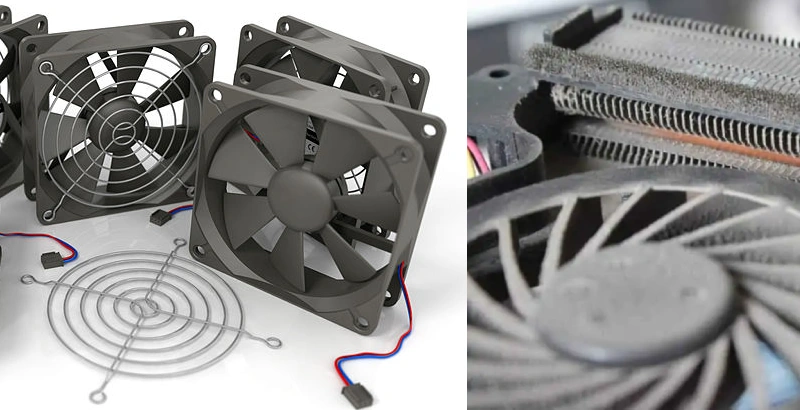
Why Cooling Fan Lifespan Matters
Role in Industrial Systems
Cooling fans play a critical role in industrial systems. They keep equipment at safe temperatures and maintain steady airflow. When a fan fails, the impact can ripple through the entire operation. Here’s what often happens:
- Reduced or lost airflow leads to overheating and poor ventilation.
- Equipment or products overheat, risking permanent damage.
- Production lines may stop, causing process disruption.
- Safety hazards increase as heat and even toxic gases can build up.
- Energy consumption rises because faulty fans draw more power.
- Connected systems may suffer damage, sometimes resulting in chain-reaction failures.
These consequences show why companies focus on the factors that affect cooling fan lifespan. Reliable fans help avoid costly downtime and keep operations running smoothly.
Airflow, thermal management, and preventing overheating
Effective airflow does more than just move air. It removes hot air produced by machines and brings in cooler air. This process keeps temperatures in check and prevents overheating. When engineers design ventilation systems, they include features like ducting and temperature-controlled exhausts. These elements stop hot air from recirculating, which is a common cause of equipment failure. Good airflow extends the life of both the fans and the equipment they protect.
Redundant fans also play a part. They keep cooling going even if one fan stops. This setup allows maintenance without shutting down the system. It also helps extend the lifespan of critical components by keeping temperatures stable.
Types of Cooling Fans
Industrial settings use several types of cooling fans. Axial fans usually last between 20,000 and 30,000 hours, with some reaching up to 50 years in ideal conditions. Centrifugal fans typically last 15,000 to 25,000 hours and can serve for 15 to 20 years. Mixed-flow fans combine features of both and offer a balance between airflow and pressure.
Choosing the right fan type depends on the application, expected lifespan, and maintenance needs. Each type brings unique strengths to industrial cooling challenges.
Effective Life of an Industrial Fan: Key Factors
Operating Conditions
Operating conditions shape the life of an industrial fan more than most people realize. High temperatures, humidity, and airborne particles all play a part. When fans run in extreme heat or moisture, their parts wear out faster. Dust and debris can clog blades and motors, making the fan work harder. Over time, this stress shortens the life of an industrial fan.
- High humidity and temperature swings can cause corrosion and weaken fan materials.
- Fans in harsh environments need thicker materials or special ratings for continuous operation.
- Corrosive atmospheres, poor duct layouts, and vibration also reduce durability.
A careful analysis of the workspace helps identify the main factors that affect cooling fan lifespan. Facilities that monitor these conditions can plan for regular cleaning and choose fans with the right protection. This approach extends the life of an industrial fan and keeps systems running smoothly.
Fanacdc Product Quality and Design
Quality and design set the foundation for a long-lasting fan. Fanacdc’s AC and DC fans use advanced engineering to tackle the toughest industrial challenges. Their design features directly address the factors that affect cooling fan lifespan.
| Design Feature | Benefit |
|---|---|
| High-quality components | Achieve 50,000 hours or more of continuous operation under standard conditions. |
| Ball bearings | Offer longer service life and better performance in high-temperature or vertical-mount installations. |
| IP-rated enclosures | Ensure long-term reliability in high dust, humidity, vibration, and corrosive atmospheres. |
| Corrosion-resistant materials | Help maintain performance in challenging industrial settings. |
| Regular cleaning and ventilation | Support extended service life by preventing dust buildup. |
Fanacdc’s AC fans use industrial-grade plastics and reinforced ribs. This design resists deformation from heat and vibration. Their DC fans feature brushless motors and smart speed controls. These features help the fans adapt to changing loads and reduce wear. Both types offer IP-rated protection and corrosion-resistant materials, making them ideal for demanding environments.
A thorough analysis of fan design reveals why high-quality fans matter. Facilities that invest in well-designed fans see fewer breakdowns and longer intervals between replacements. The right design choices lead to a longer life of an industrial fan and lower total costs.
Motor and Bearing Reliability
Motors and bearings are the heart of any industrial fan. Their reliability determines how long the fan will last. Ball bearings, for example, last much longer than sleeve bearings, especially in high-load or high-temperature conditions. The quality of the motor also matters. Poor motors burn out early or fail under heavy use.
- Bearing failures happen four times more often than motor insulation failures.
- Every 15°C rise in temperature can cut bearing life in half.
- The mean time between failures (MTBF) depends on the wear pattern of the motor and the quality of its parts.
Fanacdc’s AC and DC fans use high-grade ball bearings and motors tested for long-term use. These choices help extend the life of an industrial fan, even in tough settings. Regular analysis of fan performance can catch early signs of wear. This lets teams replace parts before a breakdown happens.
A focus on motor and bearing quality, combined with smart analysis, gives facilities the best chance at maximizing the life of an industrial fan. Choosing fans from trusted brands like fanacdc ensures reliable operation and fewer surprises.
Environmental Factors That Affect Cooling Fan Lifespan
Temperature and Humidity
Temperature and humidity play a huge role in how long a cooling tower fan lasts. High heat and moisture can speed up wear and tear. In a data center running at 25 degrees Celsius, the annual equipment failure rate sits at 2.45%. For every degree the temperature rises, the failure rate jumps by 0.36%. At 45 degrees Celsius, the projected failure rate climbs to about 11.45%. These numbers show why keeping fans cool and dry matters. When cooling tower operation happens in hot, humid spaces, fans need extra protection. Sealed bearings and corrosion-resistant materials help fans survive these tough conditions.
Dust and Contaminants
Dust and airborne particles can shorten the life of a cooling tower fan. They clog filters, jam bearings, and force fans to work harder. Facilities that ignore regular cleaning see more breakdowns and higher energy bills. The table below highlights what industry sources say about dust:
| Source | Key Insight |
|---|---|
| Eldridge USA | Dust buildup can lead to equipment failures and reduced efficiency, necessitating more frequent maintenance. |
| CFMAir | Dust can cause seized bearings and clogged filters, increasing maintenance needs and reducing lifespan. |
| Paclights | Regular cleaning and maintenance are crucial to prevent dust accumulation, which can lead to reduced performance and increased energy consumption. |
Teams that schedule routine cleaning and use fans with IP-rated enclosures keep their cooling tower fan running longer.
Vibration and Mechanical Stress
Vibration and mechanical stress are silent killers for cooling tower fans. The materials used in construction, like wood, fiberglass, or steel, affect vibration levels. Fans on flexible structures shake more than those on solid bases. Continuous operation heats up motors and wears out bearings faster. Fans that run outside their intended range face constant stress, which increases fatigue cycles and shortens service life. To fight these factors that affect cooling fan lifespan, engineers choose rigid mounts and monitor vibration levels. They also rotate fans between continuous and intermittent use when possible.
Mechanical and Electrical Factors
Bearing Type and Quality
The type and quality of bearings play a huge role in the optimization of cooling fan performance. Ball bearings last much longer than sleeve bearings, especially in tough industrial environments. Facilities that use ball bearings see fewer failure events and less downtime. The table below shows how bearing choice affects lifespan:
| Bearing Type | Lifespan |
|---|---|
| Sleeve Bearing | 10,000-20,000 hrs |
| Ball Bearing | 50,000-70,000 hrs |
Ball bearings support better optimization of fan operation. They handle higher loads and temperatures, which reduces the risk of failure. When teams select high-quality bearings, they avoid common failure modes like seizing or excessive noise. This choice leads to longer intervals between replacements and more reliable cooling.
Voltage Stability
Voltage stability is another key factor in the optimization of fan systems. Fans need a steady voltage to run smoothly. Fluctuations can cause overheating, vibration, and even sudden failure. When voltage drops or spikes, motors work harder, which increases wear and shortens lifespan. Facilities that monitor voltage stability prevent unexpected failure and keep their systems running at peak optimization.
Power Supply Quality
A high-quality power supply is essential for the optimization of industrial cooling fans. Reliable power keeps fans operating within their design limits and reduces the risk of failure. Teams that focus on power supply quality use several maintenance practices:
- Acoustic audits help detect early signs of failure.
- Thermal imaging spots hot spots before they cause damage.
- Filter checks ensure airflow stays optimized.
When facilities invest in power supply optimization, they see fewer breakdowns and longer fan life. Poor power quality often leads to repeated failure and costly repairs. By addressing these mechanical and electrical factors, teams can avoid the most common failure modes and achieve the best possible optimization for their cooling systems.
Installation and System Design
Airflow Path
A well-designed airflow path keeps cooling fans working at their best. Engineers look for ways to move air smoothly through equipment. They avoid sharp turns or blockages that can slow down airflow. When air moves freely, fans do not have to work as hard. This helps keep temperatures steady and extends the life of both the fan and the equipment.
- Optimizing airflow paths boosts cooling fan efficiency.
- Good airflow management helps remove heat and keeps temperatures safe.
- Preventing hot spots protects sensitive electronics and reduces the risk of overheating.
Placement and Mounting
Where a facility places and mounts fans makes a big difference. Teams should position fans to create even air movement and avoid dead zones. They often use wall-mounted or directional fans for workstations and assembly lines. Ceiling fans work well in mezzanines and storage areas. Placing fans near loading docks helps cool large spaces and reduce hot spots.
- Position fans to create air barriers at entry and exit points.
- Avoid placing fans too close to HVAC vents or ducts.
- Use secure mounting hardware to reduce vibration and mechanical stress.
- Check brackets, bolts, and fasteners for signs of wear or corrosion.
Proper placement and mounting help fans run quietly and last longer. They also protect sensitive equipment from sudden temperature changes.
System Load
System load refers to the amount of heat that equipment produces. Before installing fans, engineers conduct a thermal evaluation. They measure how much heat needs to be removed to keep everything cool. Choosing the right fan size and airflow ensures the system stays within safe limits.
- Determine thermal requirements by assessing heat output.
- Select fans with enough airflow and static pressure for the application.
- Consider noise levels, especially in quiet areas.
- Choose energy-efficient models to lower power use and heat production.
- Make sure fans fit the space and are mounted securely.
By matching fan capacity to system load, facilities prevent overworking fans and avoid early failures. This approach leads to reliable cooling and longer fan lifespan.
Maintenance Practices: Preventive and Predictive Approaches
Preventive Maintenance for Cooling Fans
Preventive maintenance keeps industrial cooling fans running smoothly. Teams that follow a regular schedule avoid unexpected breakdowns. They clean fan blades, check for dust buildup, and inspect mounting hardware. Fanacdc’s Industrial Cooling Fan range makes this process easier. The fans feature IP-rated enclosures and corrosion-resistant materials, so technicians can focus on simple cleaning and visual checks. They replace filters and lubricate bearings as needed. This routine helps fans last longer and keeps equipment safe from overheating.
Predictive Maintenance Strategies
Predictive maintenance takes fan care to the next level. Instead of waiting for problems, teams use data to spot early warning signs. Sensors track vibration, temperature, and noise. When the system detects changes, it alerts technicians before a failure happens. Predictive strategies help companies plan repairs only when needed. This approach reduces downtime and extends the life of each fan.
- Real-time monitoring gives instant updates on fan health.
- Analytics spot unusual patterns, like rising temperatures or odd vibrations.
- Maintenance scheduling becomes smarter, with repairs done only when necessary.
Predictive maintenance works best with fans designed for monitoring. Fanacdc’s products support sensor integration, making it easy to collect and analyze data.
Monitoring Fan Performance
Monitoring plays a key role in both preventive and predictive maintenance. Teams use sensors and software to track fan speed, temperature, and vibration. They set alerts for any changes that could signal trouble. Regular monitoring helps catch issues early, so repairs happen before a breakdown. This process also helps optimize maintenance scheduling and keeps fans running at peak performance.
Note: Combine manual inspections with digital monitoring for the best results. This balanced approach ensures nothing gets missed.
A strong maintenance plan uses both preventive and predictive methods. Facilities that invest in monitoring and smart maintenance scheduling see fewer failures and longer fan lifespans.
Comparing AC, DC, and EC Fans from Fanacdc
AC Fans: Durability and Value
AC fans from fanacdc stand out for their mechanical simplicity and strong build. Many industrial professionals choose these fans because they handle continuous operation well. The robust design means fewer moving parts and less chance of breakdown. AC fans work best in environments where they run for long periods without frequent stops. However, when used in systems that start and stop often, internal friction can shorten their lifespan. Maintenance is usually straightforward. Teams check for dust, clean blades, and inspect bearings. AC fans offer a cost-effective solution for steady cooling needs.
- Mechanical simplicity makes AC fans easy to maintain.
- Durability shines in stable, long-running applications.
- Frequent start/stop cycles may reduce lifespan due to internal friction.
DC Fan: Efficiency and Reliability
DC fans from fanacdc bring high durability and smart engineering to the table. These fans use advanced brushless motors, which means less heat and longer life. The Mean Time Between Failure (MTBF) often exceeds 50,000 hours. Bearings last longer, and the fans produce less noise. Maintenance needs drop because the fans generate less heat and wear. DC fans also support precise speed control, making them ideal for sensitive equipment and automation systems.
- MTBF over 50,000 hours for extended operational life.
- Lower heat production reduces wear and maintenance.
- Longer-lasting bearings support reliability in demanding settings.
EC Fans: Energy Savings and Longevity
EC fans from fanacdc combine the best of AC and DC technology. They use brushless motors and intelligent electronics to deliver top efficiency and control. These fans achieve over 70% efficiency, which cuts power consumption and operating costs. The design eliminates mechanical brushes, so there is less wear and a longer lifespan. EC fans also run maintenance-free, saving time and money for facility teams. The IP68 rating protects against dust and water, making them perfect for harsh environments.
| Feature | Benefit |
|---|---|
| No mechanical brushes | Less wear and tear, resulting in a longer lifespan |
| Intelligent electronics | Adjustable fan speed for better control and energy savings |
| Efficiency | Over 70% efficiency, reducing power consumption |
| Maintenance-free operation | Less need for repairs, saving time and costs |
| IP68 rating | Protection against dust and water, suitable for tough environments |
Choosing the Right Cooling Fan for Industrial Applications
Assessing Operating Environment
Industrial teams start by looking at the workspace. They check temperature, humidity, dust, and vibration levels. Fans must handle these conditions without breaking down. For example, a factory with high heat and moisture needs fans with sealed bearings and corrosion-resistant materials. In dusty areas, IP-rated fans keep out particles and last longer. Teams also consider noise. Quiet fans work best in labs or offices, while louder models suit busy factories.
| Fan Selection Factor | Key Considerations | Ideal Use Cases |
|---|---|---|
| Temperature Rating | Must exceed max operating temp; check motor and housing specs | Furnaces, kilns, ovens, exhaust systems |
| Airflow & Pressure | Balance CFM needs with system resistance | Cooling enclosures, ducted ventilation |
| Durability | Resistance to heat, corrosion, vibration | Industrial, outdoor, or harsh environments |
| Fan Type | Match design to airflow and pressure demands | Axial: open areas; Centrifugal: ducted systems |
| Energy Efficiency | Lower operating costs and heat output | Continuous operation, data centers, HVAC |
| Noise Level | Minimize disturbance in sensitive areas | Labs, offices, medical equipment |
Selecting Fan Type and Bearing
Choosing the right fan means looking at size, power, and bearing type. Teams pick axial fans for open spaces and centrifugal fans for ducted systems. They select EC fans for energy savings. Bearings matter, too. Ball bearings last longer and handle heat better than sleeve bearings. Fluid bearings offer the quietest operation and highest durability.
| Criteria | Sleeve Bearings | Ball Bearings | Fluid Bearings |
|---|---|---|---|
| Cost | Cost-effective | Moderate cost | Higher cost |
| Noise Level | Quiet initially | Slightly noisier | Very quiet |
| Lifespan | ~30,000 hours | 50,000+ hours | 60,000–100,000 hours |
| Durability | Prone to wear | Durable in various orientations | High durability |
| Temperature Handling | Limited | Handles higher temperatures | Excellent temperature handling |
| Best Use | Light-duty applications | General use | Continuous operation or harsh environments |
Teams also check mounting size, connector type, airflow direction, and cable length. They look for smart features like tachometer output and thermal sensors for automatic speed adjustment.
- 5–10W: Small, low-speed fans for light-duty applications
- 10–20W: Mid-range fans for standard commercial cooling
- 20–30W: High-performance fans for industrial or high-heat environments
- EC motors save up to 50% energy compared to traditional AC motors
Partnering with Fanacdc for Custom Solutions
Fanacdc helps companies find the perfect cooling fan. Their engineering team offers OEM and ODM services, customizing fans for unique needs. They support project design, technical training, and after-sales service. Teams can request fans with special sizes, voltages, or protection ratings. Fanacdc’s experts guide clients through selection, ensuring the fan fits the environment and system load. They deliver reliable, energy-efficient fans that keep operations running smoothly.
Note: Fanacdc’s custom solutions make it easy to match fan performance to any industrial challenge.
Applications Where Cooling Fan Lifespan Is Critical
Data Centers and Telecom
Data centers and telecom facilities depend on cooling fans to keep servers and network equipment safe. These environments run 24/7. If a fan fails, temperatures rise fast. Equipment can overheat, causing outages and data loss. Companies lose money and trust when downtime happens. Fanacdc’s AC, DC, and EC fans offer long service life and reliable performance. Teams choose fans with IP-rated protection and smart monitoring features. They schedule regular maintenance and use predictive analytics to spot problems early.
Tip: Data centers should use fans with smart speed control and real-time monitoring. This helps prevent overheating and keeps systems running smoothly.
Industrial Automation
Factories and automated production lines rely on cooling fans to protect robots, drives, and control panels. Machines generate heat during operation. Fans remove this heat and keep systems stable. If a fan stops working, production slows or stops. Workers face delays and higher repair costs. Fanacdc’s industrial cooling fans handle tough conditions. They resist dust, vibration, and high temperatures. Teams install fans with ball bearings for longer life. They check airflow paths and mounting hardware often.
- Reliable fans reduce downtime.
- Ball bearings extend service life.
- Regular inspections catch issues before they become costly.
Renewable Energy Systems
Solar farms, wind turbines, and battery storage systems need cooling fans to manage heat. These systems operate outdoors and face harsh weather. Fans protect inverters, converters, and batteries from overheating. If a fan fails, energy output drops. Repairs take time and money. Fanacdc’s EC fans deliver energy savings and long lifespan. They feature IP68 protection and maintenance-free design. Teams select fans with corrosion-resistant materials and smart control options.
| Application | Fan Feature Needed | Benefit |
|---|---|---|
| Solar Inverters | IP68, corrosion resistance | Reliable outdoor cooling |
| Wind Turbines | Maintenance-free design | Less downtime |
| Battery Storage | Smart speed regulation | Stable temperature |
Note: Choosing the right fan for renewable energy systems ensures stable performance and maximizes energy output.
Cooling fan lifespan matters most in these critical applications. Teams that select high-quality fans and follow smart maintenance routines keep their systems safe and efficient.
Factors That Affect Cooling Fan Lifespan: FAQs
What is the effective life of an industrial fan?
The effective life of an industrial fan depends on several factors. Teams often look at runtime analysis to estimate how long a fan will last. Most high-quality fans reach an average life of an industrial fan between 50,000 and 70,000 hours. Ball bearings, sealed motors, and IP-rated enclosures help extend this expectancy. Facilities that monitor runtime and schedule maintenance see longer fan service.
Note: The effective life of an industrial fan can vary based on operating conditions and maintenance routines.
How do preventive and predictive maintenance impact fan lifespan?
Preventive maintenance keeps fans clean and running smoothly. Technicians check blades, bearings, and mounting hardware. Predictive maintenance uses sensors to track vibration and temperature. When teams spot early signs of wear, they fix issues before breakdowns happen. This approach increases the effective life of an industrial fan and reduces downtime.
- Preventive maintenance: Regular cleaning, filter changes, and inspections.
- Predictive maintenance: Real-time monitoring, alerts, and data-driven repairs.
What environmental factors shorten cooling fan life?
Environmental factors that affect cooling fan lifespan include high temperatures, humidity, dust, and vibration. Fans exposed to these conditions wear out faster. Corrosive atmospheres and poor airflow paths also reduce expectancy. Facilities that use IP-rated fans and schedule cleaning protect their equipment from early failure.
| Environmental Factor | Impact on Fan Life |
|---|---|
| High Temperature | Accelerates wear |
| Humidity | Causes corrosion |
| Dust | Clogs bearings |
| Vibration | Damages mounts |
How does fanacdc ensure long-lasting cooling fans?
Fanacdc uses advanced engineering and strict quality control. Their fans feature ball bearings, brushless motors, and IP-rated enclosures. Teams can request custom solutions for harsh environments. Fanacdc also supports runtime analysis and maintenance planning, helping clients maximize fan expectancy.
Tip: Fanacdc’s technical support helps teams select the right fan for each application.
When should a cooling fan be replaced?
Teams replace cooling fans when they notice reduced airflow, unusual noise, or increased vibration. If runtime analysis shows the fan has reached its average life of an industrial fan, replacement prevents unexpected failures. Facilities also swap fans after major repairs or when upgrading equipment.
Quick check: Replace fans showing signs of wear or after reaching their rated expectancy.
Conclusion
Cooling fan lifespan in industrial settings depends on many factors, but teams can take control with the right approach. They should focus on operating conditions, product quality, and regular maintenance. When teams choose high-quality fans from fanacdc, they set themselves up for fewer breakdowns and lower costs.
Key takeaways for maximizing cooling fan lifespan:
- Monitor the environment: Keep an eye on temperature, humidity, and dust. Use IP-rated fans in harsh areas.
- Choose the right fan: Match fan type and bearing to the application. Ball bearings and brushless motors last longer.
- Install fans correctly: Ensure proper airflow, secure mounting, and correct placement.
- Maintain regularly: Clean blades, check bearings, and replace filters. Use both preventive and predictive maintenance.
- Leverage smart technology: Use sensors and monitoring tools to catch issues early.
Facilities that follow these best practices see longer fan life, better equipment protection, and improved energy efficiency. Fanacdc’s engineering support and custom solutions make it easy to find the perfect fit for any industrial challenge. By investing in quality fans and smart maintenance, companies keep operations running smoothly and avoid unexpected surprises.
For ongoing success, teams should review their cooling systems often. They can reach out to fanacdc for expert advice, technical support, or custom solutions. Reliable cooling starts with the right choices—make every fan count!
| Checklist for Fan Longevity |
|---|
| Monitor environment |
| Choose quality fans |
| Install properly |
| Maintain regularly |
| Use smart monitoring |
Stay proactive, and your cooling fans will deliver reliable performance year after year. 🚀
Cooling fan lifespan depends on environment, quality, and maintenance. Teams who choose fanacdc fans, follow preventive checks, and use smart monitoring see fewer breakdowns. A quick-reference checklist helps everyone stay on track. Reliable fans keep operations smooth and costs low. 👍
FAQ
What is the average lifespan of an industrial cooling fan?
Most high-quality industrial fans last between 50,000 and 70,000 hours. Ball bearings and brushless motors help extend this lifespan. Regular maintenance and choosing the right fan for the environment also make a big difference.
How can teams tell when a cooling fan needs replacement?
Teams should watch for these signs:
- Unusual noise
- Reduced airflow
- Increased vibration
If any appear, it’s time to consider a replacement.
Which environmental factors shorten fan life the most?
| Factor | Impact |
|---|---|
| High heat | Speeds up wear |
| Humidity | Causes corrosion |
| Dust | Clogs bearings |
| Vibration | Damages mounts |
How does preventive maintenance help cooling fans last longer?
Preventive maintenance keeps fans clean and running smoothly. Teams check blades, bearings, and mounting hardware. Regular cleaning and inspections catch small problems before they turn into big failures.
Why choose fanacdc for industrial cooling fans?
Fanacdc offers advanced engineering, strict quality control, and custom solutions. Their fans use durable materials, smart features, and IP-rated protection. Teams get reliable performance and expert support for every application.

