
You rely on your electronics to work smoothly, but heat can quickly become their biggest enemy. Cooling fans step in as the frontline defense, pulling heat away from sensitive components and keeping everything at safe temperatures. When you use advanced fan technology from fanacdc, you get more than just airflow—you get reliable, targeted cooling that boosts performance and extends the life of your devices. If you ignore thermal management, you risk frequent failures, and studies show that about 40% of electronic breakdowns in vehicles happen because of overheating.
Cooling fans create a steady temperature difference, move hot air out, and target problem areas, so your electronics stay protected. That’s why Fan Thermal Explained: How Cooling Fans Manage Heat in Electronic Systems matters for anyone who wants dependable, long-lasting equipment.
Key Takeaways
- Cooling fans are essential for managing heat in electronics. They prevent overheating and extend the lifespan of devices.
- Understanding thermal management helps you keep electronics running smoothly. Use methods like conduction, convection, and radiation to control heat.
- Choose the right fan type for your needs. AC fans are durable, DC fans offer quiet operation, and EC fans provide energy efficiency.
- Proper fan placement and airflow design are crucial. Position fans near heat sources and ensure good air circulation to enhance cooling.
- Regular maintenance of fans is key. Clean dust, check for noise, and monitor performance to keep your cooling system effective.
Thermal Management Basics
What Is Thermal Management?
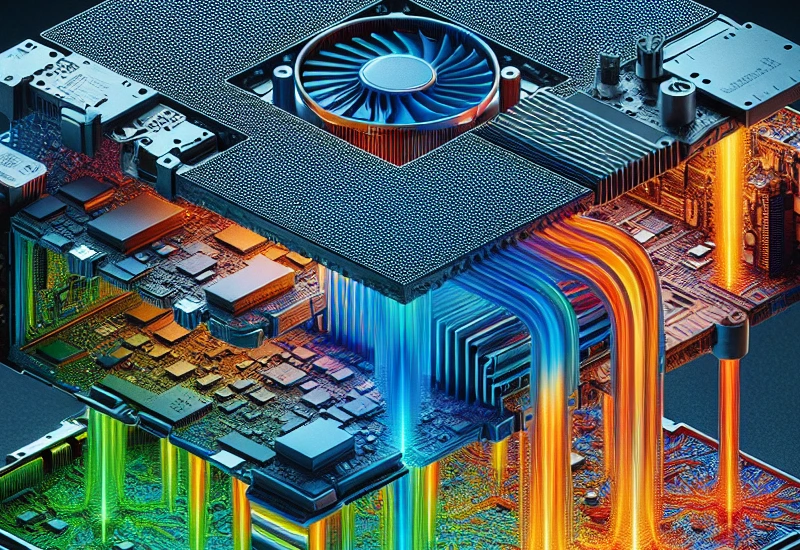
You might wonder what keeps your electronics from overheating. Thermal management is the process of controlling heat inside your devices. It uses different methods to move heat away from sensitive parts and keep everything running smoothly. Here are the main ways heat moves in electronics:
- Conduction: Heat travels through solid materials, like from a chip to a heat sink.
- Convection: Heat moves with air or liquid, often with the help of fans or cooling systems.
- Radiation: Heat escapes as energy waves, usually from hot surfaces.
When you use cooling fans, you boost convection, which is one of the most effective ways to manage heat in tight spaces.
Why Temperature Control Matters
Keeping your electronics at the right temperature is not just about comfort—it’s about survival for your devices. If you let heat build up, it can push temperatures past safe limits. This can damage the tiny parts inside, especially the semiconductor junctions. When that happens, your equipment might fail much sooner than you expect. In fact, every 10°C rise in temperature can cut the lifespan of electronic components in half. That’s why you see so many systems using fans, thermoelectric devices, or even heaters to keep things steady. Some common ways to control temperature include:
- Thermoelectric devices (like Peltier coolers)
- Resistive heaters
- On/Off control systems
- Proportional and PID control systems
Heat Sensitivity in Electronics
Not all parts inside your electronics handle heat the same way. Some are much more sensitive and need extra care. For example:
- Variable Frequency Drives (VFDs) and inverters lose 3% to 5% of their power as heat.
- Power supplies and transformers get hot from magnetic and copper losses.
- PLCs and CPUs can develop hot spots because of their delicate microprocessors.
- High-density components heat up quickly due to electrical resistance.
If you ignore proper cooling, you risk slow performance, early breakdowns, and even total system crashes. The Fan Thermal Explained: How Cooling Fans Manage Heat in Electronic Systems blog shows why smart cooling is key to keeping your electronics safe and reliable.
Heat Generation in Electronics
Main Heat Sources
You might not realize it, but every electronic device you use creates heat. This heat comes from several places inside your equipment. If you want to keep your devices running well, you need to know where the heat starts.
- Microprocessors and CPUs: These tiny chips do a lot of work. They process data and run programs, which makes them one of the hottest parts in your system.
- Power Handling Semiconductors: Devices like transistors and diodes control electricity. They often need heat sinks to stay cool.
- Power Supplies and Transformers: These parts change and deliver power. They lose some energy as heat during this process.
- Resistors and Inductors: These components slow down or store electrical energy. They also give off heat as they work.
- High-Density Circuit Boards: When you pack a lot of parts close together, heat builds up quickly.
You will find that all these parts need some way to get rid of extra heat. That is why you see heat sinks, fans, and even special cooling pipes inside modern electronics.
Heat Accumulation in Enclosures
When heat cannot escape, it starts to build up inside the enclosure. This can cause real problems for your electronics. Take a look at what happens when temperatures rise:
| Effect | Description |
|---|---|
| Lifespan of a Capacitor | Heat causes the electrolyte to evaporate, increasing ESR and leading to failure. |
| Solder Joint Fatigue | Thermal cycling leads to cracks in solder joints, causing intermittent faults. |
| Performance Throttling | CPUs may reduce clock speed to prevent damage, resulting in system lag or timeouts. |
Tip: Every time the temperature inside your device goes up by just ten degrees, the reliability of your electronics can drop by half.
Most control cabinets and electrical equipment work best when the air stays between 104°F and 122°F (40°C to 50°C). If the temperature goes higher, you risk damaging your system or causing it to fail for good. That is why you need smart cooling solutions to keep everything safe and running smoothly.
Fan Thermal Explained: How Cooling Fans Manage Heat
Forced Convection and Airflow
You might wonder why fans are so important in electronics. The answer is forced convection. When you use a cooling fan, you move air across hot components. This moving air picks up heat and carries it away, which keeps your devices cool. Forced convection works much better than just letting air sit and warm up on its own. Without a fan, heat would build up fast, and your electronics could overheat.
Fans from fanacdc, like their Industrial Cooling Fan and DC Fan, take this process to the next level. These fans use advanced engineering to push air exactly where it’s needed. You get steady airflow that sweeps away heat, even in tight spaces or crowded enclosures. This means your electronics stay at safe temperatures, and you avoid sudden temperature spikes.
Tip: Forced convection with a high-quality fan can double or even triple the rate at which your system gets rid of heat compared to natural airflow.
Here’s how fanacdc’s fans stand out when it comes to airflow and heat dissipation:
| Feature | AC Fans | DC Fans |
|---|---|---|
| Energy Efficiency | Lower efficiency | Up to 70% more efficient |
| Speed Control | Fixed speed | Precise speed control |
| Heat Output | Higher heat output | Reduced heat output |
| Motor Technology | Brushed motors | Brushless motors |
| Application Suitability | General use | Smart electronics, servers |
You can see that DC fans from fanacdc use brushless motors. These motors run smoother, last longer, and use less power. That means less heat and more reliable cooling for your electronics.
Fan Operation Principles
Let’s break down how cooling fans actually work. When you turn on a fan, the blades spin and create a pressure difference. Cool air gets pulled in, and warm air gets pushed out. This constant movement keeps the inside of your device from getting too hot.
The main principles behind fan operation include:
- Thermodynamic Principles: Fans move heat away using convection. This is the main way they keep electronics cool.
- Pressure Differential: Spinning blades create a low-pressure area that draws in cooler air and pushes out hot air.
- Performance Factors: Blade shape, motor speed, and the environment all affect how well a fan cools your system.
- Forced Convection: This is especially important in high-density electronics, where natural airflow just isn’t enough.
Here’s a quick look at these principles:
| Principle | Description |
|---|---|
| Thermodynamic Principles | Fans use convection to move heat away from components. |
| Pressure Differential | Blades create airflow by making a pressure difference. |
| Performance Influencing Factors | Blade design, speed, and environment change how well fans work. |
| Forced Convection | Needed for fast, efficient cooling in crowded electronics. |
fanacdc’s DC fans use brushless motors, which means you get precise speed control and less wear over time. You can adjust the fan speed to match the cooling needs of your system. This helps you save energy and keep noise levels down. The Industrial Cooling Fan line also offers models with smart monitoring features, so you always know your system is running at the right temperature.
Preventing Overheating
You want your electronics to last as long as possible. Overheating is one of the fastest ways to shorten their life. That’s why cooling fans play such a big role in the Fan Thermal Explained: How Cooling Fans Manage Heat in Electronic Systems.
Here are some ways you can prevent overheating with cooling fans:
- Use fans with precise speed control, like fanacdc’s DC fans, to match airflow to your system’s needs.
- Place fans near the hottest components, so they can remove heat before it spreads.
- Choose fans with high energy efficiency to reduce extra heat from the fan itself.
- Monitor fan performance with smart features, so you catch problems early.
Note: EC fans from fanacdc can save thousands of kilowatt-hours each year, which means lower energy bills and less heat inside your equipment.
When you use the right fan, you keep your electronics safe, stable, and running longer. The Fan Thermal Explained: How Cooling Fans Manage Heat in Electronic Systems shows that smart fan choices make a big difference. With fanacdc’s advanced cooling solutions, you get reliable performance, energy savings, and peace of mind.
Fan Types and Applications
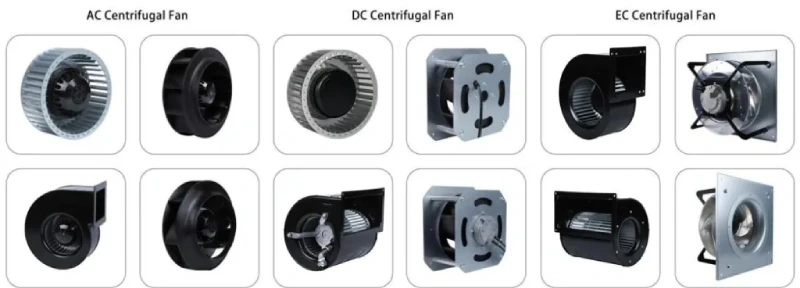
When you look at cooling solutions, you’ll find that not all fans work the same way. Each type has its own strengths, and fanacdc gives you plenty of options to match your needs.
AC Fans by fanacdc
AC fans from fanacdc are a solid choice for large spaces and continuous operation. You get a fan that’s built to last, with a lifespan of up to 60,000 hours. These fans deliver steady airflow and handle tough industrial environments with ease. You don’t have to worry much about maintenance—just an occasional bearing check. AC fans also keep costs down, making them a smart pick for many businesses.
| Characteristic | Description |
|---|---|
| Durability | Up to 60,000 hours of operation |
| Stable Airflow | Consistent cooling for industrial settings |
| Low Maintenance | Minimal upkeep required |
| Cost-Effectiveness | Lower initial investment |
| High Static Pressure | Handles heavy-duty applications |
You’ll often see these fans in control cabinets, power supplies, and industrial machines.
DC Fans by fanacdc
If you need quiet operation and precise speed control, DC fans are your go-to. These fans shine in sensitive electronics and automation systems. You can adjust their speed to match the heat load, which helps save energy and reduce noise. DC fans from fanacdc work great in computers, telecom gear, and even medical devices.
| Industry | Applications |
|---|---|
| Electronics | Servers, computers, telecom systems |
| Automotive | Engine cooling, radiators |
| Medical Devices | MRI machines, ventilators |
You can also customize these fans for size, voltage, and control features.
EC and Centrifugal Fans
EC fans take energy savings to the next level. They use smart controls and can cut your energy costs by up to 70%. You get reliable cooling and the ability to fine-tune airflow. Centrifugal fans, on the other hand, are perfect for systems with ducts or high resistance. They use aerodynamic impellers and tough materials, so they work well in harsh environments.
- EC fans offer smart speed control and high efficiency.
- Centrifugal fans provide strong airflow and can be custom-built for your project.
Industrial Cooling Applications
You’ll find fanacdc fans in all sorts of places:
- Control cabinets use AC or EC fans to keep electronics safe.
- Server racks rely on DC or EC fans for stable temperatures.
- Telecom equipment needs reliable ventilation, often with DC fans.
Tip: You can ask fanacdc for custom solutions—choose the size, voltage, and features that fit your exact needs.
No matter your application, fanacdc has a fan that fits.
Optimizing Fan Performance
Airflow and Static Pressure
You want your cooling system to work as efficiently as possible. That starts with understanding airflow and static pressure. Airflow moves heat away from your electronics, while static pressure helps push air through tight spaces or filters. If you direct airflow right at the hottest parts, you’ll see a big improvement in cooling. High static pressure becomes important when your system has lots of obstacles, like dense circuit boards or filters. Centrifugal fans from fanacdc shine in these situations because they can move air at a 90-degree angle, making them perfect for compact devices or high-heat environments.
Tip: Always match your fan’s airflow and static pressure to your enclosure’s needs for the best results.
Fan Placement and Enclosure Design
Where you put your fans matters just as much as which fans you choose. Here are some best practices:
- Place heat-generating components away from sensitive devices.
- Mount high-heat parts near the top of enclosures to use rising hot air.
- Analyze airflow paths to avoid dead zones.
- Use baffles or ducting to guide air across critical components.
- Keep enough space for hot air to escape.
- Maintain clearance from walls and doors for better circulation.
If you follow these steps, you’ll help your fans do their job and keep your electronics safe.
Ambient Temperature Effects
The temperature around your device affects how well your fans can cool. When the room gets hotter, your cooling system has to work harder. Check out this table:
| Factor | Description | Impact on Cooling Performance |
|---|---|---|
| Ambient Temperature | The temperature around your device | Higher temperatures reduce cooling effectiveness. Stronger fans may be needed. |
If you expect high ambient temperatures, consider fans with higher airflow or advanced features from fanacdc, like smart speed regulation.
Maintenance and Monitoring
Keeping your fans in top shape means regular maintenance and smart monitoring. Here’s a quick checklist:
| Maintenance Practice | Frequency |
|---|---|
| Clean dust from blades and filters | As needed |
| Check ventilation passages | Regularly |
| Inspect fan bearings for noise | Periodically |
| Lubricate in dusty environments | Monthly |
| Lubricate in clean environments | Quarterly |
You can also use sensors to track fan speed, vibration, and temperature. Many fanacdc fans support smart monitoring, so you’ll know right away if something needs attention. This helps you catch problems early and keeps your system running smoothly.
Note: Choosing the right fan and taking care of it will give you reliable cooling and peace of mind.
Future Trends in Cooling Technology
Energy Efficient EC Fans
You want your electronics to stay cool without wasting energy. EC fans are changing the game. These fans use electronically commutated motors, which means you get precise speed control and high efficiency. You can save up to 70% in energy compared to traditional AC fans. EC fans also run quieter, with noise levels between 28 and 35 dBA. You can adjust their speed to match your cooling needs, so you never use more power than necessary. EC fans help you meet strict energy regulations, making them a smart choice for modern systems.
| Feature | EC Fans | AC Fans |
|---|---|---|
| Energy Savings | Up to 70% compared to AC | Standard efficiency |
| Noise Levels | 28 to 35 dBA | Varies widely |
| Speed Control | Precise and adjustable | Fixed speed |
| Compliance with Standards | Helps meet energy regulations | May not meet newer standards |
You also see EC fans with smart technologies and IoT connectivity. These features let you monitor and control your cooling system in real time.
Intelligent Fan Control
You want your cooling fans to work smarter, not harder. Intelligent fan control lets you do just that. Modern systems use Variable Frequency Drives (VFDs) and Pulse Width Modulation (PWM) to adjust fan speed based on real-time demand. This saves energy and extends the life of your equipment. EC fans connect with building management systems (BMS), so you can optimize performance and reduce energy use.
| Technology | Description |
|---|---|
| Variable Frequency Drives (VFDs) | Adjusts fan speed based on real-time demand, enhancing efficiency. |
| Pulse Width Modulation (PWM) | Provides precise control over fan speed, saving energy and extending equipment life. |
You can set up alerts and monitor fan status from your phone or computer. This makes maintenance easier and keeps your electronics safe.
Improved Airflow Design
You want your cooling system to be as effective as possible. Recent innovations focus on smarter airflow design. Manufacturers use high-quality materials for quieter operation. They integrate smart technologies and IoT connectivity, so you can track performance and make adjustments on the fly. Advanced control algorithms let fans respond to changing conditions, keeping your electronics cool even when workloads spike.
- Smart technologies boost cooling efficiency.
- IoT connectivity lets you monitor and control fans remotely.
- High-quality materials reduce noise and vibration.
You get a cooling system that adapts to your needs and keeps your devices running smoothly.
You’ve seen how thermal management keeps your electronics reliable, whether you’re running data centers, powering vehicles, or protecting sensitive equipment. Cooling fans from fanacdc give you the edge by moving heat out fast and preventing costly overheating.
For the best results, focus on smart airflow design, choose the right fan, and follow tips like strategic placement, speed control, and regular cleaning. When you put these ideas from Fan Thermal Explained: How Cooling Fans Manage Heat in Electronic Systems into action, you help your devices last longer and perform better every day.
FAQ
What is the difference between AC, DC, and EC fans?
You get AC fans for simple, durable cooling. DC fans give you quiet operation and speed control. EC fans combine energy savings with smart features. Check your application needs before you choose.
How do I pick the right fan size for my enclosure?
Measure your enclosure and check the heat load. Use fanacdc’s airflow charts or ask for help. Bigger enclosures or higher heat need larger fans or more airflow.
Can I control the speed of my cooling fan?
Yes! You can adjust DC and EC fans using PWM signals or smart controllers. This lets you match cooling to your system’s needs and save energy.
How often should I clean or check my fans?
You should check your fans every few months. Clean dust from blades and filters. Listen for unusual noise. Regular care keeps your fans running longer.
Do fanacdc fans support custom designs?
Absolutely! You can request custom sizes, voltages, or features. fanacdc offers OEM and ODM services for unique projects.

