
Picture yourself working with an electrical cabinet or a server rack. The fan inside keeps everything cool, but can you tell if it runs on AC or DC power? Getting this wrong can cause power mismatches, equipment damage, or even a total cooling failure. Many people struggle with this in industrial settings. How to Tell if a Fan is Ac or DC helps you avoid costly mistakes. For reliable AC and DC fan solutions, you can always trust fanacdc.
Key Takeaways
- Check the voltage label on the fan. AC fans show 110V or 220V, while DC fans display 12V, 24V, or 48V.
- Inspect the power connections. AC fans connect directly to mains power, while DC fans use low-voltage connections.
- Count the wires. AC fans typically have two wires, while DC fans usually have two to four wires for added features.
- Look for speed control features. DC fans often have advanced controls, while AC fans usually run at a fixed speed.
- Review the application environment. AC fans suit industrial settings, while DC fans are ideal for sensitive electronics and energy efficiency.
Quick Identification Tip (Fastest Way to Tell AC vs DC Fan)
If you need to quickly determine whether a cooling fan is AC or DC in an industrial environment, you can use the following practical rules:
- High voltage input (110V / 220V / 380V) → typically an AC fan, designed for direct connection to mains power
- Low voltage input (5V / 12V / 24V / 48V) → typically a DC fan, commonly used in electronic and telecom systems
- More than two wires (3 or 4 wires) → most likely a DC fan, as additional wires are used for speed control, tachometer feedback, or alarm signals
These quick indicators work in most real-world scenarios, especially in electrical cabinets, server racks, and industrial control systems where labels may be missing or hard to read.
However, for critical applications, you should always confirm the fan type by checking the product label or datasheet to avoid power mismatches and potential equipment damage.
AC vs DC Fan Basics
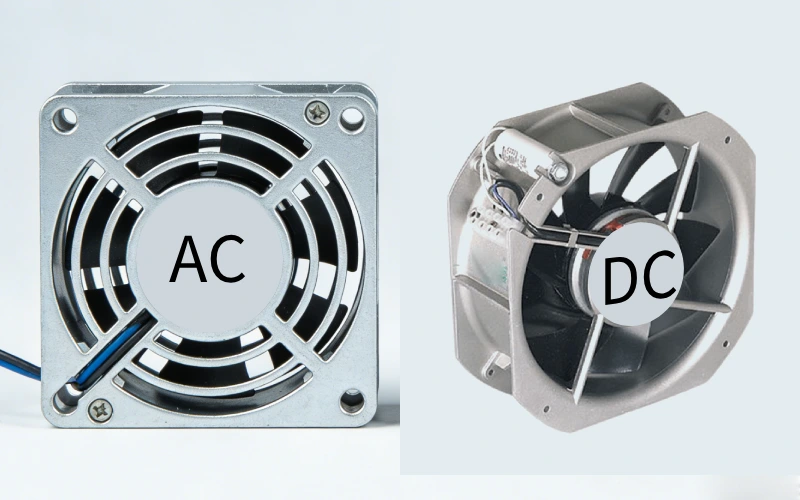
What Is an AC Fan?
You see AC fans everywhere in industrial cabinets and equipment. These fans run on alternating current, usually at 110V, 220V, or even 380V. AC fans use single-phase or three-phase motors, which makes them simple and reliable for steady cooling. You can plug them right into the mains power, and they start working at a fixed speed. AC fans are perfect for control cabinets, automation systems, and power electronics. They deliver strong airflow and last a long time, often over 50,000 hours. If you need a fan that just works without much fuss, AC fans are a solid choice.
Tip: AC fans are easy to spot in industrial setups because they connect directly to the power supply and rarely have speed control features.
What Is a DC Fan?
DC fans use direct current, usually at 5V, 12V, 24V, or 48V. You find these fans in server racks, telecom equipment, and sensitive electronics. DC fans use brushless motors, which means they run quietly and efficiently. They support advanced features like PWM speed control, tachometer feedback, and alarm systems. You can adjust their speed to match cooling needs, which saves energy and reduces noise. DC fans often operate at low voltage, making them safer and ideal for battery-powered systems. If you want precise control and energy savings, DC fans are the way to go.
| Feature | AC Fans | DC Fans |
|---|---|---|
| Power Source | Alternating Current (AC) | Direct Current (DC) |
| Motor Type | Single-phase or three-phase asynchronous | Brushless DC motors |
| Voltage | 110V, 220V, 380V | 5V, 12V, 24V, 48V |
| Speed Control | Fixed speed | PWM, variable voltage |
| Applications | Industrial cabinets, HVAC, machinery | Servers, telecom, electronics |
Why the Difference Matters
You need to know if your fan is AC or DC before installation. Mixing up the types can cause power mismatches, equipment damage, or cooling failures. AC fans work well for steady airflow and simple setups. DC fans offer energy efficiency and flexible control, which is great for changing cooling demands. DC fans can use up to 70% less energy than AC fans for the same output. If you choose the wrong fan, you risk higher costs, noise, or even system failure. Always check the label and specs to make sure you get the right fan for your industrial cabinet.
Note: Correct identification keeps your equipment safe and your cooling system running smoothly.
How to Tell if a Fan Is AC or DC
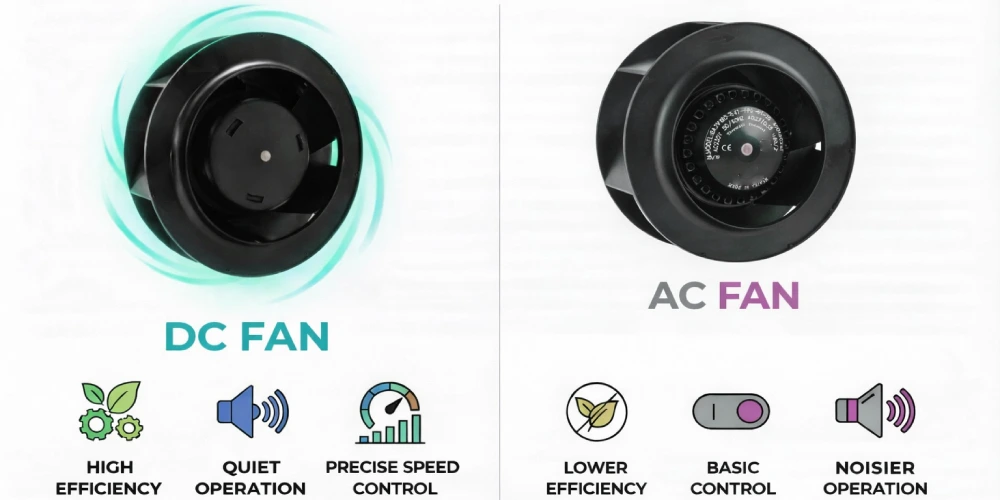
You might wonder how to tell if a fan is AC or DC when you open an industrial cabinet. This question comes up all the time in electrical rooms, server racks, and control panels. Let’s break down the six fastest and most reliable ways to figure it out.
Check the Voltage Label
Start with the voltage label. This is the quickest way to answer how to tell if a fan is ac or dc. Most industrial fans have a label or sticker on the housing. Look for the voltage rating. If you see numbers like 110V or 220V, you’re dealing with an AC fan. If the label shows 12V, 24V, or 48V, you’ve got a DC fan. Here’s a simple table to help you:
| Voltage Range | Type of Fan |
|---|---|
| 110V to 120V | AC |
| 220V to 240V | AC |
| 3V, 5V, 12V, 24V, 48V | DC |
Most LINKWELL fans from fanacdc display this information clearly. Always check the label first. It saves time and prevents mistakes.
Tip: If the voltage label is missing or hard to read, move to the next method.
Inspect Power Connections
The power connection tells you a lot about how to tell if a fan is ac or dc. AC fans connect directly to the mains power, often using single-phase or three-phase wiring. You’ll see thicker wires and sometimes terminal blocks. DC fans use low-voltage connections, often with adapters or direct wiring to a DC power supply. Here’s a quick look:
- AC fans: Connect to alternating current, usually with two or three wires.
- DC fans: Connect to direct current, often with thinner wires and sometimes a plug for a power adapter.
You can also check the power input type in the cabinet. If you see a standard wall plug or terminal block, it’s likely AC. If you spot a small connector or a DC power brick, you’re probably looking at a DC fan.
Count the Wires
Counting wires is a classic engineer trick for how to tell if a fan is ac or dc. AC fans almost always have two wires—one for live and one for neutral. DC fans usually have two to four wires. The extra wires on DC fans handle speed control, tachometer feedback, or alarms.
| Feature | DC Fan | AC Fan |
|---|---|---|
| Common Wires | 2~4 wires | 2 wires |
If you see more than two wires, you’re likely dealing with a DC fan. This method works well when labels are missing or faded.
Look for Speed Control Features
Speed control is a big clue in how to tell if a fan is ac or dc. DC fans often support advanced features like PWM speed control, tachometer output, or alarm signals. You might see a small circuit board or extra wires for these functions. AC fans usually run at a fixed speed, unless you add an external controller.
DC fans let you adjust speed for energy savings and quieter operation. You can spot these features by looking for extra connectors or control wires. If you see a fan with variable speed or smart control, it’s almost always DC.
Note: LINKWELL DC fans from fanacdc offer PWM and tachometer options for precise cooling.
Review Application Environment
Think about where the fan is used. This helps you decide how to tell if a fan is ac or dc based on experience. AC fans work best in places with stable AC power, like industrial cabinets, HVAC systems, and heavy machinery. They handle continuous-duty cycles and tough environments. DC fans show up in telecom racks, battery-powered systems, and places where energy efficiency matters. If you see a fan in a high-tech or sensitive electronics setup, it’s probably DC.
Check Model or Datasheet
For the most accurate answer to how to tell if a fan is ac or dc, check the model number or datasheet. Manufacturers like fanacdc provide detailed specs online or in the box. Look for the input voltage, power type, and control features. The datasheet will tell you if the fan is AC or DC, what voltage it uses, and what certifications it meets.
- Find the label with the model number.
- Search for the datasheet or manual.
- Confirm the voltage and power type.
LINKWELL fans always come with clear labeling and technical support. If you’re ever unsure, reach out to fanacdc’s support team for help.
Callout: Always double-check before installation. Using the wrong fan type can damage your equipment or cause cooling failure.
By following these six steps, you’ll master how to tell if a fan is ac or dc in any industrial cabinet. Start with the label, check the wiring, and use the datasheet for final confirmation. This approach keeps your systems safe and your cooling reliable.
Common Identification Mistakes
When you work with industrial cabinets, it’s easy to make mistakes while identifying the type of fan inside. Let’s look at the most common errors and how you can avoid them.
Confusing High-Voltage DC with AC
You might see a fan labeled with 48V or even higher and think it’s AC. High-voltage DC fans are common in energy storage and telecom systems. They can look just like AC fans, but they need a DC power supply. Plugging a high-voltage DC fan into an AC line can damage the fan and your equipment. Always check the voltage and power type on the label before you connect anything.
Ignoring Frequency Markings
Frequency markings matter more than you think. AC fans usually show 50Hz or 60Hz on the label. If you miss this detail, you might install a fan that runs at the wrong speed or overheats. DC fans don’t use frequency markings, so this is a quick way to tell them apart. Take a second to look for the Hz symbol when you check the label.
Overlooking Electrical Specs
Many people only check the size or airflow and forget about the electrical specs. This can lead to poor performance or even safety issues. You should always review the full list of specifications. Here’s a quick table to help you remember what to check:
| Specification | Why It Matters |
|---|---|
| Static Pressure | Needed for pushing air through dense spaces |
| Sound Level | Important for noise-sensitive environments |
| Durability | Key for long-term use in harsh conditions |
| Safety Certifications | Prevents electrical hazards; look for UL, CE, or RoHS |
| Environmental Fit | Ensures the fan works with your voltage and EMI standards |
Don’t skip these details. They keep your system safe and reliable.
Mixing Up Industrial and IT Fans
Industrial fans and IT fans can look similar, but they serve different needs. Industrial fans handle tough environments and steady cooling. IT fans focus on precise speed control and quiet operation. Here’s a quick comparison:
| Feature | AC Motor | DC Motor |
|---|---|---|
| Power Source | Alternating current | Direct current |
| Speed Control | Needs extra equipment | Easy with built-in controls |
| Applications | Industrial machinery, cabinets | Servers, telecom, battery-powered devices |
If you mix up these types, you might end up with the wrong cooling solution. Always check all the parameters, not just the size or appearance.
Tip: Take your time to review every detail. The right fan keeps your equipment cool and your operation running smoothly.
AC vs DC Fan Applications by fanacdc
AC Fan Advantages
You want a cooling solution that just works, right? AC fans from fanacdc fit perfectly in heavy-duty industrial environments. They shine in places where you need strong, steady airflow and long-lasting performance. You can count on them for control cabinets, automation systems, power electronics, and more. These fans handle tough jobs and keep your equipment safe from overheating.
Here’s a quick look at where AC fans excel and what they bring to the table:
| Application Area | Advantages |
|---|---|
| Control cabinets | Protects sensitive electronics |
| Industrial machinery | Improves system longevity |
| Power electronics | Offers reliable, continuous cooling |
| HVAC systems | Supports airflow and temperature balance |
| Telecom base stations | Effective in stable power applications |
| Food processing equipment | Supports safe and efficient operations |
You get durability, cost-effectiveness, and simple installation. AC fans work best when you have stable power and need consistent ventilation.
DC Fan Advantages
If you need more control and energy savings, DC fans from fanacdc are a smart choice. These fans use less power, run quietly, and let you fine-tune speed for each situation. You’ll find them in telecom racks, battery systems, and places where space is tight.
Check out what makes DC fans stand out:
- Energy efficiency lowers your power bills.
- Reliable cooling for demanding environments.
- Custom sizes and voltages for any setup.
- Precise speed control with PWM.
- Compact design fits small spaces.
- Advanced features for better thermal management.
- Quieter operation and less vibration.
- Longer service life, even in harsh conditions.
You can trust DC fans to keep your equipment cool and your costs down.
Choosing the Right Fan
Not sure which fan to pick? Start by thinking about your application. If you need basic, steady cooling in a cabinet or machine, an AC fan is a solid bet. It’s cost-effective and easy to set up. If you want energy savings, quiet operation, or precise speed control, go with a DC fan.
Here’s a quick comparison to help you decide:
| Fan Type | Energy Efficiency | Control Options | Best For |
|---|---|---|---|
| AC Fans | 15%-50% | Fixed speed | Basic cooling, stable power |
| DC Fans | Up to 30% more efficient | Flexible speed | Low noise, precise temperature |
Tip: Always match your fan to your power supply and control needs. If you’re unsure, check the datasheet or ask fanacdc for advice.
You’ll get the best results when you choose the right fan for your specific job.
Quick Comparison Table
When you need to pick the right fan for your industrial cabinet, a side-by-side comparison makes things much easier. Here’s a quick table that shows how AC and DC fans stack up in the areas that matter most for industrial cooling:
| Feature | AC Fan | DC Fan |
|---|---|---|
| Energy Efficiency | Lower (uses more power over time) | Higher (saves energy and lowers costs) |
| Speed Control | Fixed (limited control options) | Excellent (PWM, voltage, smart control) |
| Noise/EMI | Generally higher | Lower (quieter, less interference) |
| Lifespan | Long (up to 50,000 hours) | Very long (often 50,000+ hours) |
| Installation | Simple (direct to AC mains) | Needs DC power supply or adapter |
| Best Use | Steady, rugged environments | Sensitive, energy-focused applications |
You can see that AC fans work best when you want simple, steady airflow and easy installation. They plug right into your AC power and keep running for years. DC fans, on the other hand, shine when you need energy savings, quiet operation, and advanced speed control. You get more options for adjusting airflow, which helps protect sensitive equipment and saves money on electricity.
💡 Tip: If you want to cut down on noise and power bills, DC fans are a smart choice for modern control cabinets and telecom racks.
AC fans tend to use more energy, especially if you run them at full speed all the time. For example, a typical AC fan might cost you three times more to operate than a DC fan with the same airflow. DC fans also let you fine-tune speed with features like PWM or remote control, so you only use as much cooling as you need.
When you look at your cabinet or equipment, think about what matters most—steady power or flexible control. This table gives you a quick way to match the right fan to your job.
You can quickly tell if a fan is AC or DC by checking the label, counting the wires, and thinking about where you use it. Picking the wrong type can lead to power issues or cooling failures. Before you install or replace a fan, follow this checklist:
- Check the voltage and power supply.
- Make sure the fan fits your cabinet and meets safety rules.
- Test the fan and cooling system.
- Watch for alarms and fix problems fast.
If you ever feel unsure, look up the datasheet or reach out to fanacdc’s technical support. Always double-check before you install a new fan—your equipment depends on it!
FAQ
How do I know if my cabinet fan is AC or DC?
Check the voltage label first. AC fans show 110V or 220V. DC fans show 12V, 24V, or 48V. If you see extra wires for speed control, it’s likely a DC fan.
Can I replace an AC fan with a DC fan in my cabinet?
You can, but you need a compatible DC power supply. DC fans offer better energy savings and control. Always check your cabinet’s power source before switching.
What happens if I connect a DC fan to AC power?
Never do this. Connecting a DC fan to AC power can damage the fan instantly. Always match the fan type to your power supply.
Why do some DC fans have four wires?
Four-wire DC fans support advanced features. You get speed control (PWM), tachometer feedback, and alarms. These features help you monitor and adjust cooling in real time.
Where can I find technical support for fanacdc fans?
You can visit fanacdc for datasheets, manuals, and expert support. The LINKWELL team helps you choose the right fan and solve any technical issues.
Can I visually identify an AC vs DC fan without a label?
Sometimes yes. AC fans usually have thicker wires and simpler structure, while DC fans often include additional wires and control circuits.
Which fan is better for industrial cabinets?
It depends. AC fans are more robust and cost-effective, while DC fans provide better efficiency and control for modern systems.

