
The main difference between 3 pin vs 4 pin fan lies in how each controls speed. 3-pin fans rely on voltage regulation, while 4-pin fans use PWM for smarter speed adjustments. Engineers, buyers, and system integrators often care about this because it affects how much noise the fans make and how well they cool. Choosing the right fan can mean quieter operation and better performance. Fanacdc delivers advanced cooling solutions that meet these needs. Take a look at the table below to see how fan type impacts energy efficiency and noise levels:
| Fan Type | Energy Efficiency | Speed Control Method | Noise Level |
|---|---|---|---|
| 4-Pin | Superior | PWM | Quieter |
| 3-Pin | Less Efficient | Voltage Regulation | Higher |
Think about your application and cooling requirements. Fanacdc offers reliable options for every situation.
Key Takeaways
- 3-pin fans use voltage control for speed adjustments, which can lead to variable noise levels and less efficiency at lower speeds.
- 4-pin fans utilize PWM technology for precise speed control, resulting in quieter operation and better energy efficiency.
- Choosing the right fan type can significantly impact cooling performance and noise levels in your system.
- 3-pin fans are suitable for basic cooling needs, while 4-pin fans excel in noise-sensitive and high-performance environments.
- For optimal performance, always match fan types with compatible headers to ensure effective speed control and operation.
3 Pin vs 4 Pin Fan Basics
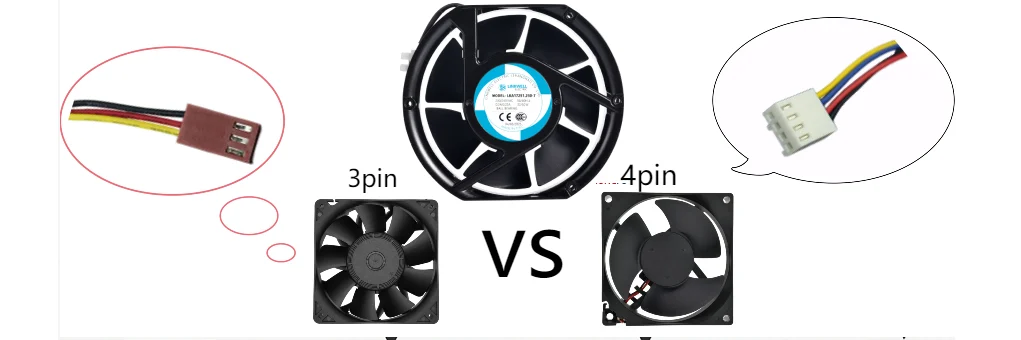
3-Pin Cooling Fans Overview
3-pin cooling fans have been a staple in computer systems and industrial setups for years. They use voltage control to adjust fan speed. The motherboard or controller sends a variable voltage, usually between 5 VDC and 12 VDC, to the fan. The fan spins faster when it receives more voltage. Many fans need at least 7 VDC to start spinning, especially as they age.
These dc fans are simple and reliable. They work well in basic cooling situations. However, they can produce variable noise because voltage changes affect how smoothly the motor runs. At lower speeds, voltage-controlled fans may consume more power and sometimes struggle to operate efficiently. Some users notice stuttering or humming sounds when the voltage drops too low.
Note: 3-pin cooling fans remain relevant in many industrial applications, but they are less common in modern PC builds where advanced fan speed control is needed.
4-Pin Cooling Fans Overview
4-pin cooling fans take fan speed control to the next level. They use PWM (pulse width modulation) to manage speed. The fourth pin on the connector sends a digital signal that tells the fan how fast to spin. The fan always receives a steady 12 VDC, but the PWM signal adjusts the duty cycle, which changes the speed without lowering the voltage.
Here’s a quick look at the pinout for 4-pin cooling fans:
| Pin Number | Color | Function |
|---|---|---|
| 1 | Black | Ground |
| 2 | Yellow | +12 VDC fixed |
| 3 | Green | Speed Pulse Signal |
| 4 | Blue | PWM Signal (controls fan speed) |
These dc fans offer precise speed control. They operate smoothly at low speeds and avoid the buzzing or humming noises that voltage-controlled fans sometimes produce. PWM fans maintain lower speeds without losing efficiency. They use less energy and stay quieter, which is important in noise-sensitive environments.
Tip: 4-pin cooling fans are gaining popularity in gaming PCs, data centers, and industrial automation. Their advanced control features make them ideal for demanding applications.
Main Technical Difference: Voltage vs PWM Control
The main difference between 3 pin vs 4 pin fan comes down to how each controls speed. Voltage control changes the amount of power sent to the fan, while PWM control uses a digital signal to adjust speed precisely. This affects noise, efficiency, and performance.
Let’s compare the two methods:
| Feature | PWM Control | Voltage Control |
|---|---|---|
| Speed Control | Uses a control signal to adjust speed precisely | Adjusts speed by varying voltage |
| Noise Profile | Consistent noise due to rapid on/off switching | Variable noise profile due to voltage fluctuations |
| Energy Efficiency | More efficient at lower speeds | Less efficient at lower speeds |
| Operating Speed Range | Broader range, operates efficiently at low speeds | May struggle at low speeds, leading to stuttering |
- PWM fans avoid buzzing or humming noises at lower speeds.
- Voltage-controlled fans may produce variable noise due to voltage changes.
- PWM fans maintain lower speeds without significant efficiency loss.
- Voltage-controlled fans consume more power at lower speeds.
fanacdc: Provider of Both Fan Types
Fanacdc, powered by LINKWELL, offers a full range of cooling solutions. They supply both 3-pin and 4-pin cooling fans for PC, industrial, and commercial applications. Their dc fans meet industry standards and deliver reliable performance. Fanacdc’s 4-pin fans stand out for their precise speed control and quiet operation. Engineers and buyers trust fanacdc for advanced cooling technology that fits every need.
If you’re looking for fans that combine durability, efficiency, and smart control, fanacdc has you covered. Their products help keep systems cool and quiet, whether in a server rack or a gaming PC.
Speed Control and Performance
Voltage Control in 3-Pin Fans
Voltage control plays a big role in how 3 pin vs 4 pin fan options perform. In 3-pin fans, the motherboard or controller changes the voltage to adjust speed. When the voltage goes up, the fan spins faster. When it drops, the fan slows down. This method works, but it has some quirks. Each fan responds differently to voltage changes, so their performance can be unpredictable. Lowering the voltage too much can cause the fan to stall, which means it stops spinning but still draws power. That can lead to overheating and even damage.
Here’s a quick look at how voltage control affects performance and noise:
| Evidence | Explanation |
|---|---|
| Adjusting voltage changes fan speed | Ohm’s Law shows that voltage and current affect speed |
| Fans need more energy to start | Once spinning, they use less power |
| Safe voltage range matters | Too low or too high can hurt performance and noise output |
PWM Control in 4-Pin Fans
PWM functionality gives 4-pin fans a big advantage in performance. Instead of changing voltage, the controller sends a rapid on-off signal. This signal, called pulse width modulation, tells the fan how fast to spin while keeping the voltage steady. Most PWM signals run at about 25 kHz, which is too fast for people to hear. PWM fans can adjust their speed smoothly, even at very low RPMs, without stalling.
Some benefits of PWM fans include:
- They adapt speed based on temperature, which boosts energy efficiency.
- They avoid wasting power, since they don’t lose energy as heat.
- They can run at speeds as low as 20% of their maximum, saving energy during light loads.
Noise and Efficiency Comparison
When comparing 3 pin vs 4 pin fan, performance differences stand out. 3-pin fans often run at a fixed speed, so they can get noisy if the system heats up. 4-pin fans use automatic speed modulation, which means they only spin as fast as needed. This keeps noise down and saves power. Studies show that pwm fans can cut power use by up to 30% compared to 3-pin models. They also run quieter at lower speeds, which makes them perfect for noise-sensitive spaces.
| Fan Type | Energy Efficiency | Speed Control Method | Noise Level |
|---|---|---|---|
| 4-Pin | Higher efficiency | PWM allows precise speed regulation | Quieter at low speeds |
| 3-Pin | Lower efficiency | Voltage-based control | Louder, less adaptable |
In the end, 4-pin fans deliver better performance, quieter operation, and smarter energy use.
Fan Compatibility
Using 3-Pin Fans on 4-Pin Headers
Many users wonder if they can plug a 3-pin fan into a 4-pin header. The answer is yes, and most modern motherboards support this setup. The 4-pin headers are often designed for backward compatibility, so they accept both types of connectors. However, there are a few things to keep in mind:
- The 3-pin fan will not use the PWM signal from the fourth pin. It will only receive power and ground, plus a speed signal.
- Some motherboards control 4-pin headers in DC mode when they detect a 3-pin fan. In this case, the fan speed can still be adjusted by changing the voltage.
- On other boards, the fan may run at full speed all the time because it cannot use PWM control. This can make the system noisier than expected.
- CPU fan headers sometimes default to PWM mode, which means a 3-pin fan connected there may not adjust speed at all.
Tip: If you want to use a 3-pin fan with a 4-pin header, check your motherboard’s BIOS or manual. Some boards let you switch between PWM and DC mode for better control.
Connecting a 3-pin fan to a 4-pin header will not damage your hardware. The main downside is reduced speed control and possibly higher noise.
Using 4-Pin Fans on 3-Pin Headers
You can also connect 4-pin fans to 3-pin headers. In this setup, the fan receives power, ground, and a speed signal, but it does not get the PWM signal needed for precise speed control. The fan will either run at full speed or may not spin at all, depending on the motherboard’s voltage control. Some 4-pin fans, like the fanacdc 4 Pin PWM Fan, are designed for intelligent speed control and work best when paired with a true PWM header.
- Without the PWM signal, the fan’s internal controller cannot adjust speed smoothly.
- The fan may interpret the missing signal as a command to run at maximum speed.
- In rare cases, the fan may not operate if it relies entirely on PWM for startup.
Note: For the quietest and most efficient operation, always match 4-pin fans with 4-pin headers that support PWM control. This ensures you get the full benefits of advanced features like real-time RPM monitoring and silent operation.
Real-World Tips for Mixed Setups
- Use adapter cables if you need to connect different fan types.
- Check your motherboard’s fan settings for options to switch between DC and PWM modes.
- For critical systems, consider upgrading to 4-pin PWM fans from fanacdc for the best compatibility and performance.
Practical Use Cases
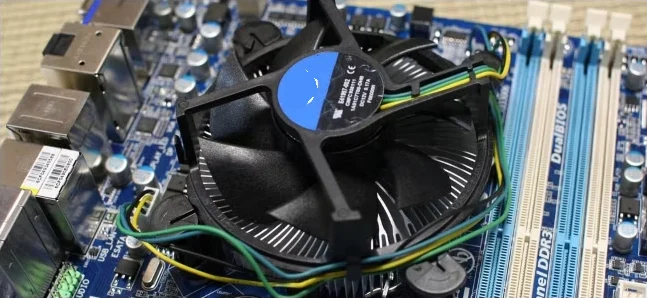
Industrial Applications
Many industries rely on cooling fans to keep equipment running smoothly. These devices show up in everything from consumer electronics to large-scale industrial automation. The table below shows where engineers often use 3-pin and 4-pin fans:
| Application Area | Common Uses |
|---|---|
| Consumer Electronics | Computer mainframes, graphics cards, laptops, game consoles, routers |
| Industrial Automation | PLC control cabinets, servo drives, inverters, industrial computers |
| Communications and Data Centers | Servers, switches, base stations, UPS (uninterruptible power supplies) |
| New Energy and Electric Vehicles | Battery management systems (BMS), motor controllers, charging modules |
| Medical Equipment | CT machines, MRI equipment, monitors, in vitro diagnostic equipment |
Fanacdc offers a wide range of cooling solutions for these industries. Their products match airflow, static pressure, and noise level requirements for each application. They also provide custom solutions, technical support, and fast lead times. This makes it easy for engineers to find the right fan for any project.
Note: Fanacdc’s engineering team helps with project customization, installation guidance, and after-sales support. This ensures smooth integration into industrial systems.
Choosing the Right Fan
Selecting the right fan depends on the control method, noise level, and temperature management needs. The table below compares the main features of 3-pin and 4-pin fans:
| Fan Type | Control Method | Advantages | Limitations |
|---|---|---|---|
| 3-Pin | Voltage Regulation | Basic speed control, quieter than 2-pin | Cannot automatically adjust speed by temperature |
| 4-Pin | PWM (Pulse Width Modulation) | Automatic speed modulation, better temperature management, quieter operation | Typically more expensive than 2-pin or 3-pin fans |
4-pin fans stand out in noise-sensitive and high-performance environments. They adjust speed automatically, which keeps noise low and energy use efficient. Users often notice a big drop in noise when switching from voltage-controlled to PWM fans. This makes them a top choice for data centers, medical labs, and home offices.
Fanacdc’s 4 Pin PWM Fan offers precise speed control and quiet operation. It works well in demanding environments where both performance and silence matter. Their fans help protect sensitive equipment and improve user comfort.
Choosing between 3-pin and 4-pin fans comes down to speed control, compatibility, and where they work best. 4-pin PWM fans give users more precise control and quieter operation. Many users praise fanacdc’s 4 Pin PWM Fan for its flexible speed adjustments, low noise, and reliability in places like data centers and medical labs. For those who want more details or need custom solutions, fanacdc’s website offers project support, technical help, and after-sales service.
| Service Type | Description |
|---|---|
| Project Customization | Tailored solutions for unique cooling needs |
| Technical Support | Expert advice from design to installation |
| After-Sales Service | 24/7 support and a global service network |
For advanced cooling and quiet performance, fanacdc’s 4 Pin PWM Fan stands out.
FAQ
Can a 3-pin fan plug into a 4-pin header?
Yes, a 3-pin fan fits into a 4-pin header. The fan will run using voltage control, not PWM. Users may not get precise speed control, but the fan will still work.
Do all 4-pin headers support PWM control?
Not always. Some 4-pin headers only provide power and speed monitoring. Users should check the motherboard manual or BIOS settings to confirm PWM support.
What is the main advantage of a 4-pin PWM fan?
A 4-pin PWM fan gives precise speed control. It runs quieter and uses less energy. This makes it a great choice for noise-sensitive or high-performance systems.
Where can users find reliable 4-pin PWM fans?
Users can visit fanacdc’s 4 Pin PWM Fan page for advanced, quiet, and efficient cooling solutions. The site offers detailed specs and support.

