
Server racks overheating is one of the most common yet costly issues in data centers. Overheating can lead to hardware throttling, unplanned downtime, and significant business losses. Many IT managers struggle to determine the correct airflow for their racks—install too little, and hotspots develop; install too much, and energy costs soar along with noise.
This article provides three proven methods to calculate CFM (Cubic Feet per Minute) for server racks, practical examples, common mistakes to avoid, and a fan selection guide featuring Linkwell industrial cooling fans. By following these methods, you can optimize your airflow and reduce cooling energy consumption by 15–25%.
Key Takeaways
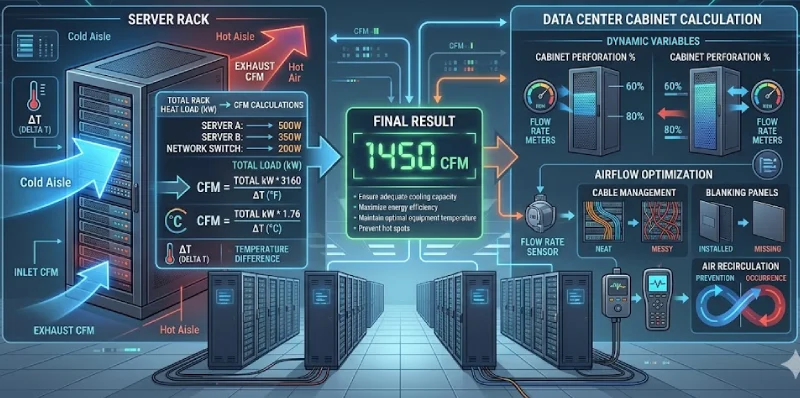
- 1 kW ≈ 160–200 CFM (rule-of-thumb)
- Precise formula: CFM = (Watts × 3.16)/ΔT
- Add 20–30% safety factor
- Redundancy: N+1 is standard
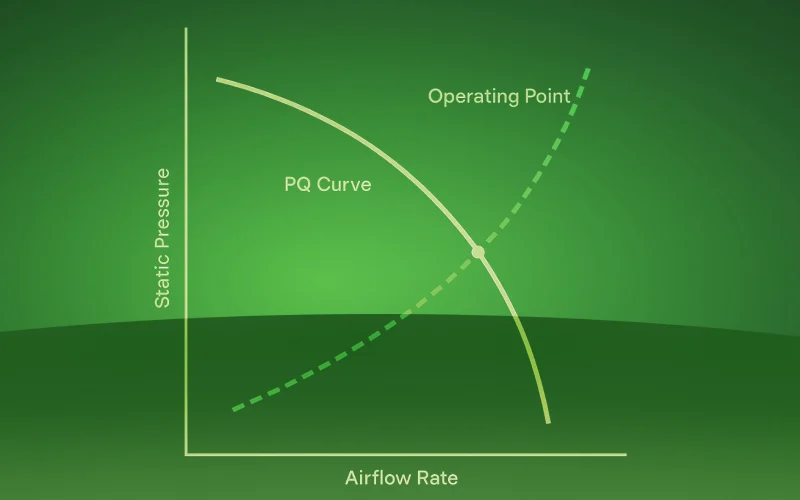
- Static pressure matters as much as CFM
- Verify airflow with measurement
What is CFM and Why It Matters for Server Rack Cooling
Definition of CFM
CFM stands for Cubic Feet per Minute, measuring the volume of air a fan or cooling system moves each minute. This metric is critical for understanding how effectively a server rack can dissipate heat.
How CFM Impacts Heat Removal
Airflow directly affects heat removal. The heat removed from a server rack can be expressed as:
Q (heat) = CFM × ΔT × constant
Where ΔT is the temperature rise from the inlet to the outlet. Higher airflow means more heat is carried away, or the same heat can be removed with lower temperature rise.
Why Accurate CFM Calculation is Critical
| Consequence | Too Low CFM | Too High CFM |
|---|---|---|
| Temperature | Overheating → hardware throttling or downtime | Normal |
| Energy Use | Normal | Wasted 15–30% electricity |
| Noise | Lower | High |
| Equipment Lifespan | Reduced >50% | Normal |
Visual tip: a chart showing “Temperature vs Equipment Lifespan” helps convey the impact.
Method 1 – Quick Estimation (For Initial Planning)
Industry Rule-of-Thumb
For rapid planning: 1 kW of IT load ≈ 160–200 CFM
Estimate by Rack Type
| Rack Type | Typical Load | Recommended CFM | Fan Suggestion |
|---|---|---|---|
| Low Density (light servers/network) | 1–2 kW | 160–400 | 2–4 × 80mm fans |
| Medium Density (general servers) | 3–5 kW | 480–1000 | 4–6 × 120mm fans |
| High Density (DB/virtualization) | 6–10 kW | 960–2000 | High static pressure fans / fan wall |
| Ultra High Density (GPU/AI) | 10–20+ kW | 1600–4000+ | Liquid cooling + fan assist |
Estimate by Device Count (Rough)
| Device | CFM per Unit |
|---|---|
| 1U server | 40–60 |
| 2U server | 60–80 |
| Storage array | 80–120 |
| Network switch | 30–50 |
Formula: Total CFM = Σ(device CFM) × 1.2 (safety factor)
This method works for initial planning or when detailed power specifications are unavailable.
Method 2 – Precise Thermal Calculation (Recommended)
Core Formula
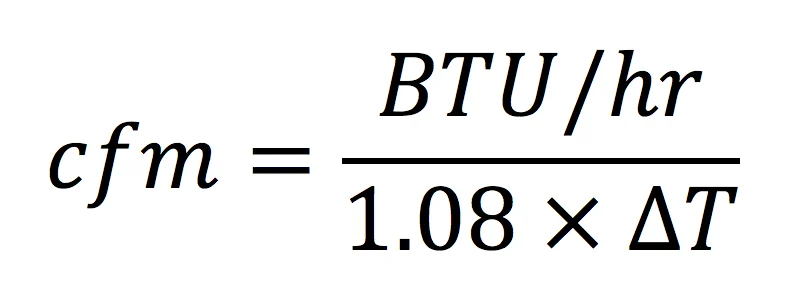
Required CFM = (Total Heat Load in Watts × 3.16) ÷ ΔT (°F)
- ΔT = temperature rise from inlet to outlet (typically 18–22°F / 10–12°C)
- 3.16 is derived from standard air properties at sea level
Step-by-Step Calculation
- Determine total heat load
- From device specs or measurement with a power meter
- Example device loads:
- 1U server: 200–400 W
- 2U server: 300–600 W
- Storage array: 400–800 W
- GPU server: 1000–4000 W
- Set target ΔT
- ASHRAE recommends inlet temp: 18–27°C (64–81°F)
- ΔT = 10–12°C (18–22°F) typical
- Lower ΔT → more airflow → colder but higher energy use
- Calculate CFM and apply safety factor
- Example: 3000 W total, ΔT = 20°F → 474 CFM
- Add 20% safety factor → 569 CFM
Visual suggestion: interactive calculation table or static example table
Method 3 – Using Online Tools and Calculators
Recommended Tools
- ASHRAE Thermal Guidelines Online Calculator
- Schneider Electric APC Cooling Calculator
- Fan manufacturer calculators (e.g., Sanyo Denki, ebm-papst, Linkwell)
- Custom Excel template (free download)
Usage Tips
- Accurate input ensures reliable results
- Watch units (Watts vs BTU/hr)
- Add 20–30% safety factor to account for real-world conditions
- CTA: download a free Excel CFM calculator from Linkwell
Other Factors Affecting CFM Requirements
Internal Rack Resistance
| Factor | Impact | Mitigation |
|---|---|---|
| Cable clutter | 20–40% airflow reduction | Vertical cable management |
| Missing blank panels | Air bypass → reduced efficiency | Install blanking panels |
| High-density layout | Localized resistance | High static pressure fans |
| Filters | Pressure drop | Low-resistance filters, replace regularly |
Environmental Temperature & Altitude
- Higher ambient temp → lower air density → more airflow needed
- High altitude (>1500m) → thinner air → +10–20% CFM
Redundancy Design
- N+1 fan configuration → Total CFM = Required × (N+1)/N
Case Study – Full CFM Calculation
Scenario:
- 42U rack: 16 × 1U servers (250W each), 2 × switches (100W each), 1 storage (500W)
- ΔT = 20°F, altitude = 200m
Calculation:
- Total heat = 16×250 + 2×100 + 500 = 4,700 W
- Base CFM = (4700 × 3.16)/20 = 743 CFM
- Add safety factor 1.2 → 891 CFM
- Add 10% redundancy → 980 CFM
Fan Configurations (Linkwell products):
- Option A: 5 × 200 CFM 120mm fans (4+1 redundancy)
- Option B: 3 × 350 CFM 172mm fans (2+1 redundancy)
- Option C: Rear fan wall (pre-assembled Linkwell solution)
Common Mistakes & Misconceptions
| Mistake | Correct Approach |
|---|---|
| Only consider max CFM, ignore static pressure | Check fan P-Q curve |
| Ignore internal rack resistance | Adjust for 50–70% effective airflow |
| Skip redundancy | N+1 is standard |
| Assume full load always | Average 60–80%, adjust safety factor |
| Ignore hot/cold aisle layout | Correct airflow design is critical |
Selecting Fans After CFM Calculation
Match Fans to CFM Requirement
| CFM Needed | Fan Setup | Typical Fan (Linkwell) |
|---|---|---|
| <200 | 1–2 × 80–92mm | Linkwell 80×25mm |
| 200–500 | 2–4 × 120mm | Linkwell 120×38mm (high static) |
| 500–1200 | 4–8 × 120mm or 2–4 × 172mm | Linkwell 172×51mm |
| >1200 | Fan wall / consider liquid cooling | Linkwell pre-configured fan wall |
Key Parameters to Compare
- Static pressure: ≥0.2–0.5 inH₂O
- Noise: ≤55 dBA
- Bearings: double ball bearing
- Control: PWM speed
When selecting fans to meet your calculated CFM requirements, Linkwell offers a comprehensive range of industrial cooling solutions designed for reliability, efficiency, and long-term performance.
Our AC fans are built for durability, providing consistent cooling for industrial machinery and commercial applications with lifespans exceeding 50,000 hours. DC brushless fans deliver high-efficiency airflow at speeds up to 8,000 RPM, making them ideal for stable cooling in server racks and telecom equipment.
For energy-conscious environments, our EC fans intelligently reduce power consumption by up to 75% while maintaining reliable performance, offering a sustainable solution for modern data centers.
For racks or systems with high resistance or compact layouts, centrifugal fans generate up to 300 Pa of static pressure, ensuring efficient airflow even under challenging conditions.
By matching the right Linkwell fan type to your calculated CFM, you can achieve optimal temperature control, energy efficiency, and long-lasting reliability in any data center setup.
FAQ
What’s the ideal ΔT (temperature rise) for a server rack?
18-22°F (10-12°C) is standard. Lower ΔT = more cooling but higher energy. Higher ΔT = less airflow but hotter components. Start with 20°F.
How do I measure actual CFM in my rack?
Use an anemometer to measure air velocity at exhaust points. Average multiple readings, then multiply by the exhaust area (in square feet) × 60.
I installed fans with enough CFM, but my servers are still hot. Why?
Most likely insufficient static pressure. The fans can’t push air through the rack’s resistance. Also check for missing blanking panels causing air recirculation.
Do I need rack fans if my servers already have internal fans?
Yes. Server fans cool internal components but don’t remove heat from the rack. Without rack-level airflow, hot air recirculates and intake temperatures rise.
How do I convert CFM to m³/h?
1 CFM = 1.699 m³/h. Multiply CFM by 1.7 for approximate m³/h.
How do I convert inH₂O to Pascals (Pa)?
1 inH₂O ≈ 249 Pa. For rough estimates, 0.4 inH₂O ≈ 100 Pa.
How often should I replace data center fans?
Quality ball-bearing fans last 60,000-80,000 hours (7-9 years continuous). Monitor for unusual noise or vibration as early warning signs.
Conclusion
In conclusion, accurately calculating CFM for server racks and data center cabinets is essential for maintaining optimal performance, energy efficiency, and equipment longevity. Using either quick estimation methods, precise thermal calculations, or reliable online tools, IT managers can ensure that airflow matches the specific heat load of each rack.
Incorporating safety factors and redundancy, such as N+1 fan configurations, further protects against unexpected failures, while attention to static pressure and airflow management prevents hotspots and inefficient cooling.
By following these practices and selecting high-quality fans like those offered by Linkwell, data centers can reduce cooling energy consumption, extend hardware lifespan, and maintain a stable, low-noise environment. Regular validation of airflow with measurements ensures that theoretical calculations translate into real-world performance, creating a balanced, reliable, and cost-effective cooling strategy for any data center.

