
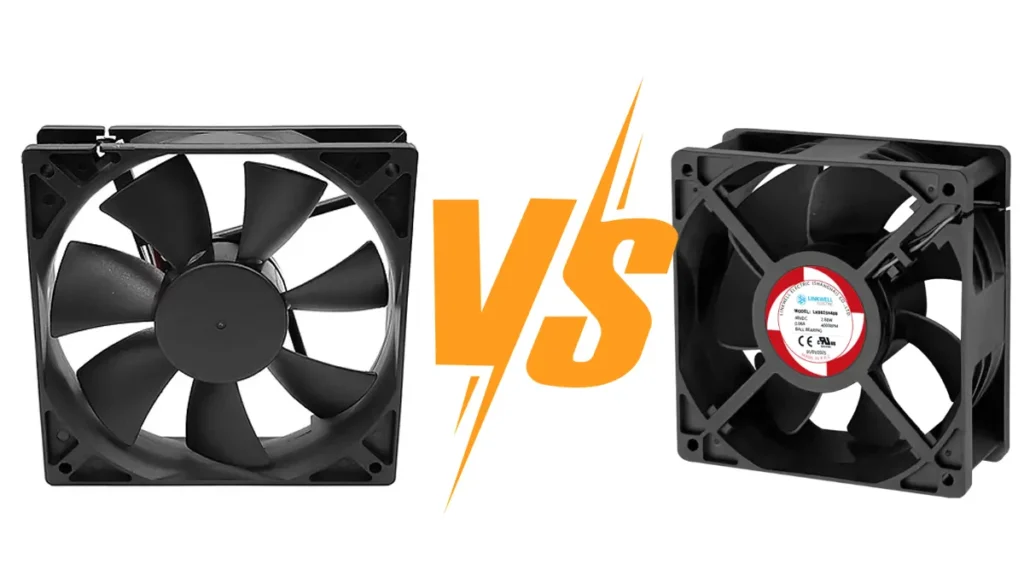
You want your cooling system to be smart. It should not work too hard. If you control your fan, you save energy. You also make less noise. Your fan will last longer. The main difference between PWM Fan vs DC Fan is in their speed control mechanisms. PWM fans use electric pulses to change speed, which helps them be very precise. In contrast, DC fans change speed by adjusting the voltage. Look at the table below. It shows how PWM technology helps:
| Metric | PWM Fans | Traditional DC Fans |
|---|---|---|
| Energy Consumption | Up to 30% less | Higher power usage |
| Noise Levels | As low as 20 dBA | Often exceeds 30 dBA |
| Reliability | Extended lifespan | Increased wear and tear |
Key Takeaways
- PWM fans use electric pulses to control speed very well. DC fans change speed by changing the voltage.
- PWM fans save more energy and can use up to 30% less power than DC fans.
- DC fans are simple and cheap for basic cooling jobs, but they might stop working at low voltages.
- PWM fans are quieter and good for places where noise matters.
- DC fans can be used in many ways, like in electronics and cars.
- PWM fans give better control and work well in smart systems that need exact cooling.
- You should pick a fan based on what you need, like how loud it is, how much energy it uses, and what you will use it for.
DC Fans Overview
How DC Fans Work
You may wonder how dc fans cool things down. These fans use direct current, so electricity moves in one way. When you turn on a dc fan, the motor spins the blades. The spinning blades push air over your stuff or workspace. You can change how fast a dc fan spins by changing the voltage. Lower voltage makes the fan spin slower. Higher voltage makes it spin faster. This way is simple, so dc fans are easy to use in many places.
DC fans are used in lots of things. You find them in computers, routers, and medical machines. They stop electronics from getting too hot. In cars, dc fans cool engines and batteries. Big factories and telecom centers use these fans to cool heavy machines. Here are some places where dc fans are important:
- Electronics: Cooling computers, servers, and routers
- Medical equipment: Keeping MRI machines and ventilators safe
- Automotive: Engine cooling, HVAC systems, battery management in electric vehicles
- Industrial: Managing heat in manufacturing plants and telecommunications
Common Voltages (12V, 24V, 48V)
DC fans come in different voltages. The most common are 12V, 24V, and 48V. If you work with computers or small gadgets, you often see 12V dc fans. Bigger machines usually use 24V or 48V fans. Picking the right voltage helps your fan work well and keeps your stuff safe.
DC Fan Pros and Cons
Advantages
DC fans have many good points. They give steady cooling and last a long time. These fans use strong bearings and good materials, so they do not rust and last longer. They save energy and are quieter. You can change their speed easily, so you have more control. Here are some main advantages:
| Advantages of DC Fans |
|---|
| High power factor |
| Reliable materials and bearings |
| Large air volume, low noise, long life, corrosion resistance |
| Energy-saving and environmentally friendly |
| Good speed regulation performance |
| Low inverter capacity and cost |
Limitations
DC fans have some downsides. Making them is harder, so they can cost more. You need to check them often to stop them from overheating. DC fans usually cost more than ac fans. Here are some things to watch out for:
- More complicated manufacturing process, leading to higher costs
- Requires regular maintenance to prevent overheating
- Slightly more expensive than ac fans
If you want a fan that is easy to use and works well, dc fans are a good pick. Just make sure you check the voltage and do regular care. DC fans work in many jobs, but you need to think about cost and how well they work.
PWM Fans Explained
What Is PWM?
You might wonder what makes pwm fans different from regular fans. PWM stands for Pulse Width Modulation. This is a smart way to control how fast your fan spins. Instead of changing the voltage, pwm changes the width of the electric pulses sent to the fan. You can think of it like turning a light switch on and off very quickly. The longer the switch stays on, the faster the fan goes.
- PWM controls fan speed by adjusting the duty cycle, which is the ratio of “on” time to the total cycle time.
- This method helps you save energy and keeps noise levels low.
- You get better control over how much air your fans move.
PWM Fans: How They Work
PWM fans use a special signal to manage speed. These fans always get a steady voltage, usually 12V. The speed changes because the pwm signal tells the fan when to turn on and off. The fan’s motor listens to these quick pulses. If the pulse stays on longer, the fan spins faster. If the pulse is short, the fan slows down.
Here’s how pwm fans operate:
- A pwm fan receives a constant voltage.
- The fan’s speed is adjusted through pulses of variable width.
- The width of these pulses decides the ON and OFF time, which changes the fan’s speed.
Most pwm fans have a fourth wire or pin. This extra pin carries the pwm signal. It lets you control the fan with great accuracy. You can run these fans at very low speeds without worrying about them stalling. This means you get quiet cooling when you need it and strong airflow when things heat up.
Tip: PWM fans can quickly react to temperature changes. Your system stays cool without making extra noise.
Here’s a table to show how pwm fans compare to regular dc fans:
| Feature | PWM Fans | DC Fans |
|---|---|---|
| Speed Control | PWM signal for precise control | Varies current for speed |
| Voltage | Constant (usually 12V) | Changes with speed |
| Minimum Speed | As low as 20% without stalling | Can stall at low voltage |
| Noise Level | Quieter at low speeds | Noisy at low voltage |
| Longevity | Lasts longer | May wear out faster |
PWM Fan Pros and Cons
Advantages
You get many benefits of pwm models when you use pwm fans:
- PWM fans give you better speed control. They adjust quickly to temperature changes, so your equipment stays safe.
- These fans run quietly at low speeds. You can use them in places where noise matters.
- PWM fans use up to 30% less energy than regular fans. This saves you money and helps the environment.
- They last longer because they do not wear out as fast.
Limitations
PWM fans do have a few drawbacks:
- They can cost more than basic dc fans.
- You need a controller or motherboard that supports pwm signals.
- Not all systems work with pwm fans, so check your setup before you buy.
If you want quiet, smart, and energy-saving cooling, pwm fans are a great choice. They give you control and peace of mind.
PWM Fan vs DC Fan: Differences
Speed Control Method
When you compare pwm fan vs dc fan, the first thing you notice is how each fan changes speed. You control dc fans by changing the voltage. If you want the fan to spin faster, you increase the voltage. If you want it to slow down, you lower the voltage. This method works, but it does not give you much precision. Sometimes, the fan does not respond quickly when the temperature changes.
PWM fans use a different method. You control these fans with pulse width modulation, or pwm. Instead of changing the voltage, you send quick pulses to the fan. The fan listens to these pulses and changes speed right away. This means you get very precise control. When your equipment heats up, pwm fans can speed up almost instantly. When things cool down, the fan slows down just as fast. You get better response and more accurate cooling.
If you want your system to react quickly to temperature changes, pwm fans are the better choice. They give you more control and keep your equipment safe.
Voltage vs PWM Signal
You might wonder what really sets pwm fan vs dc fan apart. It comes down to how you tell the fan what to do. Take a look at this table to see the technical differences:
| Control Method | Description |
|---|---|
| Voltage Control | Adjusts fan speed by reducing the voltage supplied to the fan motor, leading to lower speed, airflow, and noise, but lacks precision at low speeds. |
| PWM Control | Utilizes a pulse-width modulation signal to adjust fan speed by changing the duty cycle, allowing for more stable low speeds and clearer speed commands. |
With dc fans, you just turn the voltage up or down. This is simple, but it can be hard to get the fan to run smoothly at very low speeds. Sometimes, the fan might even stop if the voltage drops too much.
PWM fans use a pwm signal instead. You keep the voltage steady, but you change how long the pulses last. This lets the fan run at lower speeds without stalling. You get clear speed commands, and the fan follows them closely.
- Voltage control is easy to understand, but it struggles with low-speed precision.
- PWM control gives you stable, low speeds and clear commands, but sometimes needs a little extra push to start spinning.
Minimum Speed and Range
Let’s talk about how slow your fan can go. When you look at pwm fan vs dc fan, you see a big difference in minimum speed. DC fans can stall if you lower the voltage too much. This means the fan might stop spinning, which can cause your equipment to overheat.
PWM fans do not have this problem. They use a constant voltage and a pwm signal to control speed. This setup lets pwm fans run at much lower speeds without stopping. You get quiet operation and less wear on the fan. Your fan lasts longer, and your system stays cool.
You might think that running a fan slower means less cooling. In reality, both pwm fans and dc fans can move about the same amount of air when running at full speed. The big win for pwm fans is that you can slow them down more when you do not need as much cooling. This saves energy and reduces noise.
Tip: If you need your fan to run quietly most of the time but still want strong cooling when things heat up, pwm fans give you the best range and control.
Noise and Efficiency
You probably care about how much noise your fans make. Nobody likes a loud hum in the background, especially if you work in a quiet office or need to keep noise down in a control room. PWM fans usually run quieter than DC fans at low speeds. You can slow them down to very low RPMs, and they still keep spinning smoothly. This means less motor noise and less air movement when you don’t need full cooling. Sometimes, you might hear a faint clicking sound from a PWM fan. This comes from the high-frequency switching, but you’ll only notice it in very quiet rooms or with lower-quality fans. Most of the time, you won’t hear it at all.
DC fans sound different. They make a steady hum, and when you slow them down by lowering the voltage, the noise drops a bit. But they can’t go as slow as PWM fans without stalling. At higher speeds, both types of fans get louder because of air turbulence, not the motor itself. So, if you want a fan that stays quiet most of the time, PWM fans are the better pick.
When you look at energy use, PWM fans win again. They can idle at very low speeds, sometimes as low as 15% of their maximum. DC fans often run at 50% or higher, even when you don’t need much cooling. Over time, this difference adds up. If you run a lot of fans in a big system, PWM fans can save you a lot of power and money.
Tip: If you want a quiet and energy-saving setup, choose PWM fans. They give you more control over noise and use less electricity.
Control Accuracy
You want your fans to hit the right speed every time. This keeps your equipment cool and avoids wasted energy. PWM fans do a great job here. They use a separate signal to tell the fan how fast to spin, so they don’t get confused by changes in power or load. Here’s how PWM and DC fans compare:
- PWM fans keep their target speed, even if the system load changes.
- You can set PWM fans to run at very low, stable speeds. The fan electronics always get a clear command.
- DC fans can lose torque when you lower the voltage. If you go too low, the fan might stall or stop.
- DC fans have a harder time staying at a set speed if the power supply isn’t steady.
So, if you need fans to react quickly and stay on target, PWM fans are the way to go. They give you more precise control, especially in systems where the load changes a lot.
Wiring and Connectors
You might wonder why some fans have three wires and others have four. The wiring makes a big difference in how you control the fan. Here’s a quick look at the main types:
| Fan Type | Pin Configuration | Operation Mode | Compatibility Issues |
|---|---|---|---|
| 4-Pin PWM Fan | Pin #1: Ground, Pin #2: +12 VDC, Pin #3: Speed pulses, Pin #4: PWM signal | PWM Mode | Runs at variable speeds with PWM signal; on 3-pin headers, runs at full speed. |
| 3-Pin DC Fan | Pin #1: Ground, Pin #2: Varying +DCV, Pin #3: Speed pulse | Voltage Control Mode | On 4-pin headers, loses PWM control; speed changes only with voltage. |
| 2-Wire Fan | Pin #1: Ground, Pin #2: +DCV | N/A | Acts like a 3-pin fan; always runs at full speed on PWM headers. |
- 4-pin fans need a PWM signal for speed control. You get the best results when you plug them into a 4-pin header.
- 3-pin fans use voltage to change speed. If you plug a 3-pin fan into a 4-pin header, it will run at full speed because it doesn’t get a PWM signal.
- If you put a 4-pin fan on a 3-pin header, it loses PWM control but can still run at a fixed speed based on voltage.
Note: Always check your motherboard or controller before buying fans. Make sure the connectors match your needs for speed control.
Cost Comparison
You probably want to know which fan saves you money. At first, DC fans look like the cheaper choice. You pay less when you buy them. If you have a tight budget or need a lot of fans right away, DC fans seem like a good deal.
But let’s look closer. PWM fans cost more up front. They use advanced technology and have extra features. You might wonder if the higher price is worth it. Over time, PWM fans can actually save you money. They use less energy—sometimes up to 30% less than regular DC fans. That means your power bills go down, especially if you run many fans all day.
PWM fans also last longer. They run quieter and don’t wear out as fast. You spend less on repairs and replacements. If you care about long-term savings, PWM fans are a smart investment.
Here’s a quick summary:
- DC fans cost less to buy but may cost more to run.
- PWM fans cost more at first but save money on energy and maintenance.
- PWM fans are best for high-demand or energy-sensitive jobs.
Tip: If you want to save money over the life of your equipment, consider PWM fans. They pay off in the long run.
Application Flexibility
You might wonder which fan fits your project best. Both PWM and DC fans work in many places, but they shine in different ways.
PWM fans give you dynamic control. You can adjust their speed with a simple signal. This makes them perfect for smart systems that need precise cooling. They work well in modern setups where you want to save power and keep things quiet.
DC fans are very versatile. You can use them in lots of industries. They fit in tight spaces and work with many power sources. If you need a fan for a basic job or a spot with limited controls, DC fans are a solid choice.
Here’s a table to help you compare:
| Feature | PWM Fans | DC Fans |
|---|---|---|
| Speed Control | Dynamic control via PWM signal | Limited speed control |
| Power Efficiency | Saves power and operates quietly | Varies with application |
| Application Flexibility | Ideal for precise cooling requirements | Versatile across various industries |
You can see that PWM fans are great for smart, energy-saving systems. DC fans work almost anywhere and handle many different needs.
- DC fans are essential in places where cooling needs change quickly.
- They fit well in small spaces and with different power setups.
- You can use them for many types of projects, from simple to complex.
Note: Think about what your system needs. If you want smart control and energy savings, go with PWM fans. If you need something simple and flexible, DC fans are a good pick.
PWM vs DC Fans: Comparison Tables
PWM Fan vs DC Fan Table
You might want to compare these fans side by side. Here are the main features you should look at when picking a fan. The table below shows how PWM fans and DC fans are different. This helps you see which fan is right for your project.
| Feature | PWM Fan | DC Fan |
|---|---|---|
| Speed Control | Precise RPM adjustment | Constant speed |
| Energy Efficiency | More energy-efficient | Less efficient |
| Lifespan | Prolonged due to variable speed | Shortened due to constant speed |
| Noise Levels | Quieter operation | Noisy at full speed |
| Minimum Speed | Runs at lower RPM without stalling | May stall at low voltage |
| Wiring | 4-pin connector | 2 or 3-pin connector |
| Cost | Higher upfront cost | Lower upfront cost |
| Application Flexibility | Great for smart systems | Good for simple setups |
If you want a fan that is quiet and saves energy, PWM fans are a smart pick. DC fans are good if you need something simple and cheap.
Application Scenario Table
You may wonder which fan works best in different places. The table below helps you choose. It lists common uses for fans and shows which type fits each job.
| Application Scenario | Recommended Fan Type | Why It Works Best |
|---|---|---|
| Computer cooling | PWM Fan | Quiet operation and precise control |
| Industrial cabinet | DC Fan | Reliable and cost-effective |
| Telecom equipment | PWM Fan | Energy savings and low noise |
| Simple power supply cooling | DC Fan | Easy setup and low cost |
| Automation systems | PWM Fan | Fast response to temperature |
| Fixed-speed ventilation | DC Fan | Runs steady and lasts long |
- PWM fans are good for places where you need smart control and less noise.
- DC fans are best for jobs where you want steady airflow and don’t need special controls.
Tip: Think about what your system needs. If you want fans to change speed and use less power, pick PWM fans. If you only need basic cooling, DC fans are a solid choice.
When to Choose DC Fans
Simple Cooling Needs
Sometimes, you just need a fan that gets the job done without any fuss. If your system does not need fancy controls or constant speed changes, dc fans are a great choice. You can use them in places where the temperature stays steady and the cooling demand does not jump around. For example, if you have a small electronics box or a basic cabinet, you want something reliable and easy to set up. Dc fans work well in these situations because they start up quickly and keep running at a steady pace.
You do not have to worry about complicated wiring or special controllers. Just connect the fan, set the voltage, and let it run. This simple setup means you spend less time on installation and more time focusing on your main tasks. Dc fans also fit into tight spaces, so you can use them in small devices or crowded panels.
Fixed Speed Use
If you need a fan that runs at one speed most of the time, dc fans make your life easier. They are perfect for jobs where you do not need to change the fan speed often. Maybe you have a power supply or a control box that always needs the same amount of airflow. In these cases, dc fans give you steady performance without extra features you do not need.
Take a look at this table to see why dc fans are a smart pick for fixed speed applications:
| Advantage | Description |
|---|---|
| Cost | Dc fans are generally more affordable than PWM fans, making them a cost-effective choice. |
| Durability | Simpler design leads to greater durability and less susceptibility to breakages. |
| Noise Level | Generate minimal electrical noise, suitable for quiet environments like libraries or hospitals. |
| Speed Control | Voltage adjustment allows for different fan speeds, optimizing cooling and noise levels. |
You get a fan that lasts longer because it has fewer parts that can break. Dc fans also make less electrical noise, so they work well in quiet places like hospitals or libraries. If you want to adjust the speed, you can do it by changing the voltage. This gives you some control without needing a special controller.
Cost-Sensitive Projects
When you have a tight budget, every dollar counts. Dc fans help you save money because they usually cost less than other types of fans. If you need to buy a lot of fans for a big project, the savings add up fast. You do not have to sacrifice quality for price, either. Dc fans still give you reliable cooling and long life.
You might work on a project where you need basic cooling for many devices. Dc fans let you keep costs down while making sure your equipment stays safe. You can trust them to run day after day without trouble. If you want a simple, affordable solution, dc fans are the way to go.
Tip: If you want a fan that is easy to use, lasts a long time, and fits your budget, dc fans are a solid choice for many projects.
Power Supplies & Cabinets
You see power supplies and cabinets a lot at work. These boxes protect your electronics and help them work well. They need cooling so nothing gets too hot. DC fans are great for this job. They push air through small spaces and keep things cool.
DC fans are used in many places. Here are some examples:
- Personal computers use them to cool processors and graphics cards.
- Telecommunications cabinets need them to cool important electronics.
- System routers use them to keep the temperature just right.
When you choose a fan for a cabinet or power supply, think about a few things. You want a fan that gives good airflow, is not too loud, and does not use too much power. The table below shows what is important:
| Performance Metric | Description |
|---|---|
| Fan Efficiency | Helps balance airflow and noise while saving power in small boxes. |
| Airflow | Needed to remove heat from electronic parts. |
| Noise Level | Matters for quiet places like offices or homes. |
Your DC fans should be efficient. They need to move enough air to cool your parts but stay quiet. Loud fans can be annoying, especially in quiet rooms. Good airflow stops your electronics from overheating. If your fan is efficient, you use less energy and save money.
How you install your fan is important. Put DC fans so clean air comes in from the bottom and hot air goes out the top. This makes positive pressure inside the cabinet. It keeps dust and water out. Your equipment will last longer this way. If you set it up right, you stop heat problems and your system works better.
Most power supplies and cabinets do not need fancy controls. DC fans give you simple and steady cooling. You can count on them to work every day. If you want a fan that is easy to put in and does not need much care, DC fans are a good choice.
Tip: Always check the size and voltage before you buy. The right fan keeps your cabinet cool and your electronics safe.
When to Choose PWM Fans
Variable Speed Control
You want your cooling system to match your needs. PWM lets you adjust fan speed based on how hot your equipment gets. This means you don’t waste energy when your system is cool. You save money and keep your devices safe. PWM fans can change speed quickly, so your cooling stays just right. You get up to 30% energy savings compared to traditional fans. Your equipment lasts longer because it doesn’t overheat. You also get better cooling efficiency. If you need precise temperature control, pwm fans are the best choice.
- PWM fans adjust speed based on thermal demands.
- You save energy and reduce heat.
- Devices last longer and cooling works better.
Intelligent Cooling
You want your fans to think for themselves. PWM technology gives you that power. These fans use a steady 12V supply and a high-frequency signal to control the motor. The fan reacts in real time to temperature changes. You get precise thermal management. This is perfect for automation and telecom environments. Your sensitive equipment stays safe. When the temperature rises, the fan speeds up. When things cool down, the fan slows down. You use less power and keep your system running smoothly.
- PWM fans can cut power use by almost 50% when you lower speed by 20%.
- LinkWell’s industrial pwm models use up to 30% less energy than voltage-controlled fans.
- You get quieter operation, with noise dropping to as low as 22 dBA at lower speeds.
Tip: If you want your pc cooling or industrial setup to react fast and stay efficient, pwm fans are the smart pick.
Low Noise Needs
You care about noise. Nobody wants a loud fan in a quiet room. PWM fans run much quieter than DC fans. You can get noise levels as low as 20 dBA. DC fans often go above 30 dBA. If you need a fan for a lab, medical facility, or office, pwm fans help you keep things peaceful. You can see the difference in the table below:
| Fan Type | Noise Level (dBA) |
|---|---|
| DC Fan (full speed) | 45 |
| PWM Fan (50% duty cycle) | 22 |
PWM fans can reduce noise by up to 30% compared to DC fans. You get smooth airflow and less hum. Your workspace stays comfortable. If you want a fan that keeps things cool and quiet, pwm fans are the answer.
Note: If you need low noise and flexible fan speed, pwm fans fit your needs for pc cooling, labs, and sensitive environments.
Telecom & Automation
You see technology in many buildings and factories today. Telecom and automation systems need good cooling to work well. If you work with these systems, you know heat can cause problems. That is why pwm fans are helpful. They give you more control and work well in advanced setups.
Here are some ways pwm fans are used in telecom and automation:
- Industrial HVAC systems move air and keep big spaces cool.
- Machinery cooling stops motors and equipment from getting too hot.
- Process control keeps the right temperature for making things.
- Server rooms need strong cooling to protect electronics.
- Air conditioning units use variable speed fans to save power and make less noise.
- Smart buildings use pwm fans to control the climate and lower energy bills.
You want your machines to last a long time. You also want to spend less money on electricity. Pwm fans help with both. They change speed when you need more or less cooling. This saves energy when it is not hot. When things get warmer, the fans go faster to keep everything safe.
In telecom, server rooms have lots of electronics that get hot quickly. Pwm fans react fast to temperature changes. This keeps servers cool and helps stop downtime. They also make less noise, so the room is quieter.
Automation systems need careful control. Maybe you run a smart building or a busy factory. Pwm fans can connect to your control system. You can set them to turn on only when needed. This keeps machines cool and saves energy.
Pwm fans are not just for big places. You can use them in small computers or control boxes too. They help keep things cool and quiet.
Tip: If you want your telecom or automation system to work well, pick pwm fans. They give smart cooling, save energy, and help your equipment last longer.
Common Mistakes with PWM and DC Fans
Treating PWM as Separate
You might think pwm fans are a totally different kind of fan. That is not true. PWM is just a way to control the speed of dc fans. Both types use direct current, but pwm adds a special signal for better control. If you treat pwm as a separate category, you could miss out on the best cooling options. You should look at the control method and not just the label. When you compare fans, check if you need variable speed or fixed speed. This helps you pick the right fan for your system.
Remember, pwm is a feature, not a separate fan type. You can use pwm to get more precise control from dc fans.
Choosing by Price Only
You may want to save money, but picking fans based only on price can cause problems. Cheap fans might not last long or may not cool your equipment well. If you choose the lowest price, you could end up spending more on repairs or replacements. You should look at the total cost, including energy use and maintenance. Sometimes, a more expensive fan saves money in the long run.
Here is a table that shows common mistakes and how to fix them:
| Mistake | Description | Solution |
|---|---|---|
| Skipping the Heat-Load Calculation | Guessing thermal output instead of measuring it. | Quantify heat dissipation in Watts, convert to required airflow (CFM) and pressure (inches of H₂O). |
| Overlooking Static-Pressure Needs | Picking a high-CFM fan without checking if it can overcome ducts, filters, or tight spaces. | Match static-pressure requirement to a fan’s performance curve. |
| Ignoring the Environment | Installing indoor-rated fans in dusty, humid, or corrosive settings. | Specify IP-rated models for protection against water or dust ingress. |
| Mismatching Fan Type to Application | Using an AC axial fan where precise speed control or ultra-low noise is needed. | Use dc fans for pwm speed control and quiet operation. |
| Neglecting Longevity & Maintenance | Assuming all fans will last forever, leading to early bearing failures. | Choose fans with premium ball bearings and extended life tests. |
If you want your fan to work well, check the heat load and airflow needs. Make sure the fan can handle the pressure in your system. Look for fans that match your environment, like IP-rated models for dusty or wet places. Pick fans with good bearings for longer life.
Ignoring Signal Compatibility
You need to check if your system supports pwm signals before you buy a fan. Some controllers or motherboards only work with dc fans. If you plug a pwm fan into a system that does not support pwm, you lose speed control. Your fan might run at full speed all the time. This can waste energy and make more noise. Always check the connector and signal type. If you want to use pwm, make sure your system can send the right signal.
Tip: Match your fan’s connector and signal type to your controller. This helps you get the best performance and keeps your equipment safe.
If you pay attention to these mistakes, you can choose the right fan for your cooling needs. You get better performance, save money, and protect your equipment.
Wrong Voltage Use
You might think any voltage will work for your fan. That is not true. Using the wrong voltage can damage your fan or make it stop working. You need to check the label on your fan before you connect it. Most dc fans come in common voltages like 12V, 24V, or 48V. If you use a 24V fan with a 12V power supply, the fan will spin too slow or not at all. If you use a 12V fan with a 24V supply, you can burn out the motor.
Here is a quick table to help you match fans and power supplies:
| Fan Voltage | Power Supply Needed | What Happens If Mismatched |
|---|---|---|
| 12V | 12V | Works as expected |
| 24V | 24V | Works as expected |
| 12V | 24V | Fan overheats or fails |
| 24V | 12V | Fan runs slow or stalls |
You should always double-check the voltage before you plug in your fan. If you are not sure, ask your supplier or look at the datasheet. Using the right voltage keeps your fan safe and helps it last longer.
Tip: Label your power supplies and fans. This helps you avoid mistakes during installation or maintenance.
Some people try to use one power supply for all their fans. That can cause problems if you mix different voltages. You should keep fans with the same voltage together. This makes your system safer and easier to fix.
Overlooking Airflow/Pressure
You want your cooling system to work well. You need to think about airflow and pressure. Many people forget this step. They pick a fan based only on size or price. That can lead to overheating or poor performance.
Airflow tells you how much air the fan moves. Pressure shows how well the fan pushes air through tight spaces, filters, or vents. If you use dc fans in a cabinet with lots of filters, you need a fan with higher pressure. If you only look at airflow, your equipment might still get hot.
Here are some signs you picked the wrong fan:
- Your equipment feels hot even with the fan running.
- You hear the fan working hard but see little air movement.
- Dust builds up near vents or filters.
You can avoid these problems. Check your system’s airflow and pressure needs before you buy. Ask your supplier for a fan curve chart. This chart shows how the fan performs at different pressures. Pick a fan that matches your system, not just the cheapest or biggest one.
Note: Good airflow and pressure keep your equipment cool and help your fans last longer.
If you pay attention to these details, your dc fans will work better. Your equipment will stay safe, and you will not waste money on repairs.
Buyer Information Checklist for Fan Selection
When you pick the right fan for your project, you want to make sure it fits your needs. There are a few key things you should check before you buy. Here’s a quick table to help you see what matters most:
| Factor | Description |
|---|---|
| Size | Choose the right size for your space and cooling needs. |
| Voltage | Match the fan voltage to your power supply for safe operation. |
| Airflow | Make sure the fan moves enough air (CFM) for your equipment. |
| Pressure | Check if the fan can handle resistance from filters or tight spaces. |
| Speed Control | Decide if you need to adjust fan speed for noise or energy savings. |
Size & Voltage
You want your fans to fit where you need them. Measure the space before you buy. Fans come in many sizes, from small ones for electronics to large ones for cabinets. If you pick a fan that’s too big, it won’t fit. If it’s too small, it won’t cool enough.
Voltage matters, too. Most fans use 12V, 24V, or 48V. Check your power supply before you choose. Using the wrong voltage can damage your fan or make it run poorly. Always match the fan voltage to your system.
Tip: Label your power supplies and fans. This helps you avoid mistakes during installation.
Airflow & Pressure
You want your fan to move enough air to keep things cool. Look for the airflow rating, measured in CFM (cubic feet per minute). Higher CFM means more air moves through your system. If you have filters or tight ducts, you also need to check static pressure. This tells you if the fan can push air through obstacles.
- Check the fan’s performance curve. This shows how airflow changes with pressure.
- If you use filters or long ducts, pick a fan with higher static pressure.
- For open spaces, focus on airflow.
You can ask your supplier for help if you’re not sure about airflow and pressure needs.
Speed Control Needs
Think about how you want to control your fans. Do you need them to run at one speed, or do you want to adjust them? Fans with speed control can save energy and reduce noise. PWM fans let you change speed easily. DC fans can change speed by adjusting voltage, but not as precisely.
- If you want quiet operation, look for fans with speed control.
- For simple jobs, fixed-speed fans work well.
- Variable speed helps in places where cooling needs change.
Note: Speed control can help your fans last longer and keep your system quiet.
Choosing the right fan means looking at size, voltage, airflow, pressure, and speed control. When you check these things, you get better cooling and longer life for your equipment.
PWM Signal & Connector
You want your fan to work right out of the box. To make that happen, you need to check the PWM signal and connector before you buy. This step helps you avoid headaches during installation. It also makes sure you get the speed control you expect.
Most PWM fans use a 4-pin connector. The extra pin carries the PWM signal. This signal tells the fan how fast to spin. If you use a 3-pin fan, you only get voltage control. You lose the precise speed control that PWM offers.
Here’s a quick look at the common connectors:
| Connector Type | Pins | Use Case | Speed Control Method |
|---|---|---|---|
| 2-pin | 2 | Basic fans, always on | None |
| 3-pin | 3 | Standard DC fans | Voltage control |
| 4-pin | 4 | PWM fans | PWM signal |
You should always match the fan connector to your motherboard or controller. If you plug a 4-pin PWM fan into a 3-pin header, the fan will run at full speed. You lose the ability to control the speed with PWM. If you use a 3-pin fan on a 4-pin header, you only get voltage control. The PWM feature will not work.
Tip: Check your system’s manual or look at the fan header on your board. You will see small labels like “FAN1” or “CPU_FAN.” These labels tell you if the header supports PWM.
Some controllers let you switch between voltage and PWM control. You can find this option in the BIOS or software settings. If you want to use PWM fans, make sure your controller supports the PWM signal. Not all systems do.
You should also check the wire colors. Most fans use black for ground, red or yellow for power, blue for the PWM signal, and sometimes green or yellow for the speed sensor. If you mix up the wires, the fan may not work or could get damaged.
Here’s a checklist to help you:
- Look for a 4-pin connector if you want PWM control.
- Check your controller or motherboard for PWM support.
- Match the connector type to your system.
- Double-check the wire colors before plugging in.
- Read the datasheet or ask your supplier if you are not sure.
When you get the PWM signal and connector right, your fan will run smoothly. You get the quiet, energy-saving cooling you want. You also avoid installation problems and keep your equipment safe.
LINKWELL Cooling Solutions
DC, PWM, AC, EC Fans
You want choices when it comes to cooling. LINKWELL gives you a full range of options. You can pick from DC, PWM, AC, and EC fans. Each type brings something special to your setup. DC fans work well for steady airflow in automation and communication cabinets. PWM fans let you control speed with precision. You get quiet operation and save energy. AC fans handle bigger jobs like cabinet cooling and commercial ventilation. EC fans combine the best of both worlds. They use advanced motors to cut noise and power use. You see them in data centers and smart buildings.
Take a look at this table. It shows how LINKWELL’s main fan series compare:
| Product Series | Voltage Options | Airflow Range | Noise Level | Applications |
|---|---|---|---|---|
| LKA Series AC | 100/125V AC, 200/240V AC | 50-5000 CFM | 50-70 dB | Cabinet cooling, commercial ventilation |
| LK Series DC | 5/12/24V DC | 20-800 CFM | 40-55 dB | Automation equipment, communication cabinets |
| LKE Series EC | 110/240V AC, 110/125V AC, 200/240V AC | 100-6000 CFM | 30-45 dB | Data centers, smart buildings |
You can see that each fan series fits a different job. If you need quiet and efficient cooling, EC fans are a great pick. For basic jobs, DC or AC fans do the trick. PWM fans give you the most control.
Axial & Centrifugal Fans
You might wonder about the shape and style of your fan. LINKWELL offers both axial and centrifugal fans. Axial fans move air straight through the blades. They work best in open spaces or when you need to cool a large area. Centrifugal fans push air out to the side. They create higher pressure and work well in tight spaces or ducts.
Here’s a quick list to help you choose:
- Use axial fans for general cooling and ventilation.
- Pick centrifugal fans for high-pressure needs, like moving air through filters or long ducts.
You get the right airflow and pressure for your project. LINKWELL makes it easy to match the fan to your system.
Conclusion
You now know the key differences between PWM and DC fans. PWM fans use a steady voltage and a special signal for smooth, quiet speed changes. DC fans slow down by lowering voltage, but they can stall if you go too low. Here’s a quick look:
| Feature | PWM Fans | DC Fans |
|---|---|---|
| Speed Control | Wide range, no stalling | Can stall at low voltage |
| Performance | Quieter, lasts longer | Good for basic cooling |
| Best Use | Smart, quiet systems | Simple, cost-saving jobs |
Want the perfect fan? Share your needs with LINKWELL for expert help!
FAQ
What is the main difference between PWM and DC fans?
You control a DC fan’s speed by changing the voltage. You control a PWM fan’s speed with a special signal. PWM fans give you smoother and quieter speed changes.
Can I use a PWM fan in a 3-pin header?
Yes, you can plug a PWM fan into a 3-pin header. The fan will run at full speed. You won’t get speed control unless your header supports PWM.
Which fan type is quieter?
PWM fans usually run quieter. You can slow them down more without making them stall. This means less noise in your workspace.
Do PWM fans save energy?
Yes! PWM fans use less power because they only spin as fast as needed. You can save up to 30% on energy compared to regular DC fans.
How do I know if my system supports PWM fans?
Check your motherboard or controller. Look for a 4-pin fan header. You can also check the manual for “PWM support” or “4-pin fan control.”
Can I replace a DC fan with a PWM fan?
You can swap them if the voltage and size match. For full PWM control, your system needs a 4-pin header. If not, the PWM fan will just run at full speed.
What happens if I use the wrong voltage fan?
If you use the wrong voltage, your fan might not work or could break. Always match the fan voltage to your power supply. For example, use a 12V fan with a 12V supply.

