
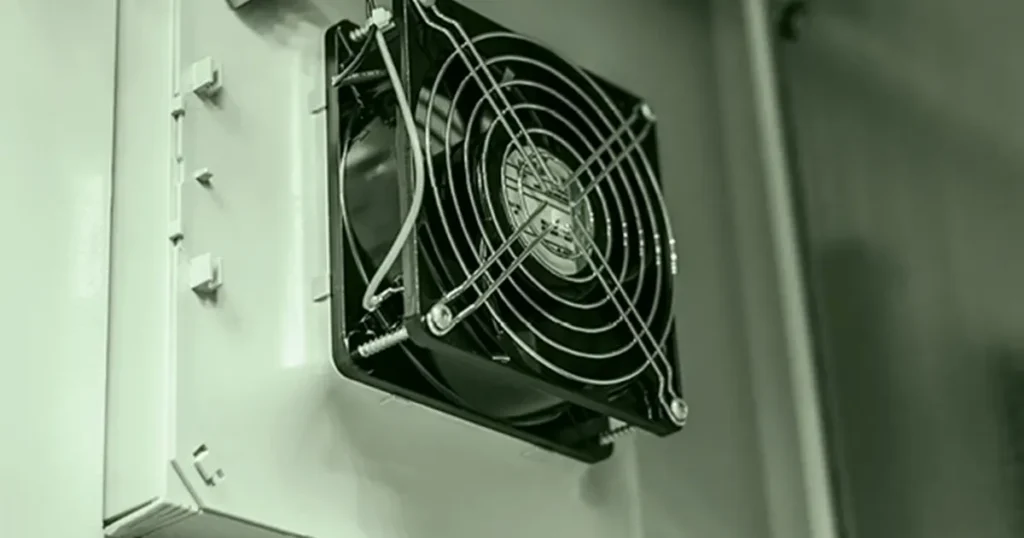
You want your electrical enclosures to work well and last long. If heat builds up, important parts can break or wear out fast. Did you know that every 10°C rise in temperature can make your equipment last half as long? Without good cooling, you might have expensive repairs, more maintenance, and even rust. Picking the Best Cabinet Fan is not just about getting the biggest or cheapest one. You need a fan that fits your enclosure and keeps your system working well.
- Too much heat and water drops can cause things to break.
- Good airflow and cooling design help stop shutdowns.
- The right climate control keeps your equipment safe and saves money on repairs.
Key Takeaways
- Pick the right cabinet fan to stop overheating and help equipment last longer.
- Think about your cabinet’s size and shape before you pick a fan. This helps you get the best airflow.
- Figure out how much airflow you need by looking at the heat load and temperature rise. This makes sure your cooling works well.
- Think about static pressure, especially if your cabinet is crowded or has filters. This helps keep the airflow strong.
- Choose the right fan type, like axial or centrifugal, for your cabinet’s airflow needs.
- Look for safety certifications such as UL and CE. This makes sure the fan is safe and follows rules.
- Use filter fans if your area is dusty. This keeps dirt away from your equipment and helps it last longer.
- Place fans in smart spots to improve airflow and stop hot spots inside the cabinet.
What Is an Enclosure Fan?
Definition and Purpose
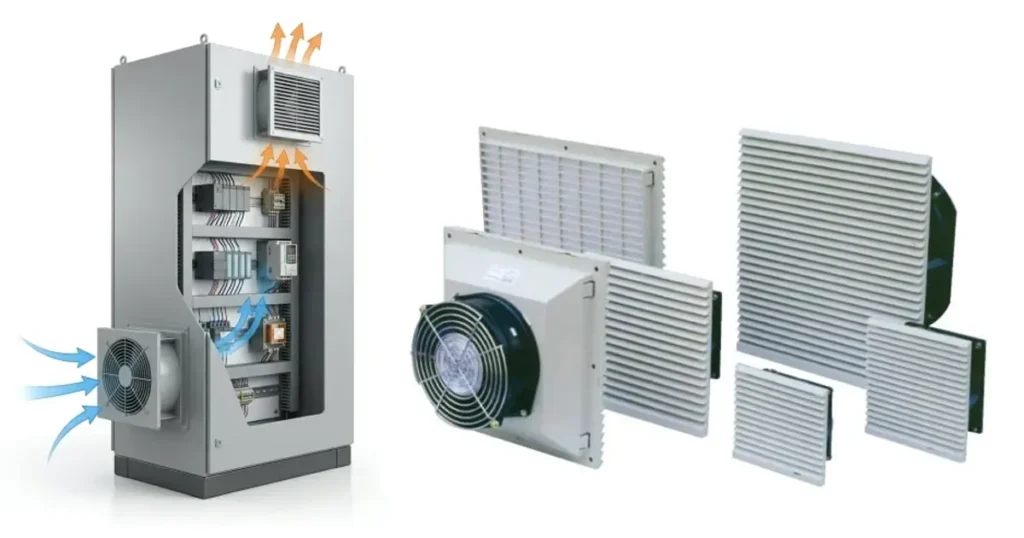
You may ask what an enclosure fan does. An enclosure fan is a cooling fan that sits on a cabinet. It moves heat out of electrical and industrial enclosures. You can find these fans in electrical cabinets, PLC panels, and automation enclosures. They help keep the temperature inside from getting too high. You do not need a big cooling system with these fans. Using an enclosure fan stops your equipment from getting too hot. It helps everything work well and last longer.
How Enclosure Fans Improve Cooling
Enclosure fans do more than just push air. They have many important jobs inside your cabinet. Look at this table to see what they do:
| Function | Description |
|---|---|
| Exhausting hot air | Takes hot air out of the cabinet, especially when there are lots of parts. |
| Directing airflow | Fan trays send air to places that get hot inside the cabinet. |
| Creating internal pressure | Blowers make more pressure inside, so air moves better. |
| Preventing dust entry | Filters on fans stop dust and lint from getting in. |
| Enhancing cooling efficiency | Putting fans in the right spot makes cooling work better. |
| Supporting critical applications | Air conditioners or coolers keep important equipment safe and cool. |
Enclosure fans use different ways to get heat out of your cabinet. Here is how they work:
| Process | Description | Example |
|---|---|---|
| Conduction | Heat moves through solid things | Aluminum walls carry heat outside |
| Convection | Moving air takes heat away | Fans take hot air out from inside |
| Radiation | Heat leaves as infrared energy | Cabinet surfaces give off heat |
You can use special systems to help with cooling:
- Fan and filter units bring in clean air and keep dust out.
- Air conditioners keep the temperature steady, even if it is hot outside.
- In-rack cooling systems cool the hottest spots right where they start.
Risks of Poor Cooling
If you do not cool things right, your equipment can get damaged. Here are some problems that happen when it gets too hot or wet:
| Failure Mechanism | Description |
|---|---|
| Condensation | Water forms on parts when it gets too cold inside. |
| Corrosion | Metal parts rust because there is moisture. |
| Insulation Breakdown | Moisture hurts insulation and causes electrical problems. |
| Erratic Equipment Behavior | Equipment acts strange because of rust and insulation issues. |
Electrical parts can break fast in high humidity. Keeping things dry stops short circuits. Air conditioning can help control humidity and protect your equipment.
Tip: Always look for signs of water or rust inside your cabinet. If you act early, you can stop bigger problems later.
What Makes the Best Cabinet Fan?
Matching Fan to Application
You want a fan that fits your job, not just any model. Every application has its own needs. For example, an outdoor telecom box faces rain and dust, while an indoor IT rack stays dry but might get hot fast. You need to think about where you will use the fan. Some cabinets sit outside and need high protection from water and dust. Others stay inside but have lots of wires and parts that block airflow. If you add new equipment or change the layout, you might create new hot spots. Always check your cabinet after changes. The right fan for one job might not work for another. You should match the fan to your real-world conditions.
Key Performance Criteria
When you look for the best cabinet fan, you need to focus on what really matters. Experts use several key criteria to judge a fan’s performance. Here is a quick table that shows what they check:
| Criteria | Details |
|---|---|
| Heat Dissipation (Watts) | How much heat your equipment makes (like 750 watts). |
| Delta T (Temperature) | The difference between the highest safe inside temperature and the hottest outside air. |
| CFM (Cubic Feet per Minute) | How much air the fan moves. Use this formula: CFM = (3.17 x Watts) / Delta T (°F). |
| Example Fan Selection | For 750 watts and 9°F Delta T, you need about 264 CFM. A 295 CFM fan kit works well here. |
You also need to look at other important features:
- CFM tells you how much air moves through the cabinet. This helps stop overheating.
- Static pressure shows how well the fan pushes air through filters or tight spaces.
- Fan blade design affects noise and how well the fan works.
- Fan RPM changes how much air and pressure you get.
- Environmental conditions matter. Humidity or high heat can change what you need.
Tip: Always check these points before you buy. You want a fan that matches your cabinet’s real needs.
Why Size or Price Alone Isn’t Enough
You might think a bigger or cheaper fan is always better. That is not true. Size and price do not tell the whole story. Here are some reasons why:
- You must look at both the heat load inside and the outside air temperature.
- Dust and moisture can ruin your cooling, even if the fan is big.
- If your cabinet is not sealed, dust or water can get in and cause problems.
- Two cabinets that look the same might need different cooling methods.
Choosing the right fan means looking at all the facts, not just the label or the price tag. When you match the fan to your application and check the key performance points, you get better results and longer equipment life.
How to Choose the Best Cabinet Fan
Assess Cabinet Size and Layout
Before you pick the best cabinet fan, take a close look at your cabinet’s size and layout. This step helps you avoid problems later. The best time to think about cooling is when you first design your cabinet. If you plan early, you can make smart choices about where to put your equipment and how to handle heat.
Here’s what you should do:
- Measure your cabinet’s height, width, and depth. Write these numbers down.
- Think about where you will place the cabinet. Is it in a hot room, outside, or near other machines?
- Look at the space inside. Will you have enough room for a fan and good airflow?
- Check if anything inside blocks air, like wires or big parts.
- Place equipment that gets hot near the bottom. This area stays cooler, so your fan works better.
- If you use a side-mounted cooling solution, put hot equipment close to the cool air inlet.
- Think about noise. If your cabinet sits near people, you might want a quieter fan.
- Remember to check for dust, water, or other things in the environment that could affect your fan.
Tip: Plan your cooling system during the design stage. This way, you can make sure your cabinet stays safe and cool.
Identify Heat Sources
Now, find out what makes your cabinet hot. You need to know how much heat your equipment gives off. This helps you choose the right fan and avoid overheating.
Follow these steps:
- Add up the heat from all the parts inside. Look at the watt losses for each device. You can find this information in the manuals or on the labels.
- Decide how much hotter the inside of your cabinet can get compared to the room outside. Check the highest temperature your equipment can handle.
- Think about how heat, airflow, and temperature rise work together. If you know these numbers, you can keep your cabinet cool.
Some cabinets use fans and blowers. Others might need air-to-air heat exchangers, air conditioners, or even air-to-water heat exchangers. Pick the right cooling method for your setup.
Calculate Required Airflow
Once you know your cabinet size and heat sources, you need to figure out the required airflow. This tells you how much air your fan must move to keep things cool.
Airflow Calculation Methods
You can use a simple formula to find the airflow you need. Here’s how it works:
| Variable | Description |
|---|---|
| Q | Required airflow (CFM) |
| P | Total heat load inside the enclosure (watts) |
| ΔT | Allowable temperature rise above ambient (°C) |
The formula is:
Q = 3.16 × (P / ΔT)
Let’s look at an example. If your cabinet has a total heat load of 240 watts and you want the inside to be no more than 10°C hotter than the outside, you get:
Q = 3.16 × (240 / 10) ≈ 76 CFM
So, you need a fan that can move about 75–80 CFM. If you want to use metric units, you can also convert CFM to m³/h for your calculations.
Using Delta T for Sizing
Delta T means the difference between the inside and outside temperatures. When you set your Delta T, you decide how much warmer your cabinet can get. A lower Delta T means you need more airflow. A higher Delta T means you can use less airflow, but your equipment will run hotter.
Here’s a quick guide:
- Find the highest temperature your equipment can handle.
- Subtract the hottest temperature outside your cabinet.
- The answer is your Delta T.
For example, if your equipment can handle 50°C and the room is 35°C, your Delta T is 15°C. Use this number in your airflow formula.
Note: Always double-check your numbers. If you get the required airflow wrong, your cabinet might overheat or waste energy.
When you follow these steps, you can choose the best cabinet fan for your needs. You will keep your equipment safe, save money, and avoid headaches down the road.
Evaluate Static Pressure Needs
Airflow is important, but static pressure matters too. Static pressure is the force your fan uses to push air through things like filters or tight spaces. If your cabinet has lots of wires or circuit boards, air has a harder time moving. This makes the airflow drop, so cooling does not work as well.
Adding a filter makes it even harder for air to move. Clean filters slow air a little, but dirty filters block air a lot. If your fan cannot handle this, hot spots can happen. Your equipment might get too hot. You need steady airflow, even when filters get dusty.
Tip: If your cabinet has filters or lots of equipment, check the static pressure rating on your fan. This helps you keep airflow strong and your system safe.
When to Choose High Static Pressure Fans
Pick a high static pressure fan when:
- Filters in your cabinet can get dirty.
- The inside is crowded with wires or devices.
- You need to push air through ducts or long paths.
- Airflow drops when you add new parts or filters.
High static pressure fans keep air moving, even when things are tough. They help stop hot spots and make sure your equipment stays cool.
Select Fan Type: Axial vs. Centrifugal
Choosing the right fan type is important for cooling. There are two main types: axial and centrifugal. Each works best in different situations.
Axial Fan Features
Axial fans move air straight through the fan. They work well when you need lots of airflow and not much resistance. Use them for open ventilation or cabinets with clear air paths.
- High airflow for open spaces.
- Easy to install and maintain.
- Use less power and make less noise.
- Good for cooling electronics in cabinets with clear air paths.
Centrifugal Fan Features
Centrifugal fans push air out at a right angle. They are good for moving air through filters, ducts, or crowded spaces. These fans create higher static pressure, so airflow stays strong.
- Best for cabinets with filters or lots of equipment.
- Handle high resistance and keep airflow strong.
- Last longer in tough spots.
- Use more power and make more noise than axial fans.
Here’s a table to compare:
| Feature | Axial Fans | Centrifugal Fans |
|---|---|---|
| Airflow | High volume, low pressure | High pressure, low volume |
| Air Direction | Parallel to fan axis | Perpendicular to fan axis |
| Power Usage | Lower | Higher |
| Noise | Lower | Higher |
| Best Use | Open ventilation | Ducted or high-resistance paths |
| Cost | Usually less expensive | More durable, higher cost |
If you want open airflow, choose axial. If your cabinet has filters or lots of parts, choose centrifugal.
Choose AC, DC, or EC Fans
Now, let’s talk about fan power. You can pick AC, DC, or EC fans. Each has its own strengths and weaknesses.
Pros and Cons
Check this table to compare:
| Fan Type | Voltage Type | Advantages | Disadvantages |
|---|---|---|---|
| AC | Alternating Current | High mechanical efficiency, stable torque, widely used in industrial applications | Higher electricity consumption, more noise |
| DC | Direct Current | Energy efficient, good low-speed performance, smaller size | Needs a controller, lower output power |
| EC | Electronic Commutation | High efficiency, precise control, low noise | Higher manufacturing cost |
- DC fans use much less power than AC fans. Sometimes up to 70% less for the same airflow.
- DC fans make less electromagnetic noise. They are good for sensitive electronics.
- EC fans are super efficient, quiet, and let you control speed easily. You might see them in medical gear or telecom cabinets.
- If you need a water-resistant fan for tough places, high-quality DC fans can keep your equipment safe.
Note: Always match your fan type to your power supply and your cabinet’s needs. This helps you get the right airflow and keeps your system running smoothly.
If you want to measure airflow in metric units, remember that 1 CFM is about 1.7 m³/h. This helps you compare fans from different brands.
Determine Voltage and Power
You want your cabinet fan to work safely and efficiently. Start by checking the voltage and power supply in your enclosure. Electrical cabinets often have more than one voltage level. You might see 480V or 600V AC for main power, and 120V AC or 24V DC for control systems. Always match your fan to the available voltage. If you use the wrong voltage, your fan could run poorly or even break.
Here are some things to check:
- Look at your enclosure’s power supply. Find out if you have AC or DC power.
- Check the voltage rating on the fan. Common options include 12V, 24V, and 48V.
- Make sure the fan’s current draw fits your system. Higher current means more power use.
- Think about energy costs. Fans that use less power save you money over time.
- Pick a voltage that matches your safety needs and the environment.
Tip: Always double-check voltage compatibility before you buy. This helps you avoid damage and keeps your system safe.
Consider Noise Level
Noise matters, especially if your cabinet sits in a workspace or lab. Some fans can get loud, and that can distract people or make it hard to focus. You want a fan that moves enough airflow but does not make too much noise.
Here’s a table that shows typical noise levels for different cabinet types:
| Cabinet Type | Typical Noise Level Range | Impact on Laboratory Environment |
|---|---|---|
| Class I | 55-60 dBA | Optimal for concentration and communication |
| Class II A2 | 58-65 dBA | Acceptable but may cause mild discomfort over time |
| Class II B2 | 62-67 dBA | Potentially disruptive and non-compliant with standards |
| Class III | 65-70 dBA | High-risk pathogens, bioweapons research |
Lower noise levels help people work better and feel less stressed. If you pick a quiet fan, you make the space more comfortable. This is important in labs, offices, and places where people need to talk or think.
Note: If you need high airflow, you might get more noise. Try to balance airflow and noise for the best results.
Check Fan Lifespan and Bearings
You want your cabinet fan to last a long time. The type of bearing inside the fan makes a big difference. Bearings help the fan spin smoothly. There are two main types: ball bearings and sleeve bearings.
Here’s a quick comparison:
| Bearing Type | Lifespan & Performance | Noise Levels | Cost |
|---|---|---|---|
| Ball Bearings | Longer lifespan, better performance | Noisier initially | Higher cost |
| Sleeve Bearings | Shorter lifespan, less durable | Quieter initially | Lower cost |
Ball bearings last longer and work better when the fan runs all the time or in tough spots. Sleeve bearings are quieter at first but wear out faster, especially if there is dust or heat.
You can make your fan last longer by:
- Installing it the right way.
- Keeping it clean and free from dust and moisture.
- Lubricating the bearings if needed.
- Checking the fan regularly for signs of wear.
According to a study by the Electric Power Research Institute, proper lubrication can increase the fan bearing life by up to 50%.
If you want the best cabinet fan, look for one with high-quality bearings. This helps you get steady airflow and less maintenance.
Confirm Safety Certifications (UL, CE)
You want your cabinet fan to be safe and reliable. Safety certifications show that the fan meets strict standards. These certifications help protect your equipment and the people who use it. When you choose a fan, look for these marks:
- UL (Underwriters Laboratories)
- CE (Conformité Européenne)
- TUV
- VDE
- ISO
- RoHS
- AMCA
UL and CE are the most common. UL is important in North America. CE is needed in Europe. TUV and VDE are also trusted in many places. ISO means the fan meets international quality standards. RoHS shows the fan does not use dangerous materials. AMCA checks the fan’s performance.
If you see these certifications, you know the fan is tested for safety, quality, and performance. Always check the labels before you buy. This helps you avoid problems and keeps your cabinet safe.
Tip: If your cabinet sits in a factory or lab, safety certifications are not just nice to have—they are required by law.
Review IP and NEMA Ratings
You need to protect your equipment from dust, water, and other hazards. IP and NEMA ratings help you pick the right fan for your environment. These ratings show how well the fan and cabinet keep out dirt and moisture.
Here’s a table that compares IP and NEMA ratings:
| Aspect | IP Ratings | NEMA Ratings |
|---|---|---|
| Global vs. Regional | Internationally recognized | Primarily used in North America |
| Testing Criteria | Focuses on solid and liquid ingress | Includes corrosion, oil resistance, and environmental conditions |
| Granularity | Uses two digits for specific protection levels | Broader, covers multiple environmental factors |
| Application Scope | Ideal for precise dust and water protection | Comprehensive for industrial and outdoor environments |
| Conversion Example | IP54 ≈ NEMA 3 (dust and splashing water) | IP66 ≈ NEMA 4X (dust, water jets, corrosion protection) |
Both IP and NEMA ratings help you choose the right fan for your cabinet. If you work on international projects, you can match NEMA ratings to IP ratings. Always check these ratings before you install your fan. This keeps your equipment safe from dust and water.
Note: If your cabinet sits outside or in a dirty place, pick a fan with high IP or NEMA ratings.
Plan Fan Placement and Mounting
You want your cooling system to work well. Where you put the fan matters a lot. Good placement helps air move through the cabinet and keeps everything cool.
Here are some best practices:
- Check your cabinet layout and find hot spots. You can use a thermal camera to see where heat builds up.
- Place intake fans at the front or bottom. Put exhaust fans at the rear or top. This helps air flow from cool to hot areas.
- Decide how many fans you need. Look at your heat load and airflow needs.
- Spread fans out so air moves everywhere. This stops hot spots and keeps all parts cool.
Intake vs. Exhaust Positioning
Intake fans pull cool air into the cabinet. Exhaust fans push hot air out. If you put intake fans at the bottom and exhaust fans at the top, you use natural airflow. Hot air rises, so this setup works best.
- Intake fans bring in fresh air.
- Exhaust fans remove hot air.
- Place fans so air flows across all equipment.
If you follow these steps, your cabinet stays cool and your equipment lasts longer.
Tip: Always check for blocked air paths. If wires or parts block airflow, move them or add more fans.
Ensure Size and Compatibility
You want your cabinet fan to fit perfectly. If you pick the wrong size, you might struggle with installation or lose airflow. Always check the dimensions of your fan and the cutout in your enclosure. Standard sizes like 40mm, 60mm, 80mm, and 120mm make things easier. When you match the fan size to the cutout, you get better airflow and less trouble with leaks.
Think about these points before you buy:
- Measure the cutout in your cabinet. Make sure it matches the fan size.
- Check the shape and placement of the cutout. This affects how air moves inside.
- Look for standard sizes. They help you avoid mistakes and make installation simple.
- Place the fan where it can move air without hitting wires or parts.
- Make sure seals stay tight. If you install the fan wrong, dust or water can sneak in.
Tip: If you plan your cutouts early, you get smoother installation and stronger airflow. You also protect your equipment from dust and moisture.
[Selection Factor vs. What Buyers Should Check Table]
Table: Selection Factor vs. What to Check
You want to compare cabinet fans quickly. Use this checklist to see what matters most. Each factor helps you pick the right fan for your needs.
| Selection Factor | What to Check/Ask For |
|---|---|
| Size | Does the fan fit your cabinet cutout? Are the dimensions correct for your enclosure? |
| Airflow | How much air does the fan move (CFM)? Will it keep your equipment cool? |
| Noise Level | Is the fan quiet enough for your workspace? What is the decibel rating? |
| Energy Efficiency | Does the fan use less power for the same airflow? Will it save you money? |
| Power Rating | Does the fan match your cabinet’s voltage and power supply? |
| Certifications | Does the fan have UL, CE, or other safety marks? Is it approved for your application? |
You can use this table when you shop. It helps you avoid mistakes and find the best fan for your cabinet.
[Cabinet Condition vs. Recommended Fan Type Table]
Table: Cabinet Condition vs. Fan Type
Different cabinets need different fans. If you know your cabinet’s condition, you can pick the right fan type. This table shows you what works best.
| Cabinet Condition | Recommended Fan Type |
|---|---|
| Open, clear airflow path | Axial fan |
| Crowded, lots of equipment | Centrifugal fan |
| Dusty or dirty environment | Filter fan |
| Outdoor, exposed to weather | High IP/NEMA rated fan |
| High heat load | High airflow fan |
| Sensitive electronics | Low noise, DC or EC fan |
You can match your cabinet to the right fan. This keeps your equipment safe and helps you get the best cooling.
When to Use a Filter Fan
Dusty or Dirty Environments
Dust can get into almost anything, even electrical cabinets. If your enclosure is in a workshop or factory, there is usually a lot of dust. You need extra protection in these places. Filter fans help by keeping dust and dirt out of your cabinet. They catch small particles before they reach your electronics. This helps your equipment stay safe and last longer.
- Filter fans are great for places with dust, lint, or debris in the air.
- You should use them where there are machines, woodworking, or textile work.
- They keep dirt and moisture away from your cabinet. This stops rust and short circuits.
- Clean fans move air well and stop dust from spreading inside.
Tip: If you see dust on your equipment, add a filter fan. You will have fewer problems and less cleaning to do.
Clean Airflow for Electrical Cabinets
You want your cabinet to stay cool and clean. Filter fans help make this happen. They pull in fresh air but block bad particles. This keeps your electronics safe from dust and allergens. Clean air helps your equipment work better and last longer.
HVAC air filters are important for good indoor air. They take dust, allergens, and debris out of the air. When you use filter fans, you protect your fans, coils, and motors from dirt. Clean fans are quieter and work better. You get good airflow and your motor does not have to work as hard.
- Dirty fan blades can put dust back into the air and make allergies worse.
- Clean fans help your cabinet work well all year.
- You spend less time cleaning and more time working.
Note: Check and change your filter often. This keeps airflow strong and your cabinet safe.
Benefits and Limitations
Filter fans have many good points for electrical cabinets. You get better cooling and cleaner air. Your equipment stays safe from dust and lasts longer.
Benefits of Filter Fans:
- Equipment lasts longer: Stops dust from building up and keeps airflow strong.
- Better air quality: Catches bad stuff and keeps air clean inside.
- Less maintenance: You clean less and save time and money.
- Energy savings: Keeps airflow steady and uses less energy.
- Many choices: Comes in different sizes and materials for many uses.
But filter fans also have some limits. They work best when your cabinet is not too hot. If your cabinet gets very hot or is outside in bad weather, you may need stronger cooling. Filter fans need regular care. If you forget to clean or change the filter, airflow drops and dust gets in.
Callout: Filter fans are great for everyday cooling in electrical enclosures. They are simple, not expensive, and easy to put in. You get good protection without spending a lot.
If you want an easy way to keep your cabinet cool and clean, filter fans are a smart pick.
Airflow Direction: Intake or Exhaust?
Choosing the right airflow direction in your electrical enclosure makes a big difference. You want to keep your equipment cool and clean. Should you use intake or exhaust? Let’s break it down so you can make the best choice for your cabinet.
Deciding Airflow Path
You need to look at your cabinet and think about where the heat comes from. The layout and the location of hot spots matter a lot. If you use a thermal camera, you can spot where things get hottest. This helps you decide where to put your fans.
Here are some things to consider when picking the airflow path:
- Cabinet layout and heat sources: Find out where the heat builds up. Place fans to target those spots.
- Intake and exhaust strategies:
- Intake at the bottom brings in cooler air.
- Exhaust at the top lets hot air escape, since heat rises.
- Placing intake and exhaust at different heights (like bottom and top, or diagonally) helps move air through the whole cabinet.
- Airflow direction and pressure systems:
- Positive pressure pushes filtered air in. This keeps dust out, which is great for dirty places.
- Negative pressure pulls hot air out. This can let unfiltered air sneak in through gaps.
- Mixed flow uses both intake and exhaust for the best of both worlds.
- Fan placement: Put intake fans at the front or bottom. Place exhaust fans at the rear or top. This creates a straight path for air to flow.
Tip: Always check for blocked airflow. Wires or big parts can stop air from moving where you need it.
Fan Placement Best Practices
You want your fans to work together, not against each other. Good placement helps air move smoothly and keeps every part cool.
- Place intake fans low, where the air is coolest.
- Put exhaust fans high, where hot air gathers.
- Spread fans out if your cabinet is big or crowded.
- Avoid putting intake and exhaust fans too close together. This can cause short cycling, where air moves in and out without cooling the whole cabinet.
- Use filters on intake fans in dusty areas.
Here’s a quick table to help you remember:
| Fan Type | Best Location | Why It Works |
|---|---|---|
| Intake Fan | Bottom/Front | Brings in cool, fresh air |
| Exhaust Fan | Top/Rear | Removes hot, rising air |
Note: If you have more than one hot spot, you might need extra fans or special placement.
Managing Dust and Heat
Dust and heat are your biggest enemies inside a cabinet. You want to keep both under control. If your enclosure sits in a dusty place, use positive pressure. This means you push filtered air in, so dust stays out. If you only use exhaust fans, you might pull in dirty air through cracks.
- Use intake fans with filters to keep dust away from your electronics.
- Clean or replace filters often to keep airflow strong.
- In very hot spots, use both intake and exhaust fans for better cooling.
- Check your cabinet for leaks or gaps. Seal them to stop dust from sneaking in.
Callout: The right airflow direction and fan placement keep your cabinet cool and clean. You protect your equipment and avoid costly repairs.
Now you know how to choose the best airflow path for your electrical enclosure. Intake or exhaust? The answer depends on your cabinet, your environment, and your cooling needs.
Common Mistakes to Avoid
Choosing by Size or Price Only
You might think grabbing the biggest fan or the cheapest one will solve your cooling problems. That’s a common trap. Bigger fans don’t always mean better airflow for your cabinet. Cheaper fans might save you money at first, but they can cost you more in repairs or replacements later.
Here’s what can go wrong if you focus only on size or price:
- The fan might not fit your cabinet cutout.
- You could get too much airflow, which stirs up dust or wastes energy.
- Cheap fans often have a short lifespan and may break down fast.
- You might miss out on important features like low noise or high protection.
Tip: Always match the fan to your cabinet’s needs. Look at airflow, static pressure, and protection ratings before you buy.
Ignoring Heat Load or Airflow Path
You can’t just guess how much cooling your cabinet needs. If you ignore the heat load, your equipment could overheat and fail. The airflow path matters too. If air can’t move freely, even the best fan won’t help.
Ask yourself:
- How much heat do your devices make?
- Where does the hot air collect inside your cabinet?
- Are there wires or parts blocking the airflow?
If you skip these questions, you might end up with hot spots or poor cooling. Sometimes, people put fans in the wrong place. Air gets trapped, and the cabinet stays hot.
Here’s a quick checklist to avoid this mistake:
- Add up the heat from all your devices.
- Use the airflow formula to find the right fan size.
- Plan the airflow path so cool air reaches every part.
Alert: Don’t forget to check for blocked vents or tangled wires. Clear paths mean better cooling.
Overlooking Voltage or Certifications
You need to check the voltage before you install a fan. If you pick the wrong voltage, the fan might not work or could even damage your equipment. Some fans run on AC power, while others need DC. Always match the fan to your cabinet’s power supply.
Certifications matter too. Fans with UL, CE, or other marks have passed safety tests. If you skip this step, you risk using a fan that isn’t safe or legal for your application.
| What to Check | Why It Matters |
|---|---|
| Voltage (AC or DC) | Prevents fan failure or damage |
| Certification (UL, CE) | Ensures safety and legal compliance |
Note: Always double-check voltage and look for certification labels. This keeps your equipment safe and up to code.
Skipping Filters in Dusty Areas
You might think your cabinet fan will work fine without a filter, but dust is sneaky. It gets everywhere, especially in factories, workshops, or places with lots of foot traffic. If you skip filters in dusty areas, you set yourself up for trouble.
Here’s what happens when you don’t use a filter:
- Dust and dirt get pulled into your cabinet.
- Fans and electronics get coated with grime.
- Airflow drops because dust clogs up the fan blades and vents.
- Your equipment overheats or even fails.
Tip: If you see dust on shelves or equipment nearby, your cabinet needs a filter fan.
Let’s look at why filters matter:
| Problem Without Filter | What You’ll Notice | Long-Term Effect |
|---|---|---|
| Dust on electronics | Fans run louder, airflow drops | Shorter equipment life |
| Clogged vents | Hot spots inside the cabinet | More breakdowns |
| Dirty fan blades | Fan shakes or makes noise | Higher repair costs |
| Dust in switches | Buttons stick or stop working | Safety risks |
You don’t want to spend your weekends cleaning out cabinets or replacing fried parts. Filters make your life easier. They catch dust before it gets inside. You just pop out the filter, clean it, and put it back. That’s much faster than fixing broken equipment.
Here’s how you can keep your cabinet clean:
- Choose a filter fan if your cabinet sits in a dusty spot.
- Check the filter every month. If it looks dirty, clean or replace it.
- Use a vacuum or soft brush to remove dust from the filter.
- Keep the area around your cabinet as clean as possible.
Alert: Never run your fan without a filter in a dusty area. Even a few weeks can cause a thick layer of dust inside.
You might think filters slow down airflow, but a clean filter barely makes a difference. The real problem comes when you forget to clean it. Set a reminder on your phone or calendar. Clean filters mean cool, safe equipment.
Skipping filters in dusty areas is a mistake you can easily avoid. Add a filter fan, keep it clean, and your cabinet will thank you.
Information Buyers Should Provide
When you want the best cabinet fan for your electrical enclosure, you need to share some key details with your supplier. The more information you give, the easier it is to get the right fan for your needs. Let’s walk through the most important things you should provide.
Cabinet Size and Dimensions
Start with the basics. You need to know the size of your cabinet. Grab a tape measure and write down the height, width, and depth. These numbers help you and your supplier figure out what size fan will fit. If your cabinet is tall and narrow, you might need a different fan than if it’s short and wide.
- Measure the outside of the cabinet.
- Check the inside space too, especially if you have shelves or equipment.
- Note any cutouts or mounting holes for fans.
Tip: Take a photo of your cabinet and send it to your supplier. Pictures help show the layout and any tight spots.
Here’s a simple table you can fill out:
| Measurement | Value (mm or inches) |
|---|---|
| Height | |
| Width | |
| Depth |
Heat Sources and Power Dissipation
Next, think about what makes your cabinet hot. Every device inside gives off heat. You need to know how much. This is called power dissipation. If you skip this step, you might pick a fan that’s too weak or too strong.
- List all the devices inside your cabinet.
- Find the wattage for each device. You can check the labels or manuals.
- Add up the total watts. This is your total heat load.
If you have a lot of equipment, you might want to make a quick list like this:
| Device Name | Power (Watts) |
|---|---|
| PLC Controller | 20 |
| Power Supply | 40 |
| Relay | 10 |
| … | … |
| Total | XX |
Note: The higher the total watts, the more airflow you need from your fan.
Ambient and Target Temperatures
You also need to know the temperatures around and inside your cabinet. The air outside your enclosure is called the ambient temperature. The highest temperature your equipment can handle is your target temperature.
- Measure the room temperature where your cabinet sits.
- Decide how hot you want the inside of your cabinet to get. Check your equipment specs for the max safe temperature.
- Write down both numbers.
For example, if your room is 30°C (86°F) and your equipment can handle up to 45°C (113°F), your target temperature rise is 15°C (27°F).
Callout: Knowing these temperatures helps you size your fan. If your room gets hot, you need a stronger fan.
When you share these details, your supplier can help you pick a fan that keeps your equipment safe and cool.
Voltage and Power Supply
You need to know what kind of power your cabinet uses before you pick a fan. Fans come in different voltage types. Some run on AC power, while others use DC. If you choose the wrong type, your fan might not work or could even break.
Start by checking your cabinet’s power supply. Look at the labels on your equipment. You might see numbers like 12V, 24V, 48V for DC fans, or 110V, 220V for AC fans. Write these numbers down. If you are not sure, ask your electrician or check the wiring diagram.
Here’s a quick table to help you match the fan to your power supply:
| Power Supply in Cabinet | Fan Type to Choose | Common Uses |
|---|---|---|
| 24V DC | 24V DC fan | Control panels, PLCs |
| 48V DC | 48V DC fan | Telecom, battery cabinets |
| 110V/120V AC | 110V AC fan | General industrial |
| 220V/230V AC | 220V AC fan | International, large panels |
Tip: Always double-check the voltage before you order. Using the wrong voltage can damage your fan and your equipment.
You also want to know how much power your fan will use. Check the fan’s wattage or current draw. If your cabinet has a small power supply, pick an energy-saving fan. This helps you avoid overloads and keeps your system safe.
Some cabinets have both AC and DC power. If you have a choice, think about what works best for your setup. DC fans use less energy and make less noise. AC fans are simple and easy to wire. EC fans give you high efficiency and speed control, but they cost more.
Here are some questions you can ask yourself:
- Does my cabinet have AC or DC power?
- What voltage do I have available?
- How much power can I use for cooling?
- Do I need a backup power option?
If you answer these questions, you can pick a fan that fits your cabinet and keeps everything running smoothly.
Alert: Never guess the voltage. Always check your cabinet’s specs or ask your supplier for help.
When you share your voltage and power details with your supplier, you make it easy for them to recommend the right fan. This step saves you time, money, and trouble down the road.
Dust/Moisture Level (IP/NEMA)
You want your electrical cabinet to stay safe from dust and water. Dust can sneak in and cause problems. Water can ruin your equipment fast. You need to know how much dust and moisture your cabinet faces every day. This helps you pick the right fan with the right protection.
You will see two main ratings: IP and NEMA. These ratings tell you how well a fan keeps out dust and water. Let’s break it down:
- IP Rating: Stands for “Ingress Protection.” The first number shows dust protection. The second number shows water protection. For example, IP54 means good dust protection and some water resistance.
- NEMA Rating: Used mostly in North America. NEMA ratings cover dust, water, oil, and even ice. NEMA 4X means the fan can handle dust, water, and corrosion.
Here’s a quick table to help you compare:
| Environment | Recommended IP Rating | NEMA Rating |
|---|---|---|
| Office or clean room | IP20 | NEMA 1 |
| Workshop or factory | IP54 | NEMA 12 |
| Outdoor, rain, dust | IP65 or higher | NEMA 4 or 4X |
Tip: If you see a lot of dust or water near your cabinet, pick a fan with a higher IP or NEMA rating. This keeps your equipment safe and running longer.
You can check the labels on your fan or ask your supplier for the rating. If you are not sure, take a photo of your cabinet’s location and show it to your supplier. They can help you choose the right protection.
Don’t forget to check for leaks or gaps in your cabinet. Even the best fan can’t help if dust or water gets in through cracks. Seal up any holes before you install your fan.
Order Quantity
You need to tell your supplier how many fans you want to order. This helps them give you the best price and delivery time. If you only need one fan for a small project, that’s easy. If you need many fans for a big job, you might get a discount.
Here’s how you can decide:
- Count how many cabinets need fans.
- Think about spare fans for backup or future repairs.
- Ask your team if they need extra fans for testing.
You can use a simple list:
- Number of cabinets: ______
- Spare fans needed: ______
- Total fans to order: ______
Note: If you order more fans at once, you can save money on shipping and get better deals.
Tell your supplier your order quantity when you ask for a quote. This helps them plan and serve you faster. If you are not sure how many fans you need, ask your supplier for advice. They can help you figure it out.
Now you know what information to share about dust, moisture, and order quantity. This makes it easy to get the right cabinet fan for your project.
Why Choose LINKWELL?
Product Range Overview
You want options when you shop for cabinet fans. LINKWELL gives you a wide range to choose from. You can find fans for small control panels or large industrial enclosures. LINKWELL offers:
- Axial fans for high airflow
- Centrifugal fans for high static pressure
- Filter fans for dusty places
- Fans with different voltages (AC, DC, EC)
- Models with high IP and NEMA ratings
You can pick the size you need. LINKWELL has fans from 40mm up to 325mm. You can also choose fans with special features like low noise, energy saving, or long life. If you want to see all the choices, you can ask for a catalog or visit their website.
Note: LINKWELL tests every fan for quality and safety. You get products that meet UL, CE, and RoHS standards.
Custom Enclosure Fan Solutions
Sometimes, you need more than a standard fan. LINKWELL can help you with custom solutions. You can talk to their engineers about your project. They will listen to your needs and design a fan that fits your cabinet.
Here’s what you can get with LINKWELL’s custom service:
- Special sizes or shapes for unique enclosures
- Fans with custom voltage or power ratings
- Extra-quiet fans for labs or offices
- Fans with special coatings for harsh environments
- Custom mounting kits or accessories
You do not have to settle for “almost right.” LINKWELL helps you get the perfect fit for your job.
Callout: If you have a tricky project, just ask. LINKWELL loves a challenge!
B2B Support for Industrial Cooling
If you run a business, you want a partner you can trust. LINKWELL supports B2B customers with fast service and expert advice. You can order one fan or a thousand. LINKWELL helps you every step of the way.
Here’s how LINKWELL supports your business:
| Service | What You Get |
|---|---|
| Fast Quotes | Quick answers for your project needs |
| Bulk Discounts | Save money on large orders |
| Technical Support | Help with sizing, specs, and setup |
| On-Time Delivery | Get your fans when you need them |
| After-Sales Service | Support if you have questions later |
You can count on LINKWELL for reliable products and friendly help. They know how important cooling is for your equipment. You get peace of mind when you choose LINKWELL.
Tip: Reach out to LINKWELL for your next project. You will see how easy it is to work with a true cooling expert.
Conclusion
You want your electrical enclosure to stay cool and safe. Start by checking your cabinet’s size, layout, and heat sources. Match the fan’s features to your real needs. Avoid common mistakes like picking by price or skipping filters. Give your supplier all the details, so you get the right fan the first time. Need help? Reach out to LINKWELL for expert advice and custom cooling solutions. Your equipment will thank you!
FAQ
What size cabinet fan do I need?
You need to measure your cabinet. Check the height, width, and depth. Use the airflow formula in this blog. If you are not sure, ask your supplier for help.
How often should I clean or replace the fan filter?
You should check the filter every month. If it looks dirty, clean or replace it. Clean filters keep airflow strong and protect your equipment.
Can I use any fan in a dusty or wet area?
No, you need a fan with a high IP or NEMA rating. These fans block dust and water. Look for IP54, IP65, or NEMA 4X for tough spots.
What is the difference between AC, DC, and EC fans?
| Fan Type | Main Benefit | Common Use |
|---|---|---|
| AC | Simple wiring | Industrial panels |
| DC | Energy saving | Control cabinets |
| EC | Quiet, efficient | Sensitive gear |
How do I know if my fan is too loud?
Check the decibel (dBA) rating. If you hear the fan over normal talking, it may be too loud. Choose a quieter fan for offices or labs.
Do I need both intake and exhaust fans?
You can use both for better airflow. Intake fans bring in cool air. Exhaust fans push out hot air. This setup cools your cabinet faster.
Why do I need safety certifications like UL or CE?
Certifications show your fan is safe and reliable. They protect your equipment and meet legal rules. Always check for these marks before you buy.

