
You want your equipment to work well and last long, right? Electrical enclosure ventilation helps keep things cool and safe. If you do not have good ventilation, you might have these problems:
- Machines can get too hot and stop working. This can cost you money.
- Water can get stuck inside and cause metal parts to rust.
- There can be safety problems, like fire or explosions.
Electrical enclosure ventilation moves air in and out. It takes away heat and keeps your equipment safe.
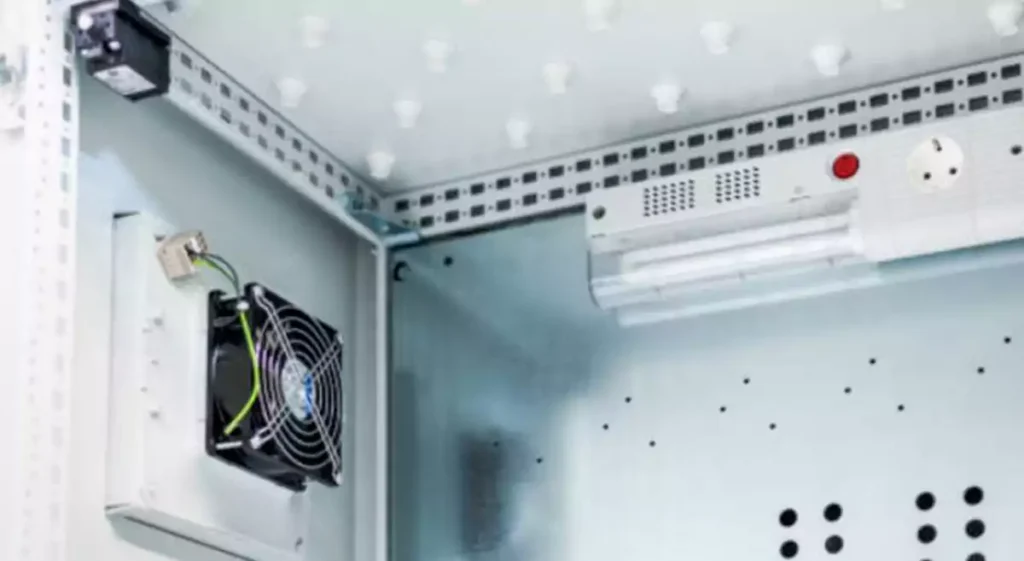
Key Takeaways
- Electrical enclosure ventilation stops overheating and rust. It also prevents safety problems like fires or explosions.
- Good ventilation helps your equipment last longer. It removes heat and keeps parts clean and safe.
- Pick fans based on the size of the enclosure. Also think about how much heat is made and if there is dust or moisture.
- Find out how much airflow (CFM) you need. Use the heat load and the temperature difference to pick the right fan size.
- Choose the fan type—AC, DC, or EC—by looking at energy use, noise, and what you need it for.
- Use filter fans in places with lots of dust. They keep equipment safe from dirt and make sure air stays clean.
- Put intake fans near the bottom and exhaust fans near the top. This helps air move well and gets rid of heat.
- Check the IP rating of fans. Make sure they can handle dust, moisture, or being outside if needed.
Importance of Electrical Enclosure Ventilation
Heat Removal and Protection
You want your electrical equipment to stay safe. Ventilation helps you keep things cool. It removes heat from control panels. This stops damage from happening. Many electrical parts cannot handle heat above 140 °F (60 °C). If it gets too hot, wires can resist more. This can even cause a fire or explosion.
Here’s why removing heat is important:
| Benefit/Risk | Description |
|---|---|
| Reliability of Control Panels | Good ventilation keeps control panels working longer. |
| Prevention of Overheating | You can stop overheating before it starts problems. |
| Cost Avoidance | Planning for heat removal saves money and time. |
The main problem in making electronics is thermal management. Heat builds up inside the enclosure. This can hurt the electronic parts. Too much heat makes them not last as long. It can even make the product stop working.
Cooling is not just for comfort. It keeps things safe and saves money.
Reliability and Service Life
You want your machines to last a long time. Ventilation helps you reach that goal. Moving air and removing heat helps equipment work better. It also helps it last longer. Clean air is important too. Industrial fans can take out dust and dirt. This keeps your shop clean. It also helps machines run well.
- Clean air means less fixing is needed.
- Protecting machines keeps them working and saves money.
- Good airflow helps machines work better and break down less.
If you do not use ventilation, you may have more repairs. You might also spend more money. The right cooling and airflow can stop these problems.
What Is Enclosure Ventilation
Electrical enclosure ventilation means moving air in and out. This controls temperature and protects your equipment. You need different parts to do this.
Airflow Path
Airflow path is the way air moves through your enclosure. Air comes in, picks up heat, and leaves. This keeps the inside cool and safe. If you block the airflow, heat will build up. This can cause problems.
Intake and Exhaust
You need both intake and exhaust for good ventilation. Intake brings in fresh air. Exhaust pushes out hot air. You can use small holes, louver windows, vents, or fans. Some enclosures have special holes or shapes to help air move.
You should follow rules and standards like NEC, NEMA, UL, and IP. These help make sure your ventilation is safe and works well.
Electrical enclosure ventilation is very important. It keeps your equipment cool, safe, and working well.
When Enclosures Need Ventilation
You might wonder when your electrical enclosure really needs ventilation. Not every box needs a fan, but many do. Let’s look at the main reasons.
Internal Heat Sources
Some electrical parts make a lot of heat. If you pack these inside an enclosure, things can get hot fast. You need to move that heat out, or your equipment could fail.
VFDs, Power Supplies, PLCs
You often find heat-makers like VFDs (Variable Frequency Drives), power supplies, and PLCs (Programmable Logic Controllers) inside enclosures. These parts work hard and get warm. But they are not alone. Other common heat sources include:
- Transformers
- Contactors
- Relays
- Lights
If you use any of these, you should think about ventilation. The more you have, the hotter it gets. You want to keep your equipment cool and safe.
Long Hours, High Density
Do your machines run all day? Maybe you have a lot of parts packed into a small space. Both of these things make heat build up even faster. When you run equipment for long hours, the heat does not have time to escape. If you have high-density setups, the air cannot move well. That’s when a fan or vent becomes important.
Tip: If you notice your enclosure feels warm to the touch, you probably need better airflow.
Ambient Conditions
The air outside your enclosure matters too. High temperatures outside can push your equipment past safe limits. Humid air can sneak inside and cause water to form. This leads to rust and even electrical shorts. You want to keep things dry and cool.
In places like coastal areas or food factories, moisture can build up inside enclosures. This can cause electrical failures. If your enclosure sits outdoors or holds heat-making parts, you need good ventilation. Moving air helps get rid of heat and moisture. This keeps your equipment running well.
Poor Natural Airflow
Sometimes, air just does not move well on its own. Maybe your enclosure sits in a tight spot or a hot room. Poor natural airflow can cause hot spots, especially at the top of the box. If you do not fix this, your equipment can overheat and stop working. Sensitive parts may break down, costing you time and money.
- Hot spots form at the top of the enclosure.
- Equipment can fail from too much heat.
- Downtime can happen if airflow is not good.
You can use vents or louvres to help air move. Even small changes can make a big difference. If you want your machines to last, make sure air can flow freely.
Fan Selection for Electrical Enclosure Ventilation
Assess Enclosure Size and Heat Load
You want to pick the right fan for your enclosure. Start by looking at the size of your box and how much heat your equipment makes. Bigger enclosures need more cooling. If you have lots of hot parts inside, you need even more air flow.
Here’s a simple table to help you see what matters most:
| Factor | Description |
|---|---|
| Required Internal Temperature | What temperature do you want inside your enclosure? |
| Heat Generation | How much heat do your machines make? |
| Required Air Flow | How much air do you need to move to keep things cool? |
You should write down the size of your enclosure. Measure the length, width, and height. Add up the heat from all the parts inside. This includes VFDs, power supplies, PLCs, and other devices. If you do not know the heat for a part, check the label or ask the maker.
Tip: If your enclosure sits in a hot room or outside, you may need more cooling.
Calculate Required Airflow (CFM)
Now, you need to figure out the required air flow. This tells you how much air your fan must move to keep things cool. You can use a simple formula for this step.
Here’s how you do it:
- Add up the total heat load (in watts) from all your parts.
- Decide how much hotter the inside can get compared to the outside (this is Delta T, in °C).
- Use the formula to find the required airflow.
The most common formula looks like this:
| Formula | Description |
|---|---|
| Required Airflow (CFM) = [3.16 × Heat Load (Watts)] / Allowable Temperature Rise (°C) | This gives you the airflow you need based on heat and temperature rise. |
Let’s look at a quick fan sizing example:
- Your enclosure makes 200 watts of heat.
- You want the inside to be no more than 10°C hotter than the outside.
Plug these into the formula:
Required Airflow (CFM) = [3.16 × 200] / 10 = 63.2 CFM
So, you need a fan that can move at least 63 CFM.
Note: Always round up to the next standard fan size. It’s better to have a little extra airflow than not enough.
Delta T and Temperature Rise
Delta T means the difference between the highest temperature inside your enclosure and the temperature outside. This number is very important for electrical enclosure ventilation. If you set Delta T too low, you will need a very big fan. If you set it too high, your equipment might get too hot and break down.
Here’s a table to help you understand the key parts:
| Parameter | Description |
|---|---|
| CFM | Airflow in cubic feet per minute |
| Pwatts | Heat to be removed in watts |
| Delta T | Difference between inside and outside temps |
A small Delta T means you need more airflow to keep things cool. A bigger Delta T means you can use less air flow, but you risk overheating your equipment. You want to find a balance. Most people use a Delta T between 10°C and 15°C for safe cooling.
Remember: The airflow rating (CFM) is key for keeping your enclosure safe. If you guess wrong, your equipment could overheat or your fan could run too much.
When you follow these steps, you make fan selection much easier. You also help your enclosure fans work better and last longer.
Choose Fan Type and Specs
You have your airflow numbers. Now, you need to pick the right kind of fan for your enclosure. There are many types, and each one works best in different situations. Let’s break down your choices.
AC, DC, EC Fan
You can choose from three main types: AC, DC, and EC fans. Each one has its own strengths and weaknesses. Here’s a quick look:
| Fan Type | Voltage Type | Advantages | Disadvantages |
|---|---|---|---|
| AC | Alternating Current | High mechanical efficiency, stable torque, widely used in industrial applications | Higher electricity consumption, more noise |
| DC | Direct Current | Energy efficient, good low-speed performance, smaller size | Needs a controller, lower output power |
| EC | Electronic Commutation | High efficiency, precise control, low noise | Higher manufacturing cost |
- DC fans use much less power than AC fans. Sometimes, you can save up to 70% on energy for the same airflow.
- DC fans also make less electromagnetic noise. This helps if you have sensitive electronics.
- EC fans are super efficient and quiet. You can control their speed easily. Many people use them in medical equipment or telecom cabinets.
If you want something simple and tough, go with AC. If you need to save energy or keep things quiet, try DC or EC.
Axial vs Centrifugal
You also need to pick the right shape. The two main types are axial and centrifugal.
| Feature | Centrifugal Fan | Axial Fan |
|---|---|---|
| Airflow Direction | 90° turn (radial) | Straight through (axial) |
| Pressure Capability | High | Low |
| Air Volume | Low-High | Low-High |
| Efficiency | Best for high-pressure systems | Best for open systems |
| Maintenance | Low (clean environments) | Easy access |
| Applications | Scrubbers, process ventilation, exhaust | Cooling, general ventilation |
- Centrifugal fans work best if you have filters, ducts, or need to push air through tight spaces. They handle high pressure well.
- Axial fans move air straight through. They are great for general cooling and open spaces.
If your enclosure has lots of filters or bends, pick a centrifugal fan. If you just need to move air in and out, axial is a good choice.
Intake or Exhaust
You need to decide if your fan will pull air in (intake) or push hot air out (exhaust). Most enclosures use exhaust fans at the top or side. Hot air rises, so this helps remove heat fast. Sometimes, you need an intake fan at the bottom to bring in cool air.
Tip: Always make sure you have a clear path for air to flow. If you block the intake or exhaust, your fan will not work well.
Filter Fan
If your shop or factory has dust, you need a filter fan. This type of fan has a built-in filter to keep dust and dirt out. Clean air helps your equipment last longer. You should check and clean the filter often.
- Use filter fans in woodworking shops, food plants, or anywhere with lots of dust.
- Change or clean the filter when it looks dirty.
IP Rating, Dust, Moisture
You want your fan to last. Look for the IP rating on the label. This tells you how well the fan keeps out dust and water.
- IP54 means the fan is protected from dust and splashes.
- IP65 means it is almost dust-tight and safe from water jets.
If your enclosure sits outside or in a wet place, pick a fan with a high IP rating.
Noise, Installation Position
Fans can make noise. If your enclosure is near people, you may want a quiet fan. DC and EC fans are usually quieter than AC fans. You can also use rubber mounts to cut down on vibration.
Think about where you will put the fan. Place it where air can move in and out easily. Do not block the airflow with wires or parts. Put intake fans low and exhaust fans high for the best cooling.
Remember: The right fan type and specs keep your equipment cool, clean, and safe.
Intake vs Exhaust Ventilation
When you set up ventilation for your electrical enclosure, you have two main choices: intake or exhaust. Each method moves air differently and affects how well your equipment stays cool.
Airflow Direction
Airflow direction matters a lot. If you get it wrong, heat can build up inside your enclosure. This can make your cooling system less effective. When air flows the right way, it carries heat away from your equipment. This keeps everything running smoothly.
You want air to move from a cooler area into the enclosure, pick up heat, and then leave through an exit. If air gets trapped or moves in circles, heat sinks and other cooling parts cannot do their job. Good airflow keeps hot spots from forming and helps your equipment last longer.
Layout and Heat Source
Think about where you place your intake and exhaust fans. The layout of your enclosure and the location of heat sources play a big role. If you put the intake near a hot wall or close to heat-making parts, you might pull in warm air. This makes cooling harder.
Try these tips:
- Place the intake fan low, where air is cooler.
- Put the exhaust fan high, where hot air gathers.
- Keep fans away from corners or blocked spaces.
If you have a lot of heat sources in one spot, direct the airflow toward them. This helps remove heat faster. You can also use baffles or guides to steer air where you need it most.
Dust and Air Path
Dust can be a big problem in some shops or factories. The path of air flow affects how much dust gets inside your enclosure. Intake fans can pull in dust, so you may need a filter. Exhaust fans push air out, which can help keep dust from entering.
Here’s a quick look at the pros and cons of each method:
| Aspect | Intake Ventilation | Exhaust Ventilation |
|---|---|---|
| Airflow Control | Properly sized intake creates turbulence, mixing incoming air with existing air. | Can effectively remove hot air from the enclosure. |
| Temperature Consideration | Intake on a south-facing wall may lead to warmer incoming air. | Helps in maintaining cooler temperatures by expelling hot air. |
| Fan Orientation | If facing prevailing winds, fan capacity may decrease. | Can be optimized to work against wind direction for better efficiency. |
| Maintenance Costs | Initial costs can be high, but flexibility in fan options can provide long-term savings. | Ongoing operating costs can be significant, especially in forced systems. |
| Irrigation Impact | May lead to uneven drying of materials within the enclosure. | Less impact on moisture levels, but still requires monitoring. |
Tip: Always check the air path. Make sure nothing blocks the flow. Clean filters and vents often to keep airflow strong.
You want to balance airflow and dust control. Intake fans with filters work well in dusty places. Exhaust fans help remove heat and keep dust out. Choose the method that fits your space and needs best.
Filter Fan Use in Ventilation
Dusty Environments
You know how dust can get everywhere in a workshop or factory. It settles on machines, tools, and even inside electrical enclosures. If you let dust build up, it can cause big problems for your equipment. That’s where filter fans come in. They help keep the air inside your enclosure clean and safe for your electronics.
You have a few good options when you need to fight dust:
- Dust extractor fans work well in places with lots of dust and airborne particles. These fans pull dirty air out and help keep your workspace cleaner.
- Positive pressure systems use fans to push filtered air into your enclosure. This creates higher pressure inside the box. Dust stays out because air only flows out through any small gaps, not in.
If you work in woodworking, metal shops, or food processing, you probably deal with dust every day. Filter fans can make a big difference. They help you avoid downtime and keep your machines running longer.
Tip: Always check the type of dust in your environment. Some dust can be sticky or oily. Choose a filter fan that matches your needs.
Component Protection
You want your electrical parts to last. Dust, lint, and debris can sneak into enclosures and cause trouble. Filter fans help you stop these problems before they start. They block dirt and moisture from getting inside. This keeps your wires and circuit boards clean. You also avoid rust and short circuits.
Clean fans help air move well. Good airflow means less dust builds up inside your enclosure. Your equipment stays cooler and works better.
Here’s how you can get the most out of your filter fan:
- Place the filter at the air inlet. This blocks dust and debris right at the entrance.
- Seal the openings for the fan and filter. This keeps out extra dirt and moisture.
- Check and replace filters often. Dirty filters can block airflow and make your fan work too hard.
You can use this simple table to see the benefits:
| Problem Prevented | How Filter Fans Help |
|---|---|
| Dust buildup | Blocks dust at the entry point |
| Moisture and rust | Keeps water out of the enclosure |
| Short circuits | Stops debris from reaching wires |
| Overheating | Maintains steady airflow |
Remember: A clean filter fan is your best friend in a dusty shop. Check it often and swap it out when it looks dirty. Your equipment will thank you!
Filter fans give you peace of mind. You know your electrical parts stay safe, even in tough environments.
Limits of Ventilation and Cooling Fan Solutions
You might think a cooling fan can solve every heat problem in your electrical enclosure. Sometimes, though, ventilation and cooling fans just can’t keep up. Let’s look at when you need more than just fans.
High Ambient Temperature
If the air outside your enclosure is already hot, a cooling fan won’t help much. Fans can only move air—they can’t make it cooler. In places like outdoor cabinets under the sun or rooms without air conditioning, the air coming in is already warm. Your equipment can still overheat, even with strong ventilation. High-density setups make this worse because more heat builds up inside. When the outside air is too hot, you need a different cooling solution.
Tip: If your enclosure sits in a hot spot, check the temperature often. Don’t rely on fans alone to keep things safe.
Sealed and Outdoor Cabinets
Some enclosures need to stay sealed to keep out dust, water, or bugs. Outdoor cabinets face rain, wind, and sun. In these cases, regular ventilation and cooling fans can’t do the job. You need special cooling solutions that work without letting outside air in.
Here’s a quick table to show your options:
| Cooling Solution | Description |
|---|---|
| Air-to-air heat exchangers | Move heat out without mixing inside and outside air. Great for sealed boxes. |
| Enclosure air conditioners | Lower the temperature inside, even in very hot places. Work well for high heat loads. |
| Vortex coolers | Keep cabinets pressurized and dry. Use thermostats to control temperature. |
| Liquid-to-air heat exchangers | Use liquid to carry heat away. Good for tough jobs and saves energy. |
You can pick the best system based on your needs. These options keep your equipment cool and safe, even in harsh places.
Heavy Dust, Moisture, High Heat Load
Dust and moisture can cause big problems for ventilation and cooling. Dust can clog filters and vents, which blocks airflow. When airflow drops, your cooling fan can’t do its job. Moisture can sneak in and cause rust or short circuits. If your enclosure has a high heat load, fans may not move enough air to keep things cool.
Here’s what you should watch for:
- Dusty places need regular filter checks and cleaning.
- Sealed boxes can still get wet inside if you don’t manage moisture.
- Too much ventilation can let in water, dust, or even bugs.
The best cooling plan depends on your environment and how much heat your equipment makes. Sometimes, you need to balance ventilation and sealing to protect your gear. If you see dust, water, or heat building up, it’s time to look at stronger cooling options like air conditioners or heat exchangers.
Note: Good design and regular maintenance help your ventilation and cooling system work better and last longer.
Fan Selection Reference Tables
Choosing the right fan for your electrical enclosure can feel tricky. You have to think about heat, dust, moisture, and where your box sits. You want your equipment to stay cool and safe, but you also want to pick a fan that fits your needs and budget. That’s where reference tables come in handy. They help you match your enclosure’s conditions to the best ventilation solution.
Let’s start with a quick table that shows you what to check before you buy a fan. This table helps you focus on the most important factors. You can use it as a checklist when you talk to your supplier or plan your project.
| Ventilation Factor | What You Should Check |
|---|---|
| Heat Load | How much heat do your devices make? |
| Ambient Temperature | Is the room or outdoor air hot or cool? |
| Dust and Contamination | Is your space clean, dusty, or oily? |
| Moisture and Humidity | Does water or steam get near your enclosure? |
| Enclosure Protection | What IP or NEMA rating do you need? |
| Space and Layout | Is your enclosure crowded or open inside? |
| Noise Level | Do you need a quiet fan for your workspace? |
Tip: Write down your answers to these checks. You’ll find it much easier to pick the right fan and avoid mistakes.
Now, let’s look at another table. This one matches common enclosure conditions to the best ventilation solution. You can find your situation and see what works best.
| Application Condition | Recommended Enclosure Ventilation |
|---|---|
| Low heat, clean indoor environment | Perforations, passive vents, louvers |
| Medium heat, moderate dust | Axial fans + filtered intake + exhaust vents |
| High heat, enclosed electronics | Blowers or directional airflow design |
| Outdoor or humid environments | Louvers + filters + weather protection |
| Tight spaces or multi-layer layouts | Internal ducting + forced-air cooling |
You can see that not every enclosure needs the same solution. If you have a clean, cool room, simple vents or louvers might do the job. If you deal with dust or higher heat, you’ll want fans with filters. For outdoor boxes or places with lots of moisture, you need weather protection and sealed designs.
Sometimes, your enclosure needs to stay sealed to keep out dust or water. In those cases, you might need a closed-loop system like a heat exchanger or even an air conditioner. Always check your enclosure’s IP or NEMA rating before you pick a fan. Some ratings don’t allow outside air to enter.
Remember: The right fan keeps your equipment cool, clean, and safe. Use these tables to guide your choice and talk with your supplier if you have questions.
You don’t have to guess. These reference tables make fan selection simple and smart. Just match your needs to the right solution, and you’ll protect your equipment for years to come.
Common Fan Selection Mistakes
Size and Price Only
You might think picking the biggest fan or the cheapest one is the best way to go. Many buyers make this mistake. They look at size and price first, but forget about what their enclosure really needs. If you choose a fan based only on these factors, you can run into trouble fast.
- You may underestimate cooling needs. Sensitive parts can overheat and fail.
- You might ignore the environment. Dust, moisture, or high temperatures can make your fan less effective.
- You could skip proper installation. Bad placement leads to poor airflow and weak cooling.
Many people forget to check the ambient temperature around their enclosure. If the air outside is hot, your fan can only move that air. It cannot cool things down. Ignoring the IP rating is another common mistake. Dust and water can sneak in and damage your equipment.
Tip: Always look beyond size and price. Think about how your fan will handle heat, dust, and moisture.
Ignoring Heat Load
Heat load is the amount of heat your equipment makes inside the enclosure. If you ignore this, you risk picking the wrong fan. You need to know how much heat your devices produce. This helps you choose a fan that can keep up.
- Ignoring heat load leads to fans that cannot cool your enclosure.
- You must consider ambient temperature, where your enclosure sits, and how much heat your equipment gives off.
- Proper evaluation keeps your enclosure cool and cuts down on repair costs.
The most common enclosure cooling calculation mistake is estimating airflow from cabinet size instead of heat load. Most of the other errors in this process come from missing thermal or environmental context.
If you skip the heat load step, your fan might run all day but still leave your equipment hot. You want to avoid extra maintenance and downtime. Always check the heat your devices make before you pick a fan.
Wrong Voltage or Type
Choosing the wrong voltage or fan type can cause big headaches. You need to match your fan to your power supply and your enclosure’s needs. If you get it wrong, you might face problems like:
- Not enough airflow
- Too much noise
- Damage to the fan system
- Blown fuses or broken belts
- Loose pulleys or electrical issues
Sometimes, the wrong voltage leads to excessive line drop or wires that cannot handle the load. You want your fan to work smoothly and safely. Always check the voltage and type before you buy.
Note: Picking the right fan keeps your equipment cool, quiet, and safe. Take your time and avoid these common mistakes.
No Filter in Dusty Areas
You might think a fan alone is enough to keep your electrical enclosure cool. In dusty places, that’s not true. Dust, lint, and debris can sneak inside and cause trouble. If you skip the filter, you risk damaging your equipment. Filter fans do more than just move air—they protect your electronics from dirt.
Here’s why you need a filter fan in dusty areas:
- Filter fans stop dust and dirt from entering your electrical cabinet.
- They protect sensitive components from damage caused by debris.
- Clean airflow helps your equipment last longer and work better.
- Regular filter maintenance keeps airflow strong and blocks dust.
If you work in a workshop, factory, or anywhere with airborne particles, you need a filter fan. Without one, dust can build up on circuit boards and wires. This leads to overheating, short circuits, and expensive repairs. You want your machines to stay clean and reliable. Check your filters often and replace them when they look dirty. Your equipment will thank you.
Tip: Don’t wait for dust to pile up. Install a filter fan before problems start.
Blocked Inlet/Outlet
You might have the right fan, but if the air can’t get in or out, your enclosure won’t stay cool. Blocked inlets or outlets can ruin your ventilation system. When airflow gets restricted, hot air collects inside. This creates dead zones where heat builds up. Even if most of your enclosure feels cool, some parts can get too hot.
Hotspots form when air doesn’t move around heat sources. These spots can cause equipment failure. Moisture can also build up if airflow drops, leading to rust and electrical shorts. You need proper spacing and clear paths for air to flow. Make sure nothing blocks the vents—wires, tools, or dust can all get in the way.
If you notice your fan working hard but your equipment still feels warm, check the inlets and outlets. Clean them out and keep them clear. Good airflow keeps temperatures even and protects your machines.
Note: Proper airflow management prevents overheating and keeps your enclosure safe.
Overlooking IP Rating
You might focus on airflow and cooling, but forget about the IP rating. This rating tells you how well your fan and enclosure protect against dust and water. If you pick a fan with a low IP rating for a wet or dusty place, you risk damage. Water can sneak in and cause rust. Dust can clog up your fan and block airflow.
Always check the IP rating before you buy. IP54 means your fan can handle dust and splashes. IP65 gives you stronger protection against water jets and almost total dust resistance. If your enclosure sits outdoors or in a tough environment, you need a high IP rating.
Remember: The right IP rating keeps your equipment safe from dust and moisture. Don’t overlook this step when choosing a fan.
Buyer Information for Fan Selection
Enclosure Size, Heat Sources
You want your electrical enclosure to stay cool and safe. Start by looking at the size of your enclosure. A bigger box needs more air flow to keep things at the right temperature. If you have a small enclosure, you might get by with less air movement. Always measure the length, width, and height of your enclosure. Write these numbers down before you start your fan selection.
Next, think about what’s inside. Every device inside your enclosure makes heat. Power supplies, VFDs, PLCs, and even lights add to the heat load. If you pack a lot of equipment into a small space, the air flow must be strong enough to remove all that heat. Try using a thermal camera to spot hot spots inside your cabinet. This helps you know where to direct cooling air.
Here’s a quick checklist for this step:
- Measure your enclosure’s size.
- List all the heat sources inside.
- Check for hot spots with a thermal camera.
- Make sure there’s space around your enclosure for air to move.
Ambient and Target Temperature
You need to know the temperature outside your enclosure. This is called the ambient temperature. If your enclosure sits in a hot room or outside in the sun, the air flow must work harder. Write down the highest temperature your enclosure will face during the year.
Now, set your target temperature. This is the highest temperature you want inside your enclosure. Most electrical parts work best below 60°C (140°F). The difference between the inside and outside temperature is important. This is called Delta T. A small Delta T means you need more air flow to keep things cool.
Tip: If you want your equipment to last longer, keep the inside temperature as low as possible.
Voltage, Airflow, Static Pressure
You also need to match your fan to your power supply. Check if you have AC or DC voltage available. Picking the wrong voltage can damage your fan or make it run poorly.
Air flow is the amount of air your fan moves, measured in CFM (cubic feet per minute). You want enough air flow to remove all the heat from your enclosure. Use the formula:
Required Airflow (CFM) = [3.16 × Heat Load (Watts)] / Allowable Temperature Rise (°C)
Static pressure is the resistance your fan faces as it pushes air through filters, grilles, or tight spaces. If your enclosure has filters or is packed with equipment, static pressure goes up. Check the fan’s performance curve to make sure it can deliver the needed air flow at your system’s static pressure.
Here’s a table to help you organize your information:
| Factor | What to Check |
|---|---|
| Voltage | AC or DC power available? |
| Air Flow (CFM) | How much air do you need to move? |
| Static Pressure | Are there filters or tight spaces? |
When you gather all this information, you make the fan selection process much easier. You also help your equipment stay cool, safe, and reliable.
Location, Dust, Moisture, IP Rating
Where you put your electrical enclosure matters a lot. You want to think about the room, the factory floor, or even the outdoors. Each place brings its own challenges. If your enclosure sits inside a clean office, you have it easy. If it sits outside or in a workshop, you need to pay more attention.
Dust can sneak into your enclosure and cause trouble. It can cover circuit boards and block airflow. You might see dust in woodworking shops, metal factories, or food plants. If you work in these places, you need a fan with a good filter. Clean filters keep your equipment safe and running longer.
Moisture is another big problem. Water can get inside from rain, cleaning, or even just humid air. When water gets in, it can cause rust or short circuits. You want to keep your enclosure dry. If you know your enclosure will face water, pick a fan that can handle it.
The IP rating tells you how well your fan and enclosure protect against dust and water. You can find the IP rating on the fan’s label. Here’s a quick table to help you understand what the numbers mean:
| IP Rating | Dust Protection | Water Protection | Where to Use |
|---|---|---|---|
| IP20 | No dust protection | No water protection | Clean, dry indoor rooms |
| IP54 | Some dust protection | Splash-proof | Light dust, indoor/outdoor areas |
| IP65 | Dust-tight | Protected from water jets | Heavy dust, outdoor, washdown |
Tip: If you see lots of dust or water near your enclosure, go for a higher IP rating. Your equipment will thank you.
You also want to check the location for things like oil, chemicals, or salty air. These can damage fans and shorten their life. If you work near the sea or in a chemical plant, ask your supplier for special coatings or materials.
Don’t forget to look at the space around your enclosure. Make sure nothing blocks the fan or vents. Good airflow keeps everything cool and safe.
When you think about location, dust, moisture, and IP rating, you make a smart choice. You help your equipment last longer and avoid costly repairs.
Conclusion
Now you understand that electrical enclosure ventilation keeps things cool and safe. First, check how much heat your equipment makes. Then, see how much air you need to move. Pick the right fan type for your setup. Think about how much cooling you need and where your enclosure is. Try not to make common mistakes when choosing fans. Give all the important details when you pick a fan for your enclosure. Good ventilation helps your machines last longer and work better. If you need help with cooling or picking a fan, contact LINKWELL for expert advice and solutions.
FAQ
How do I know if my enclosure needs a fan?
You can check for heat inside your enclosure. If it feels warm or your equipment shuts down, you need better cooling. Look for hot spots or dust buildup.
What is the best place to install a fan?
Place your fan near the top or side of the enclosure. Hot air rises, so this helps cooling. Make sure nothing blocks the airflow path.
Can I use any fan for electrical enclosures?
No, you need a fan made for electrical enclosures. These fans handle dust, moisture, and provide proper cooling. Check the IP rating before you buy.
How often should I clean or replace filters?
You should check filters every month. Clean or replace them when they look dirty. Clean filters help cooling and protect your equipment.
What happens if I pick the wrong fan size?
If your fan is too small, your equipment can overheat. Too big, and you waste energy. Use the airflow formula to find the right cooling solution.
Do I need a filter fan in a clean room?
You may not need a filter fan in a clean room. If dust is low, regular fans work fine. Filter fans help with cooling in dusty places.
Can cooling fans lower the temperature below outside air?
Cooling fans only move air. They cannot make the inside cooler than the outside air. For lower temperatures, you need air conditioners or heat exchangers.
What is the IP rating and why does it matter?
IP rating shows how well your fan protects against dust and water. Higher IP ratings mean better protection. Pick the right rating for your cooling needs.

