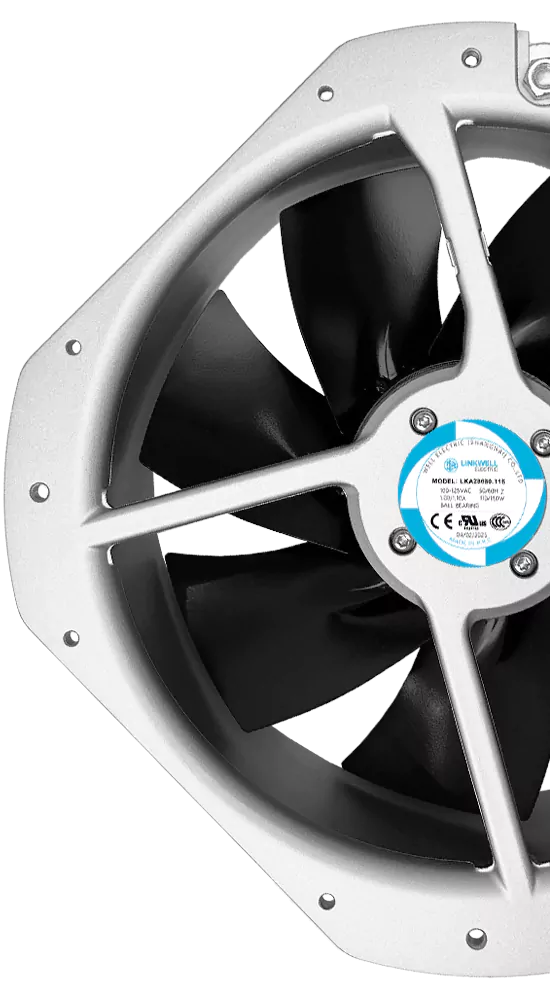
You want your equipment to run smoothly and stay cool with as little hassle as possible. That’s where brushless dc fan lifespan really matters. When you use these fans in industrial cooling, you count on them to keep things reliable and cut down on unexpected repairs. Brushless dc fan lifespan usually lands between 50,000 to 100,000 hours, which means you can get 15 to 20 years of steady performance. That’s a huge leap compared to brushed fans, which often last only 1,000 to 3,000 hours before wearing out.
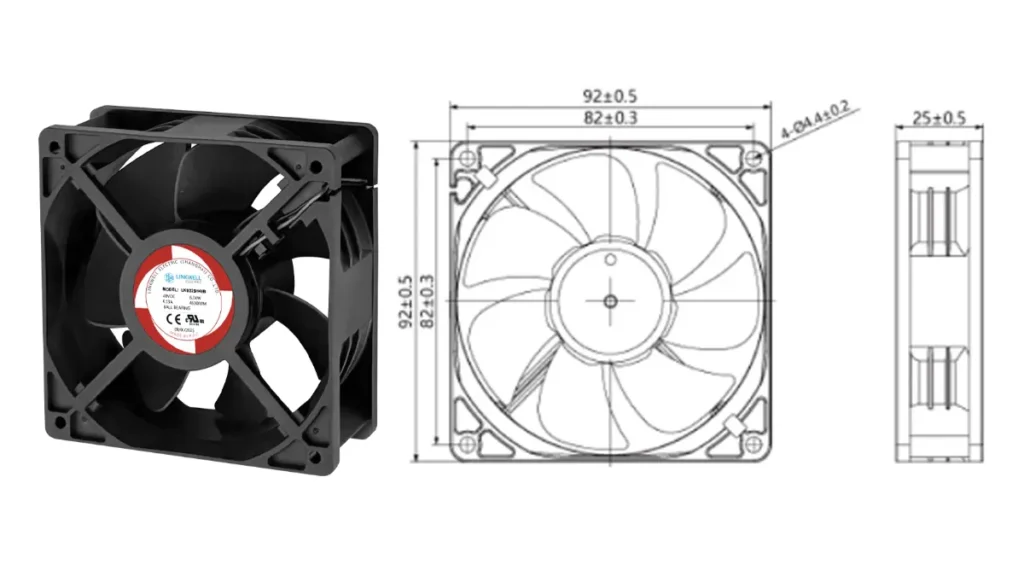
However, the actual lifespan depends on how and where the fan is used. Temperature, dust, moisture, bearing type, voltage stability, and maintenance can all affect performance. Choosing the right fan for the working environment helps reduce downtime, lower maintenance costs, and keep your equipment running reliably.
Key Takeaways
- Brushless DC fans can work for 50,000 to 100,000 hours. This means they can last 15 to 20 years. They give steady performance for a long time.
- Always check the rated lifespan and the actual lifespan. Real-world conditions can change how long a fan lasts.
- Pick fans with ball or fluid dynamic bearings. These bearings make fans last longer. They also make fans quieter than sleeve bearings.
- Clean your fan often to keep dust away. Make sure air can move freely. This helps your fan last longer.
- Choose a fan with the right IP rating for your space. This protects the fan from dust and moisture.
- Watch your fan for strange noises or shaking. These signs mean the fan is wearing out. You may need to replace it soon.
- Install your fan the right way. Do not block the airflow. This stops the fan from getting too hot and breaking early.
- Check the fan’s voltage needs. Make sure the power supply is steady. This keeps the fan safe and working well.
Brushless DC Fan Lifespan Overview
Rated vs. Actual Lifespan
When you buy a brushless DC fan, you might see a rated lifespan on the box. This number shows how long the fan should last if everything is perfect. But real life is not perfect. Things like humidity, dust, and temperature changes can make the fan wear out faster. You want to know how long your fan will last in your own space, not just in a lab.
Look at this table. It shows how rated and actual lifespan can be different for fans from different brands and places:
| Source | Rated Lifespan | Actual Lifespan | Conditions |
|---|---|---|---|
| Mitsubishi 2023 | 100,000 hours | 63,000 hours | Humidity fluctuations in South China |
| Midea 2022 | 100,000 hours | 37,000 hours | Vietnam conditions |
| General manufacturers | 30,000 hours | 15,000 hours | Real-world operation conditions |
Tip: Always check both the rated and actual lifespan if you want your equipment to work well.
Why does the actual lifespan drop? Here are some reasons:
- The type of bearings inside the fan. Ball bearings last longer than sleeve bearings.
- The environment. High heat or lots of dust can make the fan wear out faster.
- Dust buildup. Dust can get inside the fan and hurt the bearings.
Lifespan Ranges
You might ask, “How long do these fans really last?” The answer depends on the fan’s design and where you use it. Most brushless DC fans last between 50,000 and 100,000 hours. That means you can use them for 15 to 20 years if you take care of them. This is much better than brushed fans, which only last a few thousand hours.
But the range can be even bigger. Here are some common lifespan ranges for brushless DC fans:
- The L10 life expectancy (when 10% of fans have failed) can be from 30,000 hours up to 200,000 hours.
- The life of a table fan depends on speed, size, and the type of bearings.
- Fans with good ball bearings and strong design can last the longest.
If you want the best quality and efficiency, pick a fan with a longer L10 life and strong bearings.
Application Impact
Where you use your fan changes how long it will last. Some places are easy on fans, but others are hard. Here’s a table that shows how different uses affect the life of a table fan:
| Application Type | Expected Lifespan (Hours) | Key Factors Affecting Lifespan |
|---|---|---|
| Consumer Electronics and Small Devices | 1,000 – 5,000 | Heat buildup, low-cost bearings, environmental contamination |
| Robotics and Automation | 10,000 – 20,000 | Stable load conditions, precise control algorithms |
| Industrial Machinery | 20,000 – 40,000 | Proper motor sizing, clean environments |
| HVAC Systems and Air Handling Equipment | 30,000 – 60,000 | Minimal mechanical shock, steady operating conditions |
| Medical Equipment | 10,000 – 30,000 | Ultra-low vibration, strict thermal management |
| Electric Vehicles and Transportation | 15,000 – 30,000 | Advanced cooling systems, high-grade bearings |
| Aerospace, Military, and High-Reliability | 40,000+ | Aerospace-grade materials, rigorous testing |
Fans in aerospace or military gear last the longest. These fans use the best materials and go through tough tests. Fans in small electronics or cheap devices wear out much faster because they use lower quality parts.
Note: If you want your fan to last, pick a fan that matches your job. Hard jobs need high-quality fans.
Factors Affecting Fan Lifespan
When you want your brushless DC fan to last, you need to know what can make it wear out faster or help it run for years. Let’s break down the main factors that decide how long your fan will keep spinning.
Bearing Types
The type of bearing inside your fan makes a huge difference in how long it lasts and how well it works. Bearings help the fan blades spin smoothly. Here’s what you need to know about the three main types:
Ball Bearing
Ball bearings use small metal balls to reduce friction. You’ll find these in many industrial fans because they handle heat and heavy use pretty well. Ball bearings give you good durability and reliability, even if your fan runs all day or sits in a hot spot. They work well in different positions, so you can mount your fan however you need.
Sleeve Bearing
Sleeve bearings use a simple tube with oil inside. These bearings cost less, so you see them in budget fans or places where the fan doesn’t run all the time. Sleeve bearings can get noisy and wear out faster if you use your fan in a hot or dusty place. If you want long-term durability, sleeve bearings might not be the best pick for tough jobs.
Fluid Dynamic Bearing
Fluid dynamic bearings take things up a notch. They use a thin layer of oil to create a cushion between moving parts. This design lets the fan spin quietly and cuts down on friction. You get a fan that runs almost silently and lasts much longer. Fluid dynamic bearings can keep going for 100,000 to 300,000 hours. That’s perfect if you need your fan to run nonstop or you want the best performance for years. The oil layer also means less wear and tear, so your fan stays in top shape.
Tip: If you care about quiet operation and the longest possible life, look for fans with fluid dynamic bearings.
Temperature
Heat is one of the biggest enemies of any fan. When the temperature goes up, the parts inside your fan have to work harder. The wires inside the motor get more resistance, and the magnets lose some of their strength. This can make your fan spin faster when it’s empty, but it also means it can’t push as much air when it’s working hard. Over time, high temperatures can shorten your fan’s life and make it less efficient.
You should always check the recommended temperature range for your fan. If your equipment gets hot, pick a fan that can handle those conditions. Keeping your fan cool helps it last longer and keeps your machines running smoothly.
Speed & Load
How fast your fan spins and how much work it does also affect its lifespan. If you run your fan at top speed all the time, it will wear out faster. Heavy loads make the motor and bearings work harder, which can lead to more heat and quicker wear. If you want your fan to last, try not to push it to its limits every day. Choose a fan that matches your cooling needs so it doesn’t have to struggle.
Remember: The right bearing, the right temperature, and the right speed all work together to give your fan a long, healthy life.
Continuous Operation
You might wonder if running your fan nonstop is a good idea. Brushless DC fans are built for continuous operation. They can keep spinning for years without stopping. The absence of brushes and commutators means fewer parts wear out. You get a longer lifespan compared to brushed fans.
Take a look at this table. It shows how long different motors last when they run all the time:
| Motor Type | Lifespan (Continuous Operation) | Lifespan (Intermittent Operation) |
|---|---|---|
| Brushed | 18-24 months | N/A |
| Brushless | 5-7 years | N/A |
Brushless DC fans can operate for 10,000 to over 20,000 hours. You don’t have to worry about frequent breakdowns. If you need a fan for critical equipment, choose brushless DC. It keeps your machines cool and reliable.
Tip: Continuous operation is not a problem for brushless DC fans. You get steady performance and fewer maintenance headaches.
Dust & Moisture
Dust and moisture are silent enemies. They sneak into your fan and cause trouble. Dust can clog the blades and bearings. Moisture leads to rust and electrical shorts. If you work in a dusty or damp place, your fan needs extra protection.
Here’s what happens when dust and moisture get inside:
- Standard DC axial fans fail quickly in dusty or wet environments.
- Condensation can cause electrical problems.
- Wash-down exposure ruins unprotected fans.
You can fight back by choosing fans with the right protection. Look for fans with sealed bearings and special coatings. Clean your fan regularly. Keep dust and water away from the motor.
If your workspace is dirty or wet, don’t settle for standard fans. Pick a fan that’s built for tough conditions.
IP Rating
IP rating tells you how well your fan stands up to dust and water. You see numbers like IP54, IP65, IP67, and IP68. Each rating means a different level of protection.
- IP54 handles general dust and water splash.
- IP65 protects against water jets and dust. Good for outdoor gear and light washdowns.
- IP67 survives temporary immersion in water. Perfect for pumps and marine jobs.
- IP68 gives complete dust protection and can run underwater. Great for underwater robots, ROVs, and submersible systems.
“The first and foremost important factor to consider is the IP rating. It is a measure of the fan’s protection against water and dust. It is always recommended to choose IP68 rating fans for harsh environments. These IP68 harsh environment fans are fully protected against dust and can withstand the presence of water.”
If you need a fan for HVAC, outdoor enclosures, or marine equipment, pick one with a high IP rating. Incorrect IP rating selection is a common cause of premature fan failure. Don’t let dust or water ruin your fan. Choose wisely and keep your equipment safe.
Voltage Stability
You might not think about voltage every day, but it plays a huge role in how long your brushless DC fan lasts. When your fan gets steady, clean power, it runs smoothly and stays healthy. If the voltage jumps up and down, your fan has to work harder. This can make the motor less efficient and wear out the parts inside much faster. Over time, you could see your fan slow down, get noisy, or even stop working before you expect.
Tip: Use a stable power supply and check for voltage spikes. This helps your fan live a longer, happier life.
Airflow Blockage
Your fan needs to breathe. If something blocks the airflow—like dust, cables, or even a wall too close to the fan—the motor has to push harder to move air. This extra work creates more heat and stress on the bearings and motor. You might notice your fan getting louder or not cooling as well. Blocked airflow can cut the fan’s life short and make your equipment overheat.
Here’s what you can do to keep things running smoothly:
- Place your fan where air can move freely.
- Clean away dust and debris often.
- Don’t stack objects right in front of the fan.
A clear path for air means a longer life for your fan and cooler equipment.
Installation
How you install your fan matters more than you might think. If you mount the fan at an odd angle or use the wrong screws, you can cause vibration or stress on the frame. Loose mounting can make the fan wobble, which wears out the bearings and makes noise. If you install the fan upside down, some bearing types (like sleeve bearings) might fail much sooner.
Follow these simple steps for a good installation:
- Use the right screws and brackets.
- Make sure the fan sits flat and tight.
- Check the mounting direction—some fans work best in certain positions.
Good installation keeps your fan quiet, steady, and working for years.
Vibration
Vibration is one of those sneaky problems that can cut your fan’s life short. When your fan shakes or rattles, it puts extra stress on the bearings and motor. Over time, this can lead to noisy operation, faster wear, and even early failure. You might not notice a little vibration at first, but it adds up.
You can fight vibration with smart design and installation. Here’s a quick look at how different choices affect vibration and durability:
| Design Strategy | Impact on Vibration and Durability |
|---|---|
| Low-cogging or skewed stator designs | Reduces torque ripple, making the fan run smoother. |
| High-quality ball or ceramic bearings | Gives smoother rotation and less wear on moving parts. |
| Proper motor alignment and mounting | Stops resonance and mechanical shaking, so your fan lasts longer. |
| Vibration-damping materials or mounts | Helps in sensitive places by soaking up extra vibration. |
If you want your fan to last, make sure you mount it tightly and use the right hardware. Fans in noisy or high-vibration spots—like near heavy machinery—need extra care. Sometimes, using rubber pads or special mounts can make a big difference. Always check for unusual shaking or rattling. If you catch it early, you can fix the problem before it gets worse.
Tip: A smooth-running fan is a long-lasting fan. Don’t ignore small shakes or rattles—they’re your early warning sign.
Material Quality
The materials inside your fan decide how tough it is. If you pick a fan made with strong, high-quality parts, you get more years of trouble-free cooling. Cheap materials might save you money at first, but they wear out faster and can’t handle tough environments.
Here’s what you should look for in fan materials:
- High-quality materials boost durability and reliability.
- Good fans resist corrosion, moisture, and dust.
- Aluminum or stainless steel housings work best in harsh or outdoor environments.
If your fan faces lots of dust, water, or chemicals, don’t settle for plastic or low-grade metal. Fans with sturdy frames and sealed motors keep working even when things get rough. You’ll spend less time fixing or replacing them.
Note: The right materials mean less downtime and fewer headaches for you.
Maintenance
You can’t just install a fan and forget about it. Regular care keeps your fan spinning smoothly and helps you catch problems early. Even the best fan needs a little attention to reach its full lifespan.
Try these simple maintenance steps:
- Clean dust from the blades and filters often.
- Make sure nothing blocks the air passages.
- Listen for odd noises or extra vibration—these can mean the bearings need help.
- Use protective filters or sealed fans in dusty or corrosive places.
- Check the fan speed if your system supports alarms or monitoring.
- Inspect and clean your fan every 3–6 months, especially if your space is dusty.
- Look at the electrical connections and make sure the voltage is right.
- For harsh environments, use fans with IP-rated sealing.
If you add your fans to a maintenance checklist or program, you’ll spot trouble before it leads to a breakdown. A little care goes a long way.
Tip: Set a reminder to check your fans every few months. It’s a small step that can save you big repair bills later.
Ball vs. Sleeve Bearing Comparison
Lifespan Differences
When you pick a fan, you want it to last as long as possible. Ball bearing fans usually win in this area. They can keep spinning for 50,000 to 70,000 hours at 40°C. Sleeve bearing fans, on the other hand, last about 10,000 to 20,000 hours under the same conditions. That’s a big difference if you need your equipment to run for years.
Here’s a quick look at how they compare:
| Bearing Type | Lifespan at 40°C | Sensitivity to Temperature |
|---|---|---|
| Ball Bearing | 50,000–70,000 hours | Lifespan drops by 50% with a 10°C increase |
| Sleeve Bearing | 10,000–20,000 hours | Not feasible above 70°C |
You should also know that sleeve bearing fans work best when mounted vertically. If you install them sideways or upside down, their lifespan drops even more. Ball bearing fans don’t have this problem. They work well in any position, which makes them a better choice for tricky installations or high-heat jobs.
Tip: If you need a fan for a hot or demanding spot, ball bearings are the safer bet.
Noise & Performance
Noise can make a big difference, especially if your fan runs in an office or a quiet room. Sleeve bearing fans start out quieter at low speeds. You might not even notice them running. But as time goes on, the oil inside can dry up. When that happens, the fan gets louder and may start to rattle.
Ball bearing fans used to be noisier, but new designs have changed that. Now, some ball bearing fans run just as quietly as sleeve bearing fans, even at higher speeds. This is thanks to better engineering and tighter tolerances. If you need a fan that stays quiet over time, a high-quality ball bearing fan can be a smart pick.
- Sleeve bearing fans: Quieter at first, but noise rises as they age.
- Ball bearing fans: May be a bit louder at low speeds, but stay steady and quiet with new technology.
If you want a fan that stays quiet for years, look for advanced ball bearing models.
Cost & Value
You probably want to save money, but you also want a fan that lasts. Sleeve bearing fans cost less up front. They’re a good pick if you only need a fan for a short time or in a spot that doesn’t get too hot. Ball bearing fans cost more, but they last much longer and can save you money in the long run.
Here’s a table to help you compare:
| Bearing Type | Cost | Lifespan | Noise |
|---|---|---|---|
| Sleeve Bearing | Less expensive | 10,000–20,000 hrs | Low at first, rises |
| Ball Bearing | More expensive | 50,000–70,000 hrs | Higher at low speeds |
- Sleeve bearings: Cheaper and quiet at first, but wear out faster.
- Ball bearings: Cost more, but give you better durability and efficiency.
If you want the best value, think about how long you need the fan to last. For long-term use, ball bearing fans are usually worth the extra cost.
Note: Paying a little more now for ball bearings can mean fewer replacements and less downtime later.
Temperature Resistance
When you choose a fan for your equipment, you need to think about how it will handle heat. Not all fans can take the same amount of heat. Some fans start to struggle when things get hot, while others keep spinning without a problem.
Let’s look at how ball bearing and sleeve bearing fans deal with high temperatures. Here’s a quick table to show you the difference:
| Bearing Type | Temperature Resistance | Lifespan at High Temp |
|---|---|---|
| Sleeve Bearing | Less feasible above 70℃ | Shorter lifespan |
| Ball Bearing | Operates reliably at higher temps | Significantly longer lifespan |
You can see that sleeve bearing fans don’t like high heat. Once the temperature goes above 70℃, these fans start to wear out much faster. The oil inside a sleeve bearing can dry up or break down. When this happens, the fan gets noisy and may even stop working. If your equipment gets hot, a sleeve bearing fan might not last very long.
Ball bearing fans, on the other hand, are built for tough jobs. They can handle higher temperatures without losing performance. The metal balls inside the bearing don’t depend on oil as much, so they keep rolling even when things heat up. This means you get a fan that lasts much longer, even in a hot spot.
Here are some key points to remember:
- Sleeve bearings become less effective when temperatures go above 70℃.
- Ball bearings keep working well at higher temperatures.
- The lifespan of a ball bearing fan is much longer than a sleeve bearing fan, especially when things get hot.
Temperature doesn’t just make fans uncomfortable—it can cut their life in half. For every 10℃ increase in temperature, a fan’s lifespan can drop by almost 50%. That’s a big deal if your equipment runs hot all day. Sleeve bearing fans feel this drop much more than ball bearing fans.
If you want your fan to last, always check how hot your equipment gets. For hot environments, ball bearing fans are the safer choice. They give you steady cooling and fewer breakdowns. You won’t have to worry about your fan quitting when you need it most.
Tip: If your equipment runs hot, pick a ball bearing fan. It will save you time, money, and headaches down the road.
Industrial Application Needs
Electrical Enclosures
Electrical enclosures keep important equipment safe from dust, water, and heat. If the cooling fan stops working, your electronics can get too hot and turn off. That’s why you need a brushless DC fan that lasts a long time. These fans use electronic commutation, so there are fewer moving parts. This means less wear and tear. You get steady performance and less time fixing things.
Here’s why a longer fan life is important for electrical enclosures:
- Brushless DC fans keep electronics cool for many years.
- Ball-bearing fans work well in tough places and can run all the time.
- You save money because you don’t have to fix or replace fans as often.
- Your equipment stays safe and does not overheat.
Tip: Pick fans with high IP ratings and good bearings if your enclosure is in a dusty or wet place.
Telecom Equipment
Telecom equipment works all day and night. You need cooling that does not stop. Brushless DC fans are the best choice for telecom racks, switches, and base stations. They give strong cooling even when things get tough. You avoid expensive problems and keep your network working well.
Why do brushless DC fans work great for telecom gear?
- They give steady airflow and keep things cool.
- Electronic switching means less friction and less heat.
- You get 50,000–100,000 hours of use, which is much longer than AC fans.
- Fans with advanced bearings shake less and make less noise.
If you want your telecom gear to stay cool, use brushless DC fans with ball or fluid dynamic bearings.
Power Supplies
Power supplies get hot when they change electricity. If you don’t cool them, they can break or even cause fires. Brushless DC fans help control heat well. They last longer and need less care, so your power supplies stay safe and your building keeps running.
Here’s what you get with long-lasting brushless DC fans in power supplies:
- Steady cooling for strong power units.
- Less stress on parts because of electronic commutation.
- Lower costs over time.
- Fans that can run all the time and still work well.
For power supplies, choose fans with strong airflow and high static pressure.
Here’s a simple table that shows which fan types fit different jobs:
| Fan Type | Air Flow Direction | Static Pressure | Typical Applications |
|---|---|---|---|
| Axial Fans | Linear, parallel to axis | Low, high volume | Electrical enclosures, telecom, HVAC |
| Centrifugal Blowers | Radial, exits at 90° | Moderate to high | Power supplies, dust collection, automation |
| Cross Flow Fans | Perpendicular, wide flow | Low, uniform | Electronics cooling, display cases, HVAC |
Remember: Picking the right fan type and features helps your equipment last longer and stay safe.
New Energy Systems
You see new energy systems in many places today. Solar panels, wind turbines, and battery storage help power homes and cars. These systems need good cooling to work safely. If you use a brushless DC fan with a long lifespan, you protect your equipment and save money on repairs.
Why is fan lifespan so important in new energy systems? These systems often run all the time. You want your cooling fan to last as long as your solar inverter or battery. If the fan stops, your equipment can get too hot. This can cause downtime, lost energy, and expensive repairs. No one wants that to happen.
Here are some common new energy uses:
- Solar Inverters: These change DC power from solar panels into AC power for your home or business. They get hot, especially in sunny places. A long-lasting brushless DC fan keeps them cool and working.
- Battery Storage Units: Batteries store energy for later. They need steady cooling to stop overheating and help them last longer. If your fan fails early, your batteries can get damaged.
- Wind Turbine Controllers: Wind turbines use electronics to control power. These controllers need cooling fans that can handle tough weather and keep spinning for years.
Tip: Always pick fans with high IP ratings for outdoor energy systems. IP65 or IP68 fans can handle dust, rain, and snow.
You need fans that can handle big temperature changes, moisture, and shaking. Brushless DC fans with ball or fluid dynamic bearings are best. They last longer and need less care. You save money and keep your energy system running.
Here’s a simple table to help you choose the right fan for new energy systems:
| Application | Recommended Fan Features | Why It Matters |
|---|---|---|
| Solar Inverter | Ball bearing, IP65+, temp range | Handles heat and outdoor dust |
| Battery Storage | Fluid dynamic bearing, IP68 | Quiet, reliable, moisture proof |
| Wind Controller | Ball bearing, vibration damping | Survives wind and shaking |
Each job needs a special fan. If you pick the right fan for your system, you get more years of cooling without problems.
Don’t forget: A reliable fan keeps your new energy system working, even in bad weather.
If you want your solar panels or batteries to last, pay attention to the cooling fan. Pick a brushless DC fan with a strong bearing and good protection. You will spend less time fixing things and enjoy clean energy longer.
HVAC & Machinery
You count on HVAC systems and machines to keep things comfortable. If cooling fans stop working, everything can stop. That’s why you need brushless DC fans with a long lifespan. These fans help your equipment work well. They lower maintenance and save money.
HVAC systems work hard every day. They pull air through filters and push it across coils. They keep temperatures steady. If you use a fan that wears out fast, you get breakdowns and noisy operation. Repairs can cost a lot. Brushless DC fans last much longer than old fans. You get steady airflow and fewer problems.
Machines in factories and workshops need good cooling. Motors, gears, and electronics heat up quickly. If you don’t cool them, you risk overheating and shutdowns. Sometimes, it can even be dangerous. Brushless DC fans handle tough places. They resist dust, moisture, and vibration. You can trust them to keep your machines running, even in harsh spots.
Here are some reasons why fan lifespan matters in HVAC and machinery:
- You avoid changing fans often and downtime.
- Maintenance teams spend less time fixing fans.
- Your equipment stays safe from getting too hot.
- You save money on repairs and energy bills.
- Fans with ball or fluid dynamic bearings run quietly and last longer.
Tip: Pick fans with high IP ratings and strong bearings for HVAC units in dusty or wet places.
You might wonder which fan features fit your needs. Here’s a table to help you decide:
| Application | Recommended Fan Features | Why It Matters |
|---|---|---|
| HVAC Air Handler | Ball bearing, IP54+, low noise | Handles dust, runs quietly |
| Industrial Blower | Fluid dynamic bearing, IP65 | Survives vibration, moisture |
| Machinery Motor | Ball bearing, temp range 70℃+ | Works in hot, tough conditions |
Fans with the right features keep your HVAC and machinery working for years. You get peace of mind and fewer worries.
If you want your building or factory to stay cool and safe, pay attention to the cooling fans. Pick brushless DC fans with a proven lifespan. You’ll notice better reliability, comfort, and cost savings.
Don’t let a cheap fan ruin your HVAC or machinery. Buy quality fans, and your equipment will thank you.
Common Mistakes Shortening Lifespan
Price-Only Selection
You might think grabbing the cheapest fan is a smart move. It feels good to save money up front. But when you focus only on price, you often get a fan that wears out fast. Low-cost fans usually use basic bearings, thin wires, and weak magnets. These parts can’t handle tough jobs or long hours. You end up replacing fans more often, which means more downtime and higher costs in the long run.
Here’s what can happen when you pick a fan just because it’s cheap:
- Bearings lose grease and start to wear out.
- Magnets can shift or lose strength, making the fan noisy or weak.
- The fan might vibrate or jam because of poor balance.
Tip: Always look at the fan’s specs, not just the price tag. A quality fan saves you money over time.
Wrong Voltage
Using the wrong voltage is a common mistake that can ruin your fan quickly. If you connect your fan to a power supply that’s too high, the motor can overheat. Too low, and the fan might not spin fast enough to cool your equipment. Both problems can lead to early failure.
When voltage isn’t stable, the fan’s controller and windings work harder. This can cause:
- Overheating and faster wear on the motor.
- Winding faults, like short circuits or open circuits.
- Sudden jumps in current, which can burn out the fan.
You might notice the fan getting hot, making strange noises, or even stopping. Always check the voltage rating before you install a fan. If you’re not sure, ask your supplier for help.
Note: Abnormal voltage and mismatched controllers can cause overheating and shorten your fan’s life.
Ignoring Temperature
Temperature is a silent killer for brushless DC fans. If your fan runs in a hot spot—like inside a power supply or a sunny enclosure—it can wear out much faster. Operating temperatures above 40°C can cut the fan’s lifespan by about 30%. That’s a big drop!
Overheating often happens because of:
- Overloading the fan with too much work.
- Blocked airflow or a broken cooling system.
- Dusty heat sinks that trap heat.
When the fan gets too hot, the grease in the bearings dries up. The magnets can lose their power, and the motor windings might get damaged. You might hear friction sounds or see the fan slow down. Sometimes, the fan just stops working.
Here’s a quick checklist to help you avoid temperature trouble:
- Keep the fan’s airflow clear.
- Clean dust from heat sinks and blades.
- Make sure your fan matches the job’s heat level.
If you ignore temperature, you risk early fan failure and costly repairs. Keep things cool, and your fan will last much longer.
Blocked Airflow
Have you ever wondered why your brushless DC fan seems to work harder but cools less? Blocked airflow is a common mistake that can cut your fan’s life short. When something blocks the air path, your fan has to push harder to move air. This extra effort creates more heat and stress on the motor and bearings. Over time, you might notice your fan getting louder, running hotter, or even failing much sooner than you expected.
You might block airflow without even realizing it. Here are some ways this happens:
- Dust or debris builds up on the fan blades or grill.
- Cables, wires, or other equipment sit too close to the fan’s intake or exhaust.
- You install the fan in a tight space with no room for air to move.
- Filters get clogged and never get cleaned.
Tip: Always check that nothing blocks the front or back of your fan. Give it space to breathe!
Let’s look at what happens when airflow gets blocked:
| Problem | What You Notice | How It Hurts Your Fan |
|---|---|---|
| Dusty blades | Less cooling, more noise | Motor works harder, wears out |
| Clogged filters | Weak airflow, overheating | Bearings get hot, fail faster |
| Tight installation | Fan sounds strained | Shorter lifespan, more repairs |
You can avoid these problems with a few simple steps:
- Place your fan where air can move freely. Don’t push it against a wall or stuff it in a corner.
- Clean the blades and grill every few months. Use a soft brush or a can of air.
- Check filters often. If they look dirty, clean or replace them.
- Keep cables and other gear away from the airflow path.
If you ignore blocked airflow, your fan will not last as long as it should. You might also see your equipment overheat, which can lead to even bigger problems. A little attention goes a long way. Make airflow checks part of your regular maintenance routine.
Remember: A fan that can “breathe” will keep your equipment cool and last much longer. Don’t let a simple mistake cost you time and money.
Lack of Maintenance
You might think your brushless DC fan will keep spinning forever if you just leave it alone. That’s not true. Every fan needs a little care to stay in top shape. If you skip maintenance, you risk early failure, noisy operation, and even equipment damage.
Dust builds up fast. It clings to blades, blocks airflow, and makes the motor work harder. Bearings dry out or get clogged. Wires loosen. You start hearing strange noises or feeling extra vibration. These are warning signs. If you ignore them, your fan won’t last as long as you expect.
Let’s look at what happens when you neglect maintenance:
| Problem | What You Notice | How It Hurts Your Fan |
|---|---|---|
| Dust buildup | Weak airflow, noise | Motor overheats, bearings fail |
| Dry bearings | Rattling, friction | Shorter lifespan, more repairs |
| Loose wires | Intermittent operation | Electrical faults, shutdown |
| Clogged filters | Overheating | Fan works harder, wears out |
You don’t need fancy tools or special skills. Just a few simple steps can make a big difference:
- Clean the blades and grill every few months. Use a soft brush or compressed air.
- Check for loose screws or wires. Tighten them if needed.
- Listen for odd sounds. If you hear rattling or grinding, inspect the bearings.
- Replace filters when they look dirty.
- Make sure nothing blocks the airflow path.
Tip: Set a reminder on your phone or calendar. Regular checks keep your fan running longer.
You can also create a quick maintenance checklist. Here’s an example:
- [ ] Clean fan blades and grill
- [ ] Inspect bearings for noise
- [ ] Tighten mounting screws
- [ ] Check electrical connections
- [ ] Replace or clean filters
- [ ] Confirm clear airflow path
If you follow these steps, you’ll catch problems early. Your fan will stay quiet, efficient, and reliable. You won’t waste money on unexpected repairs or replacements.
Skipping maintenance is one of the biggest mistakes you can make. A little effort goes a long way. Your brushless DC fan will thank you with years of steady cooling.
Note: Maintenance isn’t just for big machines. Even small fans need attention. Don’t wait for trouble—keep your fan healthy with regular care.
Maximizing Brushless DC Fan Lifespan
Installation Tips
You want your brushless DC fan to last as long as possible. Start with a good installation. Make sure you mount the fan securely. Loose screws or brackets can cause vibration. Vibration wears out bearings and makes the fan noisy. Always check the mounting direction. Some fans work best in certain positions. Ball bearing fans can handle any direction, but sleeve bearing fans last longer when mounted vertically.
Here are some easy steps for a solid installation:
- Use the right screws and brackets for your fan.
- Place the fan flat and tight against the surface.
- Avoid mounting the fan upside down if it uses sleeve bearings.
- Leave enough space around the fan for airflow.
If you install your fan correctly, you help it run smoother and quieter. You also reach your energy efficiency goals because the fan works with less effort.
Maintenance Practices
You can’t just set up your fan and forget about it. Regular care keeps your fan spinning for years. Dust and dirt build up fast. They block airflow and make the motor work harder. You need to clean regularly. This simple step helps your fan stay cool and last longer.
Try these maintenance tips:
- Wipe dust off the blades and grill every few months.
- Check for loose screws or wires.
- Listen for strange noises. If you hear rattling, inspect the bearings.
- Replace or clean filters if they look dirty.
- Make sure nothing blocks the airflow path.
Set a reminder to check your fan. A little care goes a long way. You save money and avoid downtime.
Here’s a quick maintenance checklist:
- [ ] Clean fan blades and grill
- [ ] Inspect bearings for noise
- [ ] Tighten mounting screws
- [ ] Check electrical connections
- [ ] Replace or clean filters
- [ ] Confirm clear airflow path
Monitoring Conditions
You want to catch problems early. Monitoring helps you spot trouble before it gets worse. Watch for changes in noise, vibration, or airflow. If your fan starts making new sounds or slows down, check it right away. Some fans have alarms or sensors. These tools alert you when something goes wrong.
You can use a simple table to track fan health:
| Condition | What to Watch For | Action Needed |
|---|---|---|
| Noise | Rattling, grinding | Inspect bearings |
| Airflow | Weak or blocked | Clean blades, filters |
| Vibration | Shaking, wobbling | Tighten mounts |
| Temperature | Hot motor | Check airflow |
Keep an eye on your fan. Quick action keeps your equipment safe and helps your fan last longer.
If you follow these steps, you get steady cooling and fewer surprises. You also make sure your fan supports your energy efficiency goals.
Proper Voltage
You might not think about voltage every day, but it plays a huge role in how long your brushless DC fan lasts. If you give your fan the right voltage, it runs smoothly and stays healthy. If the voltage jumps around or doesn’t match the fan’s rating, you can run into trouble fast.
When you use the wrong voltage, your fan can overheat, slow down, or even stop working. Too much voltage makes the motor work harder than it should. This extra stress can burn out the windings or damage the controller. Too little voltage means your fan won’t spin fast enough to cool your equipment. Both problems can shorten your fan’s life.
Here’s what you should do to keep your fan happy:
- Always check the voltage rating on your fan before you plug it in.
- Use a stable power supply. Avoid power sources that spike or drop often.
- If your area has power surges, use a surge protector.
- Ask your supplier if you’re not sure about the right voltage.
Tip: A steady, correct voltage helps your fan last longer and keeps your equipment safe.
You can use this simple table to match your fan to the right power supply:
| Fan Voltage Rating | Power Supply Needed | What Happens If Wrong? |
|---|---|---|
| 12V DC | 12V DC | Overheating or weak airflow |
| 24V DC | 24V DC | Fan won’t start or burns out |
| 48V DC | 48V DC | Short lifespan, noisy motor |
If you follow these steps, you’ll avoid one of the most common reasons fans fail early. Your fan will thank you with years of steady cooling.
Airflow & Ventilation
Your fan needs to breathe. If you block the airflow, your fan has to work harder. This extra work creates more heat and wears out the bearings and motor faster. You want to make sure nothing blocks the front or back of your fan.
Here are some easy ways to keep airflow strong:
- Place your fan where air can move freely.
- Don’t put the fan right up against a wall or another piece of equipment.
- Clean dust and debris from the blades and grill often.
- Check filters and replace them if they look dirty.
Note: Good airflow means your fan doesn’t have to struggle. It stays cool and lasts longer.
You can also use this quick checklist:
- [ ] Is there space around the fan?
- [ ] Are the blades and grill clean?
- [ ] Are filters clear and not clogged?
- [ ] Is the fan facing the right direction?
If you keep the air moving, your fan will keep your equipment cool and run for years.
IP Rating Selection
You might see fans with labels like IP54, IP65, or IP68. These numbers tell you how well the fan stands up to dust and water. Picking the right IP rating is important if your fan works in a tough place.
Here’s what the numbers mean:
- IP54: Protects against dust and water splashes. Good for most indoor jobs.
- IP65: Blocks dust and handles water jets. Great for outdoor or wet spots.
- IP68: Keeps out all dust and can even run underwater. Best for harsh or wet environments.
If you use a fan with a low IP rating in a dusty or wet place, it won’t last long. Dust can clog the motor. Water can cause rust or short circuits. You want a fan that matches your environment.
Here’s a quick guide:
| Environment | Recommended IP Rating | Why It Matters |
|---|---|---|
| Office, clean room | IP20–IP54 | Basic dust protection |
| Factory, workshop | IP54–IP65 | Handles dust, some moisture |
| Outdoor, marine | IP65–IP68 | Survives rain, dust, splashes |
Tip: Always choose a higher IP rating if you’re not sure. It’s better to be safe than sorry.
When you pick the right IP rating, you help your fan last longer and avoid surprise breakdowns. Your equipment stays safe, and you spend less time on repairs.
Choosing a Long-Life Fan
When you want a brushless DC fan that lasts, you need to look at more than just the price. Picking the right fan means checking several important features. Let’s break down what you should look for.
Selection Criteria
You can use this checklist to help you choose the best fan for your needs:
- Airflow and static pressure requirements (CFM and mmH₂O)
- Power supply compatibility (12V, 24V, 48V)
- Environmental protection (IP rating)
- Noise levels (dBA)
- Bearing type (ball, sleeve, or fluid dynamic)
- Space and mounting options
- Temperature range
- Speed control or monitoring features
- Cable and connector type
- Application and quantity needed
Tip: Always match the fan’s features to your equipment’s needs. This helps you avoid early failures.
Size & Mounting
First, check the space where you want to install the fan. Measure the area and see if you need a square, round, or custom shape. Some fans fit tight spaces, while others need more room. Make sure the mounting holes line up with your equipment. If you have a tricky spot, look for fans with flexible mounting options.
Voltage
Your fan must match your power supply. Most brushless DC fans run on 12V, 24V, or 48V. Using the wrong voltage can damage the fan or make it run poorly. Always double-check the voltage before you buy.
Airflow & Pressure
Think about how much air your system needs to stay cool. Check the airflow rating (CFM) and static pressure. High airflow works for open spaces. High static pressure is better for tight or blocked areas. You can ask your supplier for help if you’re not sure.
Bearing Type
The bearing type affects how long your fan will last. Ball bearings work well for long life and tough jobs. Sleeve bearings cost less but wear out faster. Fluid dynamic bearings give you quiet operation and extra-long life. If you want the best, look for fans from premium brands with strong bearings.
IP Rating
If your fan faces dust or water, check the IP rating. Higher numbers mean better protection. For outdoor or harsh places, pick IP65 or IP68 fans.
Temperature Range
Some fans handle heat better than others. Check the temperature range on the label. If your equipment gets hot, choose a fan that can take the heat.
Speed & Noise
Some jobs need quiet fans. Others need high speed. Look at the noise level (dBA) and speed (RPM). Pick what fits your space.
Cable/Connector
Check the cable length and connector type. Make sure it matches your power supply and setup.
Application & Quantity
Think about where you’ll use the fan and how many you need. Some jobs need just one fan. Others need several working together. Always consider the brand and build quality for the best results.
| Criteria | What to Check | Why It Matters |
|---|---|---|
| Size & Mounting | Dimensions, hole pattern | Fits your equipment |
| Voltage | 12V/24V/48V | Prevents damage |
| Airflow & Pressure | CFM, mmH₂O | Keeps things cool |
| Bearing Type | Ball, sleeve, fluid dynamic | Impacts lifespan |
| IP Rating | IP54, IP65, IP68 | Protects from dust/water |
| Temperature Range | -10°C to 70°C+ | Handles hot/cold spots |
| Speed & Noise | RPM, dBA | Matches your needs |
| Cable/Connector | Length, type | Easy installation |
| Application/Qty | Use case, number needed | Right fit for your project |
Remember, a little planning now saves you time and money later.
Buyer Information for Selection
When you want to pick the right brushless DC fan, you need to get your facts straight before you reach out to a supplier. If you prepare the right details, you make the process faster and avoid mistakes. Let’s break down what you should have ready.
Size & Mounting
Start with the basics. Measure the space where you plan to install the fan. Write down the length, width, and depth. If you have a tight spot, check if the fan will fit without bumping into other parts. Think about the mounting style. Do you need a fan with screw holes, clips, or a special bracket? Some fans mount flat, while others need to sit upright. If you get the size and mounting right, you avoid headaches later.
Tip: Take a photo of your equipment or draw a quick sketch. This helps suppliers understand your setup.
Here’s a simple checklist for size and mounting:
- Measure the available space.
- Note the mounting style (screws, clips, brackets).
- Check for obstacles near the fan location.
- Decide if you need a square, round, or custom shape.
Voltage & Power
You need to match the fan’s voltage to your power supply. If you use the wrong voltage, the fan might not work or could burn out. Most brushless DC fans run on 12V, 24V, or 48V. Write down your power supply’s voltage and check if it’s steady. If your equipment has power spikes, mention this to your supplier. You also want to know how much power the fan uses. This helps you avoid overloading your system.
Note: Always double-check the voltage before you buy. If you’re not sure, ask for help.
Here’s a quick table to help you organize your voltage and power info:
| Fan Voltage | Power Supply | Is It Stable? | Notes |
|---|---|---|---|
| 12V DC | 12V DC | Yes/No | Any surges? |
| 24V DC | 24V DC | Yes/No | Backup power needed? |
| 48V DC | 48V DC | Yes/No | Special connectors? |
Airflow & Pressure
You want your fan to move enough air to keep things cool. Think about how much airflow you need. This is usually measured in cubic feet per minute (CFM). If your equipment sits in a tight space or has filters, you might need higher static pressure. Write down your airflow needs and any pressure requirements. If you don’t know the numbers, describe your setup. Suppliers can help you figure it out.
Tip: If your equipment gets hot fast, mention this. It helps suppliers pick a fan with strong airflow.
Here’s what you should prepare:
- Airflow needed (CFM)
- Static pressure (if known)
- Description of your equipment’s cooling needs
- Any filters or obstacles in the airflow path
If you gather these details, you make it easy for suppliers to recommend the best fan. You save time and get a fan that fits your job.
Temperature & Environment
You need to think about where your fan will work. Some fans handle heat or cold better than others. If your equipment sits in a hot room or outside in the sun, you should tell your supplier. Fans have a temperature range. If you use a fan outside its range, it might wear out fast or even stop working.
Write down the highest and lowest temperatures your fan will face. Will your fan run in a freezer, a hot factory, or maybe outdoors? Does your space get humid or dry? These details help your supplier pick a fan that will not fail when things get tough.
Here’s a quick table to help you organize your info:
| Environment Type | Temperature Range | Special Notes |
|---|---|---|
| Indoor, office | 10°C – 35°C | Stable, low dust |
| Factory floor | 0°C – 50°C | May have vibration |
| Outdoor enclosure | -20°C – 60°C | Sun, rain, big swings |
| Cold storage | -30°C – 10°C | High humidity possible |
Tip: If your fan faces big temperature swings, ask for a fan with a wide temperature range.
Installation Direction
How you install your fan matters. Some fans work best in certain positions. For example, sleeve bearing fans last longer when you mount them vertically. Ball bearing fans can handle any direction. If you plan to mount your fan sideways, upside down, or at an angle, write this down.
Tell your supplier how you want to install the fan. Will it blow air up, down, or sideways? Will it sit flat or hang from a wall? This info helps you get a fan that lasts longer and works better.
Here’s a checklist for installation direction:
- Will the fan be vertical, horizontal, or at an angle?
- Will the airflow go up, down, or sideways?
- Is there enough space for the fan to fit in your chosen direction?
- Do you need special brackets or mounts?
Note: The right installation direction can double your fan’s lifespan.
Dust & Moisture
Dust and moisture can ruin a fan fast. If your fan works in a dusty workshop, a kitchen, or outside, you need to tell your supplier. Moisture from rain, steam, or cleaning sprays can also cause trouble. Fans in these places need extra protection.
Write down if your space is dusty, wet, or both. Do you wash down your equipment? Does the fan face splashes or heavy rain? The more details you give, the better your supplier can help.
Here’s a simple list to check:
- Is the area dusty, oily, or greasy?
- Will the fan get wet or face splashes?
- Do you clean the area with water or chemicals?
- Is the fan near open windows or outdoors?
Tip: For tough spots, ask for fans with a high IP rating. These fans keep out dust and water, so they last longer.
If you prepare this info, you help your supplier pick the right fan for your job. You get better cooling and fewer problems down the road.
Operating Hours
You should think about how many hours your fan will run each day. Will it work all day and night, or just a few hours? This detail helps your supplier pick a fan that matches your needs. Some fans are made for nonstop use. Others work best for short bursts.
Here’s what you can do:
- Write down the number of hours your fan will run each day.
- Note if your fan will run on weekends or only during workdays.
- Tell your supplier if you need the fan to run 24/7.
Tip: Fans that run all the time need stronger bearings and better cooling. If you plan for long hours, you get a fan that lasts longer.
You can use a simple table like this to organize your info:
| Usage Type | Hours per Day | Days per Week | Notes |
|---|---|---|---|
| Continuous | 24 | 7 | Needs high durability |
| Intermittent | 8 | 5 | Office hours only |
| Occasional | 2 | 3 | Backup or testing |
Noise Requirement
Noise can be a big deal, especially if your fan runs in a quiet place. You don’t want a loud fan in an office, hospital, or classroom. Some fans make more noise than others. You should decide how much noise you can accept.
Ask yourself these questions:
- Do you need a silent fan for your space?
- Is a little noise okay, or do you need it as quiet as possible?
- Will the fan run near people or sensitive equipment?
You can check the noise level in decibels (dBA). Lower numbers mean quieter fans. Here’s a quick guide:
| Noise Level (dBA) | Where It Fits |
|---|---|
| Under 25 | Libraries, bedrooms |
| 25–35 | Offices, classrooms |
| 36–45 | Workshops, factories |
Note: Tell your supplier if you have a strict noise limit. They can help you find a fan that won’t disturb your space.
IP Rating
The IP rating tells you how well your fan stands up to dust and water. You need to match the IP rating to your environment. If your fan works in a clean office, you don’t need much protection. If it faces dust, rain, or cleaning sprays, you need a higher IP rating.
Here’s what you should do:
- Look at your workspace. Is it dusty, wet, or both?
- Write down if your fan will face splashes, rain, or heavy cleaning.
- Ask your supplier for the right IP rating for your job.
Here’s a quick table to help you choose:
| Environment | Suggested IP Rating | Why It Matters |
|---|---|---|
| Clean indoor | IP20–IP54 | Basic dust protection |
| Dusty or damp | IP54–IP65 | Handles dust, some moisture |
| Outdoor or wet | IP65–IP68 | Survives rain, splashes |
Tip: If you’re not sure, pick a higher IP rating. It’s better to be safe and keep your fan running longer.
Custom Needs
Sometimes, you need something special that regular fans don’t have. Maybe your fan needs a certain plug, a longer wire, or to fit in a small spot. Custom needs are important if you want your equipment to work just right. Suppliers can help, but you must tell them what you want from the start.
Here are some custom needs you might think about:
- Cable Length and Connector Type: The wire on a normal fan might be too short. You may need a longer wire or a certain plug for your system. Write down the length and type of plug you need.
- Speed Control or Monitoring: You might want to change how fast the fan spins or check if it’s working well. Ask for PWM control, a tachometer, or an alarm. These features help keep your equipment safe.
- Shape and Mounting: Your equipment might need a fan with a special shape or holes. If you need a different frame or special holes, tell your supplier.
- Branding and Labeling: You may want your company’s logo or a special label on the fan. This helps you find your fan and makes your equipment look nice.
- Certifications: Some jobs need fans with special safety marks like UL, CE, or RoHS. If you need these, say so early.
- Color or Finish: You might want your fan in a certain color or with a special cover. This can help you see it better or match your equipment.
Tip: Give as many details as you can. It helps suppliers make the right fan for you.
Here’s a simple table to help you plan your custom needs:
| Custom Feature | Example Request | Why It Matters |
|---|---|---|
| Cable Length | 1.5 meters, 3 meters | Fits your installation |
| Connector Type | Molex, JST, custom plug | Matches your system |
| Monitoring Feature | PWM, tachometer, alarm | Controls speed, checks health |
| Certification | UL, CE, RoHS | Meets safety standards |
| Branding | Custom logo, label | Easy identification |
| Color/Finish | Black, white, coated | Matches your equipment |
You can use a checklist so you don’t forget anything:
- [ ] Cable length and connector type
- [ ] Speed control or monitoring features
- [ ] Custom shape or mounting pattern
- [ ] Branding or labeling needs
- [ ] Required certifications
- [ ] Color or finish preferences
If you get your custom needs ready before talking to a supplier, you save time and avoid mistakes. You get a fan that fits and works the way you want. Suppliers like clear requests and can help you better.
Note: Don’t be afraid to ask for custom features. The right fan can make your equipment safer, quieter, and last longer.
Signs for Replacement
Noise & Vibration
You know your fan is in trouble when it starts making strange sounds. Maybe you hear a grinding noise or a loud rattle. These sounds often come from worn bearings inside the fan. Sometimes, you might feel the fan shaking or vibrating more than usual. This is another big warning sign. Vibration can mean the fan is out of balance or the bearings are failing.
Here are some things you might notice:
- Unusual noise or grinding from the fan
- Rattling or humming that wasn’t there before
- The fan shakes or vibrates when running
If you ignore these signs, the fan can break down fast. Noise and vibration usually mean the fan is working too hard or something inside is wearing out. You don’t want to wait until the fan stops completely. Replacing the fan early can save your equipment from overheating or shutting down.
Tip: If your fan sounds different or feels shaky, check it right away. A quiet fan is a healthy fan.
Reduced Airflow
Sometimes, your fan keeps spinning, but it doesn’t move as much air as before. You might notice your equipment getting hotter, even though the fan is running. Weak airflow is a common sign that your fan needs help. Dust can build up on the blades or inside the motor. Bearings can get stiff, making the fan slow down.
Watch for these clues:
- Air coming out of the fan feels weak
- Your equipment overheats more often
- The fan speed drops or seems unstable
A fan that can’t push enough air can’t keep your system cool. Overheating can damage other parts of your equipment. If you see these signs, try cleaning the fan first. If the problem stays, it’s time for a new fan.
Note: Reduced airflow means your fan is struggling. Don’t let your equipment suffer—replace the fan before it fails.
Intermittent Operation
Does your fan start and stop on its own? Maybe it runs for a while, then shuts off, then starts again. This is called intermittent operation. It’s a clear sign that something is wrong. The fan might have a loose wire, a failing motor, or a problem with the controller.
Here’s what you might see:
- The fan fails to start sometimes
- The fan stops suddenly during use
- The fan runs in short bursts instead of steady
Intermittent operation can cause your equipment to overheat or shut down without warning. It can also mean the fan is drawing irregular current, which puts stress on your power supply. If your fan acts this way, don’t wait. Replace it to keep your system safe.
Alert: Fans that start and stop on their own are not reliable. Swap them out before they cause bigger problems.
Visible Damage
Sometimes, you can spot a failing fan just by looking at it. Visible damage is one of the clearest signs that your brushless DC fan needs a replacement. You don’t need special tools or training. Just use your eyes and trust your instincts.
Start by turning off your equipment and unplugging the fan. Safety comes first. Now, take a close look at the fan. Here’s what you should watch for:
- Cracked or Broken Blades: If you see a blade with a crack or a missing piece, that’s a big red flag. Damaged blades can’t move air properly. They also make the fan shake and get noisy.
- Bent Frame or Housing: Sometimes, the fan’s frame gets bent from a bump or a drop. A bent frame can stop the blades from spinning freely. It can also cause the fan to rub or make strange sounds.
- Burn Marks or Discoloration: If you see dark spots, melted plastic, or a burnt smell, your fan has overheated. This usually means the motor or wiring inside has suffered damage.
- Loose or Exposed Wires: Wires should always look neat and covered. If you see frayed, loose, or exposed wires, your fan is not safe to use. This can cause shorts or even fires.
- Rust or Corrosion: Fans in damp or outdoor places can get rusty. Corrosion on the metal parts or connectors means water has gotten inside. Rust weakens the fan and can make it fail early.
Tip: If you spot any of these problems, don’t try to fix the fan with glue or tape. It’s safer and smarter to replace it.
Here’s a quick table to help you check for visible damage:
| What to Look For | What It Means | What to Do |
|---|---|---|
| Cracked blades | Poor airflow, vibration | Replace the fan |
| Bent frame | Blades may jam or rub | Replace the fan |
| Burn marks/discoloration | Overheating, motor damage | Replace the fan |
| Exposed wires | Electrical hazard | Replace the fan |
| Rust or corrosion | Water damage, weak parts | Replace the fan |
You might feel tempted to keep using a fan with small cracks or a little rust. Don’t take the risk. Even minor damage can get worse fast. A broken blade can fly off and hurt someone. Burnt wires can start a fire. Your equipment can overheat if the fan stops working.
If you see any visible damage, swap out the fan as soon as you can. You’ll keep your equipment safe and avoid bigger problems down the road.
Alert: Never ignore visible damage. A quick check can save you from costly repairs or safety hazards.
Conclusion
A long-lasting brushless DC fan depends on more than the fan model itself. Bearing type, working temperature, installation direction, dust, moisture, voltage stability, and maintenance all affect service life. Choosing the right fan for the actual working environment can help reduce downtime, lower maintenance costs, and keep your equipment running reliably.
At LINKWELL, we manufacture brushless DC fans, DC cooling fans, AC fans, EC fans, axial fans, centrifugal fans, and custom cooling fan solutions for industrial applications. Share your fan size, voltage, airflow requirement, working temperature, installation method, and application details with our team. We can help you choose a suitable cooling fan solution for your equipment.
FAQ
How long does a brushless DC fan usually last?
You can expect a brushless DC fan to run for 50,000 to 100,000 hours. That’s about 15 to 20 years if you use it right and keep it clean.
What makes a fan wear out faster?
Heat, dust, moisture, and blocked airflow can shorten your fan’s life. If you skip maintenance or use the wrong voltage, your fan won’t last as long.
Can I run my brushless DC fan nonstop?
Yes, you can. Brushless DC fans are built for continuous use. They work well in places where you need cooling all day and night.
How do I know when to replace my fan?
Listen for strange noises or feel for vibration. If airflow drops or you see damage, it’s time to swap your fan for a new one.
Which bearing type lasts the longest?
Fluid dynamic bearings last the longest. Ball bearings also give you good durability. Sleeve bearings wear out faster, especially in tough spots.
Do I need a high IP rating for my fan?
If your fan faces dust, water, or outdoor weather, pick a high IP rating like IP65 or IP68. This keeps your fan safe and working longer.
What should I do before buying a fan?
Measure your space, check your voltage, and write down how many hours your fan will run. Tell your supplier about dust, moisture, and noise needs.