
Imagine you are in front of a big cabinet. You do not know if the fan should pull air in or push air out. Picking the right Cabinet Fan Airflow Direction is very important. If you pick wrong, heat will build up quickly. Hot spots can make things break and parts may not last as long. You need good cooling so everything works well.
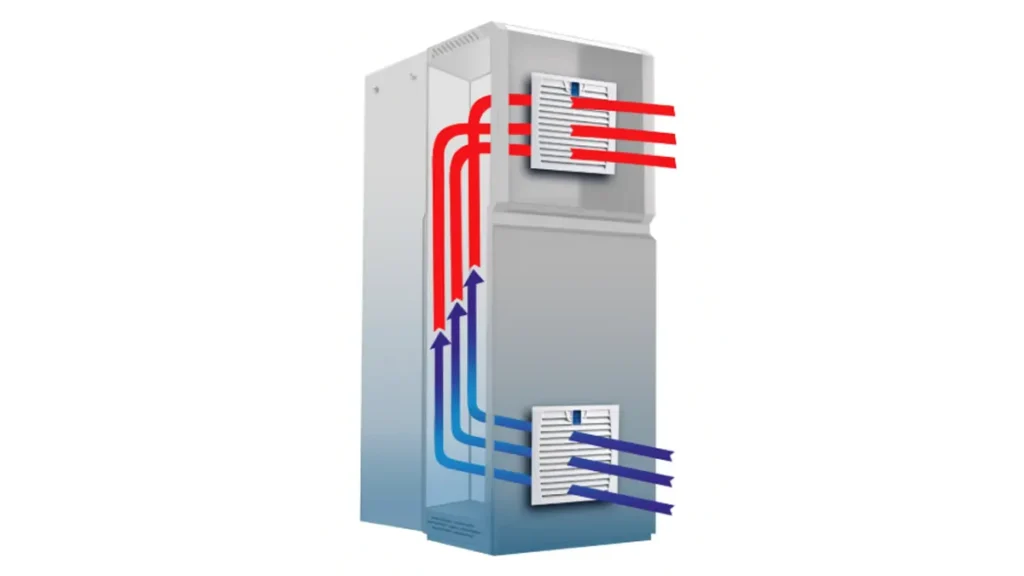
As systems get smaller and use more power, cooling is very important. Good cooling stops parts from getting too hot. Too much heat can make things work badly, not last as long, or break without warning.
Key Takeaways
- Pick the correct airflow direction for your cabinet fan. This helps stop overheating and makes your equipment last longer.
- Intake airflow brings cool air inside. Exhaust airflow pushes hot air outside. Learn which one works best for your setup.
- Put filters on intake fans to block dust. This keeps your electronics clean.
- Place intake fans at the bottom. Put exhaust fans at the top. This gives the best airflow and cooling.
- Check and clean filters often. This keeps airflow strong and stops overheating.
- Do not block airflow paths with cables or equipment. This helps cooling work well.
- Use both intake and exhaust fans for balanced airflow. This is important in bigger cabinets.
- Always check your cabinet’s heat and environment. Pick the right fan type and IP rating.
Cabinet Fan Airflow Direction Basics
How Airflow Works in Cabinets
You want your cabinet to stay cool and safe. Fans move air inside the cabinet. The cabinet fan airflow direction tells if air comes in or goes out. If you set the fan as intake, cool air comes in. If you set it as exhaust, hot air goes out.
Let’s see how different fan setups work:
| Fan Configuration | Operation Description | Advantages/Risks |
|---|---|---|
| Positive Pressure System | Fans blow filtered cool air into the cabinet | Stops dirty air from getting in, keeps things clean, less dust inside |
| Negative Pressure System | Fans pull hot air out of the cabinet | Pulls dirty air through cracks, can bring in dust over time |
| Hybrid System | Uses intake fan filter and natural exhaust | Balances dust control and good cooling |
A positive pressure system pushes clean air in and keeps dust out. A negative pressure system pulls hot air out but can bring in dust through small cracks. Hybrid systems use both ways for better cooling and dust control.
Identifying Airflow Direction
You need to know which way your fan moves air. This helps you set the cabinet fan airflow direction the right way. There are some easy ways to check.
Fan Housing Arrows
Most cabinet fans have arrows on the side. These arrows show where the air goes. Some brands, like CORSAIR, also show which way the blades spin. Look for these arrows before you put in the fan. They help you not make mistakes with fan installation direction.
- Airflow arrows point to the side where air comes out.
- Blade rotation arrows show which way the blades turn.
- The exhaust side has an X-shaped spoke and you can see the fan cables.
- The intake side is smooth and does not have X-shaped bars.
Blade Rotation and Air Path
You can also check airflow direction by looking at the blades. When the fan spins, the curved side of the blade faces the intake. The flat side faces the exhaust. If you look at the pc fan airflow direction, you see cables and spokes on the exhaust side. The intake side is round and clean.
Tip: Always check the airflow arrows and blade shape before you put in your fan. This saves time and keeps your cabinet cool.
Airflow Path and Heat Sources
Air moves through the cabinet to reach all the hot spots. You want the air to touch every heat source. If you miss a spot, that place gets too hot and can cause problems.
Thermal design is very important. You must handle the heat from each part and make sure it gets out fast. If you do not, things can get too hot and not work well.
Here are some common heat sources in industrial cabinets:
| Heat Source | Description |
|---|---|
| PLC modules | Make heat when they work |
| Power supplies | Always make heat in small spaces |
| Drives | Make things hotter if air cannot move |
| Relays | Make heat that can cause overheating |
| Transformers | Make heat that raises the cabinet temperature |
You might see these problems if airflow is not set up right:
- Too much heat inside the cabinet
- Not enough heat leaves the enclosure
- Not enough air reaches hot parts (hot spots)
Where you put these parts changes how well cooling works. If you put hot parts close together, air cannot move well. Space them out so air can move around each one. Try to keep them near the intake for better cooling. Keep exhaust areas after the air inlets. This stops hot spots and helps your cabinet fan airflow direction work best.
Note: Good airflow path design keeps your cabinet safe and helps your equipment last longer.
Intake vs. Exhaust Airflow
Intake Airflow Explained
You might wonder what happens when you set your cabinet fan airflow direction to pull air in. This is called intake airflow. The fan brings cool air from outside into your cabinet. You get fresh air moving right to your electronics and other parts.
Intake airflow works best when you want to keep dust out. You can add a filter to the fan. The filter catches dust and dirt before they get inside. This keeps your cabinet clean and helps your equipment last longer.
Here’s why you might choose intake airflow:
- You want to control dust and keep the inside clean.
- You need the coolest air to reach your most sensitive parts first.
- You want to lower the temperature for parts that get hot fast.
When you use intake airflow, you create positive pressure inside the cabinet. This means air pushes out through small cracks instead of letting dirty air sneak in.
Tip: Intake airflow is great for places with lots of dust or where you need to protect sensitive electronics.
Exhaust Airflow Explained
Now let’s talk about exhaust airflow. When you set your cabinet fan airflow direction to push air out, you pull hot air from inside the cabinet and send it outside. This is called exhaust airflow.
Exhaust airflow works well when you need to get rid of heat fast. The fan pulls hot air away from your parts. This helps stop heat from building up. You often see exhaust fans at the top or back of cabinets because hot air rises.
Exhaust airflow creates negative pressure. This means air gets pulled in through any small gaps or cracks. Sometimes, this can bring in dust if you don’t have good filters on your inlets.
You might pick exhaust airflow when:
- You need to remove hot air quickly.
- Your cabinet has a lot of heat sources.
- You have a clear path for fresh air to come in.
Note: Always check for dust problems if you use exhaust airflow. Add filters to any air inlets to keep things clean.
Intake vs. Exhaust Comparison Table
You may still wonder which setup is better for your cabinet. The answer depends on your needs. Here’s a table to help you compare intake and exhaust airflow:
| Characteristic | Intake Airflow | Exhaust Airflow |
|---|---|---|
| Air Movement | Pulls cool air in | Pushes hot air out |
| Pressure Effect | Positive pressure (keeps dust out) | Negative pressure (can pull dust in) |
| Dust Control | Easy to add filters | Needs filtered inlets |
| Cooling Efficiency | Cools sensitive parts first | Removes heat from whole cabinet |
| Best Fan Placement | Lower part of cabinet | Upper or rear part of cabinet |
| Static Pressure | ≥0.2–0.5 inH₂O | ≥0.2–0.5 inH₂O |
| Noise Level | ≤55 dBA | ≤55 dBA |
| Bearings | Double ball bearing | Double ball bearing |
| Control | PWM speed | PWM speed |
You can see both intake and exhaust airflow have strengths. Intake airflow gives you better dust control and cools key parts first. Exhaust airflow removes heat fast but may need extra dust protection.
Remember: The right cabinet fan airflow direction depends on your cabinet’s layout, heat sources, and how clean you need the inside to stay.
Intake Airflow Use Cases
Filtered Air and Positive Pressure
You want to keep your cabinet clean and safe. Intake fans help you do that. When you use intake fans with filters, you bring in fresh air and stop dust from getting inside. The filter catches dirt, pollen, and even bugs before they reach your electronics. This setup creates positive pressure inside the cabinet. Positive pressure means air pushes out through small cracks instead of letting dirty air sneak in. You get a cleaner cabinet and less dust on your parts. This makes your equipment last longer and work better.
Tip: Always check your filters and change them when they get dirty. Clean filters keep your airflow strong and your cabinet safe.
Direct Cooling of Components
Sometimes, you need to cool down certain parts fast. Intake airflow lets you send cool air right where you need it most. You can point the intake fans at your hottest components. This helps lower their temperature quickly. When you manage airflow well, you do not need as many cooling units. You save energy and money. You also keep the cabinet quieter.
- Good airflow management separates cool air from hot air. This stops hot air from mixing with cold air.
- You can use blanking panels to guide the air. These panels block empty spaces and make sure cool air goes straight to the hot spots.
- When you control the intake temperature and humidity, you can set your cooling units to work just right. This helps your system run better and saves energy.
You get better cooling and your parts stay safe. Intake airflow is a smart choice when you want to protect your most important equipment.
Cleaner Environments
Some places need extra care to stay clean. If you work in a food plant, lab, or hospital, you cannot let dust or germs get inside your cabinet. Intake fans with filters help you keep the air clean. You stop outside dirt from getting in. You also keep your electronics safe from sticky or oily air. This is very important in places where even a little dust can cause big problems.
You can trust intake airflow to give you a cleaner environment. Your equipment will last longer and need less cleaning. You also spend less time fixing problems caused by dust or dirt.
Note: Intake airflow is your best friend when you want a clean, safe, and cool cabinet.
Condition vs. Airflow Direction Table
You may ask which airflow direction is best for your cabinet. Each cabinet is different and has its own needs. You should pick the airflow direction that matches your cabinet’s situation. This helps cool your cabinet, keeps dust out, and protects your equipment.
Let’s look at some common cabinet situations. The table below shows which airflow direction works best for each one.
| Cabinet Condition | Recommended Airflow Direction | Why This Works Best |
|---|---|---|
| Dusty or dirty environment | Intake (with filter) | Keeps dust out, creates positive pressure |
| Sensitive electronics | Intake | Delivers cool air directly to key components |
| High heat load | Exhaust | Removes hot air quickly, prevents heat buildup |
| Overhead cabling present | Intake or exhaust (clear path) | Avoids blocking airflow, keeps air moving freely |
| Small cracks or gaps | Intake | Positive pressure stops dirty air from sneaking in |
| Multiple heat sources | Exhaust | Pulls heat away from all parts, keeps cabinet cooler |
| Food or medical facility | Intake (with filter) | Maintains clean air, protects sensitive equipment |
| Top-mounted fan | Exhaust | Uses rising hot air, improves heat removal |
| Filter maintenance easy | Intake | Makes filter changes simple, keeps airflow strong |
| Cabling size/count per ANSI/BICSI 002 | Intake or exhaust (based on layout) | Ensures proper airflow, follows industry standards |
Tip: Always make sure nothing blocks the way for hot air to leave. If you have cables above, check they do not stop air from getting out. You want a clear path for exhaust air to exit the cabinet.
Here are some things to remember:
- Follow ANSI/BICSI 002 rules when planning your cabinet width. This helps fit all your cables and keeps airflow strong.
- If you use intake fans, add filters and check them often. Clean filters keep your cabinet safe and your equipment cool.
- If you use exhaust fans, look for cracks or gaps. Negative pressure can pull dust in, so add filters to any air inlets.
You can use this table as a quick guide. Match your cabinet’s condition to the airflow direction. You will get better cooling, less dust, and longer equipment life.
Note: You do not have to pick just one airflow direction. Sometimes, you can use both intake and exhaust fans. This gives you balanced airflow and helps with high heat in big cabinets.
If you set up your cabinet the right way, you will stop hot spots and dust problems. Your equipment will work better and last longer. Look at your cabinet, check the conditions, and choose the airflow direction that fits best.
Exhaust Airflow Use Cases
Hot Air Removal
You want your cabinet to stay cool and safe. Removing hot air is one of the main reasons to use exhaust airflow. When you install exhaust fans, you pull hot air out of the cabinet and send it outside. This keeps the temperature down and protects your equipment.
You have several ways to remove hot air effectively:
- Fans and blowers move air quickly. Tube-axial fans are popular for exhausting hot air. Blowers can push cool air in, which helps when airflow resistance is high.
- Exhaust fans can go in different spots on your cabinet. You might put them at the top, back, or sides to get the best airflow.
- Blowers at the bottom create pressure inside the cabinet. This pushes hot air up and out through vents at the top.
- Fan trays help direct air to hot spots. You can place them near components that get hot fast.
- Air conditioning systems work best for critical cabinets. They transfer heat outside and keep everything cool.
Tip: If you have lots of heat sources, use exhaust fans to remove hot air quickly. This improves cooling efficiency and keeps your cabinet running smoothly.
Negative Pressure Effects
When you use exhaust airflow, you create negative pressure inside the cabinet. Negative pressure means air gets pulled in through any cracks or gaps. This can cause problems if your cabinet is not sealed well.
Here’s what you need to watch out for:
- Negative pressure can pull dust and moisture inside. If you have unsealed seams, dust can get in and cause short circuits.
- The pressure difference strains seals and gaskets. Over time, these parts may fail, letting more dust and moisture enter.
- Cooling efficiency drops if dust builds up on your equipment. Dust acts like a blanket and traps heat.
You can avoid these issues by sealing your cabinet well. Make sure all seams and gaskets are tight. If you use exhaust fans, add filters to any air inlets. This helps keep dust out and protects your equipment.
Note: Negative pressure can help remove hot air, but you must manage dust and moisture risks. Always check your cabinet for leaks and keep filters clean.
Top-Mounted Exhaust Fans
Hot air rises. You can use this fact to your advantage. Top-mounted exhaust fans pull hot air out from the highest point in your cabinet. This setup works well for cabinets with lots of heat sources.
You get better cooling efficiency when you place exhaust fans at the top. The fans remove hot air fast and keep the temperature steady. You also make sure fresh air comes in from the bottom, which helps cool your equipment.
- Top-mounted exhaust fans are easy to install and maintain.
- They work best in cabinets with clear airflow paths.
- You can combine them with intake fans at the bottom for balanced cooling.
Tip: Always check that nothing blocks the airflow path. Keep cables and equipment away from the fan area so air can move freely.
If you set up your cabinet with top-mounted exhaust fans, you improve cooling efficiency and protect your equipment from overheating.
Clear Inlet Paths
When you set up exhaust fans in your cabinet, you need to think about where the fresh air comes in. You might focus on getting hot air out, but you cannot forget about the path for cool air to enter. If you block or ignore these inlet paths, your exhaust fans will not work as well as you expect.
Clear inlet paths let fresh, cool air flow into your cabinet without trouble. When you give air an easy way in, your exhaust fans can pull out hot air much faster. If you block the inlets with cables, panels, or equipment, you slow down the airflow. Your cabinet might get too hot, and your equipment could start to fail.
Tip: Always check that nothing blocks the air inlets. Even small things like loose wires or dust filters can slow down the airflow.
You want to keep the airflow smooth and steady. When air moves in easily, your fans do not have to work as hard. This helps you save energy and keeps your system running quietly. If you let obstructions build up, you create pressure loss inside the cabinet. Pressure loss means your fans cannot move as much air, and your cooling system loses its power.
Let’s look at some common mistakes you might see:
- You place equipment or cables right in front of the air inlets.
- You use filters that are too dirty or too small for your fan size.
- You forget to clean vents or grilles, so dust builds up and blocks the path.
- You install panels or shelves that block the airflow from reaching your equipment.
If you want your exhaust fans to work their best, you need to keep those inlet paths open and clear. This is not just about cooling. It is also about safety. When airflow gets blocked, your cabinet can overheat. Overheating can damage your electronics or even cause a fire risk.
You also need to make sure that cold supply air reaches your equipment before it mixes with hot exhaust air. If cold and hot air mix too soon, your cooling system will not work as well. You want the cold air to go straight to the parts that need it most.
Here’s a quick checklist to help you keep your inlet paths clear:
- Check for obstructions near all air inlets.
- Clean or replace filters often.
- Arrange cables and equipment so they do not block airflow.
- Use blanking panels to guide air where you want it to go.
- Make sure vents and grilles stay free of dust and debris.
Note: Good airflow management starts with clear inlet paths. When you keep these paths open, your exhaust fans can do their job, your cabinet stays cool, and your equipment lasts longer.
If you pay attention to your inlet paths, you will see better cooling, lower energy bills, and fewer problems with your equipment. It is a simple step, but it makes a big difference in how well your cabinet cooling system works.
Fan Placement Best Practices
Lower Intake, Upper Exhaust
You want your cabinet to stay cool and work well. The best way is to put intake fans at the bottom or front. Put exhaust fans at the top or back. This setup makes air move in a straight line. Cool air comes in from below and goes up through your equipment. Hot air leaves at the top. You can use a thermal camera to find hot spots. Place fans near these spots for better cooling.
Here are some common ways to set up your fans:
- Front-to-back airflow means intake fans go in front and exhaust fans go in back.
- Bottom-to-top airflow means intake fans go at the bottom and exhaust fans go at the top.
- Side-to-side airflow uses fans on the sides for special cabinet layouts.
Always look at your cabinet and see where the heat comes from before you put in fans. This helps keep air moving right and keeps your equipment safe.
Unobstructed Airflow Path
You need a clear path for air to move inside your cabinet. If cables, panels, or equipment block the way, cooling will not work well. Hot spots can show up if air cannot move. Good rack parts, like doors with holes and sealed side panels, help guide air. Filler panels close empty spaces and stop hot air from coming back in. Use cable organizers to keep airflow channels open.
Here is a quick checklist to help keep air moving:
- Use rack parts to guide airflow.
- Add filler panels to close empty spots.
- Keep cables neat so they do not block air.
Messy cables can stop air and make cooling worse. You want air to reach every part of your cabinet for the best cooling.
Tip: Always check for things blocking air before you turn on your fans. Clean vents and fix cables so air can move easily.
Using Filters on Intake
Filters on intake fans help keep your equipment safe. They catch dust and dirt before it gets inside. Clean air helps your electronics last longer. Filters also help air move better, so your equipment does not have to work too hard. This saves energy and money.
Here are some good things about using filters on intake fans:
- Your equipment lasts longer
- Cooling works better
- You save energy
- Less downtime
- Cleaner air inside
Check and clean your filters often. Dirty filters can block air and make cooling worse. Taking care of your filters keeps your cabinet working well and helps air move right.
Note: Filters are an easy way to help cooling and protect your equipment. Always add them to your intake fans.
Using Intake and Exhaust Together
Balanced Airflow in Large Cabinets
You might have a big cabinet with lots of equipment inside. Sometimes, using only intake fans or only exhaust fans does not give you the cooling you need. You can use both intake and exhaust fans together to create a balanced airflow configuration. This setup helps you move air through the cabinet in a clear path. Intake fans pull cool air from one side, and exhaust fans push hot air out from the opposite side. You get steady cooling and keep dust out.
Here are some tips for setting up a balanced airflow configuration:
- Place intake fans on one side or at the bottom of your cabinet. These fans bring in fresh air and help cool your equipment.
- Put exhaust fans on the opposite side or at the top. These fans remove hot air and keep the temperature down.
- Try to match the amount of air coming in with the amount going out. This keeps the pressure inside your cabinet steady and stops dust from sneaking in.
- Don’t put intake fans and exhaust fans right across from each other. If you do, you might create a short circuit in airflow. Air could skip your equipment and go straight out, leaving hot spots behind.
Balanced airflow makes your cabinet safer and cleaner. You get better cooling, less dust, and longer life for your electronics.
Managing High Heat Loads
If your cabinet has lots of heat-producing parts, you need a smart airflow configuration. Using both intake and exhaust fans helps you handle high heat loads. You can direct cool air right to the hottest spots and let warm air escape fast. This setup stops hot pockets from forming and keeps your equipment running smoothly.
Here’s how you can manage high heat loads:
- Use intake fans to send cool air to the parts that get hot first. You can aim the fans at drives, power supplies, or other heat sources.
- Exhaust fans pull warm air out, so it doesn’t build up inside. You keep the temperature steady and avoid overheating.
- Channel air from the bottom to the top of your cabinet. This vertical airflow can boost cooling efficiency by up to 30%. You get more cooling power without adding extra case fans.
- Make sure your airflow configuration covers all areas. You don’t want any spots left out. Every part needs fresh air and a way for hot air to leave.
If you use both intake and exhaust fans, you get the best cooling for cabinets with lots of heat. Your equipment stays safe, and you don’t have to worry about sudden failures.
You can also use case fans to help move air around inside the cabinet. These fans support your main airflow configuration and make sure every corner gets cooled. When you plan your setup, think about where the heat comes from and how air moves. You can keep your cabinet cool and your equipment working for years.
Common Fan Setup Mistakes
No Defined Airflow Path
You might think just adding a fan will keep your cabinet cool. That’s not always true. If you don’t plan the airflow path, air can swirl around without reaching the hot spots. This mistake often leads to uneven cooling. Some parts stay cool, but others get too hot. Over time, this can cause your equipment to fail.
Picture this: You install a fan, but cables and parts block the air. The cool air never reaches the hottest components. Hot air gets trapped inside. Your cabinet heats up fast. You need to make sure air can move from the intake to the exhaust without hitting obstacles. Always check your layout before you start your fan setup.
Tip: Use blanking panels and cable organizers to guide air where you want it to go. This helps you get the most out of your cooling system.
Inlet and Outlet Too Close
Another common mistake is placing the air inlet and outlet too close together. When this happens, air enters and leaves the cabinet without passing over your equipment. This is called “short-circuiting” the airflow. Your fan works hard, but your electronics still get hot.
You want air to travel across all the important parts before it exits. If the inlet and outlet sit side by side, you waste energy and lose cooling power. Spread them apart. Place the intake low and the exhaust high, or put them on opposite sides. This way, you make sure cool air reaches every corner.
- Keep inlets and outlets far apart.
- Guide air past all heat sources.
- Avoid letting air escape too soon.
Ignoring Filters
Filters might seem like a small detail, but they play a big role in keeping your cabinet clean. If you skip filters, dust and dirt can get inside. Over time, dust builds up on your equipment. This acts like a blanket, trapping heat and making cooling less effective.
Many people forget to check or replace filters. Dirty filters block airflow and make your fans work harder. This can lead to overheating and even damage your electronics. You should always include filters in your fan setup and check them often.
Note: Clean filters help you keep your cabinet cool and your equipment safe. Don’t ignore them!
Here’s a quick list of mistakes you should avoid in your cabinet cooling plan:
- Using fans that are too small for the heat load
- Blocking airflow paths with cables or equipment
- Placing fans in the wrong spot
- Forgetting about dust and filter maintenance
If you pay attention to these details, you’ll get better cooling and longer life from your equipment. Remember, correct pc fan orientation and smart planning make all the difference.
Blocked Airflow
You might think your cabinet fan is working hard, but blocked airflow can ruin your cooling plan. Air needs a clear path to move through your cabinet. If you block that path, your fan cannot do its job. Hot air stays trapped, and your equipment gets hotter. You want to avoid this mistake because it leads to overheating and can damage your electronics.
Blocked airflow happens in many ways. You might stack cables in front of vents. You could place big equipment right where air needs to flow. Sometimes, dust builds up on filters or grilles and stops air from moving. Even small things, like loose wires or extra panels, can slow down the airflow.
Let’s look at some common causes of blocked airflow:
- Messy cables hanging in front of fans or vents
- Equipment placed too close to air inlets or outlets
- Dust and dirt clogging filters or grilles
- Extra panels or shelves blocking air channels
- Closed doors or covers with no ventilation holes
You want to keep your airflow path open. If you block it, your fan works harder but cools less. Your cabinet heats up, and your electronics can fail. You might see warning lights or hear alarms. Sometimes, your equipment shuts down to protect itself.
Tip: Always check your cabinet for things that block airflow. Move cables away from vents. Clean filters and grilles often. Make sure nothing sits in front of your fans.
Here’s a simple checklist to help you avoid blocked airflow:
- Organize cables with ties or trays.
- Place equipment away from air inlets and outlets.
- Clean filters and grilles every month.
- Remove extra panels that block air channels.
- Use doors with ventilation holes.
You can use blanking panels to guide air where you want it to go. These panels fill empty spaces and stop hot air from coming back in. You also want to keep vents and grilles free of dust. If you see dust building up, clean it right away.
Blocked airflow is easy to fix if you pay attention. You get better cooling, lower energy bills, and longer equipment life. Your cabinet stays safe, and your electronics work well. If you keep your airflow path clear, your fan can do its job and your cooling system stays strong.
Note: Good airflow management starts with a clear path. If you keep your cabinet tidy and clean, you avoid blocked airflow and protect your equipment.
Choosing the Right Cabinet Fan
Airflow and Static Pressure
You want your cabinet to stay cool and run smoothly. Picking the right fan starts with understanding airflow and static pressure. Airflow tells you how much air the fan moves, usually measured in cubic feet per minute (CFM). Static pressure shows how well the fan pushes air through obstacles like filters or tight spaces.
Here’s what you should do:
- Calculate the heat your equipment makes. Add a safety margin of 15-20% to cover extra heat.
- Check how airflow and static pressure work together. If you need more air volume, static pressure drops. If you have lots of filters or tight spots, static pressure goes up.
- Look at the PQ curve for the fan. This curve shows how much airflow you get at different static pressures. Make sure the fan meets your needs.
- Estimate the total resistance in your cabinet. Include filters, cables, and anything that blocks air.
If you get these steps right, you boost cooling performance and keep your equipment safe. Fans with the right balance of airflow and static pressure give you steady performance and help prevent overheating.
Cabinet Size and Heat Load
Cabinet size and heat load play a big role in fan selection. You need to know how much heat your cabinet produces and how big the space is. This helps you pick a fan that matches your cooling performance needs.
Follow these steps:
- Find out the heat load in watts for all your equipment.
- Use this formula to figure out the required airflow:
Required Airflow (CFM) = (Heat Load in Watts × 3.16) ÷ Delta T (°F) - For example, if your cabinet has a heat load of 200 watts and you want a temperature difference (Delta T) of 10°F, you need 63.2 CFM.
Proper calculations make sure your fan delivers the cooling performance you expect. If you skip this step, you might pick a fan that can’t handle the heat. That leads to poor performance and possible equipment failure.
Tip: Always check your cabinet’s size and heat load before buying a fan. This helps you avoid mistakes and keeps your system running strong.
Voltage and Fan Type
You also need to think about voltage and fan type. Fans come in different voltages, like 12V, 24V, or 48V. Pick a fan that matches your cabinet’s power supply. If you choose the wrong voltage, the fan won’t work or could damage your equipment.
Fan types matter too. You can pick from AC fans, DC fans, or even PWM-controlled fans. AC fans are simple and reliable. DC fans use less power and let you control speed. PWM fans give you more control over performance and noise.
Here’s a quick table to help you decide:
| Fan Type | Voltage Options | Best Use Case | Control Options |
|---|---|---|---|
| AC Fan | 110V, 220V | Large cabinets, steady power | On/Off |
| DC Fan | 12V, 24V, 48V | Small cabinets, energy saving | Variable speed |
| PWM Fan | 12V, 24V | Precise cooling performance | Speed control |
Pick the fan type and voltage that fit your cabinet and cooling performance needs. This helps you get the best performance and keeps your equipment safe.
Note: Always check your cabinet’s power supply and choose the right fan type for your cooling performance goals.
Filter and IP Rating
When you pick a cabinet fan, you need to think about filters and IP ratings. These two things help keep your equipment safe from dust, water, and other problems.
Filters are your first line of defense. They stop dust, dirt, and even bugs from getting inside your cabinet. If you work in a place with lots of dust or small particles, you need a good filter. Clean air helps your electronics last longer and work better. You can find different types of filters:
- Foam filters: Easy to clean and good for light dust.
- Metal mesh filters: Strong and work well in tough places.
- HEPA filters: Catch very tiny particles. Great for labs or clean rooms.
You should check your filters often. Dirty filters block airflow and make your fan work harder. If you see dust building up, clean or replace the filter right away.
Tip: Always match your filter to your environment. If you have lots of dust, pick a filter that can handle it.
Now, let’s talk about IP ratings. IP stands for Ingress Protection. This rating tells you how well your fan and cabinet keep out dust and water. You will see numbers like IP54 or IP65 on fan labels. The first number shows protection against solids (like dust). The second number shows protection against liquids (like water).
Here’s a quick table to help you understand IP ratings:
| IP Rating | Dust Protection | Water Protection | Where to Use |
|---|---|---|---|
| IP20 | No dust protection | No water protection | Clean, dry rooms |
| IP54 | Some dust protection | Splashing water | Light industrial, offices |
| IP55 | Dust protected | Water jets | Factories, machine shops |
| IP65 | Dust tight | Low-pressure water jets | Outdoor, washdown areas |
If you work in a wet or dusty place, pick a fan with a higher IP rating. This keeps your equipment safe from damage. For most indoor cabinets, IP54 is enough. For outdoor or harsh places, go for IP65 or higher.
Note: The right filter and IP rating help your fan last longer and keep your cabinet clean. Always check both before you buy.
You can ask your supplier for help if you are not sure which filter or IP rating you need. They can help you pick the best option for your cabinet and your work area.
Buyer Information Checklist
Cabinet Size and Layout
You want your cabinet cooling system to work right. The first thing you need to share is your cabinet’s size and layout. If you give the width, height, and depth, you help your supplier pick the best fan for your space. You should also mention how much room you have for mounting fans. Sometimes, cabinets have tight spots or shelves that block airflow. If you tell your supplier about these, you get a fan that fits and works well.
Here’s a quick table to help you see what to provide:
| Information Needed | What to Provide |
|---|---|
| Cabinet Size | Width, height, and depth |
| Mounting Space | Space for installing fans |
| Layout Details | Shelves, panels, or obstacles |
You can also draw a simple sketch of your cabinet. Show where you want to put the fans. This helps your supplier understand your setup. If you have special features, like waterproofing or alarms, mention those too.
Tip: The more details you give about your cabinet’s size and layout, the easier it is to get the right fan.
Heat Source and Target Temp
You need to think about what makes your cabinet hot. Every piece of equipment inside creates heat. You should list all the devices and their wattage. Add up the total watts to get your heat load. If you know the highest temperature you want inside the cabinet, share that number. This is your target temperature.
You also need to tell your supplier about the highest temperature around your cabinet. This is called ambient temperature. If your cabinet sits in a hot room or near machines, the cooling needs change. When you give both the heat load and target temperature, your supplier can calculate the airflow you need.
Here’s what you should provide:
- List of all equipment and their wattage
- Total heat load in watts
- Target temperature inside the cabinet
- Highest ambient temperature near the cabinet
If you want your cabinet to stay cool, you must share these numbers. Your supplier uses them to pick a fan that keeps your equipment safe.
Note: Accurate heat load and temperature details help you avoid overheating and keep your cabinet running smoothly.
Ambient Conditions
You should always think about the environment around your cabinet. If your cabinet sits in a dusty room, you need fans with filters. If water splashes near your cabinet, you need waterproof fans. You can also ask for fans with alarms if you want extra safety.
Tell your supplier about anything special in your work area. Is it hot, cold, wet, or dirty? Do you need low noise fans for quiet spaces? If you share these details, you get a fan that matches your needs.
Here’s a checklist for ambient conditions:
- Dusty or dirty environment
- Wet or humid area
- High or low temperatures
- Need for low noise or alarms
If you cover all these points, you help your supplier pick the best fan for your cabinet. You get better cooling, longer equipment life, and fewer problems.
Tip: Always mention any special conditions in your work area. This helps you get a fan that works well and lasts longer.
Airflow and IP Needs
When you want to pick the right cabinet fan, you need to know how much airflow your cabinet needs and what level of protection you want. Airflow tells you how much air moves through your cabinet. You measure airflow in cubic feet per minute (CFM). If you get the airflow wrong, your equipment can overheat or run too cold.
You can figure out your airflow needs by looking at your cabinet’s heat load. If your equipment makes a lot of heat, you need more airflow. If your cabinet sits in a cool place, you might need less. You can use this simple formula to estimate the airflow:
Required Airflow (CFM) = (Total Heat Load in Watts × 3.16) ÷ Temperature Rise (°F)
Let’s say your cabinet has a heat load of 300 watts and you want a temperature rise of 10°F. You need about 95 CFM. If you share these numbers with your supplier, you get a fan that matches your cooling needs.
Now, let’s talk about IP rating. IP stands for Ingress Protection. This rating shows how well your fan keeps out dust and water. You see numbers like IP54 or IP65 on fan labels. The first number tells you about dust protection. The second number tells you about water protection.
Here’s a quick table to help you understand IP ratings:
| IP Rating | Dust Protection | Water Protection | Where to Use |
|---|---|---|---|
| IP20 | No dust protection | No water protection | Clean, dry rooms |
| IP54 | Some dust protection | Splashing water | Light industrial, offices |
| IP55 | Dust protected | Water jets | Factories, machine shops |
| IP65 | Dust tight | Low-pressure water jets | Outdoor, washdown areas |
If your cabinet sits in a dusty place, pick a fan with a higher IP rating. If you work in a wet area, you need a fan that keeps water out. You can ask your supplier for help if you are not sure which IP rating fits your cabinet.
Tip: Always match your airflow and IP needs to your cabinet’s environment. If you get these details right, your equipment stays cool and safe.
You can make a list of your airflow and IP needs before you ask for a quote. This helps your supplier pick the best fan for your cabinet. If you skip these details, you might get a fan that does not work well.
- Write down your cabinet’s heat load in watts.
- Decide how much airflow you need in CFM.
- Check your cabinet’s environment for dust and water.
- Pick an IP rating that matches your needs.
If you follow these steps, you get better cooling and longer equipment life. Your cabinet stays clean, and your electronics work without trouble.
Conclusion
The right airflow direction helps keep your cabinet cooler, cleaner, and more reliable. Before choosing intake or exhaust airflow, check your cabinet size, heat sources, component layout, ambient temperature, dust level, and installation position. A clear airflow path can help protect electrical components and improve long-term system stability.
At LINKWELL, we manufacture cabinet fans, enclosure fans, AC fans, DC cooling fans, EC fans, axial fans, centrifugal fans, and custom cooling fan solutions for industrial applications. Share your cabinet size, voltage, heat load, airflow direction, working environment, and protection requirements with our team. We can help you choose a suitable cooling fan solution for your project.
FAQ
How do I know if my cabinet fan is set as intake or exhaust?
Look for arrows on the fan housing. The airflow arrow shows where the air goes. Intake pulls air in. Exhaust pushes air out. You can also check which side has the cables and spokes.
Can I use both intake and exhaust fans in one cabinet?
Yes, you can. Using both helps balance airflow. Intake fans bring in cool air. Exhaust fans remove hot air. This setup works well for large cabinets or high heat loads.
Do I need filters on my intake fans?
You should use filters if you want to keep dust out. Filters catch dirt before it enters your cabinet. Clean filters help your equipment last longer and keep airflow strong.
Where should I place my fans for best cooling?
Put intake fans at the bottom or front. Place exhaust fans at the top or back. This setup lets cool air flow up and hot air exit easily. Keep airflow paths clear for best results.
What happens if I block airflow inside my cabinet?
Blocked airflow causes hot spots. Your equipment can overheat and fail. Always keep cables, panels, and equipment away from vents and fans. Clean filters and grilles often.
How often should I check or replace cabinet fan filters?
Check filters every month. Replace or clean them when you see dust buildup. Clean filters keep airflow strong and protect your electronics from overheating.
Will negative pressure bring dust into my cabinet?
Negative pressure can pull dust through cracks and gaps. If you use exhaust fans, seal your cabinet well. Add filters to air inlets to stop dust from getting inside.
What IP rating should I choose for my cabinet fan?
Pick an IP rating based on your environment. Use IP54 for light dust and splashes. Choose IP65 for outdoor or wet areas. Higher IP ratings give better protection against dust and water.

