
Yes—you absolutely can add an extra heatsink fan, and in many industrial scenarios, it is one of the most practical and cost-effective ways to improve thermal performance.
From our experience as a manufacturer working closely with industrial cooling systems, we’ve seen this simple modification solve a wide range of overheating issues.
Whether you’re dealing with a variable frequency drive (VFD), a power module inside an electrical cabinet, or a rectifier unit under continuous load, adding a second fan can significantly improve heat dissipation and system stability.
This isn’t just about computer cooling. In fact, we’re focusing specifically on industrial equipment upgrades—where thermal loads are higher, operating hours are longer, and failure costs are much more serious.
In this guide, I’ll walk you through how to evaluate whether you need an extra fan, how to select the right type, how to install it properly, and what mistakes to avoid. By the end, you’ll have a clear, practical framework—not just theory.
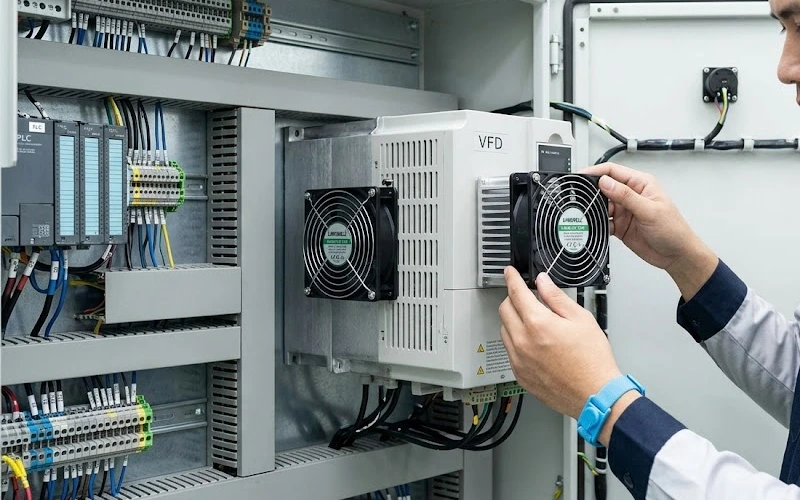
Why Would You Need an Extra Heatsink Fan?
In industrial environments, passive cooling often reaches its limits faster than expected. Heatsinks are designed to dissipate heat through natural convection, but when heat generation exceeds design assumptions, airflow becomes critical.
Here are the most common real-world situations we encounter:
1. Frequent Overheating Alarms in VFDs
When a VFD operates under heavy load or in a high ambient temperature environment, internal heatsinks can accumulate heat faster than it dissipates. This leads to thermal protection triggers, shutdowns, and production interruptions.
2. High Temperature in Rectifiers or IGBT Modules
Power electronics—especially IGBT modules—generate concentrated heat. If airflow is insufficient, temperatures rise quickly, reducing efficiency and shortening component lifespan.
3. Original Fan Discontinued or Failed
We often see older equipment where the original cooling fan is no longer available. Instead of replacing the entire system, adding an external or secondary fan becomes a practical retrofit solution.
4. Power Upgrade Without Cooling Upgrade
This is extremely common. Equipment gets upgraded for higher output, but the cooling system remains unchanged. The result? Thermal imbalance.
5. Enclosed Electrical Cabinets
In sealed or semi-sealed cabinets, heat accumulates easily. Even with ventilation, internal hotspots form around heatsinks. A targeted fan can dramatically improve airflow distribution.
What to Know Before You Add a Fan
Before installing anything, you need to evaluate three critical factors: size, voltage, and airflow characteristics.
Fan Size Selection
Choosing the correct size is not just about fitting the space—it directly impacts airflow performance.
| Fan Size | Typical Use Case |
|---|---|
| 40mm | Small control modules, compact power supplies |
| 60mm | Embedded systems, small heatsinks |
| 80mm | Electrical cabinets, medium heatsinks |
| 92mm | Industrial controllers, denser layouts |
| 120mm | Large enclosures, high heat loads |
As a rule, larger fans provide higher airflow at lower noise, but may not fit in constrained industrial layouts.
Voltage Selection
Industrial systems typically operate on DC power. The most common options are:
- 12V DC – Smaller systems, control boards
- 24V DC – Most industrial equipment (recommended standard)
- 48V DC – Telecom, solar, and high-efficiency systems
When selecting a fan, always match the available power source inside your equipment. Avoid adding external power supplies unless absolutely necessary—it complicates installation and reliability.
Airflow vs Static Pressure
This is where many people make the wrong decision.
- High Airflow (CFM) → Best for open heatsinks with minimal resistance
- High Static Pressure → Required for dense heatsinks or restricted airflow paths
Quick Judgment Rule:
- If air can pass through easily → use axial fan (airflow type)
- If airflow is restricted → use centrifugal blower (high pressure)
How to Choose the Right Fan for Your Heatsink
Let’s simplify the decision:
| Heatsink Type | Recommended Fan Type | Practical Direction |
|---|---|---|
| Dense fins, narrow spacing | Centrifugal blower | Push air through fins |
| Open fins, large spacing | Axial fan | Move large air volume |
| Confined airflow channel | High static pressure fan | Maintain airflow consistency |
| Requires speed control | PWM DC fan | Adaptive cooling |
| Needs monitoring | FG signal fan | Real-time feedback |
From a manufacturer’s perspective, we always recommend prioritizing airflow matching over fan size alone. A poorly matched fan—even if powerful—won’t solve the problem.
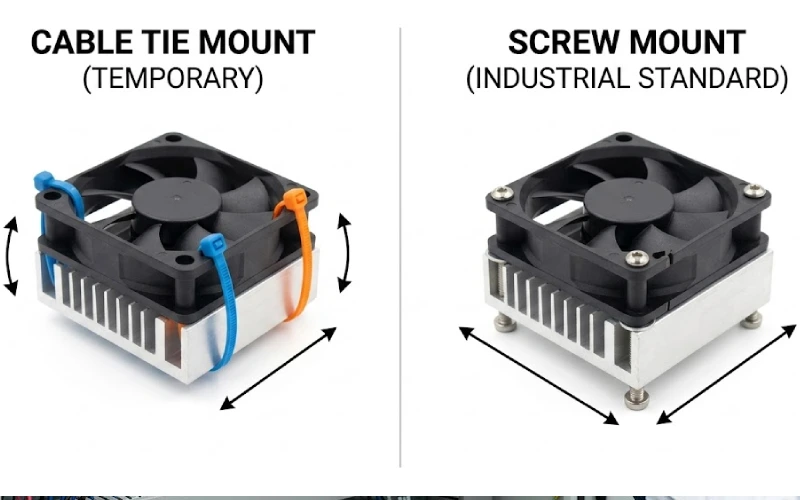
How to Mount a Second Fan on a Heatsink
There’s no single installation method that fits all situations. The best choice depends on your equipment structure and whether the installation is temporary or permanent.
| Mounting Method | Application | Advantages | Disadvantages |
|---|---|---|---|
| Screw mounting | Heatsink with pre-drilled holes | Strongest, most reliable | Requires alignment |
| Bracket/adaptor | No direct mounting points | Flexible and reusable | Additional components needed |
| Cable ties | Testing or temporary setups | Fast, zero cost | Not stable in vibration |
| Thermal adhesive / magnetic | Small fans, no drilling allowed | Easy, non-invasive | Limited strength |
In industrial environments, I strongly recommend mechanical fixation (screws or brackets) whenever possible. Stability matters, especially under vibration and long operating cycles.
Step-by-Step: Adding a Fan to an Industrial Heatsink
Let me walk you through a practical workflow we often recommend to our clients.
Step 1: Power Off and Ensure Safety
Always disconnect power and verify there is no residual voltage. Industrial systems can retain charge even after shutdown.
Step 2: Measure the Heatsink
Check:
- Width and height
- Fin spacing
- Available mounting space
This determines both fan size and type.
Step 3: Estimate Required Airflow
A simplified rule:
Higher heat load = higher airflow required
While precise calculations depend on system design, a general approach is:
- Identify heat source power (W)
- Select airflow sufficient to maintain temperature below critical limits
Step 4: Select the Fan Type
- Dense heatsink → centrifugal blower
- Open heatsink → axial fan
If noise or energy efficiency matters, consider PWM-controlled fans.
Step 5: Mount the Fan
Choose the most stable method available:
- Prefer screws or brackets
- Ensure alignment with airflow direction
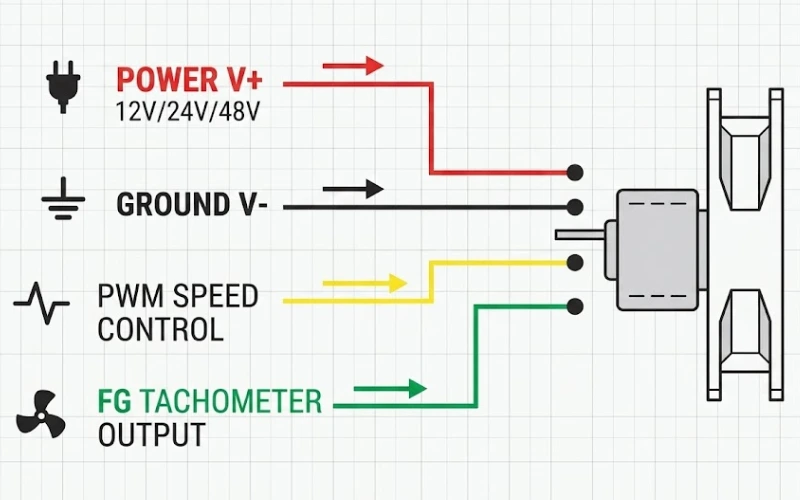
Step 6: Wiring
- Connect to appropriate DC supply (12V / 24V / 48V)
- Optional: connect PWM for speed control
- Optional: connect FG for monitoring
Step 7: Test the System
- Power on
- Measure temperature before and after installation
- Verify airflow direction
Step 8: Monitor Long-Term Performance
Observe:
- Temperature stability
- Noise levels
- Fan reliability over time
Common Mistakes When Adding a Second Fan
Even though the concept is simple, execution often goes wrong. Here are the most common issues we see:
Incorrect Airflow Direction
Installing the fan backwards is more common than you think. Always check airflow arrows.
Wrong Fan Type
Using a high-airflow fan on a dense heatsink often results in no meaningful improvement.
Improper Wiring
Incorrect voltage or parallel wiring mistakes can damage the fan or reduce performance.
Ignoring Noise
High-speed fans can significantly increase noise levels—especially in enclosed cabinets.
Insufficient Power Supply
Adding a fan increases load. If the power supply is already near its limit, this can cause instability.
When One More Fan Isn’t Enough
Sometimes, adding a second fan won’t solve the problem—and it’s important to recognize that early.
Heatsink Is Undersized
If the heatsink itself cannot dissipate heat effectively, airflow alone won’t fix it.
Poor System Design
Air recirculation, blocked vents, or poor layout can limit airflow effectiveness.
High Heat Density
In high-power systems, you may need:
- Larger heatsinks
- Multiple fans
- Or a completely different cooling approach
Advanced Solution
In more demanding applications, we often recommend:
- EC fans with smart control
- Temperature-based speed adjustment
- Integrated cooling systems
Where to Find Reliable Fans for Heatsink Upgrades
From our manufacturing experience, selecting the right fan is not just about specifications—it’s about reliability, consistency, and adaptability to industrial conditions.
Here are a few typical configurations we often provide:
Model A – Compact DC Axial Fan
- Size: 80mm
- Voltage: 24V DC
- Feature: Balanced airflow and low noise
- Application: Electrical cabinets, open heatsinks
Model B – High Static Pressure Blower
- Type: Centrifugal
- Voltage: 24V / 48V DC
- Feature: Strong airflow through dense fins
- Application: VFDs, IGBT modules
Model C – Smart PWM-Controlled Fan
- Size: 120mm
- Feature: Speed control + FG feedback
- Application: Systems requiring dynamic cooling
If you’re not sure which one fits your system, we usually suggest sharing:
- Heatsink dimensions
- Power load
- Ambient temperature
From there, we can help you match the right configuration quickly.
Conclusion
Adding an extra heatsink fan is not only feasible—it’s often one of the most effective ways to solve industrial overheating issues without redesigning the entire system.
But the key is not just adding a fan—it’s adding the right fan:
- Correct size
- Proper voltage
- Suitable airflow characteristics
Get those three right, and you’ll see a measurable improvement in thermal performance.
If you’re dealing with a specific overheating issue and want a precise recommendation, it’s worth getting a second opinion from someone who works with these systems every day. That’s usually where we can step in and help you avoid trial-and-error.
FAQ
Will adding a second fan always reduce temperature?
Not always—but in most industrial cases, it does. The improvement depends on whether airflow is the real bottleneck. If your heatsink is already saturated or undersized, adding a fan may bring only limited results. However, when poor airflow is the issue, a properly selected fan can significantly reduce operating temperature.
How much temperature drop can I expect?
In practical industrial applications, you can typically see a 5°C to 20°C reduction. The exact result depends on:
- Heat load
- Heatsink design
- Fan type (airflow vs static pressure)
- Installation quality
We’ve seen cases where simply switching to a high static pressure fan made more difference than adding a second low-performance fan.
Should the second fan push or pull air?
Both configurations can work, but in most industrial setups:
- Push (blowing air into the heatsink) → better for dense fins
- Pull (drawing air out) → useful when space is limited or airflow needs to be directed
The key is consistency—avoid airflow conflict between multiple fans.
Can I connect the new fan to the existing power supply?
Yes, as long as:
- The voltage matches (12V / 24V / 48V DC)
- The power supply has enough capacity
Always check the fan’s current rating and ensure the total load stays within safe limits. If the margin is too tight, consider a dedicated power line.
Is it better to use two small fans or one larger fan?
In most cases, one larger fan is more efficient and quieter. Larger fans move more air at lower speeds.
However, two smaller fans make sense when:
- Space is limited
- Airflow needs to be distributed across multiple hotspots
Do I need a high airflow fan or a high static pressure fan?
This depends entirely on your heatsink structure:
- Open heatsink → choose high airflow (axial fan)
- Dense or narrow fins → choose high static pressure (centrifugal blower)
Choosing the wrong type is one of the most common reasons upgrades fail.

