
If you run industrial equipment, you know how much a small issue can throw off your entire operation. Sticking to a centrifugal fan maintenance checklist helps you avoid costly breakdowns, wasted energy, and unexpected downtime. Even simple tasks like cleaning and lubrication can boost efficiency by up to 30% and extend your fan’s life by years. Check out how regular maintenance pays off:
| Benefit | Description |
|---|---|
| Extended Equipment Lifespan | Proper care adds years to your fan’s operational life. |
| Energy Efficiency | Clean, well-lubricated fans use less power. |
| Reduced Downtime | Maintenance helps you dodge surprise breakdowns. |
| Cost Savings | Fixing small issues early saves you big money later. |
| Efficiency Improvement | Well-maintained fans work up to 30% more efficiently. |
With fanacdc’s reliable design and quality, you can count on your system running smoothly when you stick to a smart maintenance routine.
Key Takeaways
- Regular maintenance can extend your centrifugal fan’s lifespan by up to 60%.
- Daily inspections help catch small issues early, preventing costly breakdowns.
- Cleaning and lubricating your fan can improve efficiency by up to 30%.
- Ignoring maintenance can lead to higher energy costs and unexpected downtime.
- Using a maintenance checklist ensures your fan runs smoothly and reliably all year.
Why Centrifugal Fan Maintenance Matters
Performance and Efficiency
You want your equipment to run at its best every day. That’s where centrifugal fan maintenance comes in. When you keep up with cleaning, lubrication, and inspections, your fans deliver steady airflow and use less energy. Over time, dust and grease can build up inside your fan. This makes the motor work harder and wastes power. Regular maintenance restores the fan’s aerodynamic shape and keeps everything balanced. You’ll notice smoother operation and lower energy bills.
Here’s a quick look at common performance issues when you skip centrifugal fan maintenance:
| Maintenance Issue | Description | Impact |
|---|---|---|
| Impeller Cleanliness | Dirt causes imbalance and vibration | Equipment damage, inefficiency |
| Bearing Lubrication | Poor lubrication leads to noise, malfunction | Higher costs, more downtime |
| Belt Drive Tension | Wrong tension causes noise, poor performance | Energy loss, possible failure |
| Motor Upkeep | Dirty or dry motors overheat | Shorter life, less efficiency |
Risks of Neglect
Dust can damage bearings, and vibration can loosen parts. Dirty fan wheels waste energy and can even cause sudden failures that stop production. You might face higher energy costs, more downtime, and even compliance risks. Unplanned shutdowns can cost you time and money. With a good maintenance routine, you can spot problems early and avoid these headaches.
- Dust buildup damages bearings
- Vibration loosens structures
- Dirty wheels waste energy
- Sudden failures halt production
- Higher energy bills and downtime
Benefits of Regular Maintenance
Proper motor care can extend your fan’s life by up to 60%. You’ll avoid expensive repairs and keep your operation running smoothly. Regular upkeep also cuts energy use and lowers your bills. Predictive maintenance programs can reduce unplanned downtime by up to 70%. With fanacdc’s reliable design, you get even more value from your efforts. Their fans run smoothly and efficiently when you give them the care they deserve.
| Metric | Benefit |
|---|---|
| Increased Lifespan | Fans and machinery last longer |
| Reduced Repair Costs | Fewer breakdowns and emergency repairs |
| Energy Consumption | Lower operational costs |
Key Fan Components to Maintain
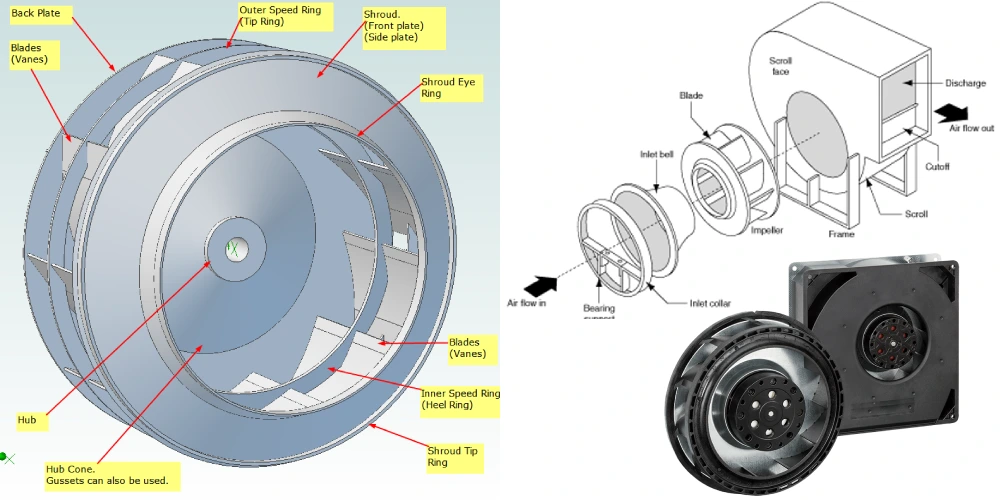
Keeping your centrifugal fan in top shape means knowing which parts need your attention. Each component plays a big role in how well your fan runs. Let’s break down what you should focus on during maintenance.
Impeller and Blades
The impeller and blades move air through your system. If dirt or debris builds up, you might see vibration or hear strange noises. Damaged or unbalanced blades can lower efficiency and even cause breakdowns. You should check the impeller for wear, cracks, or buildup. Clean it regularly to keep airflow smooth.
| Component | Failure Risk Description |
|---|---|
| Blades | Imbalance can occur from uneven wear or damage. |
Motor and Bearings
The motor powers your fan. Bearings help everything spin smoothly. Without regular lubrication, bearings can overheat or wear out. Motors can fail if they get too hot or damp. Always listen for unusual sounds and feel for excess heat.
| Component | Failure Risk Description |
|---|---|
| Bearings | Prone to friction and overheating without proper lubrication. |
| Motors | Can fail due to excessive heat or humidity. |
- Lubricate bearings as recommended by the manufacturer.
- Inspect for signs of wear, moisture, or misalignment.
fanacdc centrifugal fans use sealed bearings. These keep out dust and moisture, so you spend less time on maintenance and avoid unexpected failures.
Housing and Ducts
The housing protects the fan’s moving parts. Ducts guide the airflow. If you let dust or debris build up, airflow drops and your system works harder. fanacdc fans feature flame-retardant housings made from tough materials. This design extends the fan’s life and means you don’t have to service the housing as often.
Electrical and Drive System
Wires, connectors, and belts keep your fan running. Loose connections or worn belts can cause shutdowns or reduce performance. Check for frayed wires, tight connections, and proper belt tension. Replace any damaged parts right away.
Regular checks on these key components help you catch problems early and keep your fan running strong.
Centrifugal Fan Maintenance Checklist: Daily to Annual
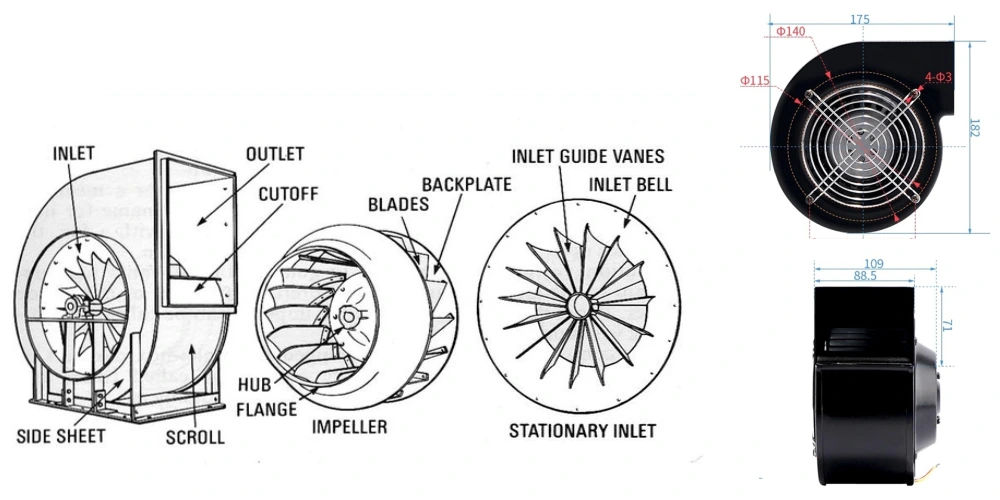
You want your centrifugal fan to run smoothly all year. A good centrifugal fan maintenance checklist helps you catch problems early and keeps your system efficient. Let’s break down what you should do every day, week, month, and year.
Daily Checks
Start each day with a quick look at your fan. These daily maintenance tasks only take a few minutes but can save you from big headaches later. Here’s a simple table to guide you:
| Task | Purpose | Action Items |
|---|---|---|
| Visual Inspection | Spot obvious issues | Check for vibrations, leaks, or debris |
| Temperature Check | Prevent overheating | Use an infrared thermometer on bearings/motor |
| Sound Monitoring | Catch abnormal noises | Listen for grinding or scraping sounds |
You should walk around your equipment and use your senses. Look for anything that seems off. Listen for new noises. Feel for hot spots. These routine inspections help you spot trouble before it grows.
Weekly Tasks
Set aside time each week for a deeper check. Weekly maintenance tasks focus on parts that need regular attention but not every day. Here’s what you should do:
- Inspect fan blades for dust or damage.
- Check the gearbox oil level if your fan uses a gearbox.
- Review the VFD (variable frequency drive) fault log if your system has one.
A quick table can help you remember:
| Maintenance Feature | Impact Level | Recommended Frequency |
|---|---|---|
| Visual fan blade inspection | Critical | Weekly |
| Gearbox oil level check | Critical | Weekly |
| VFD fault log review | Important | Weekly |
Weekly inspections keep your fan balanced and safe. If you use fanacdc fans, you’ll notice that sealed bearings and tough housings mean less frequent repairs. You spend less time fixing and more time running.
Monthly Inspections
Monthly maintenance tasks dig even deeper. These inspections help you find early signs of wear and tear. Here’s what you should focus on:
- Look for vibration or damage.
- Clean the impeller and housing.
- Lubricate moving parts if needed.
- Check belt tension and adjust if necessary.
Monthly inspections help you avoid breakdowns. They also extend the life of your fan. If you follow a maintenance checklist, you can prevent downtime and keep your operation smooth.
Note: Regular monthly inspections are key for industrial fans. They help you avoid sudden failures and costly repairs.
Quarterly and Annual Maintenance
Every few months, and at least once a year, you need to go all in. Quarterly and annual maintenance covers everything from lubrication to system alignment. Here’s a checklist to keep you on track:
| Frequency | Maintenance Task | Component | Impact Level |
|---|---|---|---|
| Quarterly | Bearing lubrication | Bearings | High |
| Quarterly | Fastener torque check | All | High |
| Quarterly | Motor amperage reading | Motor | Medium |
| Annually | Vibration analysis | Whole system | High |
| Annually | Insulation resistance testing | Electrical | High |
| Annually | System alignment review | All | High |
Quarterly maintenance keeps your bearings and fasteners in top shape. Annual maintenance gives you a full picture of your fan’s health. You can catch hidden problems and plan repairs before they cause trouble.
If you use fanacdc centrifugal fans, you’ll find that durable materials and sealed bearings make these checks easier. You won’t need to replace parts as often, and your maintenance checklist gets shorter.
Callout: Stick to your centrifugal fan maintenance checklist. You’ll boost efficiency, cut costs, and keep your system running strong all year.
By following this step-by-step maintenance checklist, you make sure your centrifugal fan stays reliable. Routine inspections, cleaning, and timely repairs protect your investment. With fanacdc’s advanced design, you can spend less time on maintenance and more time focusing on your business.
Troubleshooting and Warning Signs
Centrifugal fans usually give you warning signs before something goes wrong. If you know what to look for, you can fix small problems before they turn into big ones. Let’s break down the most common issues and what you can do about them.
Vibration and Noise
You might notice your fan shaking or making strange sounds. These are classic warning signs. Here’s what to watch for:
- Excessive vibration often means the fan is out of balance. Dust or debris on the blades, bent impellers, or worn bearings can cause this.
- Grinding or squealing noises usually point to worn bearings or loose mounting bolts.
- Unbalanced impellers, sheaves, or motors can also create vibrations.
- Loose connections or improper installation of bolts and isolators may add to the problem.
Tip: Use a vibration meter or just your hand to check for unusual shaking. Tighten all bolts and inspect the bearings. If you hear grinding, stop the fan and check the bearings right away.
Regular maintenance, like cleaning the blades and checking fasteners, keeps these issues from popping up.
Reduced Airflow
If your fan isn’t moving as much air as it should, something’s wrong. Here’s what you should check:
- Look for dust or debris clogging the blades or housing.
- Check for loose or slipping belts.
- Inspect the impeller for damage or buildup.
- Make sure the ducts are clear and not blocked.
A simple cleaning routine and regular inspections keep airflow strong. When you follow your maintenance checklist, you prevent most airflow problems before they start.
Overheating and Shutdowns
Fans that run hot or shut down unexpectedly need quick attention. Common causes include:
- Lack of bearing lubrication
- Misaligned drive components
- Blocked airflow or dirty blades
- Loose electrical connections
Note: Overheating often starts with small issues. Lubricate bearings, clean the fan, and check alignment to keep things cool.
When you stick to your maintenance plan—cleaning, lubricating, and inspecting parts—you stop overheating before it leads to a shutdown. Keeping good records helps you spot patterns and fix problems early.
By watching for these warning signs and following your maintenance checklist, you keep your centrifugal fan running smoothly and avoid costly downtime.
Maintenance Tips for Different Fan Types
Every centrifugal fan has its own quirks. You want to get the most out of your equipment, so it helps to know what makes each type unique. Let’s break down the best ways to keep backward curved, forward curved, and high-pressure fans in top shape.
Backward Curved Fans
Backward curved fans are tough. They resist clogging and handle higher static pressure with ease. You’ll find they need less maintenance than other types. Here’s what you should focus on:
- Check for dust or debris every 3 to 6 months in clean environments.
- In harsh or dusty areas, inspect monthly to catch buildup early.
- Listen for vibration or odd noises. These fans run quietly, so new sounds stand out.
- fanacdc backward curved fans use sealed bearings and flame-retardant housings. This means you spend less time cleaning and more time running your system.
Tip: If you want a fan that’s easy to care for, backward curved models are a solid choice.
Forward Curved Fans
Forward curved fans work well in compact spaces. Their design means you need to pay attention to dust and airflow. Here’s how you can keep them running smoothly:
- Clean the impeller and housing every 3 to 6 months. In tight or dirty spots, check monthly.
- Watch for dust buildup, which can cause imbalance.
- Make sure the fan stays balanced. Even a little dirt can throw it off.
- fanacdc forward curved fans are built for easy access. You can clean and inspect them without much hassle.
Note: Regular cleaning keeps forward curved fans efficient and quiet.
High-Pressure and Industrial Fans
High-pressure fans work hard in tough environments. They might be backward or forward curved. These fans need more frequent checks, especially if you use them in heavy-duty operations.
- Inspect every 4 to 8 weeks if your fan runs in a demanding setting.
- Look for signs of wear, vibration, or overheating.
- Lubricate bearings and check alignment often.
- fanacdc high-pressure fans use durable materials and advanced motors. This helps them last longer, even when the job gets tough.
| Fan Type | Maintenance Frequency (Clean/Harsh) | Key Focus Areas |
|---|---|---|
| Backward Curved | 3-6 months / Monthly | Dust, vibration, noise |
| Forward Curved | 3-6 months / Monthly | Dust, balance, cleaning |
| High-Pressure/Industrial | 4-8 weeks / Monthly | Wear, alignment, bearings |
Callout: Always check your fan’s manual for the best maintenance schedule. fanacdc fans make the job easier with smart design and rugged parts.
How Maintenance Improves Fan Efficiency
Cleaning and Airflow
You want your centrifugal fan to move air smoothly. Regular cleaning makes a big difference. When you clean filters and nozzles, you stop dust and debris from blocking airflow. Clean filters let air pass freely, so your system reaches the right temperature faster. You also help your fan use less energy because it does not have to work as hard. Routine cleaning removes dust buildup, which can slow down cooling and make your fan less effective. By keeping everything clean, you support steady airflow and keep your work area comfortable.
Reducing Energy Use
You can cut energy costs just by sticking to a good maintenance routine. When you check and care for your fan, you keep it running at its best. Well-maintained fans use less power and save you money. Regular upkeep means your fan does not waste energy fighting against clogged parts or worn-out components. With fanacdc’s high-efficiency motor and aerodynamic impeller design, you get even better results. These features help your fan move air with less effort, so you see real savings on your energy bill.
- Regular maintenance keeps performance high.
- Good practices improve energy efficiency.
- Lower energy use means lower operational costs.
Balancing and Longevity
You want your fan to last for years. Proper balancing during maintenance helps you get there. When you balance the impeller, you cut down on vibrations. Less vibration means less wear and tear on parts like motors, bearings, and belts. This keeps your fan running quietly and smoothly. If you skip balancing, you risk damaging your fan and other equipment. Regular checks for balance prevent noise and breakdowns, so your fan stays reliable for the long haul.
Callout: Balanced fans run longer, cost less to repair, and keep your system safe.
Keeping up with maintenance boosts fan efficiency, saves energy, and extends the life of your equipment. You get more value from your investment and fewer headaches down the road.
Why Choose fanacdc Centrifugal Fans
Durable Design
You want a fan that keeps working, year after year. fanacdc centrifugal fans use tough materials and smart engineering. The flame-retardant housing stands up to heat and harsh conditions. Sealed bearings keep out dust and moisture, so you don’t have to worry about frequent breakdowns. These features mean you spend less time fixing your fan and more time focusing on your business. You get a fan that lasts longer and needs less attention. That’s peace of mind for any busy facility.
Callout: When you choose a fan built for durability, you cut down on surprise repairs and lower your total maintenance costs.
Certified Quality
You want to trust the equipment you install. fanacdc centrifugal fans meet strict international standards. These certifications show that your fan is safe, reliable, and built to last. Here’s a quick look at what these certifications mean for you:
| Certification | Impact on Maintenance Needs |
|---|---|
| UL | Safe, reliable performance means fewer maintenance checks. |
| CE | Meets European safety standards for efficient operation. |
| RoHS | No hazardous substances, so your fan lasts longer and needs less care. |
You get more than just a fan—you get confidence that your system will run smoothly. Certified quality means you can relax, knowing your equipment meets the highest standards.
Custom Solutions
Every job is different. fanacdc gives you options to match your exact needs. You can pick the right size, voltage, and performance curve for your system. If you work in a tough environment, you can choose fans with IP-rated protection or corrosion-resistant materials. This flexibility makes installation easy and keeps maintenance simple.
| Customization Aspect | Description |
|---|---|
| Tailored Size | Fits your specific application perfectly. |
| Voltage | Matches your system’s power needs. |
| Performance Curve | Optimizes airflow and pressure for your setup. |
| Adverse Environment Protection | Handles dust, moisture, and chemicals with special features. |
When you pick fanacdc, you get a fan that fits your needs, lasts longer, and saves you money on maintenance. That’s a smart choice for any operation.
You get more reliability, efficiency, and cost savings when you stick to a centrifugal fan maintenance checklist. Check out these real benefits:
| Benefit | Description |
|---|---|
| Reliability Improvements | Structured maintenance keeps your fan stable and running strong. |
| Early Issue Identification | Spot problems early and avoid downtime. |
| Extended Equipment Life | Planned care helps your fan last longer. |
| Condition-Based Maintenance | Service based on real data saves money and boosts reliability. |
Choosing fanacdc means you enjoy durable fans with ball bearings and brushless motors. You also get engineering support and custom solutions. Start your checklist today and reach out to fanacdc for expert help.
FAQ
How often should you clean a centrifugal fan?
You should clean your fan every 3 to 6 months. If you work in a dusty or harsh environment, check and clean it monthly. Regular cleaning keeps airflow strong and prevents breakdowns.
What signs tell you a fan needs maintenance?
Look for strange noises, vibration, reduced airflow, or overheating. If you notice any of these, inspect your fan right away. Catching issues early helps you avoid bigger problems.
Can you use any lubricant for fan bearings?
Stick to the lubricant recommended by the manufacturer. Using the wrong type can cause damage or shorten bearing life. fanacdc fans use sealed bearings, so you spend less time worrying about lubrication.
Why does fanacdc recommend sealed bearings?
Sealed bearings keep out dust and moisture. You get longer service life and fewer maintenance tasks. This design helps your fan run smoothly, even in tough conditions.

