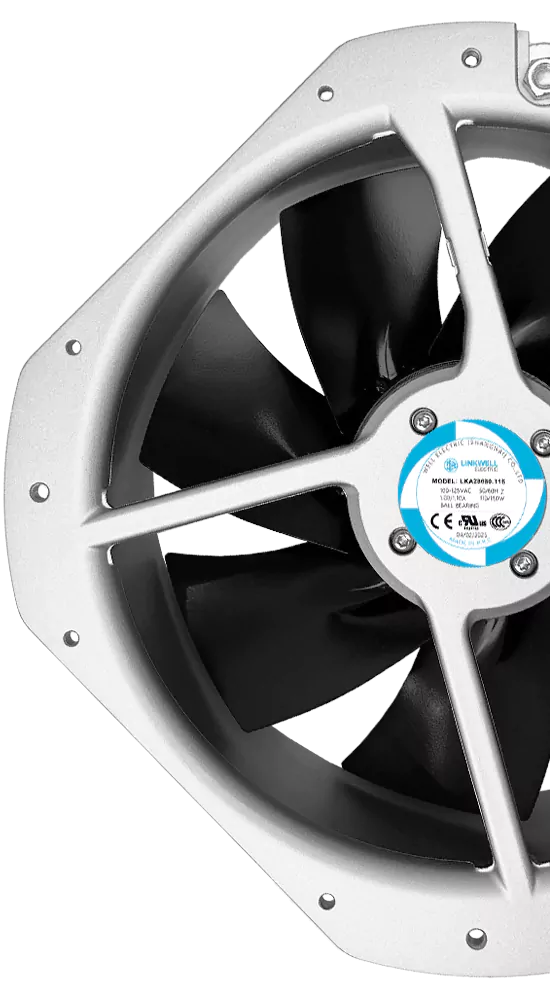
If you want to know how does an ac axial fan work, it’s pretty simple. The fan uses blades that spin and push air straight along the shaft. You get steady airflow that cools things down or moves air where you need it. You’ll find these fans in places like HVAC systems, cooling towers, and even inside computers.
- Cooling electronic equipment
- HVAC systems
- Industrial cooling
- Ventilation systems
Key Takeaways
- AC axial fans have spinning blades that move air straight along the shaft. This helps cool and ventilate spaces well.
- The special blade shape makes a pressure difference. This lets air move easily from high to low pressure spots.
- Installing and taking care of the fan is important. Cleaning it often helps the fan work better and last longer.
- Pick the right fan size and airflow for your needs. Think about what you need to cool or ventilate.
- Axial fans work best when you need lots of airflow but not much pressure. They are good for HVAC systems and cooling in factories.
- The material and blade shape matter a lot. They affect how well the fan works, how loud it is, and how long it lasts.
- Make sure nothing blocks the fan’s intake or exhaust. This helps air move well and stops the fan from getting too hot.
- Check the fan often for damage or worn parts. This can stop problems and keep your fan safe and working well.
How Does an Axial AC Fan Work
Working Of An Axial Fan
Rotational Energy And Airflow
When you turn on an axial AC fan, the first thing that happens is power goes to the motor. This power makes the shaft spin. The blades, which look a bit like airplane wings, start to rotate with the shaft. As the blades spin, they grab the air and push it forward. The unique shape of the blades helps them cut through the air and move it quickly. This is the basic idea behind how does an axial ac fan work.
The design of the blades follows aerofoil theory. This means the blades create a pressure difference as they move. The front side of each blade has lower pressure, and the back side has higher pressure. This difference pulls air in and pushes it out along the same line as the shaft. You get a steady stream of air moving straight through the fan.
Here’s a simple breakdown of the steps involved in the working of an axial fan:
| Step | Description |
|---|---|
| 1 | Power is supplied to the rotator shaft. |
| 2 | The rotator shaft begins to rotate, drawing air in through the air inlet. |
| 3 | Air flows parallel to the rotor shaft, increasing the flow rate. |
| 4 | The air enters the impeller in an axial direction. |
| 5 | Blades push the impeller, deflecting air into the guide vane. |
| 6 | Airflow becomes axial again as it enters the diffuser tube. |
| 7 | Kinetic energy from the blades is converted into pressure for ventilation. |
| 8 | The fixed blades can be adjusted to achieve the desired flow rate. |
Pressure Difference And Air Movement
You might wonder why the air moves at all. The answer lies in the pressure difference created by the spinning blades. When the blades rotate, they make the air on one side move faster than the other. This speed difference creates a low-pressure area in front of the blade and a high-pressure area behind it. Air always wants to move from high pressure to low pressure, so it rushes through the fan. This is the main reason how does an axial ac fan work to move air efficiently.
If you compare this to other types of fans, like centrifugal fans, you’ll notice a big difference. Axial fans work best when you need a lot of air flow but not much pressure. That’s why you see them in places like HVAC systems or server rooms.
- Axial fans: Efficient for high airflow at low pressure, perfect for open spaces or areas with little resistance.
- Centrifugal fans: Better for high pressure, used when air needs to move through ducts or tight spaces.
Airflow Direction
Parallel To Shaft
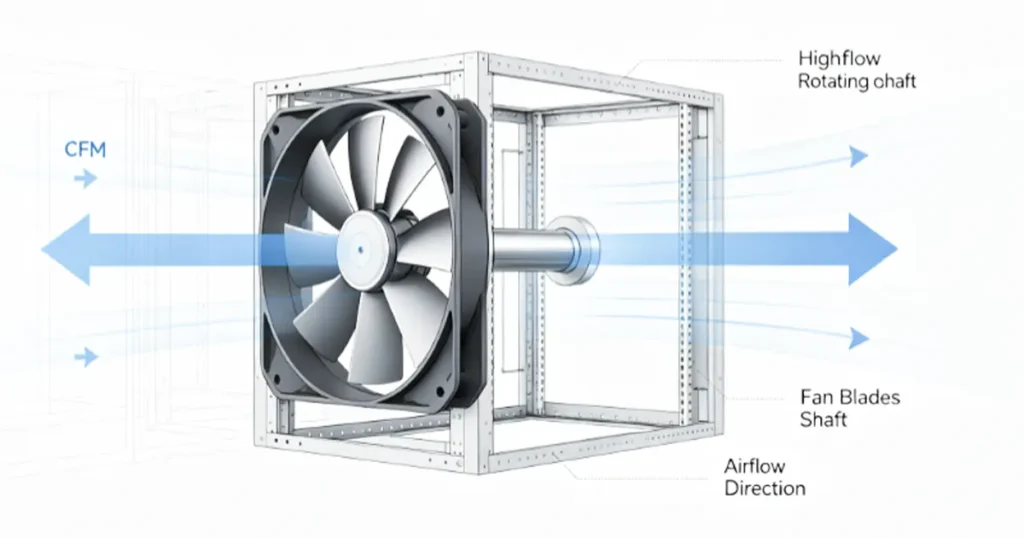
One thing that makes an axial AC fan special is the direction of the air flow. The air moves in a straight line, right along the shaft of the fan. This is different from other fans, where the air might come in one way and go out another. In an axial fan, the air comes in from the back and goes out the front, all in one smooth path. This is a key part of how does an axial ac fan work.
Here’s a quick comparison:
| Fan Type | Airflow Direction |
|---|---|
| Axial Fan | Air moves parallel to the axis |
| Centrifugal Fan | Air is expelled at a 90-degree angle to the intake |
Intake And Exhaust
You’ll notice two main sides on an axial AC fan: the intake and the exhaust. Air enters through the intake, which sits at the back of the fan. The spinning blades pull the air in and push it straight out through the exhaust at the front. This simple path makes the fan easy to use and very effective for cooling or ventilation.
Tip: If you want to get the best results, always make sure nothing blocks the intake or exhaust. Clear airflow means better performance!
So, when you ask how does an axial ac fan work, remember that it’s all about the spinning blades, the pressure difference, and the straight path of the air. The fan keeps things cool and comfortable by moving air exactly where you need it.
Axial Fan Components
Motor
You can think of the motor as the heart of the fan. It gives the energy needed to spin the blades. When you turn on the fan, the motor starts working right away. Most axial fans use AC motors because they handle steady loads well. You might see different types of motors in these fans. Some motors work best for steady jobs, while others save energy or handle bigger loads.
Here’s a quick look at common motor types:
| Motor Type | Characteristics | Applications |
|---|---|---|
| A motors | Steady load, not much starting torque | Industrial ventilation, HVAC fans |
| B motors | General-purpose, efficient | Commercial fans, pumps |
| E motors | Low starting torque, high efficiency | Industrial blowers, fans |
The motor connects directly to the shaft. This setup makes the fan reliable and easy to maintain. You don’t have to worry about belts or extra parts.
Blades
The blades do the heavy lifting. They grab the air and push it forward. You’ll notice that the blades have a special shape. This shape helps them cut through the air and move it smoothly. The angle of the blades matters too. If the angle is higher, the blades push more air, but the motor needs more power.
Let’s break down what affects blade performance:
| Factor | Influence on Performance and Efficiency |
|---|---|
| Blade Shape | Reduces drag, boosts airflow |
| Pitch Angle | Higher angle means more airflow |
| Number of Blades | More blades can add weight |
| Blade Design | Smooth airflow, less turbulence |
| Noise Management | Tapered blades cut down noise |
| Energy Use | Efficient blades save power |
You want blades that balance airflow and energy use. Too many blades can make the fan heavy and less efficient. The right design keeps the fan quiet and saves energy.
Tip: Clean blades help the fan work better. Dust and dirt can slow down airflow.
Impeller
The impeller sits at the center of the fan. It connects the blades to the shaft. When the motor spins the shaft, the impeller turns and moves air along the same line as the shaft. This setup creates a high-volume, low-pressure airflow. You get steady ventilation without much resistance.
The impeller’s shape matters. If it’s aerodynamic, you get smooth airflow and less energy loss. The impeller makes sure the fan pushes air in the right direction. You don’t have to worry about air swirling or getting stuck.
You can see how each part works together in this table:
| Component | Role |
|---|---|
| Motor | Drives the blades, gives energy for rotation |
| Blades | Push air, create airflow |
| Impeller | Connects blades to shaft, moves air |
If you understand these parts, you can pick the right axial fan for your needs. You’ll know what makes the fan efficient and reliable.
Housing
You might not think much about the housing of a fan, but it does a lot more than just hold everything together. The housing gives your fan its shape and protects the moving parts inside. It also helps guide the air in the right direction. When you look at an axial fan, you’ll see that the housing surrounds the blades and motor. This design keeps dust and debris out, so your fan lasts longer.
The housing does more than protect. It helps control how the air moves. Some housings can rotate. This means you can adjust where the air flows. If you need to cool a certain spot, just turn the housing to point the airflow right where you want it. That’s pretty handy in a workshop or a server room.
Noise can be a big problem with fans. The housing helps with that, too. Many housings have special shapes or channels that bend. These channels scatter the sound waves from the spinning blades. You get less noise, so your space stays quieter. Some fans use sinusoidal blade profiles. This means the edges of the blades have a wavy shape. These wavy edges cut down on the humming sound while still moving a lot of air.
Here’s what a good housing does for your fan:
- Protects the motor and blades from dust and damage
- Lets you adjust the airflow direction with a rotatable design
- Reduces noise with special channels and wavy blade edges
- Keeps airflow steady and smooth
Tip: Always check that nothing blocks the housing. Clear space means better airflow and less noise.
Power Supply
You need the right power supply to keep your fan running safely and smoothly. Most AC fans use standard power from your wall outlet. You’ll usually see two main types: 110–120 volts or 220–240 volts. This makes it easy to use the fan in homes, offices, or factories. You just plug it in, and you’re good to go.
Inside the fan, you’ll find shaded-pole or PSC motors. These motors work well with AC power and don’t waste much energy. They also have built-in thermal protection. If the fan gets too hot, it shuts off before anything gets damaged. That means you don’t have to worry about overheating, even if you run the fan for a long time.
Another cool thing about AC fans is their induction motors. These motors don’t get bothered by electromagnetic interference or power surges. You can use them in places with lots of other machines, and they’ll keep working without a hitch. They’re made for moving a lot of air, not just pushing it through a small space.
Here’s a quick list of what you get with a standard power supply:
- Works with 110–120 V or 220–240 V outlets
- Uses shaded-pole or PSC motors for efficiency
- Built-in thermal protection to stop overheating
- Induction motors resist power surges and interference
- Great for high air volume needs
If you pick the right power supply, your fan will run longer and safer. You’ll get steady airflow and peace of mind.
Airflow Mechanism
Blade Rotation
When you switch on your fan, the blades start to spin right away. This rotation is what gets the air moving. The faster the blades turn, the more air they push through the fan. You might think that doubling the speed will double the air flow, but it’s not that simple. The relationship between speed and air volume is positive, but it’s not a straight line. Sometimes, you get less extra air than you expect when you increase the speed.
A few things can change how much air the blades move:
- Higher fan speed means more air moves each minute.
- The shape and angle of the blades matter. Some designs move air better than others.
- If the blades face a lot of resistance from the air, they can’t move as much.
- Turbulence from spinning blades can make the air flow less steady.
If you want your fan to work its best, keep the blades clean and make sure nothing blocks them. This helps the blades spin freely and move more air.
Impeller Action
The impeller sits at the center of the fan and connects all the blades. When the motor turns the shaft, the impeller spins with it. This spinning action pulls air in from one side and pushes it out the other. The impeller’s job is to keep the air moving in a straight line, right through the fan.
You can think of the impeller as the traffic cop for air flow. It makes sure the air doesn’t swirl around or get stuck. Instead, the air moves smoothly from the intake to the exhaust. If the impeller has a good shape, you get less energy loss and more efficient air movement.
Air Acceleration
As the blades and impeller spin, they don’t just move air—they speed it up. This is called air acceleration. The faster the air moves, the more cooling or ventilation you get. But several things can change how quickly the air accelerates.
Here’s a table to show what affects air acceleration in your fan:
| Factor | Description |
|---|---|
| Resistance to Airflow | If ducts or vents are blocked, air moves slower and pressure goes up. |
| Fan Speed | Faster fan speed means higher air velocity and more pressure, but it can use more energy. |
| Role of Fan Motors | A strong motor keeps air moving fast, even if there’s resistance. Regular checks help a lot. |
If you want the best air flow, check your fan’s speed and keep the path clear. A strong motor and clean blades make a big difference. You’ll notice better air movement and a cooler space.
Tip: If your fan seems weak, check for dust or blockages. Sometimes, a simple cleaning brings back strong air flow.
Efficient Airflow Management
You want your axial AC fan to work at its best, right? Efficient airflow management makes all the difference. When you set up your fan, you need to think about how air moves through your space. If you get this right, you save energy, reduce noise, and keep things cool.
Let’s break down what helps your fan manage airflow efficiently. You’ll notice that the design of the fan matters a lot. Some fans move more air with less power. Others fit into tight spots without losing performance. You can even find fans that run quietly, so you don’t have to deal with loud humming.
Here’s a table that shows the main design features that boost efficient airflow management:
| Design Feature | Description |
|---|---|
| High Airflow Efficiency | Axial fans can move larger volumes of air with less power, making them cost-effective for large applications. |
| Compact Form Factor | Their simple designs allow for easy installation in tight spaces like ducts and walls. |
| Reduced Noise | High-quality axial fans operate more quietly than other types, enhancing workplace safety. |
| Functional Blade Designs | Customizable blade types optimize efficiency, speed, and noise reduction based on the fan’s purpose. |
You can see that high airflow efficiency means your fan pushes more air without using a lot of electricity. This saves money and keeps your equipment cool. Compact form factor lets you install the fan almost anywhere. You don’t need a big space. Reduced noise is a huge plus. If you work in an office or a factory, you want a fan that doesn’t distract you.
Functional blade designs give you options. You can pick blades that fit your needs. Some blades move air faster. Others cut down on noise. You get to choose what works best for your space.
Here are a few tips to help you manage airflow efficiently:
- Place your fan where nothing blocks the intake or exhaust.
- Clean the blades and housing often. Dust slows down airflow.
- Adjust the fan speed to match your cooling needs.
- Use fans with aerodynamic blades for smoother air movement.
Tip: If you notice your fan making more noise or moving less air, check for dirt or obstructions. A quick cleaning can restore performance.
Efficient airflow management isn’t just about the fan itself. You need to look at your whole setup. Make sure air can move freely. Choose the right fan for your space. Keep everything clean and well-maintained. You’ll enjoy better cooling, lower energy bills, and a quieter environment.
Blade Design And Performance
Shape And Angle
You might not think much about the shape and angle of fan blades, but they make a huge difference in how your axial AC fan works. The right blade shape helps your fan move more air with less effort. If you look at the blades, you’ll see they often have a curve or a tilt. This isn’t just for looks. The angle, or pitch, lets the blades grab air and push it forward.
Some fans use special designs to boost performance and cut down on noise. For example, an inclined plane on the blade helps redirect airflow and lowers resistance. This means your fan can move more air and stay quiet. Some blades have asymmetric teeth. These help the fan handle uneven airflow and stop noisy air separation. Sinusoidal profiling gives the blade a wavy edge. This shape cuts down on humming sounds but keeps the airflow strong.
Here’s a quick look at how different blade features affect your fan:
| Design Feature | Effect on Airflow and Noise Levels |
|---|---|
| Inclined Plane | Improves airflow efficiency and reduces noise |
| Asymmetric Teeth | Prevents noisy airflow separation, lowers broadband noise |
| Sinusoidal Profiling | Reduces tonal noise, keeps airflow strong |
Tip: If you want a quiet fan, look for blades with wavy or uneven edges. These shapes help keep things cool without the extra noise.
Material
The material of the blades matters just as much as the shape. You’ll find fan blades made from carbon fiber, metal, composite, plastic, or stainless steel. Each material has its own strengths.
- Carbon fiber blades are super strong and light. They last a long time and resist rust. You’ll see these in high-performance fans.
- Metal blades (like aluminum or steel) are tough but can be noisy if not designed well. They work well in heavy-duty jobs.
- Composite blades absorb vibrations. This makes your fan quieter, which is great for offices or bedrooms.
- Plastic blades are light and cheap. They work well for small fans or places where you don’t need a lot of power.
- Stainless steel blades fight off rust and last in harsh places, like factories or near the ocean.
Here’s a table to help you compare:
| Material | Durability Impact | Performance Impact | Cost-Effectiveness Impact |
|---|---|---|---|
| Carbon Fiber | High strength, corrosion-resistant | Handles high speeds, lasts long | High cost, but worth it for durability |
| Metal | Tough, can be noisy | Needs good design to stay quiet | More expensive than plastic |
| Composite | Absorbs vibration, reduces noise | Quiet operation, good for sensitive areas | Cost varies by design |
| Plastic | Chemical-resistant, lightweight | Good for low-power fans | Most affordable, easy to make |
| Stainless Steel | Great in harsh environments | Durable in tough jobs | Higher cost, but lasts a long time |
Number Of Blades
You might wonder if more blades mean a better fan. The answer isn’t always yes. The number of blades changes how your fan moves air and how much noise it makes.
- If your fan has too few blades, it can’t move enough air. You’ll get low pressure and weak airflow.
- Too many blades can slow things down. The fan faces more air resistance, which lowers efficiency and makes more noise.
- The right number of blades gives you strong airflow and good pressure.
- Fans with more blades can run quietly at low speeds because the airflow stays smooth.
- At high speeds, more blades can actually make more noise. The air hits the blades more often, which creates extra sound.
Note: For most uses, three to five blades strike a good balance between airflow, efficiency, and noise.
Choosing the right blade design helps your axial AC fan work better and last longer. You get the airflow you need without extra noise or wasted energy.
Impact On Efficiency
When you pick an axial AC fan, you want it to work well and save energy. The design of the blades plays a big role in how efficient your fan will be. If you choose the right shape, angle, and material, your fan can move more air without using extra power. That means you get better cooling and lower electricity bills.
Let’s talk about why efficiency matters. An efficient fan does more with less. It pushes a lot of air while using less energy. This helps you keep your space cool and your costs down. You also help the environment by using less electricity.
You might wonder how axial fans stack up against other types. Here’s a simple table to show you the difference:
| Fan Type | Efficiency Characteristics |
|---|---|
| Axial Fans | High at low resistance |
| Centrifugal Fans | Consistent under load |
Axial fans shine when there’s not much blocking the airflow. They move a lot of air in open spaces. If you use them in a place with little resistance, you get top efficiency. Centrifugal fans do better when they have to push air through ducts or filters. They keep working well even if the path is tough.
Blade design changes everything. If the blades have a good angle, they grab more air and push it forward. Curved blades can cut down on drag. That means the motor doesn’t have to work as hard. Lightweight materials like carbon fiber or plastic help the fan spin faster and use less energy. Too many blades or the wrong shape can slow things down and waste power.
Here’s what you can do to boost your fan’s efficiency:
- Pick a fan with aerodynamic blades.
- Make sure the blades are clean and free from dust.
- Use the fan in open spaces with little resistance.
- Check that the motor matches the fan size.
Tip: If your fan seems weak or noisy, check the blades. Sometimes, a quick cleaning or a small adjustment makes a big difference.
You don’t need to be an engineer to get good results. Just pay attention to the blade design and where you put your fan. You’ll notice better airflow, less noise, and lower energy use. That’s the power of efficient fan design!
Choosing The Right Axial Fan
Airflow Needs
You want your space to feel comfortable and stay cool. To do that, you need to pick a fan that matches your air flow needs. Start by thinking about where you will use the fan. Is it for a small room, a workshop, or maybe a server cabinet? Each place needs a different amount of air movement.
Here are some things you should consider when figuring out your airflow needs:
- What is the main application? (cooling, ventilation, or equipment protection)
- How much air do you need to move? (measured in CFM or cubic feet per minute)
- Do you need high pressure or just a gentle breeze?
- What size fan fits your space?
- Will you mount the fan on a wall, ceiling, or inside equipment?
- How efficient is the motor?
- How much noise can you handle?
- What material works best for your environment?
- Are there any rules or safety standards you need to follow?
- How easy is it to maintain the fan?
- What is your budget?
If you answer these questions, you will find the right axial fan for your needs. You do not want a fan that is too weak or too strong. The right fit keeps your space comfortable and your equipment safe.
Size And Mounting
Size matters when you choose a fan. A fan that is too big can waste energy and make too much noise. A fan that is too small will not move enough air. Measure your space before you buy. Check the opening where you want to install the fan. Make sure the fan fits without blocking anything.
Mounting is also important. Some fans go on walls, others on ceilings, and some fit inside machines. Think about how you want to install your fan. If you need to move air in a straight line, an axial fan works well. Make sure you have enough space around the fan for good air flow. If you block the intake or exhaust, the fan will not work as well.
Tip: Leave at least a few inches of space around the fan. This helps air move freely and keeps the fan running smoothly.
Noise And Energy Use
Nobody likes a noisy fan. You want a fan that does its job without making a racket. Most axial fans run at 35 to 45 decibels. That is about as loud as a quiet office or a soft conversation. These fans are usually 10 to 15 decibels quieter than blowers. If you need a fan for your bedroom or office, look for one with a low noise rating.
Energy use is another thing to check. Axial fans are very efficient. For example, some can move 220 CFM of air while using only 14 watts. Blowers need more power for the same job—sometimes up to 38 watts. That means an axial fan can save you 20 to 40 percent on energy in low-pressure spaces. You get strong air flow without a big electric bill.
If you want a quiet and efficient fan, check the noise level and power rating before you buy. A good fan keeps your space cool and your wallet happy.
Durability
When you pick an axial fan, you want it to last. Durability matters, especially if you plan to use the fan in tough places like factories, kitchens, or outdoors. A durable fan saves you money and trouble. You won’t have to replace it often or worry about sudden breakdowns.
Start by looking at the materials. The right material can handle whatever your space throws at it. If you have a lot of moisture, dust, or even chemicals in the air, you need blades and housing that won’t rust or wear out fast. For example, stainless steel fights off rust. Plastic resists chemicals. Metal stands up to heat and heavy use. Always match the material to your environment.
Next, think about where you will use the fan. Will it run all day, or just sometimes? If your fan works nonstop, you need a motor that can handle a heavy duty cycle. High temperatures can also stress the motor and other parts. Make sure the fan has good insulation and can expand or contract without breaking. This keeps the motor safe and the fan running smoothly.
You should also check the design. Some fans have special impellers that move air better and last longer. Others have motors built for tough jobs. Look at how the fan mounts. A strong, stable mount keeps the fan from shaking or wearing out early. Good design means fewer repairs and less downtime.
Here’s a table to help you remember what to check for durability:
| Factor | Description |
|---|---|
| Material Selection | Pick materials that match your air—moisture, fumes, or dust can wear out the wrong parts. |
| Environmental Conditions | Think about how long and how hot the fan will run. Make sure the motor and parts can handle it. |
| Design Specifications | Check the impeller, motor, and mounting. Good design means better performance and longer life. |
Tip: If you use your fan in a harsh place, clean it often. Dust and grime can shorten its life.
You can also look for fans with extra features. Some have sealed bearings to keep out dirt. Others have thermal protection to stop overheating. These small details can make a big difference.
Don’t forget about maintenance. Even the toughest fan needs a little care. Wipe off dust, check for loose screws, and listen for strange noises. If you catch problems early, you can fix them before they get worse.
Choosing a durable axial fan means thinking ahead. You want a fan that fits your space, handles your workload, and stands up to the environment. When you get it right, you enjoy cool air and peace of mind for years.
Axial Fan Applications
Industrial Cooling
Factories and workshops use axial fans a lot. These fans help cool machines and tools. When you turn on an axial fan, it blows air over hot parts. This moves heat away and keeps things from getting too hot. Machines often need cooling inside their covers. Axial fans are good for this because they move lots of air but don’t make high pressure. You can find them in machines that use electronics. They keep the electronics safe from heat. If you walk in a factory, you might see fans on walls or by work tables. These fans cool workers and machines right where they are.
Axial fans also help get rid of hot air and bring in fresh air. They pull out the warm air and let new air come in. This makes the air cleaner and nicer to breathe. You can use these fans for many things because they are easy to put in and work well.
Tip: Put your fan close to the hottest places in your work area. This cools things faster and keeps your machines safe.
Here are some ways people use axial fans for cooling at work:
- Cooling electronics inside covers
- Cooling machines and workers in certain spots
- Pulling hot air out through walls
- Bringing in fresh air
If you want good cooling at work, try an axial fan. It gives steady air and is easy to use.
Ventilation
You want fresh air in your space. You also want to keep things cool and comfortable. That’s where axial AC fans come in. These fans do a great job with ventilation. They move a lot of air without using much energy. You can use them in homes, offices, shops, or even big commercial buildings.
Axial fans shine when you need to move air fast. They work best in places where there’s not much resistance. You might see them in HVAC systems. These systems use fans to keep air moving all the time. You get steady airflow, which means better climate control. Your rooms stay cool in summer and warm in winter.
Let’s look at some ways you can use axial fans for ventilation:
- Move fresh air into rooms and push stale air out.
- Keep air moving in climate control units.
- Ventilate electrical enclosures to stop overheating.
- Cool down equipment in server rooms or workshops.
- Help remove smoke, dust, or odors from kitchens and bathrooms.
You can see that these fans fit many jobs. They work quietly and don’t take up much space. You can mount them on walls, ceilings, or even inside ducts. If you have a stuffy room, an axial fan can fix that fast.
Tip: Place your fan near windows or vents. This helps pull in fresh air and push out hot or stale air.
Here’s a quick table to show where you might use axial fans for ventilation:
| Location | How Axial Fans Help |
|---|---|
| Home | Fresh air in bedrooms and kitchens |
| Office | Keeps air moving, reduces stuffiness |
| Commercial Building | Climate control, steady airflow |
| Workshop | Removes fumes and dust |
| Server Room | Cools equipment, prevents shutdown |
You don’t need to worry about noise. Most axial fans run quietly. You can work, sleep, or relax without loud humming. These fans also use less power than other types, so you save on energy bills.
If you want better air quality, try an axial fan. You’ll notice the difference right away. Fresh air makes your space feel better and keeps you healthy. Clean air also helps your equipment last longer.
Axial fans make ventilation simple. You get strong airflow, easy setup, and reliable performance. Next time you need to move air, remember how useful these fans can be.
Maintenance Tips
Installation
You want your axial AC fan to work its best right from the start. Good installation makes a big difference. Start by picking the right spot. Choose a location where air can move freely. Avoid corners or tight spaces that block airflow. Use vibration-dampening mounts. These mounts cut down on noise and stop the fan from shaking.
When you wire the fan, always follow the manufacturer’s diagram. This keeps things safe and helps the fan run smoothly. Here’s a quick table to help you remember the key steps:
| Component | Details |
|---|---|
| Circuit Selection | Use a dedicated circuit with the right gauge wires. |
| Grounding | Connect to the building’s grounding system. |
| Disconnect Switch | Place it where you can see and reach it easily. |
Tip: Double-check all connections before you turn on the fan. This helps prevent problems later.
Routine Checks
You want your fan to last a long time. Regular checks keep it running strong. Clean the blades, housing, and ducts often. Dust and dirt slow down airflow and make the fan work harder. Lubricate the bearings and motor as the manual says. This keeps everything moving smoothly.
Look for signs of wear or damage. If you see cracks or loose parts, fix them right away. Check the belt tension if your fan uses a belt. A loose belt can slip and make noise. Use a torque wrench to tighten bolts. This stops the fan from rattling.
Here’s a table of routine tasks you should do:
| Maintenance Task | Description |
|---|---|
| Cleaning and Inspection | Clean blades, housing, and ducts to remove buildup. |
| Lubrication | Lubricate bearings and motors as recommended. |
| Mechanical Checks | Inspect for wear, damage, and proper alignment. |
| Electrical Maintenance | Check voltage and amperage to prevent overheating. |
| Operational Monitoring | Watch for changes in performance or strange noises. |
Note: Listen to your fan. If it sounds different, check it right away.
Troubleshooting
Sometimes, your fan might not work as it should. Don’t worry. You can fix many problems yourself. Start by checking the power supply. Make sure the fan is plugged in and getting electricity. Look at the blades. Dust, damage, or imbalance can slow them down.
Check the motor for overheating. If it feels hot or smells burnt, turn off the fan. Clean any blockages from grilles or ducts. Make sure the bearings have enough lubrication. If the fan shakes, check the mounting and installation.
Here’s a simple troubleshooting guide:
| Step | Description |
|---|---|
| 1 | Check the power supply. |
| 2 | Inspect blades for dust, damage, or imbalance. |
| 3 | Examine the motor for overheating or burnout. |
| 4 | Clean dirty grilles and remove airflow blockages. |
| 5 | Check bearings and lubrication. |
| 6 | Ensure correct installation and secure mounting. |
| 7 | Test the speed controller and electrical connections for faults. |
If you still have problems, call a professional. Safety comes first!
Safety
You want your axial AC fan to work well, but you also want to stay safe while taking care of it. Safety matters every time you handle maintenance. You might think fan maintenance is simple, but accidents can happen if you skip the basics. Let’s walk through the steps you should follow to protect yourself and your equipment.
First, always disconnect the power before you touch the fan. Electricity can surprise you if you leave the fan plugged in. You don’t want to risk a shock or injury. Make sure the fan is completely off and unplugged. If your fan connects to a circuit, flip the breaker or use a disconnect switch. Double-check before you start.
Next, grab your personal protective equipment (PPE). You should wear gloves to protect your hands from sharp edges. Safety glasses keep dust and debris out of your eyes. If you work in a noisy area, ear protection helps too. You never know what you’ll find inside the fan housing, so it’s better to be ready.
Check the fan’s voltage compatibility. You want to make sure the fan matches your system’s voltage. If you use the wrong voltage, you could damage the fan or cause a fire. Look at the label on the fan and compare it to your power supply. If you’re not sure, ask an electrician or check the manual.
Inspect the blades and wiring before you start cleaning or repairs. Damaged blades can break off and cause injuries. Exposed wiring can shock you or start a fire. If you see cracks, chips, or loose wires, fix them first. Don’t run the fan until everything looks safe.
Here’s a quick table to help you remember the main safety precautions:
| Safety Precautions |
|---|
| Disconnect power before handling |
| Use PPE when working near fans |
| Confirm compatibility with system voltage |
| Avoid operating with damaged blades or exposed wiring |
You should also keep your workspace clear. Remove tools, rags, or anything that could get caught in the fan. If you work on a ladder or stool, make sure it’s stable. You don’t want to fall while reaching for the fan.
Tip: Always let the fan blades stop spinning before you touch them. Even slow-moving blades can hurt you.
If you follow these steps, you’ll keep yourself safe and your fan in good shape. Safety isn’t just about rules—it’s about making sure you can enjoy cool air without worry. Take your time, check everything twice, and don’t rush. You’ll thank yourself later.
Conclusion
You now understand how an axial fan works and how the motor, blades, impeller, housing, and power supply work together to move air. When choosing a fan, consider airflow, size, noise, voltage, and durability to ensure reliable cooling performance.
As an experienced AC axial fan manufacturer, we produce fans for industrial equipment, electrical enclosures, ventilation systems, and OEM cooling applications. We can help you select the right model based on your airflow, size, voltage, and operating requirements.
Contact us for product information, fan selection support, or a custom AC axial fan solution for your project.
FAQ
What is an AC axial fan?
You use an AC axial fan to move air in a straight line. The blades spin and push air along the shaft. You see these fans in cooling systems, ventilation, and electronics.
How do I know what size fan I need?
Check the space you want to cool or ventilate. Measure the area and look at the airflow rating (CFM) on the fan. Pick a fan that matches your room or equipment size.
Can I use an axial fan for both intake and exhaust?
Yes, you can. Just install the fan so it pulls air in or pushes air out. Axial fans work well for both intake and exhaust jobs.
Why does my fan make noise?
Dust, loose parts, or worn bearings can cause noise. Clean the blades and check for damage. If the fan still makes noise, you might need to replace a part.
How often should I clean my axial fan?
You should clean your fan every few months. Dust and dirt slow down airflow and make the fan work harder. Use a soft brush or cloth to wipe the blades and housing.
Is it safe to run my fan all day?
You can run your fan all day if it has good thermal protection. Make sure nothing blocks the airflow. Check the motor for overheating sometimes.
What should I do if my fan stops working?
First, check the power supply. Look for blockages or damaged blades. If you still have trouble, call a professional or check the manual for help.
Can I install an axial fan myself?
You can install a fan if you follow the instructions. Make sure you turn off the power before you start. Use the right tools and check all connections.