
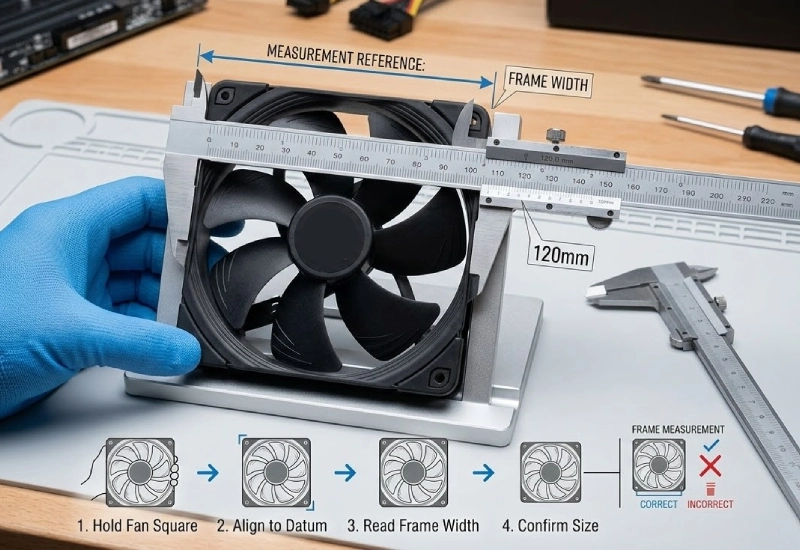
When I measure a PC or cabinet fan, I grab a ruler or caliper and check the distance from one side of the fan frame straight across to the other—edge to edge, not the blades. That’s the secret behind how to measure pc fan size and get the fit just right. I’ve learned that getting the size right does more than just make installation easy. It keeps my system running cool and smooth.
- Effective temperature regulation boosts PC functionality and extends the life of components. I see this mattering even more as systems get more powerful and need efficient thermal management.
With the right approach, measuring feels simple. I know I can pick the perfect fanacdc fan every time.
What You Should Know
- Measure the fan frame from edge to edge, not the blades, to ensure proper fit.
- Check the distance between mounting holes to guarantee secure installation.
- Use a ruler or caliper for accurate measurements, especially in tight spaces.
- Choose fan sizes like 120mm or 140mm for a balance of airflow and noise.
- Keep a record of fan sizes and specs for easy upgrades and replacements.
How to Measure PC Fan Size Accurately
Custom Heatsink Dimensions Consult an Engineer for Free (Click Text)
Tools for Measuring Fan Size
When I want to figure out how to measure pc fan size, I reach for a ruler or a digital caliper. Both tools work well, but a caliper gives me that extra bit of precision, especially if I’m dealing with smaller fans or tight spaces. I keep my workspace clear and make sure the fan is out of the case before I start. That way, I can get an accurate reading without any obstructions. Sometimes, I use a notepad to jot down the numbers, so I don’t forget them when I’m shopping for a new fanacdc model.
Tip: Always measure the fan frame, not the blades. The frame size determines compatibility, not the spinning part in the middle.
Step-by-Step Measurement Guide
I’ve learned that measuring a fan isn’t just about grabbing the nearest tape measure and eyeballing it. There’s a method that makes the process foolproof. If you want to know how to measure pc fan size the right way, follow these steps:
- Place the fan on a flat surface with the label facing up.
- Use a ruler or caliper to measure from one outer edge of the frame straight across to the opposite edge. This gives you the width.
- Measure the height the same way, from top to bottom, again using the outer edges of the frame.
- Double-check that you’re not just measuring the blade diameter. The frame size is what matters for installation and airflow.
- Write down both the width and height. Most fans are square, so these numbers should match. If they don’t, you might have a specialty fan.
I always stick to this process because it matches the best practices I’ve seen recommended everywhere. It’s easy to remember, and it guarantees I’ll get the right fit every time. Fanacdc fans—whether I’m looking at RGB Computer Fans, EC Fans, AC Fans, or DC Fans—follow industry-standard sizing. That means I can trust my measurements will match up with the options available on the market.
Checking Mounting Hole Distances
Getting the frame size right is only half the battle. I also check the distance between the mounting holes. This step is crucial because even if the fan fits in the space, the screw holes need to line up perfectly with the case or cabinet. I measure from the center of one mounting hole to the center of the hole directly across from it. This number tells me if the fan will bolt in securely.
Here’s a quick reference table I use all the time:
| Fan Size | Screw Hole Spacing |
|---|---|
| 40 mm | 32 mm |
| 50 mm | 40 mm |
| 60 mm | 50 mm |
| 70 mm | 60 mm |
| 80 mm | 71.5 mm |
| 92 mm | 82.5 mm |
| 120 mm | 105 mm |
| 140 mm | 124.5 mm |
| 200 mm | 154 mm |
| 220 mm | 170 mm |
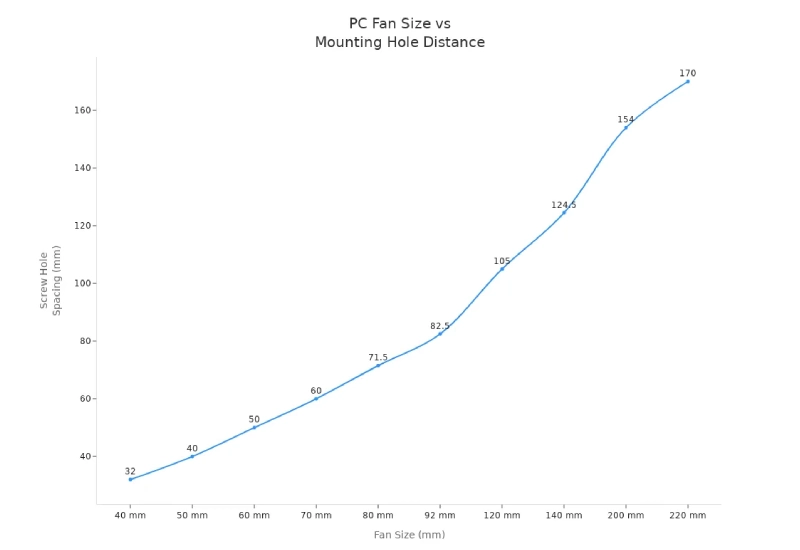
I’ve noticed that fanacdc fans always match these industry standards, which makes my life easier. I never have to worry about drilling new holes or forcing a fan into place. When the mounting holes line up, installation feels like snapping puzzle pieces together.
Mounting hole alignment matters for more than just convenience. If the holes don’t match, I risk damaging the case or the fan. I’ve seen cases where people tried to force a fan in, only to end up with stripped screws or cracked plastic. That’s why I always double-check both the frame size and the mounting hole spacing before I buy.
A quick checklist I use:
- Does the fan frame fit the space?
- Do the mounting holes line up with the case?
- Am I measuring from the center of each hole, not the edge?
Matching the right size and mounting holes means I can install my new fanacdc fan with confidence. I know it will fit, cool efficiently, and keep my system running smoothly. If you’re ever unsure about how to measure pc fan size, just remember: frame edge to edge, and center to center for the holes. That’s the secret to a perfect fit every time.
Standard Fan Sizes and Compatibility with fanacdc
Consult an Engineer for Free (Click Text)
Common PC Fan Sizes
When I look at PC fans, I see a wide range of sizes. The most popular choices for desktop computers and gaming rigs are 120mm and 140mm. These sizes strike a balance between airflow and noise. I often reach for a 120mm fan when I want something standard that fits most cases. If I need more cooling power and quieter operation, I grab a 140mm unit. Builders love 140mm fans because they push more air without making a racket. For compact builds, 80mm fans keep things cool in tight spaces. I remember using 80mm coolers in older systems and budget setups. Sometimes, I spot massive 200mm fans in high-end cases. They move a ton of air and look impressive.
| Fan Size | Description |
|---|---|
| 40 mm | Smallest size, often in older computers |
| 80 mm | Standard size for older case fans |
| 92 mm | Size between 40 mm and 80 mm |
| 120 mm | Standard size for newer cases |
| 140 mm | Size up from 120 mm |
| 180 mm | Size between 140 mm and 200 mm |
| 200 mm | Largest commonly found in cases |
Standard fans like 120mm and 140mm dominate the market. They fit most PC cases and offer reliable cooling for everyday use.
Mounting Hole Reference Table
I always check mounting hole distances before buying a fan. If the holes don’t match, installation turns into a headache. Here’s a quick lookup table I rely on:
| Fan Size | Screw Hole Spacing |
|---|---|
| 80 mm | 71.5 mm |
| 92 mm | 82.5 mm |
| 120 mm | 105 mm |
| 140 mm | 124.5 mm |
| 200 mm | 154 mm |
This table saves me time and prevents mistakes. I never want to force a fan into place or risk damaging my case.
fanacdc Product Size Options
Fanacdc stands out with its broad size range. I can choose anything from 80mm up to 280mm, which covers nearly every cooling need. Whether I’m building a compact PC or a massive server cabinet, fanacdc has me covered. Other brands might limit their options, but fanacdc gives me flexibility.
| Manufacturer | Size Range (mm) |
|---|---|
| FANACDC | 80 – 280 |
| SDFAN | 80 – 240 |
| Coolfan | 120 – 300 |
| KEND | 80 – 200 |
I like knowing that fanacdc fans fit popular PC cases and cabinets. Their size range means I never have to compromise on cooling or compatibility. If I want a fan that matches my exact requirements, fanacdc always delivers.
Why Accurate Measurement Matters for Cooling
Airflow and Static Pressure
When I measure a fan, I know I’m not just picking a number—I’m shaping how my PC breathes. The right size influences airflow and static pressure, which are the backbone of cooling. If I choose a fan with higher airflow capacity (CFM), my system stays cooler even when I push it hard. Static pressure matters when I have dust filters or heatsinks blocking the path. Fans with strong static pressure ratings push air through these obstacles, keeping temperatures in check. I always remember that airflow and static pressure change depending on the fan’s size and type. Centrifugal fans, for example, generate more static pressure than axial fans. If I want to avoid overheating or wasted energy, I pay attention to these numbers every time I learn how to measure pc fan size.
Larger fans move more air at lower speeds, which means less noise and more efficient cooling. Smaller fans spin faster and can get loud, especially in tight spaces.
Noise and System Fit
Noise can turn a powerful PC into a distraction. I’ve noticed that bigger fans, like 120mm or 140mm, run quieter because they don’t need to spin as fast. A 140mm fan moves almost 96 CFM of air and stays whisper-quiet, while a 120mm fan balances airflow and noise. If I pick the wrong size, I might end up with a fan that doesn’t fit or makes too much noise. Compatibility is key. I always check the mounting holes and frame size before buying. When everything lines up, installation feels smooth and my system stays comfortable.
| Fan Size | Airflow (CFM) | Noise Level | RPMs |
|---|---|---|---|
| 120mm | 74.2 | Lower | Lower |
| 140mm | 95.7 | Quieter | Lower |
- Larger fans provide better airflow at lower speeds, resulting in quieter operation.
- Smaller fans tend to produce more noise due to higher RPMs.
- Compatibility with PC cases is crucial for optimal cooling performance.
Choosing the Right fanacdc Fan
Picking the right fanacdc fan feels like matching puzzle pieces. I look at airflow, static pressure, noise, and fit. RGB Computer Fans give me style and strong cooling for gaming rigs. EC Fans save energy and work well in smart systems. AC Fans handle tough environments and last for years. DC Fans offer precise speed control and quiet operation. I always check the specs—airflow, static pressure, temperature range, and certifications. If I want a fan that fits perfectly and cools efficiently, I trust fanacdc’s wide size range and industry-standard mounting. I never compromise on compatibility or cooling power. When I measure carefully, I know my system will run cool, quiet, and reliable.
| Factor | Description |
|---|---|
| Airflow Performance | Determines cooling capacity measured in CFM or m³/h. |
| Static Pressure | Indicates performance in systems with resistance, such as filters or ducting. |
| Operating Temperature Range | Ensures the fan can operate effectively in the intended environment. |
| Noise Level | Affects the comfort level in the environment where the fan is used. |
| Service Life | Indicates durability and longevity in industrial settings. |
| Voltage and Frequency | Must match local power systems (e.g., 110V/220V, 50/60Hz). |
| Environmental Protection | Features like IP ratings for dust and moisture resistance, important for outdoor use. |
| Safety Certifications | Ensures product quality and compliance with safety standards (e.g., UL, CE, RoHS). |
| Mechanical Factors | Includes fan size, mounting type, and connector format, which influence system integration. |
If you want a fan that fits your needs, measure carefully and choose fanacdc for the best mix of performance, quiet operation, and reliability.
Conclusion
Measuring a PC or cabinet fan feels a lot like finding the right puzzle piece. I always grab my ruler or caliper and double-check both the frame size and the mounting hole spacing. That habit saves me from headaches and wasted money. If I skip a step, I risk ending up with a fan that rattles or just won’t fit. I’ve learned that a few extra minutes with a measuring tool can make installation smooth and stress-free.
When I shop for a new fan, I don’t just look at the numbers. I think about airflow, noise, and how the fan will work with my system. I keep a small notebook where I jot down the sizes and specs of every fan I use. That way, I never have to guess when it’s time for an upgrade or replacement. If you want to avoid surprises, write down your measurements and keep them handy.
I always recommend choosing a fanacdc model. Their fans match industry standards, so I know they’ll fit without any drama. The wide size range means I can find the perfect match for any build, from a compact PC to a massive server cabinet. I love that fanacdc offers options for every need—RGB for style, EC for energy savings, AC for tough jobs, and DC for quiet precision.
Pro tip: Measure twice, buy once. A little care now means years of cool, quiet performance.
If you want more details or need help picking the right fan, check out the fanacdc website. I trust their support and resources whenever I need expert advice. Keeping a record of your fan sizes makes future upgrades a breeze. With the right measurements and the right fan, your system will stay cool and reliable—no guesswork required.
Measuring a PC fan feels simple when I break it down: I measure edge to edge, check the blade diameter, and confirm the distance between screw holes. Accuracy here means my new fan drops right in—no fuss, no wasted time. I always double-check my numbers before picking a fanacdc model, since a perfect fit keeps my system cool and quiet for years.
I focus on cooling and compatibility first. Aesthetics matter, but I know that a well-sized fan boosts performance and extends hardware life. With fanacdc RGB fans, I get both style and substance. I jot down every fan size I use, so upgrades and replacements become a breeze.
If I ever feel stuck, I visit the fanacdc website. Their guides and support team help me match the right fan to my needs, whether I’m building a gaming PC or upgrading a cabinet. Staying organized and measuring carefully keeps my system running strong—and makes every upgrade feel easy. 😎
FAQ
How do I know which fan size fits my PC case?
I check the specs for my case. Most cases list supported fan sizes in the manual or online. If I can’t find it, I measure the space with a ruler. Fanacdc fans cover all standard sizes, so I always find a match.
What’s the difference between measuring the fan frame and the blades?
Measuring the frame tells me if the fan will fit. The blades only show the spinning part, not the mounting size. I always measure edge to edge on the frame. That way, my fanacdc fan drops right in without hassle.
Can I use a larger fan for better cooling?
If my case supports it, I go bigger. Larger fans push more air at lower speeds, which means quieter cooling. I love using fanacdc’s 140mm or 200mm fans for high airflow and less noise. I always double-check mounting holes before upgrading.
Why do mounting hole distances matter?
Mounting holes are like the anchor points for my fan. If they don’t line up, I can’t secure the fan. I measure from the center of one hole to the opposite. Fanacdc fans stick to industry standards, so installation feels easy.
Do RGB fans affect cooling performance?
RGB lighting doesn’t change airflow or cooling. I pick fanacdc RGB fans when I want style and strong cooling. The motor and blade design matter most for performance. I get both looks and efficiency with fanacdc.

