
Why do 60% of electronic devices overheat just because of poor fan selection? You might think picking a bigger fan is safer, but that often means wasted money and energy. If you choose a fan that’s too small, your electronic equipment can fail early.
In 2026, trends like EC motors and smart controls are changing how you cool electronics. Projects using DC blowers now save up to 70% energy compared to older AC models. When you ask yourself How to Select a Fan for Electronic Cooling, remember you need to match your fan selection to your device’s needs, local climate, and future standards.
Key Takeaways
- Understand your device’s heat load to determine how much cooling is needed. This helps you select the right fan.
- Calculate the required airflow based on factors like temperature and humidity. Use this to find a fan that meets your needs.
- Match the fan’s specifications to your system’s requirements. Check the fan performance curve to ensure efficiency.
- Choose the right type of fan (AC, DC, EC, or centrifugal) based on your specific application and cooling needs.
- Consider environmental factors like temperature and humidity. Select fans with appropriate IP ratings for protection.
How to Select a Fan for Electronic Cooling
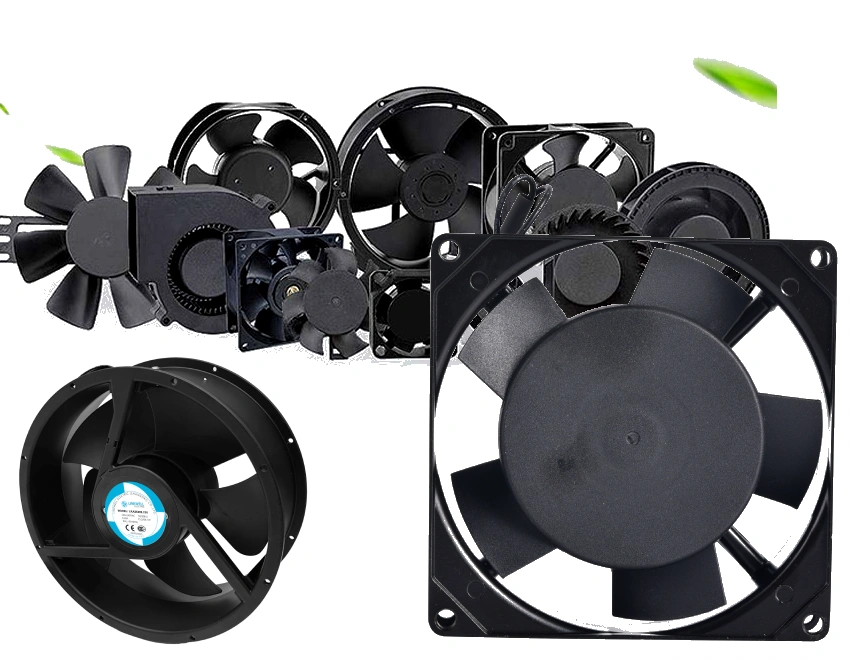
Choosing the right fan for your electronic cooling project in 2026 can feel overwhelming. You want to avoid mistakes that lead to overheating or wasted energy. Let’s break down how to select a fan for electronic cooling with a simple four-step framework that engineers trust:
- Identify Your Cooling Needs
Start by understanding your device’s heat load. Figure out how much heat your system generates and what temperature you need to maintain. This step helps you set your airflow requirement. - Calculate the Required Airflow
Use the heat load to determine how much air you need to move. Factors like room temperature, humidity, and the number of heat-producing components all play a role. The basic formula for cooling load is:Q = U × A × (To – Ti) + Qint + Qsol + Qvent
This formula considers outside temperature, internal heat, solar gain, and ventilation. - Match Specifications to Your Application
Now, compare your airflow requirement with the fan performance curve. The fan performance curve shows how much air a fan can move at different pressures. You want your operating point to fall within the efficient range of the curve. Check the static pressure and system resistance, too. If your system has filters or long ducts, you’ll need a fan that can handle higher resistance. - Choose the Right Fan Type
Decide if you need an AC fan, DC fan, EC fan, or centrifugal fan. Each type has strengths. For example, DC fans from fanacdc offer precise speed control and low noise, while AC fans provide robust, long-term operation. Industrial cooling fans from fanacdc can be customized for unique needs.
Key Parameters: Airflow & Heat Load
You can’t skip airflow and heat load calculations. These numbers drive your entire fan selection process. Here’s what you need to know:
- The cooling load is the amount of heat you must remove to keep your device at a safe temperature.
- External factors like outdoor temperature, sunlight, and humidity affect the load.
- Internal factors include the number of devices, people, and lighting in the space.
- Use the airflow requirement to find a fan that matches your needs on the fan performance curve.
If you’re not sure how to calculate these values, fanacdc’s technical team can help you with tools and support.
Static Pressure & System Resistance
Static pressure tells you how much resistance your fan must overcome to push air through your system. Ducts, filters, and bends all add resistance. You need to compare your system’s resistance curve with the fan performance curve to make sure the fan will work as expected.
Here’s a quick look at the main formulas:
| Formula | Description |
|---|---|
| SP₍total₎ = SP₍ducts₎ + SP₍fittings₎ + SP₍filters₎ + SP₍equipment₎ + SP₍terminals₎ | Total static pressure calculation. |
| SP = f × (L/100) × (V²/4005) × (12/D) | Straight duct pressure loss calculation. |
| Q = (3,160×W)/∆t | Airflow based on temperature rise. |
| ∆P = K ρ Qn | Pressure drop in the system. |
| A = (Q×∆P)/6,350 | Air horsepower. |
| S = (T×N)/5,252 | Motor shaft horsepower. |
| No = Nf×Nm×Ne | Overall efficiency. |
- External Static Pressure (E.S.P) is the total resistance the fan must overcome.
- Always check the fan performance curve to see if the fan can handle your system’s resistance.
Input Power & Fan Size
Input power and fan size matter for both cooling efficiency and energy costs. If you pick a fan that’s too small, it won’t cool your devices. If you pick one that’s too big, you’ll waste energy and money.
Here’s a simple table to help you compare:
| Specification | Description |
|---|---|
| Airflow Rate (CFM) | Measures the volume of air moved by the fan, crucial for effective ventilation in electronics. |
| Power Consumption | Affects energy efficiency and operational costs; lower power usage leads to savings over time. |
You should always check the fan performance curve to make sure the fan delivers the right airflow at the right power level. Fanacdc offers a wide range of sizes and power options, from compact DC fans for electronics to large industrial cooling fans. You can also choose different bearing types for longer service life.
Tip: Don’t forget to consider future upgrades. If you expect your system to run hotter or add more devices, choose a fan with a little extra capacity.
When you follow these steps, you’ll know how to select a fan for electronic cooling that fits your project perfectly. Fanacdc’s experts can guide you through every step, from calculating airflow to reading a fan performance curve. You’ll avoid common mistakes and get reliable, energy-efficient cooling for your devices.
Cooling Fan Types & Selection Guide
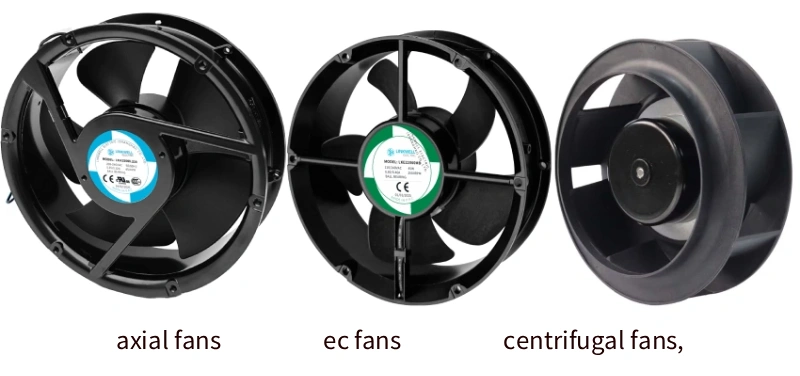
Axial, Centrifugal, and EC Fans
You have a lot of choices when it comes to picking a cooling fan for your electronic project. Axial fans work best when you need high airflow in open spaces with little resistance. They run quietly and use less power, which makes them great for control cabinets or server racks. Centrifugal fans shine in setups with lots of ducts or filters. They push air with higher pressure, so they handle tough cooling jobs in industrial automation or telecom equipment.
EC fans take things up a notch. These fans use electronically commutated motors, which means you get precise speed control and top-notch energy efficiency. EC fans keep their efficiency high, even when you don’t need full power. You’ll see them in refrigeration units or anywhere energy savings matter most.
Here’s a quick table to help you compare:
| Fan Type | Best Use Case | Advantages |
|---|---|---|
| Axial Fans | Open spaces, low resistance | Quiet, energy-efficient, low maintenance |
| Centrifugal | Complex ducts, high resistance | High pressure, precise cooling |
| EC Fans | Energy-sensitive, variable cooling needs | Very efficient, smart control features |
fanacdc Cooling Fan Solutions
Fanacdc offers a full lineup of cooling fan options. You can choose AC fans for large spaces or continuous cooling. These fans deliver strong airflow and help extend equipment life. DC fans give you quiet operation and smart speed control, perfect for sensitive electronics. EC fans from fanacdc can cut your energy use by up to 75%. They adjust speed based on temperature, so you always get efficient cooling.
Fanacdc stands out because you get smart controls, tailored solutions, and strong support. You can pick the right cooling fan for your needs and trust that it will last.
Application Scenarios & Customization
Every project is different. Sometimes you need a cooling fan with special dimensions or mounting options. Fanacdc makes it easy to customize your fan for optimal thermal performance and fast integration. You can select the voltage and speed control that fits your regulatory needs. OEM and ODM services mean you get a cooling fan that matches your exact requirements.
Here’s how customization helps:
- Tailored airflow for your application
- Energy-efficient performance over the long term
- Smooth integration into your equipment
If you want a cooling fan that fits your electronic system perfectly, fanacdc has you covered.
Environmental & Reliability Factors
Temperature, Humidity, and IP Ratings
When you select a fan for thermal management, you need to think about the environment where your device will run. Temperature and humidity can change how well your cooling system works. Check out this table to see how different factors affect performance:
| Environmental Factor | Impact on Cooling Fan Performance |
|---|---|
| Ambient Temperature | Higher temperatures reduce cooling effectiveness, so you may need a stronger fan. |
| Humidity | High humidity can affect the design and choice of your cooling solution. |
| Operating Environment | Dust, water, and other conditions can change how well your cooling strategy works. |
Local climate matters, too. If your device operates in a cooler place, the air helps carry away more heat. In warmer or high-altitude areas, the air is thinner and less effective at cooling, so you may need to adjust your thermal management plan.
IP ratings help you protect your investment. These ratings, set by EN 60529, show how well a fan resists dust and water. If you use a fan with a high IP rating, like IP68, you get better protection and less maintenance. This is key for electronic devices in harsh environments.
Bearing Types & Service Life
The type of bearing in your fan makes a big difference in how long it lasts. Here’s a quick look at average service life for common bearing types:
| Bearing Type | Average Service Life (hours) |
|---|---|
| Oil-bearing | 30,000 |
| Hydraulic Bearing | 40,000 |
| 1 Ball Bearing | 40,000 |
| 2 Ball Bearing | 50,000 – 100,000 |
Fanacdc cooling fans stand out with a high Mean Time Between Failures (MTBF). Some models last up to 1,000,000 hours. That means fewer breakdowns and more reliable thermal management for your projects.
Compliance & Certification
You want your cooling fans to be safe and eco-friendly. Look for these certifications:
- UL certification for safety and reliability
- CE certification for meeting European health and safety standards
- RoHS compliance to make sure your fan is free from hazardous substances
Fanacdc fans meet these strict standards. You get peace of mind knowing your thermal management solution is both safe and responsible for the environment.
Installation & Troubleshooting
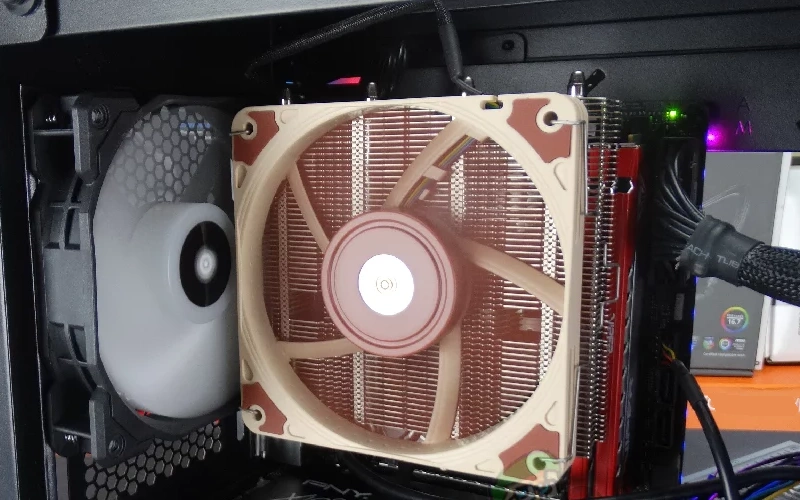
Airflow Path & Integration
You want your cooling fan to work at its best, right? Start by planning the airflow path before you install anything. Place your fan close to heat-producing parts. This helps pull heat away fast. Make sure vents and exhausts have a clear route—no blocked paths or sharp bends. Here are a few tips to get you started:
- Position fans near hot components for better heat removal.
- Use vibration-dampening mounts to cut down on noise.
- Design your layout so air can move freely through the device.
- Add smart controls like PWM to adjust fan speed as temperatures change.
If you’re building a new system, try to integrate the fan into your design early. This makes everything fit together smoothly and keeps your electronics cool.
Noise, Vibration, and Maintenance
Nobody likes a noisy device. You can keep things quiet by picking the right fan and installing it the right way. Here’s a quick table to help you minimize noise and vibration:
| Strategy | How It Helps |
|---|---|
| Choose the right fan type | Reduces noise at the source |
| Use vibration-dampening mounts | Stops rattling and hums |
| Optimize thermal design | Lowers heat, so fans don’t have to work as hard |
| Add noise barriers or silencers | Blocks sound from escaping |
Keep your fan running longer with simple maintenance:
- Clean dust and debris from fans and vents regularly.
- Lubricate bearings if your fan model allows it.
- Check for loose screws or worn blades.
- Balance the fan wheels to prevent shaking.
- Update your device’s software for better fan control.
Common Selection Mistakes
It’s easy to make mistakes when picking or installing a cooling fan. Watch out for these common errors:
- Choosing a fan based only on free-air CFM, not system resistance.
- Forgetting to check ambient temperature or duty cycle.
- Ignoring dust, moisture, or other contaminants.
- Using fans with low IP ratings in tough environments.
- Skipping vibration isolation during mounting.
- Overlooking EMI issues from nearby equipment.
- Not setting up PWM or control features correctly.
- Using cheap connectors or poor cable routing.
- Skipping diagnostics or monitoring.
- Not testing the whole system before going live.
If you run into trouble, fanacdc’s technical support team is ready to help. You can also count on their after-sales service for quick solutions and expert advice.
Conclusion
You now know how to select the right fan for electronic cooling in 2026. You have learned why matching your fan to your device’s needs matters. You have seen how airflow, static pressure, and input power all play a role. You have explored the different types of cooling fans and how each one fits a unique scenario. You have also discovered why environmental factors and certifications keep your system safe and reliable.
Let’s make your next project a success. Here’s a quick checklist to guide you:
- Start with the basics: Know your heat load and airflow needs.
- Check the specs: Match the fan’s performance curve to your system’s resistance.
- Pick the right type: Choose between AC, DC, EC, or centrifugal fans based on your application.
- Think about the environment: Consider temperature, humidity, and IP ratings.
- Plan for the future: Leave room for upgrades or higher loads.
Tip: Always test your cooling setup before going live. Small changes in layout or airflow can make a big difference.
If you ever feel stuck, don’t worry. Fanacdc offers tools, checklists, and expert technical support. You can reach out for help with calculations, product selection, or troubleshooting. Their team can even help you customize a fan for your exact needs.
Remember, the right cooling fan does more than just move air. It protects your investment, saves energy, and keeps your devices running longer. Stay proactive. Review your cooling system as your technology changes. Standards and requirements will keep evolving, so keep learning and adapting.
Ready to get started? Visit fanacdc’s website for more resources and support. Your next project deserves the best in cooling innovation!
You now have a clear path for picking the right cooling fan. Match your fan’s specs to your device’s needs and use fanacdc’s checklists and support for smart decisions. Keep these tips in mind:
- Include thermal management early in your design.
- Use the right thermal interface materials.
- Avoid placing heatsinks in stagnant air.
Ongoing evaluation and adapting to local climate or new tech will boost your system’s reliability. Stay proactive and your electronics will stay cool for years.
FAQ
What is the most important factor when choosing a cooling fan?
You need to match the fan’s airflow and static pressure to your device’s heat load. This ensures your electronics stay cool and run reliably.
How do I know if I need an AC, DC, or EC fan?
Think about your power source, control needs, and energy goals. AC fans work well for simple setups. DC fans offer quiet, precise control. EC fans give you top energy savings and smart features.
Can I customize a fan for my project?
Absolutely! You can choose size, voltage, speed control, and even IP rating. Fanacdc offers OEM and ODM services to help you get the perfect fit.
How often should I maintain my cooling fan?
Check your fan every few months. Clean dust, inspect for noise, and make sure nothing blocks airflow. Regular care keeps your fan running longer.
