
You probably wonder what is a cooling pad and why your laptop needs one. A cooling pad sits under your laptop and uses advanced cooling technology to keep your device running smoothly. When your laptop heats up, you risk thermal throttling and shorter lifespan. Sustained high temperatures can damage processors, accelerate battery wear, and cause breakdowns. If you use your laptop for gaming or work, cooling becomes even more important. Brands like fanacdc deliver cooling pad solutions that improve airflow and help you identify hot spots. With a cooling pad, you protect your laptop, boost performance, and extend its life.
Key Takeaways
- A cooling pad helps keep your laptop cool by improving airflow and reducing heat buildup.
- Using a cooling pad can prevent thermal throttling, which keeps your laptop running smoothly during gaming or heavy tasks.
- Choose an active cooling pad with fans for high-performance laptops, especially for gaming.
- Regular use of a cooling pad can extend your laptop’s lifespan and improve battery life.
- Look for features like adjustable height and extra USB ports to enhance comfort and functionality.
What is a Cooling Pad
Cooling Pad Purpose
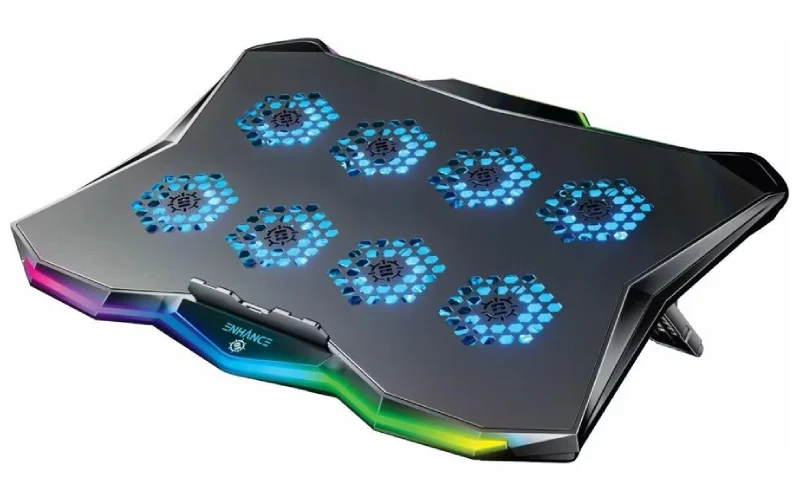
You might see a cooling pad as just another accessory, but it plays a big role in keeping your laptop healthy. When you use your laptop for hours, heat builds up inside. That heat can slow down your device, cause lag, and even shorten its life. A cooling pad sits under your laptop and helps manage that heat. It uses built-in fans or other cooling methods to push air around your laptop, lowering the temperature and keeping things running smoothly.
Let’s break down what makes a cooling pad tick:
| Definition | Primary Components |
|---|---|
| A laptop cooling pad is an essential accessory for maintaining optimal performance and longevity of laptops by dissipating excess heat. | Built-in fans, adjustable height features, air cooling, liquid cooling, Peltier cooling |
You get more than just cooling with a cooling pad. Many models lift your laptop off the desk, which keeps your hands comfortable and prevents direct contact with a hot surface. Some cooling pads even let you adjust the height, so you can find the best angle for typing or gaming. You’ll notice that some cooling pads come with extra USB ports, RGB lighting, and powered fans. These features make your setup more functional and fun.
Tip: If you spend hours gaming or working on your laptop, a cooling pad can help prevent neck and shoulder pain by letting you adjust the height and angle.
How Cooling Pads Help Laptops
You want your laptop to last as long as possible and perform at its best. A cooling pad helps you achieve that goal. When your laptop gets hot, the CPU and GPU can slow down to protect themselves. This process is called thermal throttling. You might notice lag or stuttering during games or heavy tasks. A cooling pad manages heat output and keeps your laptop cool, so you get smoother performance.
Here’s why people choose a cooling pad for their laptop:
- It solves performance issues like lag by managing heat from the CPU and GPU.
- It slows down the aging process of internal components by reducing heat load.
- Heavy-duty PC gamers use cooling pads to prevent thermal throttling and boost gaming performance.
- Cooling pads provide lift, keeping your laptop off hot surfaces and making it more comfortable to use.
- Adjustable height features help reduce neck and shoulder pain.
- Many cooling pads offer built-in USB ports for charging devices.
- Some models include RGB lighting and powered fans for extra functionality.
You might hear myths about cooling pads. Some people think cooling pads work like air conditioners and drastically lower internal temperatures. In reality, most cooling pads reduce temperatures by 3–8°C under heavy use. That drop isn’t huge, but it’s enough to make a difference in performance and longevity. Modern cooling pads operate quietly, often below 30 dB, so you won’t get distracted by noise. Cooling pads aren’t just for gamers. Anyone who uses a laptop on soft surfaces or in hot environments can benefit.
| Myth | Reality |
|---|---|
| Cooling pads drastically lower internal temps like air conditioners | Most provide 3–8°C reduction under load—not transformative, but meaningful |
| All cooling pads are noisy | Many modern models operate below 30 dB; some are nearly silent |
| They’re only for gamers | Useful for anyone using laptops on soft surfaces or in hot environments |
| If my laptop feels warm, it’s damaged | Warmth is normal; damage occurs from sustained high internal temps (>90°C) |
| Cheap pads work as well as expensive ones | Poor fan placement or weak motors in budget models offer little benefit |
You should know that a cooling pad doesn’t replace regular maintenance. Dust can build up inside your laptop, blocking airflow and causing overheating. Cleaning your laptop’s fans and heat sinks every year or two keeps your cooling pad working at its best.
Note: Gaming laptops are designed to run hotter than desktops. It’s normal for high-end CPUs and GPUs to reach 90–95°C under load. Thermal throttling protects your laptop from damage by lowering clock speeds when things get too hot.
A cooling pad gives you peace of mind. You get better performance, longer device life, and a more comfortable experience. Whether you’re gaming, working, or just browsing, a cooling pad helps your laptop stay cool and reliable.
How Does a Cooling Pad Work
Cooling Mechanisms
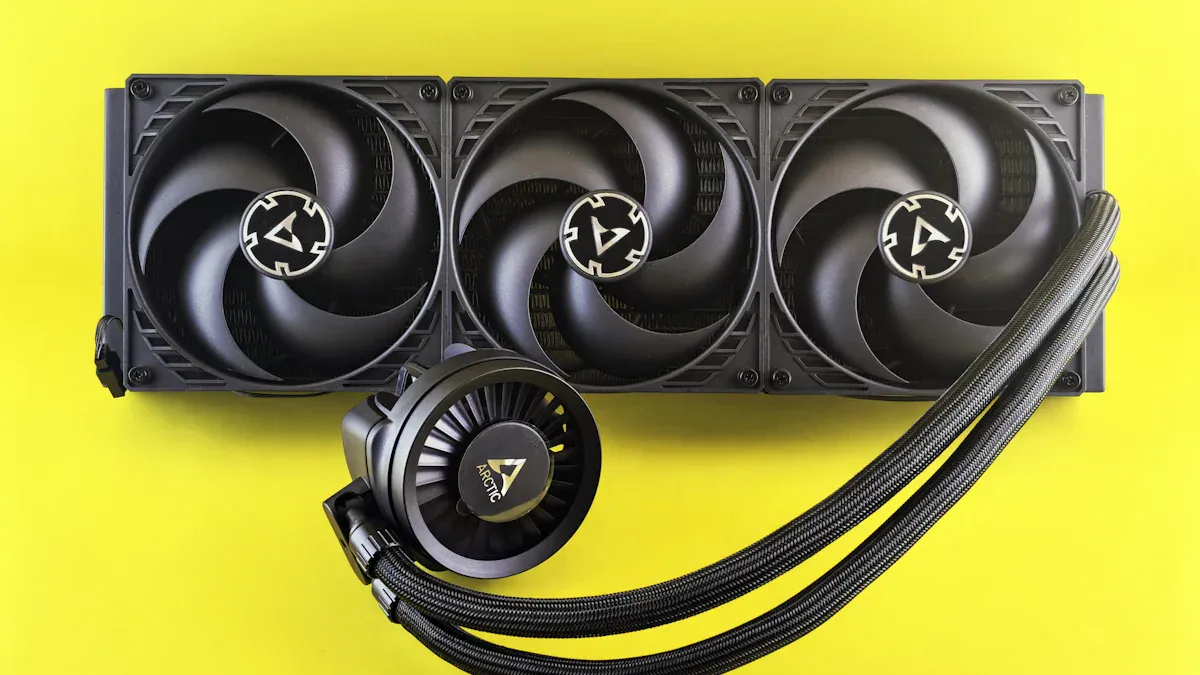
You might wonder what happens inside a cooling pad when you turn it on. The main goal is to keep your laptop cool and prevent overheating. Cooling pads use several scientific principles and technologies to achieve this.
- Cooling pads lift your laptop off the desk. This simple move allows fresh air to flow underneath, which helps prevent airflow blockage. If you place your laptop on a soft surface, you block vents and trap heat. Elevating your device solves this problem.
- Fan-based cooling is the most common method. Fans inside the pad blow cool air toward the laptop’s underside. This airflow helps your laptop’s internal fans work more efficiently. You get a steady stream of air that draws heat away from hot spots.
- Some cooling pads use passive cooling. These pads rely on thermally conductive materials, like aluminum, to absorb heat from your laptop. They don’t need power. You just place your laptop on top, and the pad pulls heat away naturally.
- Advanced cooling pads may use thermoelectric cooling. Peltier coolers transfer heat from one side of the pad to the other. This technology moves heat away from your laptop, keeping it cool even during heavy use.
- Ionic cooling systems are rare but interesting. Electrodes ionize air molecules, which helps cool hot spots inside your laptop. Heat pipes can transfer heat from the processor to the ionic cooling system, boosting overall cooling efficiency.
Tip: If you use your laptop for gaming or video editing, choose a cooling pad with multiple fans. More fans mean better airflow and faster cooling.
Here’s a quick look at how cooling pads work:
- Elevate your laptop to improve airflow.
- Blow fresh air to the underside, cooling hot spots.
- Use heat-conductive materials to absorb heat.
- Employ advanced technologies like Peltier coolers or ionic systems for extra cooling.
You get a combination of airflow, heat absorption, and sometimes high-tech solutions. All these methods help your laptop stay cool and perform better.
Active vs Passive Cooling Pads
You have two main types of cooling pads to choose from: active and passive. Each type uses a different approach to keep your laptop cool.
| Cooling Method | Description | Effectiveness |
|---|---|---|
| Active Coolers | Utilize fans to enhance airflow, drawing heat away from the laptop. | Generally effective, especially with multiple fans. |
| Passive Coolers | Use thermally conductive materials to absorb heat without power. | Limited effectiveness, typically lasts 6-8 hours. |
Active cooling pads use fans. You plug them in, and they start blowing air under your laptop. These pads work well for gaming laptops or devices that run hot. If you want fast cooling, active pads are your best bet. Some models even let you control fan speed or add RGB lighting for a custom look.
Passive cooling pads don’t use fans. They rely on materials like aluminum or copper to absorb heat. You don’t need power. These pads are silent and simple. If you use your laptop for light tasks, passive cooling might be enough. They work best for short sessions and don’t handle heavy workloads as well as active pads.
Note: If you use your laptop for hours or play games, active cooling pads offer stronger cooling. Passive pads are great for quiet environments and basic tasks.
You can find cooling pads that combine both methods. Some pads elevate your laptop and use fans, while others add heat pipes or thermoelectric coolers. Choose the type that fits your needs and usage style.
You get better performance and longer device life when you pick the right cooling pad. Cooling pads help you avoid overheating, thermal throttling, and uncomfortable hot surfaces. Whether you want silent cooling or powerful airflow, there’s a pad for you.
Types of Cooling Pads for Laptops
You have plenty of choices when picking a cooler pad for your laptop. The market offers active, passive, and multi-surface cooler pad designs. Each type brings unique features and benefits, so you can find the right cooling solution for your needs.
Active Cooling Pads (fanacdc Cooling Pad Fan)
Active cooler pad models use built-in fans to push air under your laptop. This cooling method works well for high-performance laptops and gaming setups. Most cooler pad options on the market are active, making up over 62% of sales. You get powerful cooling and steady airflow, which helps your laptop stay cool during intense tasks.
The fanacdc Cooling Pad Fan stands out as an advanced active cooler pad. You get dual ball bearings for durability, PWM control for precise fan speed, and RGB readiness for a custom look. These fans operate quietly and save energy, so you can focus on gaming or work without distractions. The fanacdc cooler pad also offers IP68 dust and water resistance, making it reliable in any environment.
Tip: If you play games or run heavy software, choose an active cooler pad with multiple fans and smart features.
| Advancement Type | Description |
|---|---|
| Fan Technology | Brushless motors, dual or quad-fan setups for powerful cooling and quiet operation. |
| Ergonomic Design | Adjustable height settings for better posture and comfort. |
| Smart Features | Automatic fan control based on laptop temperature. |
| Material Innovation | Aluminum and mesh for efficient heat dissipation. |
| Aesthetic Enhancements | Customizable RGB lighting for gamers. |
| Eco-Friendly Models | Energy-efficient cooler pad designs that save power. |
Passive Cooling Pads
Passive cooler pad designs use materials like aluminum to absorb heat from your laptop. You don’t need power or fans. This cooling method works best for light tasks and short sessions. Passive cooler pad models stay silent and simple, so you can use them in quiet spaces. If you only browse or stream, a passive cooler pad might be enough.
Multi-Surface and Multipurpose Pads
Multi-surface and multipurpose cooler pad designs combine cooling with ergonomic features. You get adjustable height, USB hubs, and sometimes wireless charging. These cooler pad models appeal to professionals and digital nomads who want more than just cooling. Hybrid cooler pad options are gaining popularity because they offer both cooling and extra functionality.
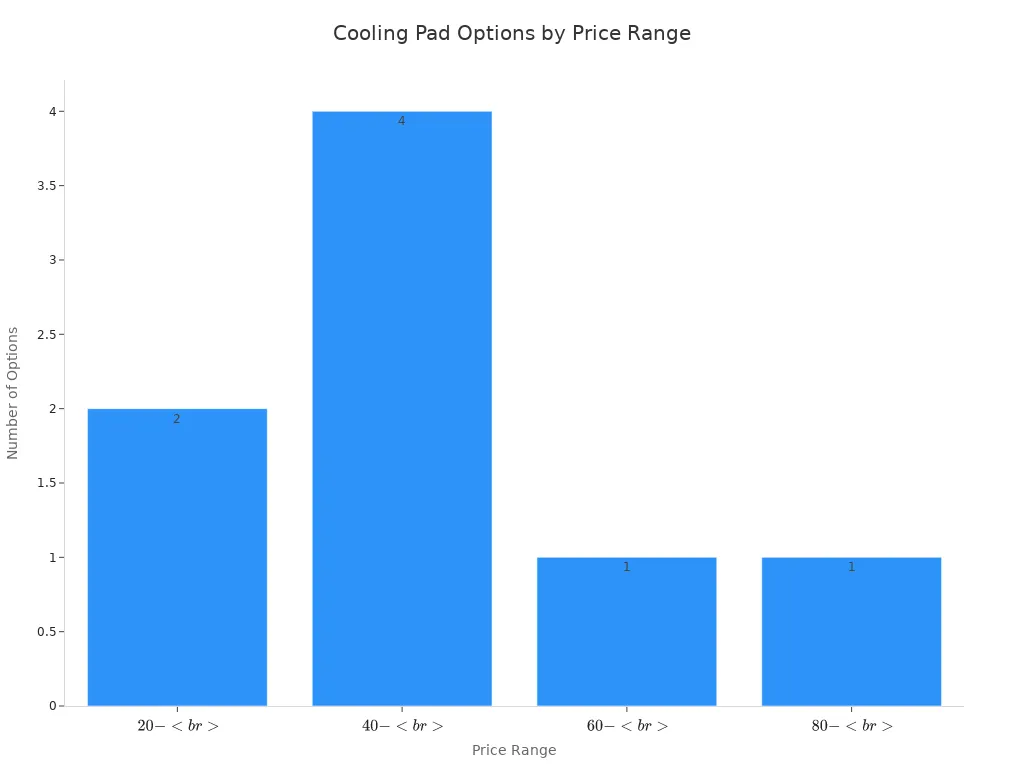
| Price Range | Options Available | User Segment Suitability |
|---|---|---|
| $20 – $40 | 2 | Students |
| $40 – $60 | 4 | Professionals |
| $60 – $80 | 1 | Gamers |
| $80 – $100 | 1 | High-end users |
You get the best cooling for gaming laptops with active cooler pad models. Industry experts recommend pads with smart cooling technology, RGB lighting, and multiple fans. If you want a cooler pad for professional use, look for hybrid designs with ergonomic features and USB ports. Students often choose affordable cooler pad options that provide basic cooling.
Note: Your laptop needs a cooler pad that matches your workload. Gaming and high-performance tasks demand active cooling, while light use can rely on passive or hybrid pads.
Benefits of a Laptop Cooling Pad
Performance and Longevity
You want your laptop to last as long as possible and run at its best. A cooler pad helps you do that by managing heat and dissipating heat away from your device. When you use a cooler pad, you can see your laptop’s temperature drop by about 7 degrees Celsius during heavy tasks. If you combine a cooler pad with other heat management tricks, like repasting thermal paste, you can lower temperatures by up to 15 degrees. Lower heat means less stress on your laptop’s parts. Over time, this can extend your laptop’s life and keep it running smoothly.
Here’s why a cooler pad makes a difference:
- Heat is one of the biggest reasons laptops break down.
- A cooler pad prevents overheating and keeps your device safe.
- Regular use of a cooler pad can help your laptop last longer.
You also get better battery life. Cooler pads can reduce battery capacity loss by 12%, especially if you use your laptop in hot places. That means you spend less time worrying about charging and more time getting things done.
Gaming and High-Performance Use
If you love gaming or use your laptop for high-performance work, you know how hot things can get. A gaming laptop often runs at high temperatures, which can lead to thermal throttling. This slows down your performance and makes games lag. A cooler pad helps keep your gaming laptop cool, so you get smoother gameplay and higher frame rates.
Check out how a cooler pad boosts gaming performance:
| Laptop Model | Avg Temp (No Pad) | Avg Temp (With Pad) | FPS Change |
|---|---|---|---|
| ASUS ROG Zephyrus G14 | 89°C | 78°C | +7 FPS |
| MSI GE76 Raider | 93°C | N/A | +5 FPS |
| Razer Blade 15 | 91°C | 85°C | +3 FPS |
| Lenovo Legion 5 Pro | 87°C | 76°C | +9 FPS |
| Acer Predator Helios 300 | 95°C | 83°C | +6 FPS |
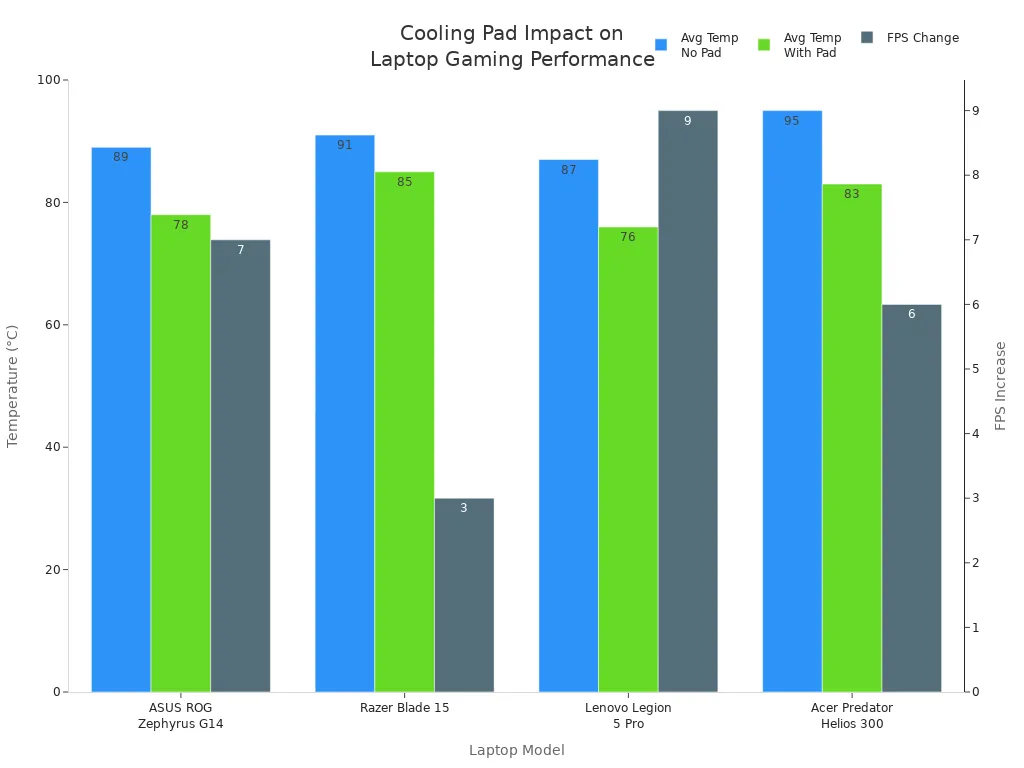
You can see that a cooler pad lowers temperatures and boosts frame rates. That means less thermal throttling and more fun during gaming sessions. You get the most out of your gaming laptop with the right cooling setup.
Why Choose fanacdc Cooling Pad Fan
You want a cooler pad that works quietly and saves energy. The fanacdc Cooling Pad Fan uses brushless motors and aerodynamic blades to keep noise low. Most models run at just 28 to 38 decibels, so you can focus on your game or work without distractions. These cooler pads also use EC fans that cut energy use by up to 75%. That’s good for your wallet and the planet.
Here’s what makes fanacdc stand out:
- Quiet operation, even during intense gaming or heavy workloads.
- Energy-efficient design that lowers your power bill.
- Customizable features like PWM speed control and RGB lighting.
- Reliable cooling for any laptop, from gaming laptops to workstations.
You get all the benefits of a laptop cooling pad with fanacdc—better performance, longer device life, and a more comfortable experience. If you want to keep your gaming laptop cool and quiet, fanacdc is a smart choice.
Tip: Clean your cooler pad’s vents every month and keep your laptop elevated for the best cooling results.
Cooling Pad vs Laptop Stand
Key Differences
You might wonder if you need a cooler pad or a laptop stand. Both help your laptop, but they serve different purposes. A cooler pad manages heat by using fans or special materials. You place your laptop on the cooler pad, and it pushes air underneath. This keeps your device cool and prevents overheating. A laptop stand lifts your laptop off the desk. It improves your posture and makes typing easier. You get better comfort, but a stand does not address heat directly.
Let’s look at the main differences:
| Feature | Cooler Pad | Laptop Stand |
|---|---|---|
| Heat Management | Active cooling with fans | No cooling function |
| Gaming Support | Essential for gaming | Not designed for gaming |
| Comfort | Some ergonomic features | Focused on ergonomics |
| Power Source | Needs power for fans | No power needed |
| Extra Features | USB ports, RGB lighting | Simple design |
If you play gaming titles or run heavy software, a cooler pad is your best friend. You get active cooling that lowers heat and keeps your laptop running fast.
When to Use Each
You should choose a cooler pad when you need to manage heat. If you use your laptop for gaming, video editing, or other demanding tasks, a cooler pad keeps temperatures down. You avoid thermal throttling and enjoy smooth performance. User reviews and expert tests show that cooler pads can drop CPU heat by 10°C to 18°C. This helps your laptop maintain higher speeds during gaming or work.
Pick a laptop stand if you want better posture or need to work comfortably. A stand works well for light tasks like browsing or writing. It does not cool your laptop, so you might see heat build up during gaming or long sessions.
Here’s when a cooler pad makes sense:
- You play gaming titles for hours.
- You notice heat slowing down your laptop.
- You want to prevent thermal throttling.
- You need extra USB ports or RGB lighting.
- You use your laptop in hot environments.
Choose a laptop stand for:
- Simple office work.
- Improving your typing angle.
- Reducing neck and shoulder pain.
Tip: Combine a cooler pad with a laptop stand for the best of both worlds. You get cooling for gaming and comfort for everyday use.
Conclusion
You’ve learned a lot about cooling pads and how they help your laptop. If you spend hours on your laptop, especially for gaming, you know how hot things can get. A cooling pad keeps your device cool, boosts performance, and helps your laptop last longer. You don’t want your gaming sessions interrupted by overheating or slowdowns. That’s where a good cooling pad comes in.
Let’s recap what you get with a cooling pad:
- Lower laptop temperatures during gaming and heavy use
- Less risk of thermal throttling, so your gaming stays smooth
- Longer device life, even if you game every day
- Extra features like RGB lighting and adjustable height for a better gaming setup
You might wonder if a cooling pad is right for you. If you love gaming, stream for hours, or use demanding software, you’ll see the benefits right away. Even if you just want a more comfortable experience, a cooling pad helps. You can find models that fit any gaming style, from casual to pro.
Remember: Not all cooling pads are the same. For the best results, look for advanced features that match your gaming needs.
Here’s a quick table to help you decide:
| User Type | Cooling Pad Benefit |
|---|---|
| Casual Gamer | Keeps laptop cool for long gaming sessions |
| Pro Gamer | Prevents lag and boosts gaming performance |
| Student | Makes gaming and studying more comfortable |
| Streamer | Supports long gaming streams without overheating |
If you want a reliable solution, check out fanacdc Cooling Pad Fan. It’s built for gaming, runs quietly, and saves energy. You get a cooler laptop and a better gaming experience every time.
So, are you ready to level up your gaming setup? A cooling pad could be the upgrade you need. Stay cool, play longer, and enjoy every gaming moment.
You’ve seen how a cooling pad keeps your laptop cool, boosts performance, and extends its life. If you use your laptop for gaming or heavy work, a quality pad like the fanacdc Cooling Pad Fan makes a real difference.
“Cooling pads won’t fix a fundamentally flawed thermal design, but they can provide marginal gains in airflow-constrained environments.” — Dr. Lin Zhao, MIT Lincoln Laboratory
Ask yourself:
- Do you run demanding apps for hours?
- Does your laptop get hot or throttle?
- Is your workspace warm or poorly ventilated?
If you answered yes, a cooling pad could be your best upgrade.
FAQ
How do you know if your laptop needs a cooling pad?
You notice your notebook gets hot, slows down, or shuts off during heavy use. These signs your laptop might need a cooling pad. If you feel heat or see performance drops, it’s time to consider extra cooling.
What is the best way to choose the right cooler pad?
You look at your laptop’s size, workload, and cooling pad technology. Check fan size, noise level, and extra features. Compare models and read reviews before buying your gaming cooling pad.
Can a cooling pad help keep your laptop at optimal temperature?
Yes, a cooling pad helps your laptop stay at optimal temperature. It improves airflow and reduces heat buildup. You get smoother performance and longer device life.
Does cooling pad technology work for all laptops?
Most cooling pad technology works for notebooks of all sizes. You find pads with adjustable fans and ergonomic designs. Make sure the pad fits your device and matches your needs.
Why should you buy a gaming cooling pad?
You want stable performance during gaming. Buying your gaming cooling pad keeps your laptop cool, prevents lag, and protects your hardware. It’s a smart upgrade for any gamer.
