
A usb cooling fan keeps your workspace comfortable by providing targeted airflow. You can use one to cool your laptop, desktop, or personal area. These fans connect through a usb port, making them easy to carry and set up anywhere. Many users choose usb cooling fans because they use less power and fit in small spaces. The table below shows how usb cooling fans compare to traditional fans in portability and energy use.
| Feature | USB Cooling Fans | Traditional Fans |
|---|---|---|
| Power Source | Low-voltage DC via USB | AC power from outlets |
| Portability | Lightweight and compact | Larger and less mobile |
| Power Consumption | 2 to 5 watts | 30 to 100+ watts |
| Cooling Scope | Targeted, personal airflow | Circulates air broadly |
Key Takeaways
- USB cooling fans provide targeted airflow, making them ideal for personal use in small spaces like desks or laptops.
- These fans are energy-efficient, consuming only 1-5 watts, which can save you money on electricity bills.
- Portability is a key feature; USB fans are lightweight and easy to set up anywhere, including with power banks.
- Regular maintenance, such as cleaning every 4-6 weeks, helps extend the lifespan and efficiency of your USB fan.
- Choosing a fan with adjustable speed settings allows you to balance airflow and noise for a comfortable workspace.
USB Cooling Fan Overview
What is a USB Cooling Fan
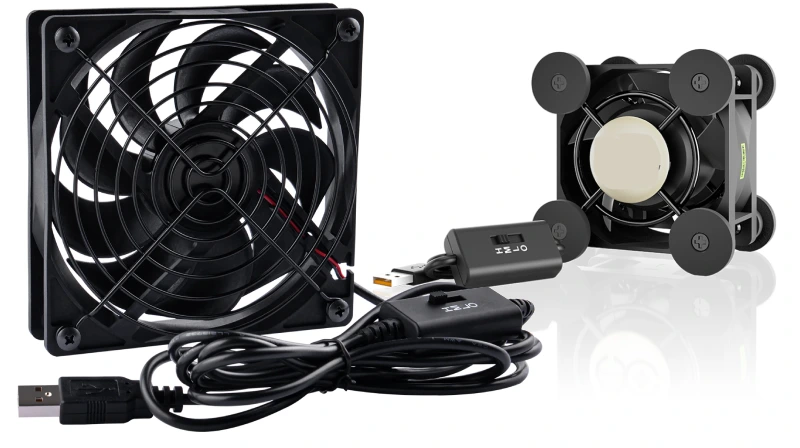
You can use a usb cooling fan to keep your devices and workspace comfortable. This fan uses usb power, which means you can plug it into your laptop, desktop, or power bank. The fan is compact and lightweight, making it a portable cooling solution for many situations. You can carry it in your bag or place it on your desk without taking up much space.
A usb fan has several main components that help it work efficiently. The table below shows these parts and their roles:
| Component | Description |
|---|---|
| Fan Blades | Push air forward to create airflow. Usually made from durable plastic. |
| Motor | Turns electrical energy into motion. Brushless DC motors improve efficiency. |
| Fan Grills | Protect the blades and keep you safe. Also add strength to the design. |
| Housing | Holds all parts together. Often made from ABS plastic for stability. |
| Heat Sink | Absorbs heat in dual-function models. Aluminum helps manage temperature. |
You will find usb fans made from materials like ABS plastic, polycarbonate, aluminum, steel, fabric, and rubber. ABS plastic gives the fan impact resistance and strength. Polycarbonate handles heat well and is used in premium models. Aluminum blades make the fan quieter and more efficient. Steel adds support in larger fans. Fabric parts improve comfort in wearable fans. Rubber reduces vibrations and keeps the fan steady.
Key Features and Benefits
You get many benefits when you use a usb cooling fan. The fan is easy to move and set up. Its small size and light weight make it perfect for desktops, laptops, or even handheld use. You can use it in different places without hassle.
- USB fans save energy. They use only 1–5 watts, which is much less than AC-powered fans. You can see the difference in the table below:Fan TypePower Consumption (Watts)Energy Savings (%)USB Cooling Fan1–530–50% (vs AC fans)AC-Powered FanVariesN/A
- You spend less than $1 per month on electricity for a usb fan. The fan is eco-friendly and budget-conscious. You can run it for hours on a power bank or laptop battery without draining much energy.
- USB fans have advanced features. Some models include smart technology, such as IoT connectivity and app controls. You can adjust airflow and monitor performance from your phone. Many fans have LED lighting and charging ports, making them multifunctional. You can choose from different colors and patterns to match your style.
Tip: Choose a usb fan with energy-efficient components and customizable options for the best experience.
You will notice that the demand for usb cooling fans has grown over the past five years. More people want personal cooling solutions that are easy to use and carry. Industry reports show that the market will keep growing, with an annual rate of 7.9% from 2026 to 2033.
USB fans offer reliable cooling solutions for your devices and workspace. You can enjoy quiet operation, strong airflow, and easy portability. The fan uses usb power, so you can plug it in almost anywhere. You get a product that fits your needs and saves energy.
How a USB Fan Works
Power and Connectivity
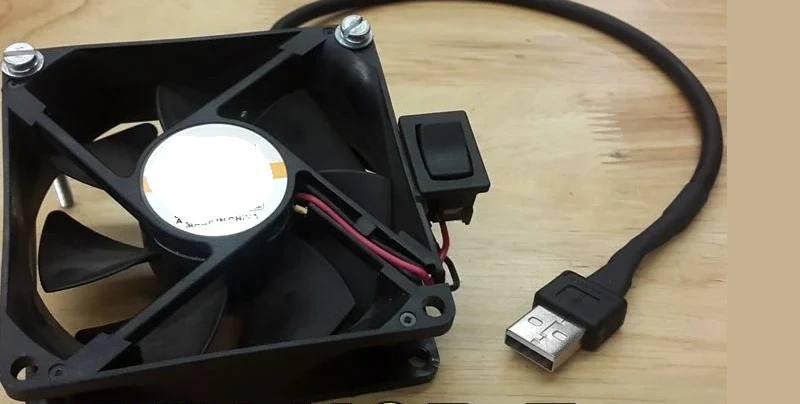
You can power a usb fan using any device with a usb port. This includes laptops, desktops, power banks, or even wall adapters. The usb connection makes setup simple. You just plug the fan in, and it starts working right away. Many users choose a usb cooling fan because it uses very little energy. Most eco-conscious usb fans operate on just 2–5 watts. This is much less than traditional fans, which often require much more power.
Here is a table that shows how usb fans compare to other cooling devices:
| Fan Type | Power Consumption (Watts) | Comparison to USB Fan |
|---|---|---|
| USB Desk Fan | 0.5 – 2.5 | Significantly lower |
| Standard Pedestal Fan | 50 – 100 | 20–40 times higher |
| Window Air Conditioner | 500 – 1500 | 200–600 times higher |
| Laptop (for reference) | 30 – 90 | 15–40 times higher |
Note: You can run a usb fan for hours using a power bank. This makes it a great choice for portable cooling solutions.
Airflow and Efficiency
You will notice that a usb fan creates airflow by spinning its blades. The motor inside the fan uses the energy from the usb port to turn the blades. This movement pushes air forward and helps you cool your equipment or workspace. The design of the fan blades and the motor speed affect how much air the fan can move.
Battery-powered fans usually generate stronger airflow because they use higher-wattage motors. These fans can have larger blades and more powerful motors. A usb fan is limited by the standard 5V/2.4A output from usb ports. This means the motor size and speed are smaller, so the airflow is more targeted and gentle.
You can use a usb cooling fan to cool their equipment, keep your workspace comfortable, or provide personal cooling solutions. Many fans offer adjustable speeds, so you can control the airflow to match your needs. You get efficient cooling without wasting energy.
- USB fans work best for close-range cooling.
- You can use them in small spaces, like on your desk or next to your laptop.
- The fan provides steady airflow and helps prevent overheating.
Tip: Choose a usb fan with adjustable speed settings for the best balance between airflow and energy use.
Types of USB Cooling Fans by fanacdc
Cooling Pad Fan for Laptops
You can use a cooling pad fan to keep your laptop running smoothly, especially during long work or gaming sessions. fanacdc’s cooling pad fans sit underneath your laptop and connect through usb. This design makes them easy to set up and move. You get features like dual ball bearings, PWM speed control, and even RGB lighting for a personalized touch.
Here is a table that shows how cooling pad fans differ from standard laptop fans:
| Feature | Laptop Fan (Internal) | Cooling Pad Fan (External) |
|---|---|---|
| Location | Inside the laptop | Underneath the laptop |
| Power Source | Internal battery | USB-powered |
| Noise Level | Moderate to high | Low to moderate |
| Customizability | Not adjustable | Speed and light control |
| Maintenance | Hard to clean | Easy to clean and replace |
You will find cooling pad fans most useful in these situations:
- Older laptops with poor cooling.
- Plastic laptops that trap heat.
- Hot rooms or summer days.
- Gaming or creative work that pushes your laptop hard.
- Thin laptops under heavy load.
Many cooling pads also improve your posture and wrist comfort, making them a smart choice for daily use.
Industrial USB Cooling Fan
If you work in a factory, server room, or data center, you need a usb fan built for tough jobs. fanacdc’s industrial usb cooling fans use strong materials like reinforced plastics and lightweight metals. These fans have brushless motors for long life and high efficiency. You can rely on them to keep equipment cool in demanding environments.
Here is a quick comparison between industrial and consumer usb fans:
| Feature | Industrial USB Fans | Consumer USB Fans |
|---|---|---|
| Blade Material | Reinforced plastics and metals | Basic plastics |
| Aerodynamic Efficiency | High, for strong airflow | Moderate |
| Case Material | High-impact ABS or polycarbonate | Lower-grade plastics |
| Motor Type | Brushless, efficient, long-lasting | Brushed, less efficient |
You can use these fans to:
- Maintain safe temperatures for sensitive equipment.
- Provide steady airflow in crowded server racks.
- Reduce cable clutter in manufacturing spaces.
Industrial usb fans help prevent overheating and keep your workflow running smoothly.
AC Fans for Industrial Use
When you need even more power, you can choose AC fans from fanacdc. These fans use higher voltage and deliver strong airflow for large machines, control panels, and telecom systems. AC fans work well in places where you need steady, reliable cooling for long hours.
Here is a table that shows the difference between AC fans and usb-powered fans:
| Fan Type | Power Requirements | Airflow Output |
|---|---|---|
| AC Fans | Higher | Higher |
| USB-powered Fans | 1-5 watts | Lower |
You can use AC fans in:
- Industrial machinery
- Power electronics
- Outdoor telecom cabinets
AC fans from fanacdc offer long service life and strong performance, making them ideal for demanding industrial needs.
Performance, Safety, and Durability
Airflow and Noise
You can measure the performance of a usb cooling fan by looking at airflow and noise levels. Airflow is measured in cubic feet per minute (CFM). Noise is measured in decibels (dB). The table below shows typical values for usb fans:
| CFM Range | Description |
|---|---|
| Low (1–5 CFM) | Ideal for desktop use, laptops, or personal cooling in very small spaces. |
| Medium (5–10 CFM) | Suitable for small rooms, cubicles, or bedside use. |
| High (10+ CFM) | Best for larger desks, shared workspaces, or environments requiring robust airflow. |
| Noise Level (dB) | Description |
|---|---|
| 20–30 dB | Quieter models, comparable to a whisper. |
| 30–50 dB | Most USB fans operate within this range. |
You can adjust fan speed to balance airflow and noise. Many usb fans, including fanacdc models, offer speed controls. This feature lets you reduce noise while keeping your devices cool. You get a quiet workspace that improves comfort and productivity.
Tip: Adjust fan speed for the best balance between cooling and quiet operation.
Energy Use and Safety
USB cooling fans use very little energy. Most models operate on 2–5 watts. This low power consumption makes them safe to use with laptops, power banks, or desktop computers. You can run a usb fan for hours without worrying about overheating or high electricity bills.
Fanacdc fans feature high efficiency motors and advanced safety designs. You get products with UL, CE, and RoHS certifications. These certifications show that the fans meet strict safety and environmental standards. You can trust fanacdc fans to deliver reliable cooling in any setting.
Note: Certified fans protect your devices and help you maintain productivity.
Durability and Maintenance
You can expect usb cooling fans to last for thousands of hours. The chart below compares the average lifespan of different bearing types:
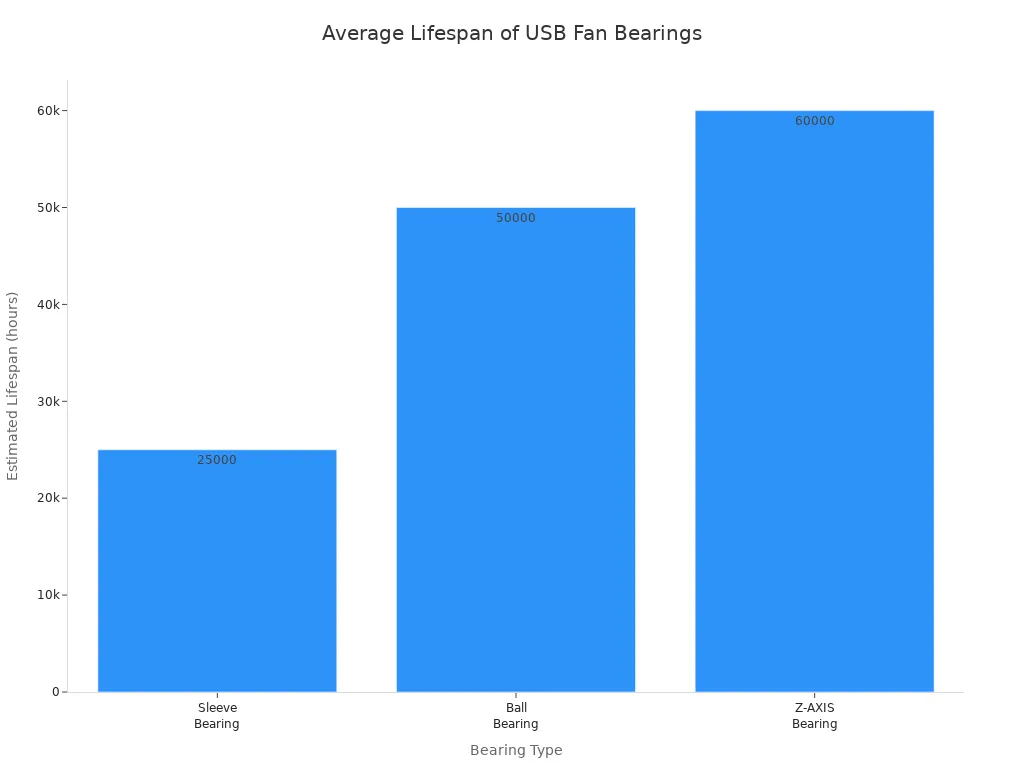
| Bearing Type | Estimated Lifespan at 25°C |
|---|---|
| Sleeve Bearing | 25,000 hours |
| Ball Bearing | 50,000 hours |
| Z-AXIS Bearing | 60,000 hours |
You can extend the life of your usb fan with regular maintenance. Follow these steps:
- Power off and unplug the fan before cleaning.
- Use a dry or slightly damp microfiber cloth to wipe blades and housing.
- Use compressed air to blow out dust from hard-to-reach areas.
- Clean every 4–6 weeks, or more often in dusty environments.
- Inspect and clean fans every 3–6 months for best results.
Dust buildup can restrict airflow and increase wear. Excessive debris may cause noise and vibration. Regular cleaning keeps your fan running smoothly and quietly.
Keeping your usb fan clean ensures high efficiency and long-lasting performance.
You now understand that a USB cooling fan offers efficient, portable cooling for your devices and workspace. Choosing a trusted brand like fanacdc gives you reliable performance and advanced features. When selecting a fan, consider these factors:
- Cooling needs and thermal output matching
- Fan size and physical compatibility
- Noise levels and acoustic performance
- Airflow and static pressure
- Power source and USB connection type
- Adjustment features and smart controls
Regular cleaning keeps your fan running smoothly. You solve air circulation issues in stuffy rooms and enjoy energy savings in spaces with limited power.
FAQ
How do you clean a USB cooling fan?
You unplug the fan first. Use a soft cloth or compressed air to remove dust from the blades and housing. Clean every month for best performance.
Can you use a USB cooling fan with a power bank?
Yes, you can plug your USB cooling fan into any power bank. This setup gives you portable cooling for outdoor use or travel.
What is the average lifespan of a USB cooling fan?
Most USB cooling fans last between 25,000 and 50,000 hours. Ball bearing models usually last longer than sleeve bearing types.
Are USB cooling fans safe for laptops and electronics?
Certified USB cooling fans protect your devices. You avoid overheating and electrical risks. Look for UL, CE, or RoHS marks for safety assurance.

