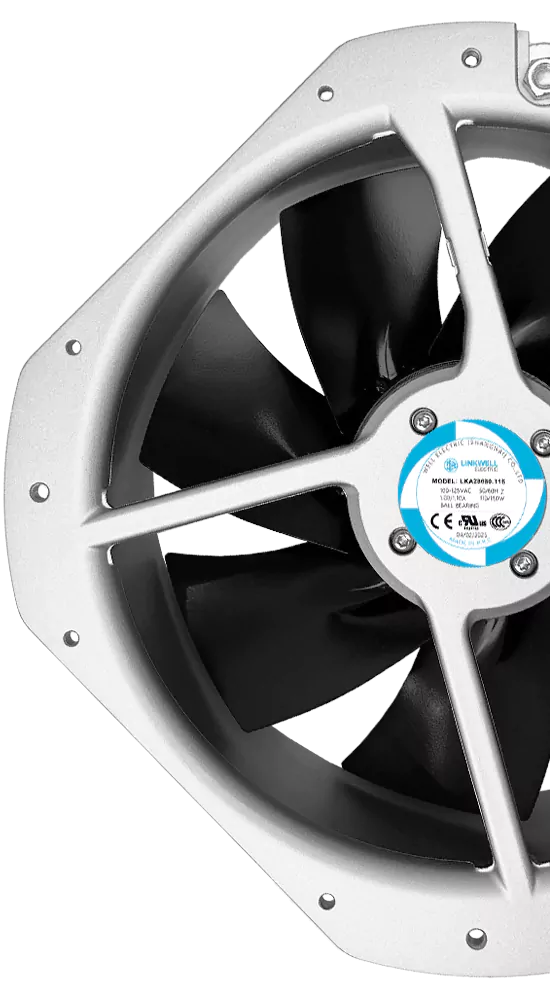
So, what is an EC axial fan? You can find this fan in many places. It is used in big cooling machines and in telecom equipment. EC axial fans have special motors called electronically commutated motors. These motors use both AC and DC power. This helps the fan work better and save energy. Companies want to save energy and help the environment. That is why they use EC axial fans. These fans give steady airflow and waste less energy. They are also easier to control. This is why EC axial fans are important for many businesses today.
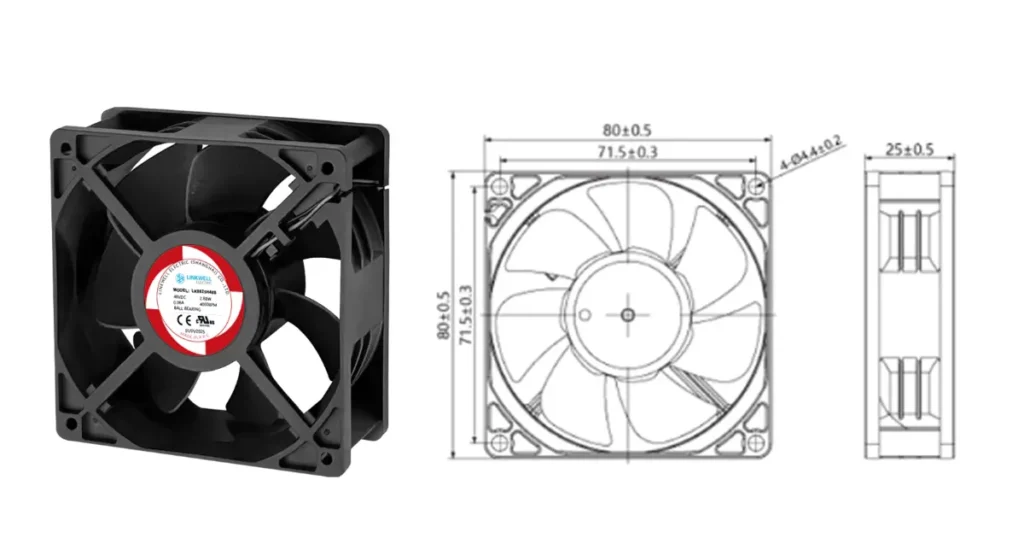
Key Takeaways
- EC axial fans use electronically commutated motors. They mix AC and DC power for better efficiency.
- These fans can save up to 70% energy. They use less power than regular AC fans. This makes them eco-friendly.
- EC axial fans have a compact design. They are easy to install in small spaces. They do not lose airflow.
- Adjustable speed control helps match airflow to needs. This reduces wasted energy and lowers noise.
- Built-in sensors give real-time feedback. This helps with maintenance and improves performance.
- EC axial fans work quietly. They are good for places like offices and data centers.
- These fans last longer than regular fans. This means lower maintenance costs over time.
- EC axial fans are versatile. They work well in HVAC, refrigeration, and automation.
What Is an EC Axial Fan?
If you want to know what is an ec axial fan, you are not alone. Many people see these fans in machines but do not know how they work. Let’s break it down so you can understand why these fans matter and how they help keep things cool.
EC Motor Technology
When you hear about what is an ec axial fan, the first thing you should know is the motor. EC stands for “electronically commutated.” This means the fan uses a special motor that combines the best parts of AC and DC motors. You get the power of AC and the control of DC. The result is a fan that saves energy and works smarter.
Here’s a quick look at how EC motor technology makes a difference:
| Feature | Value |
|---|---|
| Efficiency | Often above 90% |
| Energy Savings | Up to 70% less than AC motors |
| Operational Efficiency | Maintains 85% efficiency at 20% speed |
You can see that an ec axial fan does not waste much energy. The built-in electronics let you control the speed easily. You can slow the fan down or speed it up, and it still works well. This means you save money and use less power.
- Integrated electronics help the fan work better in different situations.
- You can change the speed to match what you need.
- The fan keeps high efficiency, even when it runs slow.
If you compare this to old AC fans, you will notice a big difference. EC axial fans can save up to 70% of energy. You will also find that these fans lower your costs and give you more control.
Axial Flow Fan Design
Now, let’s talk about the design. The term “axial flow fan” means the air moves in a straight line along the axis of the fan. This is different from other fans that push air out to the sides. If you want to know what is an ec axial fan, you need to look at how the blades and the body work together.
Here’s a table to show you the main design features of an axial flow fan:
| Design Characteristic | Description |
|---|---|
| Large flow rate | Moves a lot of air, more than many other fans. |
| Small air pressure | Does not push air very hard, but moves it fast. |
| Small size | Fits into small spaces, easy to install. |
| Light weight | Easy to handle and mount. |
| Simple structure | Not many parts, so it is easy to fix. |
| High fan efficiency | Works well, especially when you adjust the blades. |
| Wide working range | Can work in many different situations. |
| EC axial flow fan | Gives you high efficiency and saves energy. |
You will see that an axial flow fan is simple but powerful. The blades spin around the axis and pull air straight through. This makes the fan great for cooling electronics, machines, or even rooms. The compact design means you can put the fan almost anywhere. You do not need a lot of space.
Air Movement Direction
The direction of air is very important in an axial fan. In an ec axial fan, the air moves along the same line as the fan’s axis. The blades spin and pull air from one side to the other. This straight path helps the fan move a lot of air quickly.
Why does this matter? When you use an ec axial fan in a machine or a room, you want to cool things down fast. The straight airflow helps remove hot air and bring in cool air. This makes the fan perfect for cooling jobs in factories, data centers, or even your home.
Tip: If you need strong airflow and want to save energy, choose an ec axial fan. The airflow direction helps you get better cooling with less power.
So, what is an ec axial fan? It is a special type of axial flow fan that uses an electronically commutated motor. You get high airflow, energy savings, and easy control. The design is simple, the fan is small, and the air moves straight through. This makes the fan a smart choice for many cooling needs.
Fan Components
Motor and Controller
When you look inside an EC axial fan, you will find the motor and controller at the heart of everything. The motor takes electrical energy and turns it into movement. This movement spins the fan blades. The controller acts like the brain. It tells the motor how fast to spin and when to slow down. You get smooth speed changes and better control over airflow. The controller can even adjust the fan based on what your system needs. This means you do not waste energy when you do not need full power.
Here’s a quick table to show you how each main part helps the fan work better:
| Component | Contribution to Performance |
|---|---|
| Fan Blades | Move air quickly and in the right direction. |
| Motor | Powers the blades and controls their speed. |
| Housing | Protects the inside parts and helps air flow smoothly. |
| Control Module | Changes the speed and can use sensors for smarter control. |
| Mounting Brackets | Hold the fan steady and in the best spot for airflow. |
| Wiring and Connectors | Bring power safely to the motor. |
| Air Inlet and Outlet | Help air move in and out with less resistance. |
| Protective Grill | Keeps fingers and objects safe from the spinning blades. |
You can see that every part has a job. The motor and controller work together to give you the power and control you need.
Impeller and Frame
The impeller is another name for the fan blades. These blades spin fast and push air in a straight line. The shape and angle of the blades decide how much air the fan can move. If you want strong airflow, you need well-designed blades. The frame, or housing, holds everything together. It keeps the motor, blades, and electronics safe from dust and bumps. The frame also helps guide the air, so you get the best cooling for your machines or rooms.
You might notice mounting brackets on the frame. These brackets make it easy to install the fan where you need it. You can put the fan on a wall, inside a cabinet, or even in a tight space. The frame and impeller work as a team to give you strong, steady airflow.
Tip: Always check that the impeller spins freely and the frame is not bent. This keeps your fan working its best.
Bearings and Sensors
Bearings help the fan blades spin smoothly. They cut down on friction and noise. Good bearings mean your fan will last longer and need less fixing. You do not want a fan that squeaks or stops working after a short time.
Sensors make EC axial fans even smarter. These tiny parts watch for problems before they get big. For example, vibration sensors can tell if something is wrong inside the fan. Some sensors check how fast the blades spin or how hot the motor gets. The fan can use this information to fix small issues or warn you before a breakdown happens. This means less downtime and fewer surprises.
Modern EC fans use sensors to adjust airflow when the system changes. If the air gets blocked, the fan can speed up or slow down to keep things cool. You get better performance and save energy. Sensors also help with maintenance. They can tell you when it is time to clean or check the fan. This keeps your machines running smoothly and safely.
Wiring and Interfaces
When you look at an EC axial fan, you might notice a few wires coming out of it. These wires do more than just bring power. They help you control the fan, get feedback, and keep everything safe. Let’s break down what you need to know about wiring and interfaces.
First, you have the power wires. These bring electricity to the fan. Most EC axial fans use AC power, but the motor inside changes it to DC. You just connect the power wires to your system, and the fan gets what it needs to run.
Next, you see control wires. These wires let you tell the fan how fast to spin. You can use a simple voltage signal, like 0–10V, or a digital signal, like PWM (pulse-width modulation). If you want the fan to go faster, you send a higher signal. If you want it to slow down, you send a lower one. It’s that easy.
You also get feedback wires. These wires send information back to you. For example, the fan can tell you how fast it’s spinning or if there’s a problem. This helps you keep an eye on your system and fix things before they get worse.
Here’s a quick table to show you the main types of wires and what they do:
| Wire Type | What It Does | Why It Matters |
|---|---|---|
| Power | Runs the fan | Makes the fan work |
| Control | Changes fan speed | Lets you adjust airflow |
| Feedback | Sends info about fan status | Helps with monitoring and safety |
| Ground | Keeps things safe | Prevents electrical problems |
Most EC axial fans also have connectors. These make it easy to plug the fan in or swap it out. You don’t need to mess with loose wires. Just click the connector in place, and you’re good to go.
Tip: Always check the wiring diagram before you hook up your fan. This keeps you safe and makes sure the fan works right.
Some fans even have smart interfaces. You can connect them to a computer or a building control system. This lets you set up automatic speed changes, alarms, or even remote control. You get more options and better control.
If you want to keep your machines cool and safe, pay attention to the wiring and interfaces. Good wiring means fewer problems and easier setup. Smart interfaces give you more control and peace of mind. So, when you choose an EC axial fan, look at the wiring and see what options you get. It can make your whole system work better.
How EC Axial Fans Work
Power Input and Conversion
When you turn on an axial fan, a process starts. First, you connect the fan to electricity. Most EC axial fans use AC power. Inside the fan, electronics change AC to DC power. This is the first step in how the fan works. Next, the controller takes charge. It decides how much power the motor gets. This smart control helps the fan move air well. The fan can change its speed when you need it. You always get good airflow without wasting energy. You do not have to worry about the fan going too fast or too slow. The main idea is simple: take in power, change it, and use it wisely.
Electronic Commutation Process
Now, let’s see what makes an EC axial fan special. The secret is in the electronic commutation process. Old fans use brushes to switch the current in the motor. Brushes make friction and wear out over time. In an EC axial fan, switching happens with electronics. The controller uses sensors and smart parts to switch the current at the right time.
Here’s a table to help you see the difference:
| Feature | Electronic Commutation (EC) | Traditional Commutation (Brushed DC) |
|---|---|---|
| Commutation Method | Electronic | Mechanical (brushes and commutator) |
| Motor Type | Brushless permanent-magnet | Brushed DC motor |
| Maintenance | Low (no brushes to replace) | High (brushes wear out) |
| Efficiency | Higher (less friction) | Lower (friction from brushes) |
| Control Precision | High (electronic control) | Limited (mechanical limitations) |
This means the fan lasts longer and needs less fixing. The electronic commutation makes the fan run smoother. You also get more control over the speed. You can change the speed easily, and the fan reacts fast. This is why EC axial fans are used in many places that need good airflow.
Rotor and Impeller Rotation
After the controller sends signals, the rotor starts to spin. The impeller, which is attached to the rotor, turns too. This is how the fan moves a lot of air. The blades are shaped to grab air and push it along the axis.
Let’s break down the steps:
- Air goes into the fan housing, moving straight along the shaft.
- The spinning blades give energy to the air. The blade angle decides how much air moves and how much pressure is made.
- The air leaves the fan in the same direction, making a strong stream.
The axial fan design is great for moving air quickly. The fan does not waste energy pushing air the wrong way. The main idea is to turn electrical power into movement and then into airflow.
If you need to cool a room, a machine, or a cabinet, you want high airflow. The axial design makes air move straight through, so things cool down fast. The fan keeps working smoothly. You do not have to worry about loud noise or breakdowns.
Tip: For the best results, check that your axial fan spins freely and the blades are clean. This keeps airflow strong and your system working well.
When you know how power input, electronic commutation, and rotor rotation work together, you see why the axial fan is a smart choice. You get good airflow, high airflow, and a fan that works hard every day.
Airflow Output
When you use an EC axial fan, you want to know how much air it can move. This is called the airflow output. The fan pulls air in from one side and pushes it out the other. The air moves in a straight line, right along the axis of the fan. This design helps you cool things down fast.
You might wonder, “How much air can these fans really move?” The answer depends on the size and model of the fan. In industrial settings, you often see fans with different airflow ranges. Here’s a quick look at some typical numbers:
| Model | Flow Rate (CFM) |
|---|---|
| EC12038 Fan | 60 – 135 |
CFM stands for cubic feet per minute. It tells you how many cubic feet of air the fan moves every minute. If you pick a bigger fan, you get more airflow. If you need less air, you can choose a smaller model or slow the fan down.
Let’s break down what happens when the fan runs:
- The motor spins the impeller.
- The blades grab the air and push it forward.
- The air flows out in a strong, steady stream.
You get a lot of control with EC axial fans. You can change the speed to match your needs. If your equipment gets hot, you can turn up the fan. If things cool down, you can slow the fan to save energy.
Tip: Always check the airflow rating before you buy a fan. Make sure it matches what your system needs.
You also get even airflow. The fan does not pulse or surge. The electronics keep the speed steady. This helps protect your machines and keeps temperatures stable.
Some fans can move a little air. Others can move a lot. You just pick the right one for your job. If you need to cool a server room, you might want a fan with a high CFM. If you need to cool a small box, a lower CFM works fine.
You can trust EC axial fans to give you the airflow you need. The design makes sure the air goes where you want it. The smart motor keeps things running smooth. You get strong, steady, and reliable airflow every time.
Fan Control Methods
0–10V and PWM
You have a lot of control options when you use an EC axial fan. Two of the most common methods are 0–10V and PWM. These let you change the speed of the fan to match what your system needs. If you want simple control, 0–10V is a great choice. You send an analog signal, and the fan responds by speeding up or slowing down. This works well in HVAC systems and building management setups.
PWM, or pulse-width modulation, uses a digital signal. The fan gets a series of pulses, and the length of each pulse decides how fast the fan spins. PWM gives you better low-speed control. You can fine-tune the fan speed for quiet operation or energy savings.
Here’s a quick comparison:
| Control Method | Advantages | Limitations |
|---|---|---|
| 0-10V Control | Great for HVAC and BMS integration | Limited low-speed control |
| PWM Control | Better low-speed control | Minimum duty and restart issues |
You can pick the method that fits your system best. Both help you save energy because the fan only runs as fast as you need.
Speed Feedback
You want to know how your fan is performing. Speed feedback lets you track the fan’s RPM and see if it’s working right. Many EC axial fans have built-in sensors that send information back to your control system. You get real-time updates, so you can spot problems early.
If the fan slows down or stops, you get an alert. This helps you fix issues before they cause trouble. You can also use feedback to adjust the fan speed automatically. The system checks the airflow and changes the speed to keep things cool. You get steady performance and less downtime.
Tip: Use speed feedback to keep your equipment safe and your cooling system running smoothly.
Temperature-Based Control
Temperature-based control is a smart way to run your fan. The fan uses sensors to check the temperature in your system. If things get hot, the fan speeds up. If things cool down, the fan slows down. This keeps your equipment at the right temperature and saves energy.
You get precise airflow control. The fan only works as hard as it needs to. This means you waste less energy and lower your costs. You can see how the fan responds to changes in temperature, giving you real-time insight into your system.
- Maximizes thermal efficiency
- Reduces energy waste
- Gives you performance data for better decisions
By using temperature-based control, your fan becomes part of an intelligent cooling system. You get better results and a more reliable setup.
Note: If you want to improve energy use and keep your equipment safe, try temperature-based control for your fan.
Intelligent Integration
You want your cooling system to do more than just spin a fan. EC axial fans let you step into the world of intelligent integration. This means your fan can talk to other devices, follow commands from a computer, and even make decisions on its own. You get smarter control and better performance.
Imagine your fan working with sensors, building management systems, or even your phone. You can set up automatic rules. For example, when the room gets hot, the fan speeds up. When things cool down, the fan slows down. You do not have to touch a button. The fan knows what to do.
Let’s look at some ways you can use intelligent integration:
- Connect to Building Management Systems (BMS): Your fan can link to the main control system in your building. You set schedules, monitor energy use, and adjust settings from one place.
- Use IoT Platforms: You can connect your fan to the Internet of Things. This lets you check fan status from anywhere. You get alerts if something goes wrong. You can even change settings with your phone.
- Automate with Sensors: Add temperature, humidity, or pressure sensors. The fan reads these sensors and changes speed to match the environment. You get perfect cooling without wasting energy.
- Remote Monitoring and Control: You do not need to stand next to the fan. You can see how it’s working from your computer or phone. If you need to change something, you do it remotely.
Tip: If you want to save time and money, use intelligent integration. You get fewer breakdowns and more reliable cooling.
Here’s a table to show you what intelligent integration can do:
| Feature | What You Get |
|---|---|
| Automatic Speed Control | Fan adjusts itself for best airflow |
| Remote Access | Change settings from anywhere |
| Data Logging | Track performance and spot problems |
| Smart Alerts | Get warnings before issues grow |
| Energy Optimization | Lower costs and use less power |
You can set up your fan to work with other smart devices. For example, if your air conditioner turns on, the fan can speed up. If a door opens, the fan can slow down. You build a system that fits your needs.
Smart integration makes your life easier. You do not need to worry about manual checks or sudden failures. The fan keeps you informed and adapts to changes. You get peace of mind and a system that works for you.
Note: Always check if your EC axial fan supports smart integration. Some models need special software or connectors.
With intelligent integration, you turn a simple fan into a smart helper. You get more control, better cooling, and less stress. Try it and see how much easier your system can run.
Axial Fan Comparison
EC vs AC vs DC
You might wonder how an EC axial fan stacks up against AC and DC fans. Each type has its own strengths and weaknesses. When you look at an EC axial fan, you see a modern design that uses advanced electronics. This makes the fan more efficient and easier to control. An AC axial fan uses a simple motor and usually costs less at first. A DC axial fan gives you good speed control but may need extra equipment.
Here’s a table to help you compare these fans:
| Feature | EC Fans | AC Fans |
|---|---|---|
| Energy Consumption | More energy-efficient, adjusts usage | Consistent power draw |
| Maintenance | Lower maintenance needs | Higher maintenance needs |
| Lifespan | Longer lifespan | Shorter lifespan |
An EC axial fan can save you up to 70% on energy compared to an AC axial fan. You also spend less time fixing or replacing parts. The brushless motor in an EC fan means fewer moving parts and less wear. If you want a fan that lasts longer and costs less to run, the EC axial fan is a smart choice.
Efficiency and Speed Control
Let’s talk about efficiency and speed control. You want your axial fan to move the right amount of air without wasting power. EC axial fans lead the way in efficiency. They use smart electronics to adjust how much energy they use. AC axial fans draw the same power all the time, even if you do not need full airflow. This can waste energy and raise your bills.
Speed control is another big difference. Here’s a quick look:
| Fan Type | Speed Control Capability | Notes |
|---|---|---|
| EC Fans | Precise variable speed control | Advanced electronics allow quick adjustments to airflow |
| AC Fans | Limited speed control options | Often rely on on/off switches or basic multi-speed settings |
| DC Fans | Precise speed control via PWM or 0-10V | Can be programmed for silent operation at low loads |
With an EC axial fan, you can change the speed easily. You get the exact airflow you need for your system. This helps you save energy and keep things cool. DC axial fans also give you good speed control, but EC axial fans do it with less noise and better efficiency. AC axial fans usually have only a few speed settings, so you get less control.
Noise and Installation
Noise matters, especially if you use your axial fan in a quiet place. EC axial fans run at 50-60 dB. That is about as loud as a normal conversation. Traditional AC axial fans can be much louder, often reaching 70-80 dB. This makes a big difference if you want a peaceful workspace or need to keep noise down in a data center.
- EC axial fans operate at noise levels around 50-60 dB.
- Traditional AC blowers generate noise levels around 70-80 dB.
- The difference in noise levels is significant, especially in applications requiring quiet operation.
When you install an EC axial fan, you get a compact and lightweight design. The fan fits into small spaces and is easy to mount. You do not need special tools or heavy brackets. AC axial fans can be bulkier and harder to fit in tight spots. DC axial fans are usually small, but they may need extra wiring for control.
Tip: If you want a quiet, easy-to-install solution, choose an EC axial fan. You get strong airflow, high efficiency, and less noise.
You can see that the right axial fan makes your job easier. You get better airflow, lower costs, and a quieter environment.
Cost and Applications
You probably want to know how much these fans cost and where you can use them. Let’s break it down so you can make the best choice for your needs.
First, let’s look at the price. EC axial fans usually cost more than AC or DC fans. You pay extra for the smart electronics and energy savings. AC fans are the cheapest. DC fans sit in the middle. Here’s a quick table to show you the difference:
| Fan Type | Cost Comparison |
|---|---|
| AC | Least expensive |
| DC | Generally more expensive |
| EC | Generally most expensive |
You might ask, “Why pay more for an EC fan?” EC fans save you money on your energy bill. They last longer and need less fixing. If you run your fan all day, the savings add up. You spend more at first, but you get lower costs over time.
Now, let’s talk about where you can use each fan. You see AC fans in simple jobs. They work well in places where you don’t need to change the speed much. Think about small rooms, basic cooling, or old machines.
DC fans fit into spots where you want good speed control. You find them in electronics, computers, or places that need quiet operation. They work well in small spaces.
EC axial fans shine in tough jobs. You use them in big cooling systems, HVAC, data centers, and factories. They handle changing loads and give you steady airflow. You can control them with smart systems. EC fans fit into modern setups where you want energy savings and easy control.
Here’s a quick list to help you match the fan to the job:
- AC Fans: Small rooms, simple cooling, old machines
- DC Fans: Electronics, computers, quiet spaces
- EC Fans: HVAC, data centers, factories, smart buildings
Tip: If you want to save energy and get more control, EC axial fans are your best bet. They cost more upfront, but you get better performance and lower bills.
You can see that each fan has its place. If you need basic cooling, AC fans work fine. If you want quiet and control, DC fans do the job. If you want top efficiency and smart features, EC axial fans lead the way. Choose the fan that fits your needs and your budget.
EC Axial Fan Benefits
Energy Efficiency
You want your cooling system to save energy and lower your bills. An axial fan with EC motor technology gives you exactly that. These fans use smart electronics to cut down on wasted power. You get high efficiency, even when the fan runs at low speeds. A modern axial fan uses about 30% less electricity than a similar AC fan. This happens because the fan avoids belt and slip losses and keeps efficiency high across the load range.
Let’s look at how much energy you can save in different applications:
| Application Type | Energy Savings Percentage |
|---|---|
| AHU Systems | ~50% |
| FCU Systems | ~51% |
| FFU Cleanroom | ~42% |
| Cooling Towers | 30-35% |
You see big savings in places like AHU and FCU systems. If you use an axial fan in a cleanroom or cooling tower, you still get strong energy savings. This means you spend less on electricity and help the environment. You also get steady fan performance, which keeps your machines cool without wasting power.
Adjustable Speed
You need a fan that can change speed to match your needs. An axial fan with EC technology lets you do just that. You can adjust the speed to fit the airflow you want. This means the fan only works as hard as it needs to. You save energy and keep fan efficiency high.
Here’s what adjustable speed gives you:
- You match airflow to demand, so you never waste power.
- You get quieter operation because the fan slows down when full speed isn’t needed.
- You keep fan performance steady, even when conditions change.
EC axial fans can operate at variable speeds. This lets you fine-tune airflow for your system. You get more control and better efficiency. If your equipment needs less cooling, you slow the fan down. If things heat up, you speed the fan up. You always get the right airflow.
Low Noise
You want a quiet workspace or a peaceful environment. An axial fan with EC motor technology helps you achieve that. Fan noise increases with the fifth power of blade tip speed. If you reduce the speed from full load to 70%, you can lower noise by 7 to 10 dB(A). You still get enough airflow for most jobs.
EC axial fans use efficient motor control and smart blade design. This cuts down on turbulence and keeps noise low. You notice the difference in places like offices, hospitals, and data centers. The fan runs quietly, so you can focus on your work.
- Lower speed means less noise.
- Smart design keeps airflow steady and fan performance high.
- You get a comfortable space without loud distractions.
If you want strong airflow, high efficiency, and low noise, an axial fan with EC technology is the best choice. You get all the benefits in one package.
Compact Design
You want a fan that fits where you need it. EC axial fans give you that flexibility. These fans have a compact design that saves space in your equipment or room. You can install them in tight spots, inside cabinets, or even on crowded racks. The small size does not mean less power. You still get strong airflow and high efficiency.
Manufacturers build EC axial fans with fewer parts. The motor, controller, and electronics fit together in one neat package. You do not see bulky boxes or extra wires hanging out. This makes your setup look clean and organized. You also find it easier to handle and move these fans during installation.
Here are some reasons why you will love the compact design:
- Easy installation: You can mount the fan quickly, even in small spaces.
- Flexible placement: The fan fits in many types of equipment, from HVAC units to server cabinets.
- Lightweight: You do not need special tools or extra hands to lift the fan.
- Neat appearance: The fan blends in with your system and does not take up extra room.
Tip: If you need to upgrade your cooling system, you can swap out old fans for EC axial fans without changing much. The compact size makes retrofits simple.
You get more room for other components. You also reduce clutter and improve airflow paths. A compact fan helps your whole system work better.
Long Service Life
You want your fan to last a long time. EC axial fans deliver on that promise. These fans use brushless motors and advanced electronics. You do not have to worry about worn-out brushes or frequent breakdowns. The fan keeps running, year after year.
Let’s look at how EC fans compare to traditional AC fans. The numbers show a big difference in service life:
| Fan Type | Average Service Life (Hours) |
|---|---|
| EC Fans | 40,000 – 60,000 |
| AC Fans | 15,000 – 25,000 |
You can see that EC axial fans last almost twice as long as AC fans. This means fewer replacements and less downtime for your equipment. You save money on repairs and maintenance. You also avoid the hassle of changing fans often.
Why do EC fans last longer? The answer is simple. The brushless design reduces friction and heat. The electronics protect the motor from overloads and voltage spikes. The fan runs smoothly, even in tough conditions.
Here’s what you get with a long service life:
- Less maintenance: You spend less time fixing or replacing fans.
- More reliability: Your equipment stays cool and safe.
- Lower costs: You save money over the life of your system.
Note: If you want peace of mind and fewer headaches, choose EC axial fans. You get a fan that works hard and lasts for years.
With EC axial fans, you invest in quality and durability. You keep your systems running and your worries low.
Industrial Applications
HVAC and Refrigeration
You find axial fans in many HVAC and refrigeration systems. These systems need steady airflow to keep rooms cool and food safe. Axial fans push air straight along the axis. This helps cool air move fast and spread everywhere. You can put these fans in air handling units, chillers, and evaporators. The small size lets them fit in tight spots. You do not need much space for them. You can change the speed to match how much cooling you need. This saves energy and keeps things quiet. If you want a fan that works well, choose an axial fan for these jobs.
Tip: If your HVAC system needs more airflow, try an axial fan. It is easy to install and gives strong cooling.
Electrical Enclosures
Electrical enclosures keep important equipment safe from dust and heat. Good airflow is needed to protect everything inside. Axial fans are great here because they move air straight through the box. You can put the fan on the door or the side. The airflow keeps the temperature steady and stops things from getting too hot. You do not have to worry about dust building up. The fan pushes hot air out and brings cool air in. You can use these fans in control cabinets, switchgear, and server racks. The simple design makes them easy to take care of. You get steady cooling and your equipment lasts longer.
- Axial fans fit well in small boxes.
- They give strong airflow for important jobs.
- The fan keeps electronics cool and safe.
Telecom and Data Centers
Telecom and data centers need strong cooling to protect servers. EC axial fans are a good choice for these places. Here’s why they help:
- Energy Efficiency – EC fans use 30–50% less power than AC fans. You save money and lower your bills.
- Smart Speed Control – The fan changes speed when the temperature changes. This stops wasted energy and keeps things from overheating.
- Reliability and Longevity – With fewer moving parts, the fan lasts longer. You do not have to fix it as often.
- Low Noise Operation – The fan is quiet. This is important in server rooms where noise can be a problem.
- Sustainability Advantage – EC fans help you use less energy. You meet energy rules and help the environment.
You can count on axial fans in telecom and data center jobs. The fan keeps servers cool, saves energy, and runs quietly. You get steady cooling and peace of mind.
Note: If you run a data center, pick EC axial fans for better cooling and lower costs.
You see axial fans used in many places. They work in HVAC, refrigeration, electrical enclosures, telecom, and data centers. You get strong airflow, easy control, and steady cooling. These fans help protect equipment and save energy in all kinds of cooling jobs.
Automation and New Energy
You can find EC axial fans in more automation and new energy projects every year. These fans help keep machines cool so everything works well. If you use robots, solar panels, or electric vehicles, you know good airflow is important. EC axial fans give steady airflow and do not waste energy.
In factories, automation systems have many sensors and control panels. These parts can get hot very fast. You need a fan that reacts quickly to changes. EC axial fans can speed up or slow down as needed. This keeps the temperature just right. You do not have to worry about things getting too hot or shutting down.
Here are some ways EC axial fans help in automation and new energy:
- Robotics: Robots work hard and get hot. Their motors and controllers need cooling. An EC axial fan keeps them cool so they keep working.
- Solar Inverters: Solar power systems use inverters that get hot in the sun. A fan helps them last longer and work better.
- Battery Storage: Big batteries need even temperatures. EC axial fans move air around battery packs. This stops hot spots and keeps batteries safe.
- Electric Vehicle Charging: Charging stations use fans to cool power electronics. This helps charging go faster and keeps things safe.
- Wind Power: Wind turbines have control boxes that get hot. Fans keep these parts cool, even when the wind is strong.
Here’s a table to show where EC axial fans help in automation and new energy:
| Application Area | Why Use EC Axial Fans? |
|---|---|
| Robotics | Fast cooling, smart speed control |
| Solar Inverters | Energy savings, long service life |
| Battery Storage | Even airflow, safe temperatures |
| EV Charging Stations | Quiet operation, reliable cooling |
| Wind Turbines | Compact size, easy installation |
You get more than just cooling with these fans. EC axial fans help save energy, lower noise, and need less fixing. You can connect them to smart systems. This lets you check the fans from your phone or computer. If there is a problem, you get an alert right away.
Tip: If you want your automation or new energy project to be ready for the future, pick EC axial fans. They fit into modern systems and help you save energy.
You will see more uses for axial flow fans in these fields. As more companies use automation and clean energy, the need for smart, efficient fans will grow. You can trust EC axial fans to keep your systems cool and safe.
Selection Factors
Airflow and Pressure
When you pick an EC axial fan, you need to know how much airflow your system needs. Airflow tells you how much air moves through your space every minute. If you get this wrong, your equipment might overheat or not cool down fast enough. You should check the heat load and how often you want to change the air in your room. Sometimes, you need to dilute contaminants, so you must calculate the right airflow for that too.
Pressure is just as important. Static pressure shows how hard the fan must work to push air through ducts, filters, or any obstacles. If you ignore pressure, your fan might not deliver the airflow you expect. Engineers use fan curves to see how airflow and pressure work together. These curves help you find the best operating point for your system. You should also look at duct length and resistance from filters. If you plan ahead, you avoid oversizing or undersizing your fan.
Here’s a quick table to help you remember what matters:
| Factor | Description |
|---|---|
| Required Airflow | Calculate based on heat load, air changes, or contaminant dilution. |
| Operating Static Pressure | Add up duct losses and obstructions to match fan performance with system needs. |
| Impeller Type and Pitch | Pick blade design for best efficiency and noise at your operating point. |
Tip: Always check both airflow and pressure before you buy a fan. This keeps your system running smoothly.
Voltage and Size
You want your EC axial fan to fit your system without trouble. Voltage is the first thing to check. Most EC fans run on standard AC input, like 110V or 220V. This makes them easy to swap with old AC fans. You do not need big changes to your wiring.
Size matters too. You must make sure the fan fits in your space. Check the physical dimensions, airflow direction, and mounting design. If these match, you can install the fan quickly. Sometimes, you need to check control signals, like PWM or FG, to make sure your system can talk to the fan.
Here’s what you should look for:
- Standard voltage for easy replacement
- Matching size and mounting for quick installation
- Compatible control signals for smooth operation
Note: If you check voltage and size first, you avoid headaches during installation.
Noise and Temperature
Noise can be a big deal, especially if you work in a quiet place. You want a fan that runs quietly but still gives you strong airflow. Blade design and speed affect noise levels. If you pick a fan with smart blades and adjust the speed, you can keep noise low.
Temperature is another key factor. You need to know how hot your system gets. If your fan runs in a hot spot, pick one with good motor insulation. This helps the fan last longer. Duty cycle matters too. If your fan runs all day, make sure it can handle the heat and keep working.
Here’s a quick list to help you:
- Choose low-noise fans for quiet spaces
- Check motor insulation for high-temperature jobs
- Match duty cycle to your system’s needs
Tip: If you want reliable cooling and less noise, pay attention to temperature and fan design.
Protection and Bearings
When you pick an EC axial fan, you want it to last and work safely. That’s where protection features and bearings come in. Let’s break down what you need to know.
Protection Features
You don’t want your fan to stop working because of dust, water, or electrical problems. Good fans come with built-in protection. Here are some things to look for:
- IP Rating: This tells you how well the fan keeps out dust and water. A higher number means better protection. For example, IP54 means the fan can handle dust and splashes.
- Overload Protection: This stops the fan from burning out if it gets too much power.
- Locked-Rotor Protection: If something blocks the blades, this feature shuts off the fan to keep it safe.
- Thermal Protection: If the motor gets too hot, the fan will turn off before it gets damaged.
Tip: Always check the IP rating and protection features before you buy. This helps your fan last longer, even in tough places.
Here’s a quick table to help you compare:
| Protection Feature | What It Does | Why It Matters |
|---|---|---|
| IP Rating | Blocks dust and water | Keeps fan safe in harsh spots |
| Overload Protection | Stops too much power | Prevents motor damage |
| Locked-Rotor | Shuts off if blades jam | Avoids overheating |
| Thermal Protection | Turns off if too hot | Extends fan life |
Bearings
Bearings help the fan blades spin smoothly. You want good bearings for quiet operation and a long-lasting fan. There are two main types:
- Ball Bearings: These last a long time and work well in any position. They handle heat and run quietly. You see them in most industrial fans.
- Sleeve Bearings: These cost less and work best when the fan sits flat. They are quieter at low speeds but wear out faster if the fan runs all the time or gets hot.
If you want a fan for heavy-duty jobs, go with ball bearings. For light use or short runs, sleeve bearings can work.
Note: Ball bearings are best for fans that run all day or in hot spots. They need less fixing and make less noise over time.
Here’s a simple table to compare:
| Bearing Type | Best For | Pros | Cons |
|---|---|---|---|
| Ball Bearing | Long life, any position | Quiet, durable | Costs more |
| Sleeve Bearing | Light use, flat mount | Cheap, quiet at start | Wears out faster |
When you choose your EC axial fan, look for strong protection and the right bearings. This keeps your fan running smoothly and saves you trouble down the road.
Common Misunderstandings
EC vs Axial Fan Types
You might think all axial fans are the same, but that’s not true. EC axial fans stand out because of their special motors and smart controls. Some people mix up EC fans with regular AC or DC axial fans. You need to know the difference so you can pick the right fan for your job.
An EC axial fan uses an electronically commutated motor. This motor gives you better energy savings and more control. Regular AC axial fans just turn on and off. They don’t let you change the speed easily. DC axial fans can adjust speed, but they often need extra equipment. EC fans combine the best parts of both. You get easy speed control, high efficiency, and a longer life.
If you want a fan that saves energy and gives you more options, EC axial fans are the way to go.
EC Is Not Just DC
It’s easy to think EC means “just a DC fan.” That’s a common mix-up. EC stands for “electronically commutated.” This means the fan uses AC power from the wall, but inside, smart electronics turn it into DC power for the motor. You get the benefits of both AC and DC in one package.
Here’s a quick table to help you see the difference:
| Feature | EC Fan | DC Fan |
|---|---|---|
| Power Input | AC or DC | DC only |
| Motor Control | Electronic (smart) | Basic |
| Efficiency | Very high | High |
| Speed Control | Easy and precise | Good |
You can plug an EC fan into a regular outlet. The electronics inside do the hard work. You get smooth speed changes and better performance. So, when you see “EC,” remember it’s not just a DC fan—it’s smarter.
Airflow Is Not the Only Factor
You might think picking a fan is all about airflow. That’s only part of the story. There are other things you need to check to make sure your fan works well in your system.
Here are some reasons why airflow isn’t the only thing that matters:
- Incorrect Fan Type: If you use the wrong type of fan, it might not handle the pressure or airflow your system needs.
- Inadequate Sizing: A fan that’s too small won’t cool enough. A fan that’s too big can waste energy or cause too much noise.
- System Impedance: Things like filters, bends, or small ducts can block airflow. This creates extra pressure the fan must overcome.
- Improper Installation: If you mount the fan the wrong way or use poor ducting, you lose performance and might even damage the fan.
Tip: Always look at the whole system, not just the airflow number. Check the pressure, size, and how you install the fan.
When you think about all these factors, you get a fan that works better and lasts longer. Don’t just chase the biggest airflow. Make sure your fan fits your real needs.
Suitability and Control Functions
You might think every EC axial fan works for any job, but that’s not true. Not all fans fit every situation. You need to check if the fan matches your system and your needs. Some people buy an EC axial fan just because it sounds advanced. They forget to look at the details. This can lead to problems later.
First, think about where you want to use the fan. EC axial fans work great in places like HVAC, data centers, and automation systems. If you need strong airflow and smart control, these fans shine. But if your system only needs simple on-off airflow, you might not need all the extra features. Sometimes, a basic AC fan does the job just fine.
Let’s look at some things you should check before picking an EC axial fan:
- Control Needs: Do you want to change the fan speed? EC fans let you do that with signals like 0–10V or PWM. If you never plan to adjust the speed, you might not use this feature.
- System Compatibility: Make sure your system can send the right control signals. Some older systems can’t talk to EC fans without upgrades.
- Environment: EC fans handle heat, dust, and moisture well, but you should still check the IP rating. If you use the fan outdoors or in a wet place, pick a model with good protection.
- Budget: EC fans cost more at first. If you only need basic cooling, you might save money with a simpler fan.
Here’s a quick table to help you decide if an EC axial fan fits your needs:
| Question | Why It Matters |
|---|---|
| Do you need variable speed? | EC fans offer precise control |
| Is your system modern or smart? | EC fans work best with new systems |
| Will you use remote monitoring? | EC fans support feedback signals |
| Is energy saving a top goal? | EC fans cut power use |
Tip: Always match the fan’s control functions to your system. Don’t pay for features you won’t use.
Some people also think all EC fans have the same control options. That’s not true. One EC fan might use 0–10V control, while another uses PWM or even digital communication. You need to check the datasheet or ask the supplier. If you skip this step, you might end up with a fan you can’t control.
You get the best results when you pick a fan that fits your system and your goals. Take time to check the control functions and make sure they match what you need. This helps you avoid headaches and keeps your cooling system running smoothly.
Conclusion
An EC axial fan combines an electronically commutated motor with an axial-flow impeller. Its integrated electronics control the motor operation and allow the fan to move air along the motor shaft while adjusting speed according to the cooling demand.
Compared with basic fixed-speed fans, EC axial fans can provide efficient operation, flexible speed control, lower operating noise, and compact installation. However, the actual performance depends on the fan size, airflow, static pressure, control method, voltage, and operating environment.
As an EC axial fan manufacturer, we produce cooling fans for industrial equipment, HVAC systems, refrigeration equipment, electrical enclosures, and OEM applications. Share your airflow, static pressure, fan size, control, and installation requirements with us, and we will help you select or manufacture a suitable EC axial fan.
FAQ
What does EC stand for in EC axial fans?
EC means “electronically commutated.” You get a fan that uses smart electronics to control the motor. This gives you better energy savings and more control than old-style fans.
Can I replace my AC fan with an EC axial fan?
Yes, you can swap most AC fans for EC axial fans. Just check the size, voltage, and wiring. You get better efficiency and quieter operation right away.
How do I control the speed of an EC axial fan?
You can use a 0–10V signal or PWM control. Some fans also work with smart building systems. You just adjust the signal, and the fan changes speed.
Are EC axial fans noisy?
No, EC axial fans run quietly. The smart motor and blade design keep noise low. You can use them in offices, data centers, or anywhere you want less noise.
Do EC axial fans save money?
Yes! You save on energy bills because these fans use less power. You also spend less on repairs since they last longer and need less maintenance.
Where can I use EC axial fans?
You can use them in HVAC, refrigeration, electrical cabinets, telecom, and automation. They fit almost anywhere you need strong, efficient airflow.
What makes EC axial fans last longer?
You get a brushless motor with fewer moving parts. This means less wear and tear. The electronics also protect the fan from overheating and power surges.
Tip: Always check the fan’s datasheet for details about control, size, and protection features.