Fan Sensors: A Practical Guide for System Cooling & Reliability
Table of Contents
Imagine your server room suddenly shuts down. Overheating and a failed fan go unnoticed, causing chaos. You know how important reliable equipment is. Monitoring fan health makes a huge difference. When you keep an eye on fans, you prevent overheating, reduce downtime, and avoid high replacement costs.
Benefit
Description
Prevents Overheating
Properly functioning fans prevent overheating of servers and network devices, ensuring reliability.
Reduces Downtime
Continuous monitoring helps avoid costly downtime, maintaining uninterrupted business processes.
Lowers Replacement Costs
Ensures systems remain well-ventilated, reducing the need for frequent hardware replacements.
Fan sensors act as your early warning system. With Fan Sensors: A Practical Guide for System Cooling & Reliability, you can take control before issues arise. fanacdc brings years of expertise, offering smart sensor integration for industrial and data center cooling.
Key Takeaways
Fan sensors prevent overheating by monitoring fan health, ensuring your equipment runs reliably.
Real-time alerts from fan sensors help you catch problems early, reducing downtime and saving money.
Automatic speed adjustments from fan sensors optimize energy use, leading to significant cost savings.
Regular maintenance of sensors and fans keeps your cooling system efficient and extends equipment lifespan.
Fan Sensors: A Practical Guide for System Cooling & Reliability
Fan Sensor Types & Functions
You might wonder what makes one fan sensor different from another. Let’s break it down. Each sensor type has a unique job, and knowing how they work helps you pick the right one for your system.
Sensor Type
Operation Description
Application Example
Lock Rotor Sensor
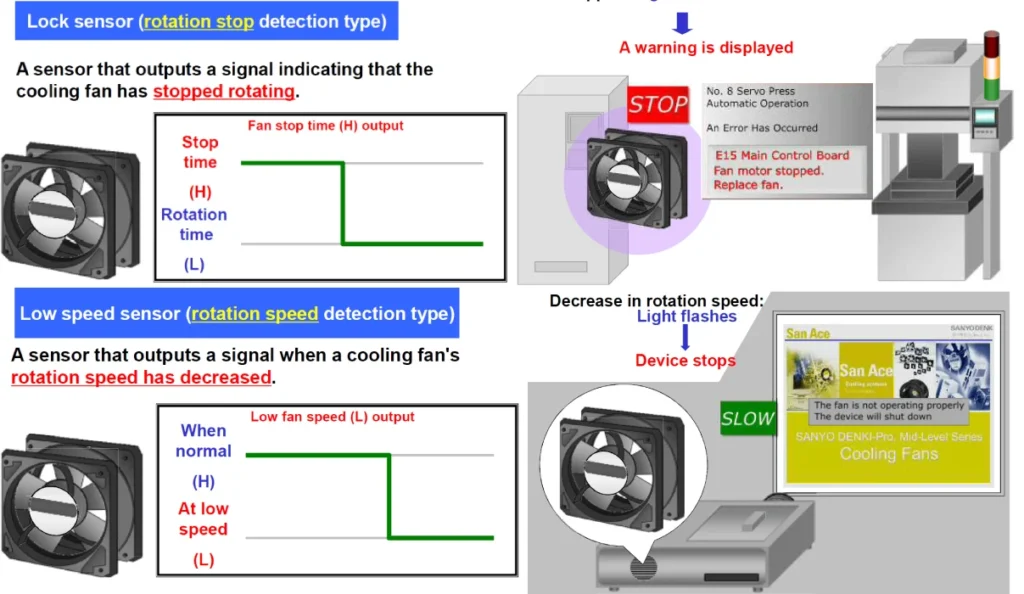
Outputs a high signal when the fan stops working (locked rotor) and low when running.
Used in semiconductor tools for quick failure alerts.
Low-Speed Sensor
Switches from low to high when fan speed drops below a set point.
Monitors cooling in laser projectors.
Tachometer Sensor
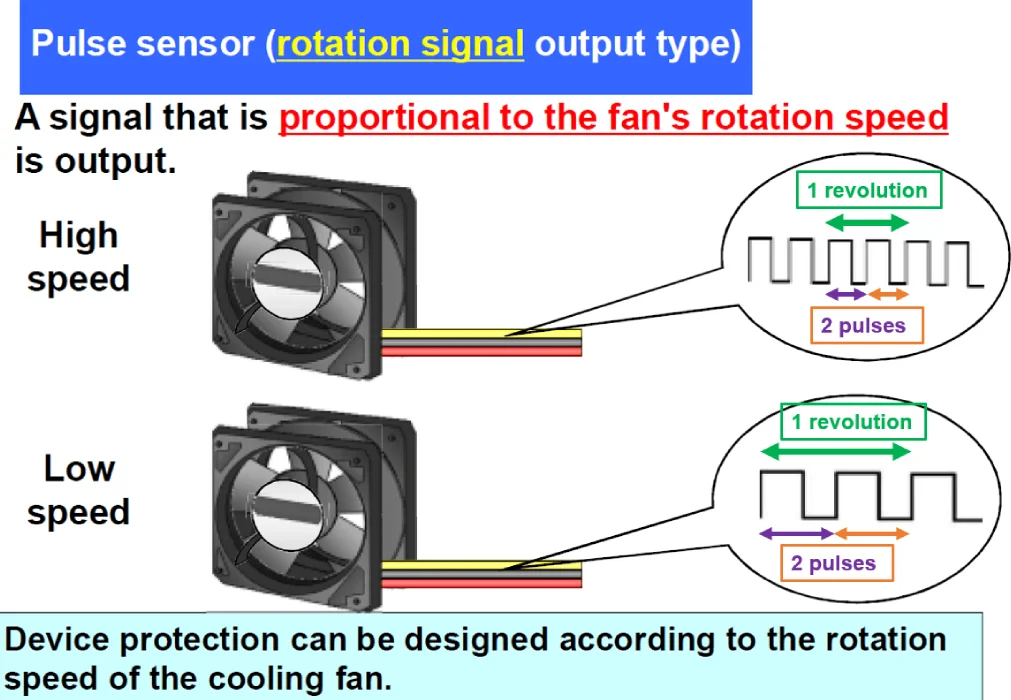
Sends out pulse signals that show the exact RPM of the fan.
Used where you need precise speed monitoring.
You can see that each sensor gives you a different kind of feedback. A lock rotor sensor tells you right away if a fan stops. A low-speed sensor warns you if a fan slows down too much. A tachometer sensor gives you real-time speed data. With Fan Sensors: A Practical Guide for System Cooling & Reliability, you get the tools to spot problems before they cause damage.
Integration in Cooling Systems
You want your cooling system to run smoothly and efficiently. Integrating fan sensors is the smart way to make that happen. Here’s how you can do it:
Control variable speed fans using underfloor static pressure. This helps you manage airflow and keep temperatures steady.
Make sure all cooling units run at the same speed. This prevents conflicts and keeps your system balanced.
Set up supply air control before adding variable speed drives. This avoids hot spots in your cold aisles.
Monitor temperatures at the inlet of your IT devices. This lets you adjust airflow right where it matters.
When you use fanacdc industrial cooling fans, you get products designed for easy sensor integration. For example, fanacdc’s DC fans support tachometer and low-speed sensors, making them perfect for electronics and automation. In data centers, you can use EC fans with built-in sensor feedback to adjust speed and save energy. Fan Sensors: A Practical Guide for System Cooling & Reliability helps you match the right sensor to your cooling needs.
Tip: Always check your system’s airflow and temperature patterns before choosing a sensor. This ensures you get the best performance and reliability.
Signal Outputs & Typical Applications
Fan sensors send out signals that your system can read and act on. Here’s what you need to know:
Lock rotor sensors give a simple on/off signal. If the fan stops, you get an alert right away.
Low-speed sensors switch their signal when the fan slows down. This helps you catch problems early.
Tachometer sensors send out pulses that show the fan’s exact speed. You can track performance in real time.
You’ll find these sensors in many industries. Cooling towers use them to boost performance and cut power use. Electronics systems rely on them for thermal management and reliability. Data centers use them to keep high-powered components cool, even in tight spaces. Industrial air coolers and laser projectors also depend on fan sensors to prevent failures and reduce downtime.
With Fan Sensors: A Practical Guide for System Cooling & Reliability, you can see how these sensors fit into real-world systems. fanacdc’s cooling solutions for data centers and industrial automation come ready for sensor integration, giving you peace of mind and better control.
Cooling & Reliability Mechanisms
Real-Time Monitoring & Feedback
You want to know what’s happening inside your system at all times. That’s where real-time monitoring comes in. Fan sensors give you instant feedback about fan speed, airflow, and temperature. You can spot problems before they turn into disasters. For example, if a fan slows down or stops, you get an alert right away. This lets you act fast and keep your equipment safe.
Let’s look at the numbers. Real-time monitoring doesn’t just keep you informed—it saves you money and energy, too.
Benefit Description
Measurable Impact
Typical Energy Savings from Optimized CRAC Operations
15-30%
Potential Loss from Data Center Thermal Event
$500,000+
Cooling Energy Reduction through Monitoring
15-30%
You can see how much you gain by staying ahead of problems. With Fan Sensors: A Practical Guide for System Cooling & Reliability, you get the tools to make your cooling smarter and more reliable.
Fanacdc’s Industrial Cooling Fans and Data Center Cooling Solutions make this easy. Their fans come ready for sensor integration, so you can monitor everything in real time. You get peace of mind and better control over your system.
Automatic Speed Adjustment
You don’t want your fans running at full speed all the time. That wastes energy and wears out your equipment. Automatic speed adjustment solves this problem. Fan sensors measure temperature and airflow, then adjust fan speed to match what your system needs.
Here’s how different technologies help you save energy and keep things stable:
Technology
Contribution to Energy Savings and Stability
Variable Frequency Drives
Enables precise control of fan speed, resulting in energy savings of approximately 30-50% and improved functionality.
Smart Controllers
Learns from operational behavior for dynamic adjustments, ensuring optimal performance and reducing equipment wear.
Sensor Integration
Activates fan speed controls based on temperature readings, preventing overheating and ensuring effective cooling.
Fan Affinity Laws
Demonstrates that small reductions in fan speed can lead to significant energy savings due to the cubic relationship with power.
You get even more benefits with advanced features. For example, the Active Pressure Load (APL) function keeps airflow balanced by adjusting fan speeds across all units. Automatic Temperature (TPWM) Controls use temperature sensors to fine-tune fan speed. This means your system always runs at the right temperature, without wasting energy.
Fanacdc’s cooling solutions use brushless motors and precise speed control. You get smooth operation, less heat, and longer fan life. This is especially important in data centers, where every bit of energy counts.
Overheating Prevention
You never want to deal with overheating. It can cause equipment failure, downtime, and expensive repairs. Fan sensors help you prevent these problems before they start.
Monitor temperatures in power circuits to catch issues early.
Add specialized cooling for heat-sensitive devices, like thermoelectric coolers or heat exchangers.
Install dual or redundant fans for backup in mission-critical systems.
Place temperature sensors at key points, such as cold aisle and hot aisle locations in server rooms.
Fanacdc’s Industrial Cooling Fans and Data Center Cooling Solutions address these risks head-on. Their fans use brushless motors for smooth, efficient cooling. You get features like precise speed control and smart placement, which help manage airflow and stop hot spots from forming. In high-density data centers, these solutions keep your hardware safe and extend the life of your equipment.
Tip: Regularly check your sensors and fans to make sure everything works as it should. Early action keeps your system running smoothly.
Risk Type
Consequence
Overheating
Equipment failure and operational disruptions due to high temps.
Single Point of Failure
Major impact if cooling infrastructure fails.
Hot Spots
Localized heat can damage sensitive equipment.
With Fan Sensors: A Practical Guide for System Cooling & Reliability, you can turn cooling from a guessing game into a science. You get reliable, energy-efficient performance and fewer surprises.
Benefits for System Performance & Longevity
Extended Equipment Lifespan
You want your equipment to last as long as possible. Fan sensors help you reach that goal. They keep your cooling system running at the right temperature. When you avoid overheating, your servers, drives, and electronics stay healthy. You get fewer breakdowns and longer service life.
Take a look at how sensors make a difference:
Evidence Type
Description
Energy Savings
Using precise sensors lets you safely raise cooling set points, saving 4–5% energy per degree.
Temperature Regulation
Better temperature control stops overheating, keeping your equipment reliable.
Sensors also let you spot problems early. Condition monitoring, like vibration analysis or infrared thermography, helps you catch issues before they turn into failures. You get more uptime and less stress.
Note: Cooling is critical in data centers. High server density means more heat. Good sensors keep everything running smoothly.
Technical Deep Dive: How Do These Sensors Work?
To better understand the signals, here is a brief technical overview based on industry-leading references:
Lock Sensor: Acts as a simple alarm. The signal is low when the fan rotor is running normally. If the rotor locks, the signal immediately switches to high, triggering a direct failure alert (e.g., an LED alarm light).
Low-Speed Sensor: Acts as a pre-failure warning. The signal output switches when the fan speed falls below a preset threshold (e.g., from 8000 RPM down to 3000 RPM due to dust or aging). This allows for preventative maintenance before a complete stop.
Tachometer Sensor (Pulse Sensor): Provides rich, real-time data. The fan sends a specific number of pulses per revolution (standard is 2 pulses per revolution). By measuring the pulse frequency, the system calculates the exact RPM. This is crucial for closed-loop control, where the system adjusts PWM input based on the feedback to balance cooling and energy savings.
Reduced Maintenance & Downtime
Nobody likes surprise repairs. Fan sensors help you avoid them. They give you real-time data, so you can fix small problems before they become big ones. This means less time spent on emergency fixes and more time with your system up and running.
Here’s what you gain:
IoT sensors can prevent 70–85% of unplanned downtime.
Buildings with sensor networks see 60–75% fewer equipment outages.
Maintenance costs drop by 40–55% with smarter service schedules.
You can save a lot of money, too. Avoiding just one chiller failure could save you between $35,000 and $85,000. That’s a big win for your budget.
Energy Efficiency Improvements
Fan sensors do more than protect your gear. They help you use less energy. When sensors adjust fan speed and airflow, you don’t waste power cooling empty or cool spaces. You only use what you need.
Check out these real-world savings:
Energy savings can reach up to 65% by boosting air movement and using smart sensors.
Lowering the PMV value by −0.5 to −0.8 can save 41–53% energy.
Switching to fan mode when people sleep can cut energy use by 46.3%.
With fanacdc’s advanced cooling fans, you get all these benefits. Your system runs cooler, lasts longer, and costs less to maintain.
Choosing the Right Fan Sensor & Solution
Application Scenarios & Recommendations
Picking the right fan sensor can feel tricky, but you can make it simple with a checklist. Start by thinking about your environment and what you need for reliability. Here’s a quick table to help you compare the most important factors:
Factor
Description
Size & Mounting
Choose compact sensors for tight spaces. Make sure they fit your setup.
Energy & Voltage
Match the sensor to your power supply. Check for electrical noise sensitivity.
Resolution & Range
Pick sensors with the right precision and measurement span.
Response Speed
Fast response is key for quick alerts.
Linearity
Look for sensors with proportional output for accuracy.
Environmental Durability
Make sure sensors can handle heat, dust, or moisture.
Certifications
Confirm compliance with safety and quality standards.
Connectivity
Decide if you need wired or wireless options.
Warranty
Longer warranties mean more peace of mind.
Cost
Balance upfront and long-term costs.
Tip: Sensors must handle your environment. High temperatures or humidity can affect performance. NTC thermistors work well for fast, accurate temperature readings, which helps you set tighter safety limits and save energy.
fanacdc Industrial Cooling Fan Solutions
You want a solution that fits your needs. fanacdc gives you plenty of ways to customize your cooling fans. You can choose special connectors, custom wires, or even add fan filters and guards. If you need less noise or vibration, fanacdc can optimize that too. You can also get special coatings, custom labels, and unique packaging. This flexibility means your cooling system works exactly how you want.
Customization Option
Connectorization
Wire/Cable customization
Fan Filters and Guards attached
Noise and vibration optimization
Special conformal coatings
Custom labeling
Unique packaging
Kitting, bag and tag
fanacdc fans come with top certifications. You get ISO 9001 and ISO 14001 for quality and environmental standards. UL and CE show safety and compliance. RoHS means no hazardous materials. TÜV certification proves reliability in tough conditions.
Data Center Cooling with fanacdc
If you run a data center, you know cooling is critical. fanacdc solutions use smart speed control to adjust airflow automatically. EC fans help you save energy—sometimes up to 70%. These fans keep efficiency high, even at lower speeds. You also get N+1 fan setups for backup, so your system stays safe if one fan fails. fanacdc focuses on managing static pressure and airflow to stop hotspots and keep your hardware cool. You get reliable, efficient cooling that grows with your needs.
Note: fanacdc’s technical support team is ready to help you choose, customize, and maintain your cooling solution. You get expert advice every step of the way.
Maintenance & Troubleshooting Tips
Common Sensor Issues
You might run into a few common problems with fan sensors. Sometimes, sensors give false alarms or miss real issues. Dust, wiring problems, or blocked airflow can cause trouble. If you want to keep your system running smoothly, you need a plan for quick diagnosis and repair.
Here’s a simple table that shows how you can find and fix sensor issues:
Step
Description
1
Build a database of normal and faulty conditions for your system.
2
Preprocess real-time data to spot unusual patterns.
3
Check key features like pressure, temperature, current, and voltage.
4
Use smart tools or software to help you pick out the problem quickly.
5
Follow rules to find the cause, such as blocked filters or airflow restrictions.
Make sure valves and flow directions are set right.
Tip: Regular checks and cleaning go a long way in preventing most sensor issues.
Best Practices for Installation
Getting the installation right makes a big difference. If you put sensors in the wrong spot, your cooling system may not work as you expect. For example, placing a temperature sensor in the return air path can cause some areas to cool too fast while others stay warm. This leads to uneven temperatures and unhappy users.
To avoid these problems:
Place sensors where they measure the air that matters most, like near the equipment you want to protect.
Double-check wiring and connections for a secure fit.
Follow the manufacturer’s guidelines for mounting and spacing.
Note: Good placement and setup help your sensors give accurate readings and keep your system balanced.
Customization & Certification Considerations
You may need special features for your cooling system. Custom sensors can handle high heat, moisture, or dust. You can also choose sensors with special connectors or coatings for tough environments.
Always look for certifications like UL, CE, or RoHS. These show that your sensors meet safety and quality standards. When you work with fanacdc, you get help picking the right options and making sure your system meets all requirements.
Remember: Certified and customized sensors keep your system safe, reliable, and ready for anything.
You don’t have to guess if your system stays cool anymore. Fan sensors turn cooling into a proactive process. Smart thermostats, building management systems, and machine learning now help you spot problems before they happen.
Technology Type
Description
Smart Thermostats
Use AI to adjust temperature and airflow in real time.
Building Management Systems
Give you continuous data for better control.
Machine Learning Algorithms
Find patterns and make smart adjustments for efficiency.
With fanacdc, you get reliable sensors and expert support. Explore the product catalog or talk to a specialist for the best fit.
FAQ
What is the main benefit of using fan sensors in my system?
Fan sensors help you catch cooling problems early. You get real-time alerts if a fan slows down or stops. This keeps your equipment safe and running longer.
How do I know which fan sensor is right for my application?
Start by checking your system’s needs. Think about speed, temperature, and space. You can also ask fanacdc’s experts for advice. They help you match the right sensor to your setup.
Can I add fan sensors to my existing cooling fans?
Yes, you can often add sensors to your current fans. Many fanacdc fans support sensor integration. Just check compatibility and follow the installation guide.
How often should I check or replace my fan sensors?
You should inspect sensors during regular maintenance. Clean them and check for dust or loose wires. Replace them if you notice false alarms or missed alerts.