
You might wonder if you can plug a DC fan straight into an AC outlet. That’s not safe. DC fans need direct current, but your wall outlet gives alternating current. If you connect them directly, you risk damaging the fan or even causing a fire.
You need proper AC to DC conversion to protect your equipment and yourself. When you follow the right steps, you’ll see how to connect DC fan to AC power safely and keep everything running smoothly. Trust fanacdc for reliable cooling solutions.
Key Takeaways
- Always use a high-quality AC to DC converter to safely power your DC fan.
- Check the voltage and current ratings on your fan’s label before making any connections.
- Follow proper wiring diagrams and ensure correct polarity to avoid damage.
- Incorporate safety devices like fuses and isolation switches to protect your setup.
- Test your fan setup thoroughly before use to ensure safe and efficient operation.
Can You Connect DC Fan to AC Power?
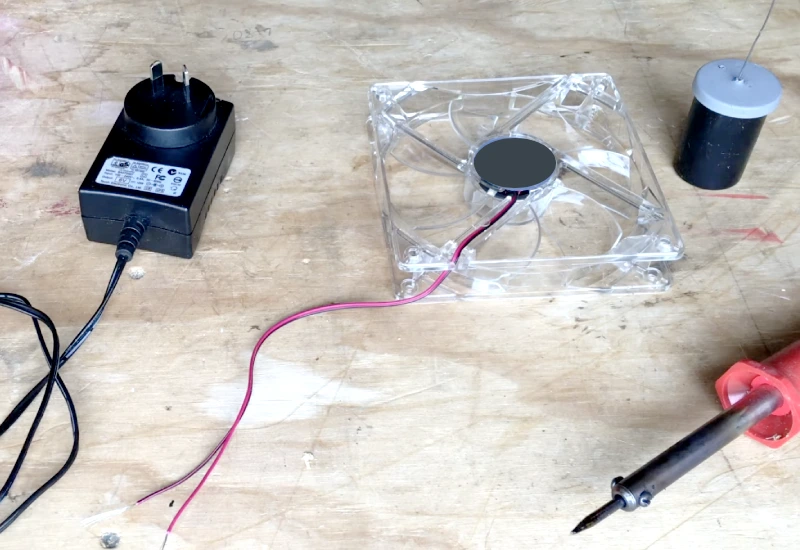
Why Direct Connection Fails
You might think plugging a DC fan into an AC outlet is easy. It’s not. DC fans run on direct current. Your wall outlet supplies alternating current. If you connect a DC fan directly to AC power, the fan won’t work. The motor inside the fan expects a steady flow of electricity. AC power switches direction many times each second. This confuses the fan’s electronics and can cause instant failure.
Industry standards, like UL and CE, warn against direct AC connections for DC devices. These standards exist to protect you and your equipment. If you ignore them, you risk damaging the fan’s motor, burning out the circuit board, or even starting a fire. You need a proper AC to DC converter to make the fan work safely. If you want to learn how to connect DC fan to AC power, you must use the right tools.
Risks of Incorrect Wiring
Incorrect wiring can cause big problems. If you mix up the wires, you might short-circuit the fan. This can lead to sparks, smoke, or permanent damage. Sometimes, the fan might spin for a second and then stop. Other times, it won’t turn on at all.
Here are some common risks:
- Overheating: Wrong voltage can make the fan run hot and fail.
- Electrical shock: Exposed wires can shock you.
- Fire hazard: Faulty connections can start fires.
- Equipment damage: The fan and other devices may break.
You should always follow wiring diagrams and use insulated connectors. Double-check your connections before powering up. If you’re unsure, ask a professional or check the manufacturer’s instructions. Safety comes first every time.
How to Connect DC Fan to AC Power
AC to DC Conversion Basics
You can’t just plug a DC fan into an AC outlet. You need to change the power from AC to DC first. This process uses a few key components that work together to make your fan run safely and smoothly. Here’s what you need:
- Transformer: This device lowers the AC voltage to a level your fan can handle.
- Rectification: Diodes turn the AC into a one-way flow, creating pulsating DC.
- Filtering: Capacitors smooth out the bumps in the DC, making it steady.
- Voltage Regulation: This keeps the DC voltage stable, so your fan gets the right amount of power.
When you look for a power supply, you’ll see different types. Some older or cheap converters waste a lot of energy. Modern switching power supplies work much better. Here’s a quick look at how efficient different converters can be:
| Converter Type | Efficiency Range |
|---|---|
| Older or low-quality designs | Below 70% |
| Standard modern switching power supplies | 80% – 90% |
| High-efficiency/high-quality designs | 90% – 95% |
| Top-tier products | Exceeds 96% |
If you want to know how to connect DC fan to AC power the right way, always use a high-quality converter. This keeps your fan running longer and saves energy.
Choosing the Right Power Supply for fanacdc DC Fan
Picking the right power supply is important. You want your fan to work well and last a long time. Here’s what you should think about:
- Energy consumption: DC fans use up to 70% less power than old AC fans.
- System efficiency: Brushless motors in fanacdc DC fans give you more cooling with less waste.
- Maintenance: Good power supplies and ball bearings mean less downtime and fewer repairs.
- Service life: A steady, reliable power supply helps your fan last for years.
- Voltage stability: Your fan needs a steady voltage. Fluctuations can cause overheating or sudden failure.
You also need to match the voltage and current to your fan. For example, if you use a 30W fan, here’s what you need:
| Voltage Rating | Current Draw (for 30W fan) |
|---|---|
| 12V | ~2.5A |
| 24V | ~1.25A |
Always check your fan’s label or manual for the right numbers. If you want to learn how to connect DC fan to AC power, start by choosing a power supply that matches these ratings.
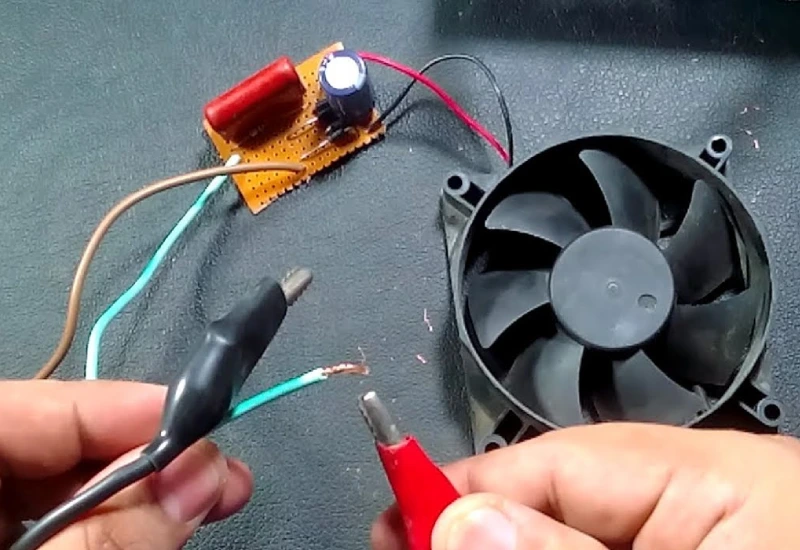
Step-by-Step Wiring Guide
Ready to wire your fan? Follow these steps to keep things safe and simple:
- Turn off the circuit breaker. Make sure there’s no power before you start.
- Connect the wires. Usually, you’ll have a black (hot), white (neutral), and a ground wire. Some fans come pre-wired, so check your model.
- Double-check your connections. Make sure everything is tight and in the right place.
- Add safety devices. Use a fuse to protect against overloads and an isolation switch for safe repairs.
Tip: If you’re not sure about any step, ask a professional or check the fanacdc support team for help.
Testing and Safety Checks
Before you flip the switch, do a few quick checks. This keeps you and your equipment safe.
- Inspect all connections. Look for loose wires or exposed metal.
- Make sure the fuse and isolation switch are in place.
- Test the fan with the power on. Watch for smooth operation and listen for any strange noises.
- Check for overheating. The fan should stay cool and run quietly.
Here’s a table of safety devices you might use:
| Device Type | Description | Benefits |
|---|---|---|
| Electrical Fuses | Protect circuits by melting and breaking the connection during overloads. | Simple, cost-effective, reliable for protection. |
| Residual Current Devices (RCDs) | Detect imbalances in currents to prevent electric shock. | Protects against electric shock, essential in wet areas. |
| Surge Protection Devices (SPDs) | Shield equipment from voltage spikes caused by surges. | Guards against voltage spikes, prevents costly repairs. |
| Isolator Switches | Allows safe disconnection of power for repairs. | Ensures power is off during maintenance. |
If you follow these steps, you’ll know how to connect DC fan to AC power safely and confidently. You’ll protect your equipment and get the best performance from your fanacdc DC fan.
Safety Tips and Common Mistakes
Voltage and Current Matching
Getting the voltage and current right is the first step to a safe DC fan setup. If you mismatch these, you can run into problems like overheating, poor performance, or even permanent damage. Always check your fan’s label for the correct voltage and current. For example, fanacdc DC fans often run at 12V, 24V, or 48V. Your power supply should match this exactly.
If you connect a 4-pin fan to a header using only voltage control, you lose some speed control features. The fan still works, but you can’t slow it down as much without risking a stall. If you use a 3-pin fan on a 4-pin PWM header, it will run at full speed all the time. You get strong cooling, but no way to reduce noise or save energy.
Here’s a quick look at the recommended voltage tolerances for fanacdc DC fans:
| Specification | Tolerance |
|---|---|
| Voltage (Continuous) | ±5% (11.4–12.6V) |
| Voltage (Wide Voltage) | ±20% (8–16V) |
Staying within these ranges keeps your fan running smoothly and safely.
Wiring and Polarity Errors
Wiring mistakes are easy to make but can cause big headaches. You might see the fan fail to start, run at the wrong speed, or even burn out. Here are some common errors to watch for:
- Incorrect wiring can stop your fan from starting or cause damage.
- Always match the input voltage rating to your power supply (12V, 24V, or 48V DC).
- Check polarity with the wiring diagram:
- Red = Positive (+)
- Black = Negative (-)
- Yellow or Blue = Tachometer or PWM signal (if equipped)
- Test the fan after wiring before you finish the installation.
Improper wiring can lead to motor burnout, RPM changes, or controller problems. Many industrial DC fans, like those from fanacdc, include reverse polarity protection, but it’s still best to double-check your work.
Protection Devices
Don’t skip protection devices. Fuses, isolation switches, and surge protectors keep your setup safe. A fuse will break the circuit if there’s an overload, stopping damage before it starts. Isolation switches let you cut power for safe repairs. Surge protectors guard against voltage spikes that can fry your fan.
Tip: Always use a fuse rated just above your fan’s maximum current. This small step can save your equipment and prevent accidents.
By following these safety tips, you’ll avoid the most common mistakes and keep your fanacdc DC fan running reliably for years.
Why Choose fanacdc DC Fan
Product Advantages
You want a cooling fan that works hard and lasts long. fanacdc DC fans give you exactly that. These fans use brushless motors, so you get strong airflow with less power. You save money on electricity bills because DC fans use up to 70% less power than AC fans. They run quietly, which makes them perfect for places where noise matters.
Check out how fanacdc DC fans stack up against others:
| Feature/Advantage | Description |
|---|---|
| Lower Power Consumption | Uses up to 70% less power than AC fans. |
| Minimal EMI | Produces minimal electromagnetic interference. |
| Lower Noise | Operates quietly due to smooth motor action. |
| Lower Voltage | Runs at 12V or 24V for easy integration. |
| Waterproof | Sealed construction protects against moisture. |
| More Speed Options | Offers 3 to 7 speed settings or more. |
| Variable Flow | Stepless speed control for optimal airflow. |
| Compact Design | Smaller and lighter, fits tight spaces. |
You also get advanced control features. fanacdc DC fans let you adjust speed based on temperature, set timers, and even use voice control. You can manage settings from your phone or integrate the fan with smart home systems. Climate-based automation keeps your equipment cool no matter the weather.
Reliability matters. fanacdc DC fans are built for a service life of up to 70,000 hours. They pass tough environmental tests for heat, humidity, and vibration. You get peace of mind knowing your fan will keep working.
Here are the certifications you can trust:
| Certification | Description |
|---|---|
| UL | Safety and reliability. |
| CE | Health, safety, and environmental compliance. |
| RoHS | Restricts hazardous substances. |
| IP68 | Dust and water protection. |
Industrial Applications
You need cooling solutions that fit your industry. fanacdc DC fans work in many places:
- Telecom equipment: Keeps server racks and communication gear cool.
- Industrial automation: Protects control cabinets and machinery from overheating.
- Energy storage systems: Maintains safe temperatures for batteries and power electronics.
- Electronics: Ensures stable operation for sensitive devices.
You can rely on fanacdc DC fans for high-density environments and demanding conditions. Their compact design and smart controls make them easy to install and manage. Whether you work in telecom, automation, or energy storage, these fans help your systems run smoothly and safely.
If you want a fan that saves energy, lasts longer, and gives you more control, fanacdc DC fans are the smart choice.
Conclusion
You now know how to connect a DC fan to AC power safely. You learned that direct connection is never safe. You need an AC to DC converter to protect your fan and your equipment. You saw why matching voltage and current matters. You also discovered how to avoid wiring mistakes and why protection devices are a must.
Choosing a reliable DC fan makes a big difference. fanacdc DC fans give you energy savings, quiet operation, and long service life. You get advanced features like speed control and smart monitoring. These fans work in tough environments and pass strict safety tests. You can trust them for telecom, automation, and energy storage projects.
Here’s a quick checklist for your next project:
| Step | Done? |
|---|---|
| Chose the right fan | ✅ |
| Matched power supply | ✅ |
| Checked wiring | ✅ |
| Added protection | ✅ |
| Tested everything | ✅ |
Stay safe, and enjoy reliable cooling with your new DC fan setup!
You need AC to DC conversion for your DC fan. This step keeps your fan safe and running strong. Industry best practices show that switching from AC to DC or EC fans cuts energy use and meets new building standards:
| Area | Key Takeaway | Impact/Data |
|---|---|---|
| HVAC Technology | Replace legacy AC with EC/DC | Drastically cuts energy and wear |
| 2026 Compliance | Mandate EC/DC for new builds | Meets strict DOE building standards |
FAQ
Can I use any AC to DC converter for my DC fan?
You need a converter that matches your fan’s voltage and current. Check your fan’s label. Using the wrong converter can damage your fan or cause safety issues.
How do I know if my DC fan is wired correctly?
Look for clear labels on the wires. Red is usually positive, black is negative. Test the fan after wiring. If it runs smoothly and quietly, you did it right.
What happens if I connect a DC fan directly to AC power?
You risk burning out the motor or causing a fire. DC fans need direct current. Always use an AC to DC converter for safe operation.
Do fanacdc DC fans work in high-temperature environments?
Yes! fanacdc DC fans handle temperatures up to 70°C. They use advanced bearings and materials for reliable cooling in tough conditions.
Where can I get technical support for fanacdc DC fans?
You can visit fanacdc for help. The support team answers questions, offers wiring advice, and helps you choose the right fan.
