
Electromagnetic noise in AC fans refers to unwanted electrical signals that disrupt normal fan operation. You may notice this noise as a hum or buzz. This type of interference matters because it can reduce the efficiency of your cooling equipment and shorten its lifespan. For example, non-sine wave power sources create more heat and use more energy. Harmonic currents also raise energy consumption and lower cooling capacity, sometimes causing efficiency losses of 6% to 20%.
| Issue | Result |
|---|---|
| Non-sine wave power sources | More heat, lower mechanical efficiency |
| Harmonic distortion | Higher energy use, reduced cooling performance |
You want a fan that avoids these problems. fanacdc AC Fans use advanced design and strict quality control to keep electromagnetic noise low, so you get reliable and quiet performance.
Key Takeaways
- Electromagnetic noise in AC fans can reduce efficiency and lifespan. Choose fans designed to minimize this noise for better performance.
- Regular maintenance, including inspections and cleaning, helps prevent noise issues and keeps your fan running smoothly.
- Understanding the difference between electromagnetic and mechanical noise allows for better diagnosis and quicker fixes.
- Upgrading to high-quality fans, like fanacdc AC Fans, can significantly reduce unwanted noise and improve energy efficiency.
- Implementing solutions like EMI filters and stable power sources can further reduce electromagnetic noise in your cooling systems.
What Is Electromagnetic Noise?
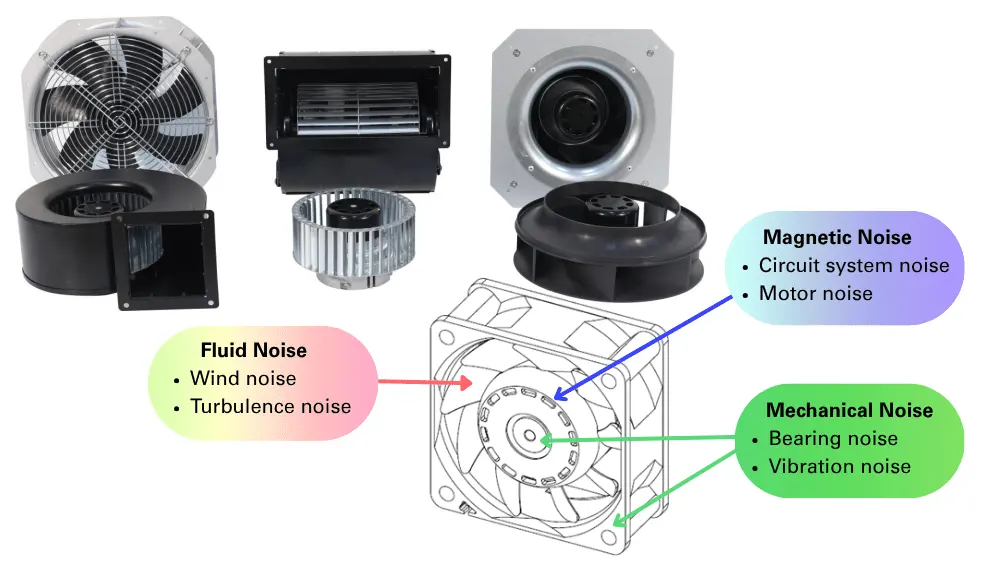
Types of Noise in AC Fans
When you use an AC fan, you may notice different types of noise. These noises can affect your comfort and the performance of your equipment. The two main types are:
- Mechanical noise: This comes from moving parts like bearings, shafts, and the fan’s mounting structure. You might hear rattling, clicking, or vibration sounds.
- Electromagnetic noise: This is an audible hum or buzz. It happens because of changes in the electric current and magnetic fields inside the motor.
You can hear mechanical noise when parts wear out or become misaligned. Electromagnetic noise often sounds like a steady hum, especially when the fan runs at a constant speed.
Electromagnetic vs Mechanical Noise
You need to know the difference between electromagnetic noise and mechanical noise to diagnose fan issues correctly. Electromagnetic noise in AC fans comes from the alternating magnetic field inside the motor. This field creates a humming sound. If the air gap inside the motor is uneven or the bearings are worn, the hum can get louder. Mechanical noise, on the other hand, results from physical vibrations caused by components such as bearings and shafts.
Here is a simple table to help you compare:
| Aspect | Mechanical Noise | Fluid Noise | Electromagnetic Noise |
|---|---|---|---|
| Origin | Physical parts like bearings and shafts | Air friction against blade surfaces | Magnetic forces inside the motor |
| Cause of Noise | Vibrations, friction, misalignment | High airflow velocity / turbulent airflow | Motor current changes, electromagnetic field |
| Audible Manifestation | Rattling, clicking, vibration | Wind noise / rushing air sound | Hum or buzz |
You want a fan that keeps both types of noise low. fanacdc AC Fans use high-quality materials and advanced motor design. This reduces electromagnetic noise and ensures strong, quiet performance. You get reliable cooling for your equipment and a quieter environment.
How AC Fans Generate Electromagnetic Noise
AC Motor Principles
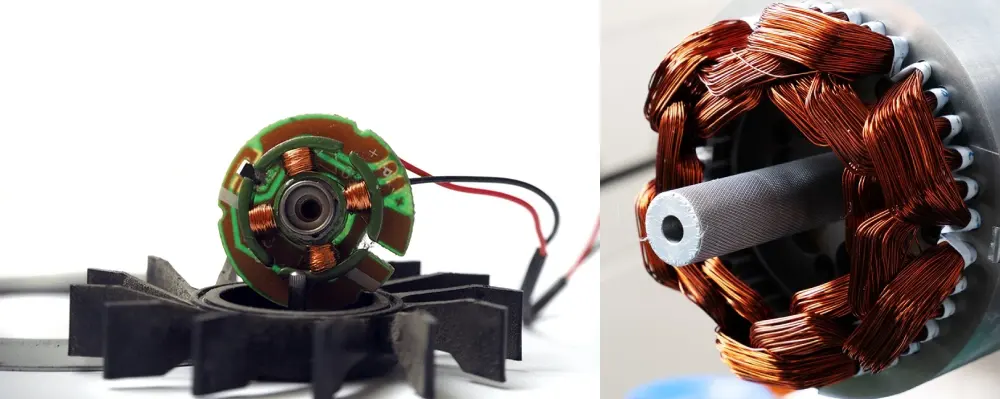
You use AC fans every day, but do you know how their motors work? An AC motor has two main parts: the stator and the rotor. The stator stays still while the rotor spins. When you power the fan, electricity flows through the stator. This creates a changing magnetic field. The magnetic field pushes the rotor, making it turn and move air.
Inside the motor, electromagnetic forces act in the small space between the stator and rotor. These forces can cause vibrations. Radial forces push outward from the center, shaking the stator. Tangential forces twist the rotor and stator. When these forces interact, they can make the whole motor vibrate more. You may hear these vibrations as a hum or buzz. This is electromagnetic noise.
fanacdc AC Fans use high-efficiency motors to keep these vibrations low. The motors meet strict UL, CE, and RoHS certifications. You get reliable cooling with less unwanted noise.
Sources of EMI
Electromagnetic interference (EMI) comes from several sources inside an AC fan. Harmonic electromagnetic forces, often caused by changes in the power supply, can create extra vibrations and noise. If the magnetic pull inside the motor becomes unbalanced, it can shake the motor even more. This is called Unbalanced Magnetic Pull (UMP). UMP can make the fan louder and less efficient.
You may also notice more noise if the power supply uses pulse-width modulation. This method can add more harmonics to the system, increasing both vibrations and electromagnetic noise. High-quality fans, like those from fanacdc, use advanced designs to reduce these effects. You get a quieter fan that works well in many environments.
Tip: Choosing a fan with certified, high-efficiency motors helps you avoid problems with electromagnetic noise and EMI.
Causes of Electromagnetic Noise
Understanding the main causes of electromagnetic noise in AC fans helps you keep your equipment running smoothly. You can prevent many problems by knowing what to look for and choosing fans with strong quality control, like those from fanacdc.
Voltage Fluctuations
Voltage fluctuations happen when the power supply does not stay steady. Sudden changes in voltage can make the motor work harder. This can lead to extra vibrations and unwanted noise. You might notice your fan humming louder or running less smoothly during storms or when large machines turn on nearby. High-quality AC fans use stable components and strict testing to handle these changes, so you get reliable performance even when the power supply is not perfect.
Bearing Electrical Issues
Bearings help the fan’s motor spin with little friction. When electrical currents pass through the bearings, they can cause damage over time. This damage leads to more noise and can even stop the fan from working.
- Bearing faults cause about 30% to 40% of all failures in rotating machines.
- Unplanned downtime from bearing failures can cost between $50,000 and $200,000 per hour.
- In electric motors, complex shaft voltages and bearing currents can create electrical failures.
- Bearings are the most sensitive parts in motors, so they are more likely to fail from electrical problems.
You should choose fans with high-quality bearings and strong insulation. fanacdc AC Fans use advanced materials and careful assembly to reduce the risk of bearing electrical issues. This means your fan will last longer and run more quietly.
Motor Winding Defects
Motor windings are coils of wire inside the fan’s motor. If these windings have defects, the motor can create extra noise and vibrations. Problems like uneven air gaps, short circuits, or missing magnetic wedges can make the motor’s magnetic forces unbalanced. This unbalance, called Unbalanced Magnetic Pull (UMP), can bend the rotor and make the fan vibrate more.
- Motor winding defects increase noise and vibration.
- Faulty machines often have mechanical and magnetic problems, such as uneven air gaps or demagnetization.
- UMP causes the rotor to move in ways that create more noise.
You can avoid these problems by choosing fans with strict quality checks. fanacdc AC Fans go through careful testing to make sure the windings are perfect, so you get smooth and quiet operation.
Power Frequency Harmonics
Power frequency harmonics are extra signals in the power supply that do not match the main frequency. These harmonics can make the motor vibrate more and create more electromagnetic noise.
| Study | Findings |
|---|---|
| Zuo X | More harmonics increase radial force and vibration in motors. |
| Huang H et al. | Odd harmonic voltage makes air conditioning units noisier. |
| Li S | Harmonics and motor resonance are main reasons for higher noise in motors. |
| Gao W | Noise in outdoor units rises with more harmonics, especially odd ones. |
| Zhang J R | Harmonic current can match the machine’s natural frequency, causing resonance and more noise. |
| General | As harmonics rise from 0% to 10.5%, noise peaks at 200 Hz get louder. Lowering harmonics can reduce noise by up to 9dB. |
You can reduce these effects by using fans with good power filtering and strong motor design. fanacdc AC Fans are built to handle power harmonics, so you get steady and quiet cooling.
Capacitor Faults
Many AC fans use capacitors to help start and run the motor. If a capacitor fails, the motor may not get the right amount of power. This can cause the fan to hum, buzz, or even stop working. Faulty capacitors can also make the motor draw uneven current, which increases electromagnetic noise.
You should check capacitors regularly and replace them if you notice any problems. fanacdc AC Fans use high-quality capacitors that last longer and keep your fan running smoothly.
Note: Choosing fans with strong quality control and durable parts, like those from fanacdc, helps you avoid most causes of electromagnetic noise. You get peace of mind and reliable cooling for your equipment.
Electromagnetic vs Mechanical Noise
Common Symptoms
You may hear different sounds when your AC fan runs. These sounds can help you figure out what type of noise you are dealing with. Mechanical noise often sounds like rattling, clicking, or grinding. You might notice these noises get louder when the fan speed changes or when the fan starts and stops. Loose screws, worn bearings, or misaligned parts usually cause these sounds.
Electromagnetic noise usually sounds like a steady hum or buzz. This noise does not change much with fan speed. You may hear it most when the fan runs at a constant speed. It often comes from the motor’s magnetic field. If you hear a hum that does not go away, you are likely hearing electromagnetic noise.
Tip: Listen closely to your fan. A changing, uneven sound points to mechanical noise. A steady hum points to electromagnetic noise.
Diagnostic Comparison
You can use a simple checklist to tell the difference between mechanical and electromagnetic noise:
| Feature | Mechanical Noise | Electromagnetic Noise |
|---|---|---|
| Sound Type | Rattling, clicking, grinding | Steady hum or buzz |
| Changes with Speed | Yes, often louder at high speed | No, usually stays the same |
| Source | Bearings, blades, loose parts | Motor windings, power supply |
| Fix | Tighten, replace, or align parts | Check motor, power quality |
If you want a fan with low mechanical noise, choose one with a strong frame and quality bearings. fanacdc AC Fans use reinforced structures and high-grade materials. This design keeps mechanical noise low and ensures long-lasting, quiet operation. You get reliable cooling without annoying sounds.
Note: Regular inspection and maintenance help you catch mechanical issues early. For electromagnetic noise, make sure your fan uses certified, high-efficiency motors like those in fanacdc AC Fans.
Symptoms of Electromagnetic Noise
When you use an AC fan, you might notice several signs that point to electromagnetic noise. Recognizing these symptoms helps you keep your equipment running smoothly and avoid bigger problems.
Humming and Buzzing
You may hear a steady hum or a buzzing sound coming from your fan. This noise often stays the same, even if you change the fan speed. The sound usually comes from the motor’s magnetic field. If the hum gets louder over time, it could mean the motor is working harder than it should. You should pay attention to these sounds, as they often signal an underlying issue.
Load-Dependent Noise
Sometimes, the noise from your fan changes when the load changes. For example, if you connect more devices or increase the fan’s workload, the hum or buzz may become louder. This happens because the motor draws more current, which increases the electromagnetic forces inside. You might notice this symptom in factories or server rooms where equipment runs at different power levels throughout the day.
Tip: If you hear more noise when your equipment works harder, check for voltage fluctuations or power supply issues.
Electronic Interference
Electromagnetic noise from AC fans can affect nearby electronics. You might see your computer screen flicker or hear static on your speakers. This happens because the fan’s high power and frequency create electromagnetic interference. The noise can enter other devices, causing them to act strangely or even malfunction. Sensitive electronics, such as medical equipment or communication devices, are especially at risk.
Irregular Motor Performance
You may also notice your fan running unevenly. The motor might speed up, slow down, or stop for a moment. These changes often happen without warning. Irregular performance can mean the motor is struggling with electromagnetic noise. If you see these symptoms, your fan may need inspection or maintenance soon.
Note: Early detection of these symptoms helps you prevent equipment failure and maintain a quiet, efficient environment.
Diagnosing Electromagnetic Noise
Inspection Steps
You can diagnose electromagnetic noise in your AC fan by following a few simple steps. Start by turning off the power to your equipment. Safety comes first. Next, listen closely to your fan when you turn it back on. Try to identify if the noise is a steady hum or a changing rattle. A steady hum often points to electromagnetic noise.
Check the power supply. Use a voltage tester to see if the voltage stays stable. Fluctuations can cause extra noise. Inspect the fan’s wiring and connections. Loose wires or poor contacts can increase electromagnetic interference. Look at the motor and capacitor for signs of wear or damage. If you see burnt marks or bulging parts, you may have found the problem.
You should also check the bearings. Spin the fan blades by hand. If you feel roughness or hear grinding, the bearings may need attention. fanacdc AC Fans make this process easy with accessible components and clear labeling. You can perform these checks quickly, which helps you keep your fan running smoothly.
Tip: Always follow the manufacturer’s instructions for inspection and maintenance. This keeps your warranty valid and your equipment safe.
Diagnostic Tools
You can use several tools to help diagnose electromagnetic noise. A digital multimeter lets you measure voltage and current. This tool helps you spot power issues that may cause noise. An insulation resistance tester checks the motor windings for faults. If the reading is low, the windings may have a problem.
A sound level meter helps you measure the noise coming from your fan. Compare the readings to the fan’s specifications. If the noise is higher than normal, you may have electromagnetic interference. You can also use an oscilloscope to check for harmonics in the power supply.
fanacdc AC Fans support easy maintenance and troubleshooting. The design allows you to access key parts without special tools. This saves you time and helps you keep your cooling system reliable.
Note: Regular checks with the right tools help you catch problems early and avoid costly repairs.
Reducing AC Fan Noise
You can take several steps to reduce electromagnetic noise in your AC fans. These solutions help you create a quieter environment and protect your equipment. fanacdc AC Fans offer advanced features and customization options that make noise reduction easier and more effective.
Improve Power Quality
You improve power quality by using stable voltage sources and avoiding sudden changes in electrical supply. Clean power reduces the risk of voltage fluctuations, which often cause extra humming or buzzing in AC fans. You can install surge protectors or voltage regulators to keep the power steady. When you use high-quality power supplies, your fan runs more smoothly and produces less electromagnetic noise.
Tip: Stable power keeps your fan running quietly and extends its lifespan.
Use Quality Bearings
You reduce noise by choosing fans with high-quality bearings. Bearings support the motor shaft and allow it to spin with minimal friction. When you use bearings with smooth surfaces and proper lubrication, your fan operates quietly and efficiently. Poor bearings create friction and imperfections, which lead to vibration and tonal noise. These vibrations can increase electromagnetic noise levels in AC fans.
- Friction and imperfections in bearings lead to vibration and tonal noise.
- High-quality bearings reduce friction, minimize noise, and improve energy efficiency.
fanacdc AC Fans use advanced bearings that last longer and keep your fan running quietly. You get reliable cooling and less unwanted noise.
Optimize Motor Design
You can lower electromagnetic noise by optimizing the motor design. Engineers use several techniques to make motors quieter and more efficient. These improvements help you get the best performance from your fan.
| Optimization Technique | Description |
|---|---|
| Rotor and Stator Geometry | Enhancements in rotor and stator shapes can minimize electromagnetic noise sources and vibrations. |
| Advanced Materials for Laminations | Using better materials for laminations helps reduce noise by improving magnetic properties. |
| Better Winding Techniques | Improved winding methods can lead to reduced electromagnetic interference and noise. |
| Active Noise Control Systems | These systems detect noise patterns and generate anti-noise signals to cancel unwanted sounds. |
| Vibration Isolation and Damping Techniques | Specialized mounts and materials absorb vibrations, minimizing noise propagation to surrounding areas. |
| Optimized Cooling Systems | Efficient fan blade designs and airflow improvements reduce thermal noise and enhance motor longevity. |
| Electronic Noise Suppression Techniques | Advanced power electronics and shielding reduce electrical noise and improve overall motor performance. |
fanacdc AC Fans feature optimized motor designs, including aerodynamic blades and reinforced structures. You benefit from quieter operation and longer service life.
Install EMI Filters
You can install EMI filters to block unwanted electrical noise. EMI filters remove both common mode and differential mode noise, making your fan quieter and protecting nearby electronics. Controlled studies show that different filter types target specific noise sources.
| Filter Type | Noise Type | Effectiveness |
|---|---|---|
| Inductor Filter | Common Mode (CM) | Effectively removes CM noise |
| Choke Filter | Common Mode (CM) | Effectively removes CM noise |
| Pi-Filter | Differential Mode (DM) | Effectively removes DM noise |
You add these filters to your fan’s power supply or wiring. fanacdc AC Fans support EMI filter integration, helping you achieve reliable and quiet cooling in sensitive environments.
Note: EMI filters protect your equipment from interference and keep your fan noise levels low.
Upgrade to EC or DC Fans
You can upgrade to EC (electronically commutated) or DC fans for advanced noise control. EC and DC fans use brushless motors and electronic controls, which reduce electromagnetic noise and improve energy efficiency. Studies show that blower DC fans can lower noise by up to 10 dB, while AC fans achieve reductions of 6–8 dB.
| Fan Type | Noise Reduction | Source |
|---|---|---|
| Blower DC Fans | Up to 10 dB | Gagner-Toomey |
| AC Fans | 6–8 dB | AFL Motor |
fanacdc offers EC and DC fan options with customizable features. You get quieter operation, lower energy costs, and improved performance.
Tip: Upgrading to EC or DC fans gives you the best noise reduction and energy savings.
You can combine these solutions for maximum effect. fanacdc AC Fans provide advanced engineering, quality materials, and flexible customization. You achieve reliable cooling and a quieter workspace.
Maintenance Tips
Keeping your AC fan in top shape helps you avoid unwanted noise and ensures reliable performance. Simple maintenance steps can make a big difference in how quietly and efficiently your fan runs. fanacdc AC Fans are built for long service life, but regular care keeps them at their best.
Regular Inspection
You should check your fan regularly. Look for dust, debris, or signs of wear. Clean the blades and housing to prevent buildup that can block airflow and increase noise. Balanced blades help avoid vibrations and keep your fan running smoothly. Lubricate the bearings if needed to reduce friction and save energy. Inspect for rust or corrosion, especially if your fan operates in a humid environment.
| Maintenance Practice | Description |
|---|---|
| Regular Cleaning | Prevents dust and debris buildup that can obstruct airflow and increase power consumption. |
| Blade Balance Checks | Ensures blades are balanced to avoid vibrations that lead to wear and reduced efficiency. |
| Lubrication | Reduces friction in bearings for smooth operation and energy savings. |
| Corrosion Prevention | Protects components from rust, maintaining structural integrity and efficiency. |
Tip: A quick inspection every month can help you catch small issues before they become big problems.
Monitor Voltage
You need to keep an eye on the voltage that powers your fan. Unstable voltage can cause the motor to work harder, leading to more electromagnetic noise and possible damage. Use a voltage tester to check for steady power. If you notice frequent voltage drops or spikes, consider using a voltage regulator. Stable voltage helps your fan last longer and run more quietly.
Replace Worn Parts
Worn parts can make your fan noisy and less efficient. Bearings, capacitors, and blades are the most common parts that need replacement. If you hear grinding or see the fan wobble, replace the bearings. Swap out old capacitors if the fan struggles to start or runs unevenly. Always use high-quality replacement parts to maintain performance. fanacdc AC Fans use durable materials, so you will not need to replace parts often, but timely replacement keeps your fan reliable for years.
Note: Regular maintenance not only reduces noise but also extends the lifespan of your fan, giving you peace of mind and consistent cooling.
Repair or Replace?
When your AC fan starts making noise or shows signs of trouble, you face a choice: repair it or replace it. Making the right decision helps you save money and keep your equipment running smoothly. Let’s look at the key factors.
Cost vs Performance
You should weigh the cost of repairs against the performance you expect. Small fixes, like replacing a capacitor or cleaning the bearings, often cost less than buying a new fan. However, if your fan needs frequent repairs or if the noise returns soon after fixing, replacement may be the smarter choice. New fans often run quieter and use less energy. fanacdc AC Fans offer strong value because they last longer and require less maintenance. You get reliable cooling without constant repair bills.
| Repair Cost | Replacement Cost | Performance Gain |
|---|---|---|
| Low | Higher | Sometimes high |
| Repeated | One-time | Consistently high |
Tip: If repair costs add up to more than half the price of a new fan, replacement is usually better.
Repeated EMI Issues
If you notice electromagnetic noise keeps coming back, you may have a deeper problem. Repeated EMI issues can signal aging components or design limits. You can try repairs, but if the noise returns, a new fan with advanced EMI control may solve the problem for good. fanacdc AC Fans use high-quality materials and advanced motor designs to minimize EMI, so you enjoy quieter operation over time.
Reliability Concerns
You want a fan that works well in tough conditions. fanacdc AC Fans stand out for their rugged mechanical design. They handle high temperatures and dusty environments with ease. In most industrial settings, these fans support long equipment life and reduce failure rates. If your current fan breaks down often or cannot handle your environment, upgrading to a fanacdc AC Fan gives you peace of mind and long-term reliability.
- Rugged design for harsh conditions
- Long service life in constant-load systems
- Lower failure rates in industrial use
Note: Choosing a reliable fan reduces downtime and keeps your systems running smoothly. fanacdc also offers strong support services to help you with installation and maintenance.
Why Choose fanacdc?
Our Advantages
You want a cooling solution that works every time you need it. fanacdc stands out because you get more than just a fan. You get a product built on over 20 years of engineering experience. The team at fanacdc uses advanced research and strict quality control to deliver fans that last longer and run more quietly.
You benefit from a wide range of options. fanacdc offers AC, DC, and EC fans for many industries. You can choose custom sizes, voltages, and protection features. The fans use premium materials and pass tough tests for safety and durability. You can trust these fans in control cabinets, telecom equipment, and industrial machines.
When you pick fanacdc, you choose a partner who supports you with technical help, project customization, and after-sales service.
Here is how customer satisfaction ratings reflect the strengths of fanacdc AC Fans:
| Feature | Description |
|---|---|
| Low acoustic performance | Ensures quiet operation, ideal for sensitive environments. |
| Lifetime-lubricated bearings | Contributes to long service life and reliability. |
| Premium build quality | High manufacturing standards enhance durability. |
Why Our Products Are Noise-Free
You notice the difference when you use a fanacdc AC Fan. The design focuses on reducing electromagnetic and mechanical noise. Engineers use aerodynamic blades and high-efficiency motors to keep sound levels low. Lifetime-lubricated bearings help the fan run smoothly for years. You get quiet operation, even in demanding environments.
You also benefit from strict quality checks. Every fan goes through tests for noise, vibration, and performance. This means you receive a product that meets high standards for both reliability and quietness.
Choose fanacdc if you want a fan that keeps your workspace peaceful and your equipment safe.
AC vs EC Fan Noise
AC Fan Noise Characteristics
You often hear AC fans in industrial and commercial spaces. These fans use traditional motors that run at a fixed speed. When you operate an AC fan, you may notice a steady hum or buzz. This sound comes from the motor’s electromagnetic forces and the movement of air through the blades. The noise level usually stays the same, even if you reduce airflow by blocking the fan or using dampers. This happens because the motor keeps spinning at full speed.
You can see the difference in noise levels when you compare AC fans and EC fans at different speeds:
| Operating Mode | AC Fan Noise (dB(A)) | EC Fan Noise (dB(A)) |
|---|---|---|
| Full Speed | 75 | 74 |
| 70% Speed | 75 (throttled) | 66 |
| 50% Speed | 75 (throttled) | 60 |
The table shows that AC fans keep the same noise level, even when you try to slow them down by restricting airflow. This can make your workspace louder than you want, especially in quiet environments.
EC Fan Noise Control
You get better noise control with EC (electronically commutated) fans. EC fans use advanced motors and electronic controls. You can adjust the speed of an EC fan to match your cooling needs. When you lower the speed, the noise drops quickly. For example, at 50% speed, an EC fan can be up to 15 dB(A) quieter than an AC fan running at the same airflow.
You benefit from several features that make EC fans quieter:
- EC fans use optimized speed control and advanced motor design. This helps you keep noise low in noise-sensitive areas.
- The brushless design of EC fans reduces friction and vibration. You get quieter operation and a longer fan lifespan.
fanacdc offers both AC and EC fans. You can choose the right fan for your application. If you need quiet operation and energy savings, EC fans give you the best results. If you want simple, reliable cooling, AC fans provide strong performance. You always get high-quality products and expert support from fanacdc.
You can manage Electromagnetic Noise in AC fans by understanding its main causes and using smart solutions. Regular maintenance and correct diagnosis help you keep your equipment quiet and reliable.
- Choose fanacdc AC Fans for strong performance and low noise.
- Upgrade to EC fans if you want advanced noise control and better energy savings.
Tip: Stay proactive with inspections to prevent costly downtime and keep your systems running smoothly.
FAQ
What causes a humming sound in my AC fan?
You often hear a humming sound from electromagnetic noise. This comes from the motor’s magnetic field. Voltage changes, power harmonics, or faulty components can make the hum louder. fanacdc AC Fans use advanced motors to keep this noise low.
How can I tell if the noise is electromagnetic or mechanical?
You can listen closely. Electromagnetic noise sounds like a steady hum or buzz. Mechanical noise rattles, clicks, or grinds. Use this table for a quick check:
| Noise Type | Sound Example |
|---|---|
| Electromagnetic | Steady hum/buzz |
| Mechanical | Rattle/click/grind |
Will electromagnetic noise damage my equipment?
Electromagnetic noise can cause interference with sensitive electronics. You may see screen flicker or hear static in speakers. You protect your devices by using fans with EMI filters, like those from fanacdc.
How do I reduce electromagnetic noise in my AC fan?
You can improve power quality, use high-quality bearings, and install EMI filters. Upgrading to EC or DC fans also helps. fanacdc offers these solutions for quieter, more reliable cooling.

