
When it comes to airflow and noise, the 140mm fan size stands out as the top choice for most setups, while the 120mm fan is the most versatile. For compact spaces, the 80mm fan works best. Many users notice that 120mm and 140mm fans strike a great balance between performance and quiet operation, especially in gaming PCs and workstations.
The 80mm vs 120mm vs 140mm fans: size, airflow, and cooling efficiency all play a role in the right choice for your computer fan or industrial application. Here’s a quick look at how each fan size compares:
- 80mm Fan: Lower airflow, higher noise.
- 120mm Fan: Over 70 CFM airflow, under 40 dBA at 2000 RPM.
- 140mm Fan: Similar speed to 120mm, often quieter and more efficient.
fanacdc’s industrial cooling fan solutions offer real-world examples of these differences.
Key Takeaways
- 140mm fans provide the best airflow and quiet operation, making them ideal for high-performance systems.
- 120mm fans offer a versatile option, balancing airflow and noise, suitable for most PC cases and industrial applications.
- 80mm fans fit in tight spaces but can be noisier; they are best for compact systems where larger fans won’t fit.
- Consider airflow needs and noise sensitivity when choosing a fan size to ensure optimal cooling and comfort.
- Always check compatibility with your case or enclosure before selecting a fan size to avoid installation issues.
Fan Size Comparison: 80mm vs 120mm vs 140mm
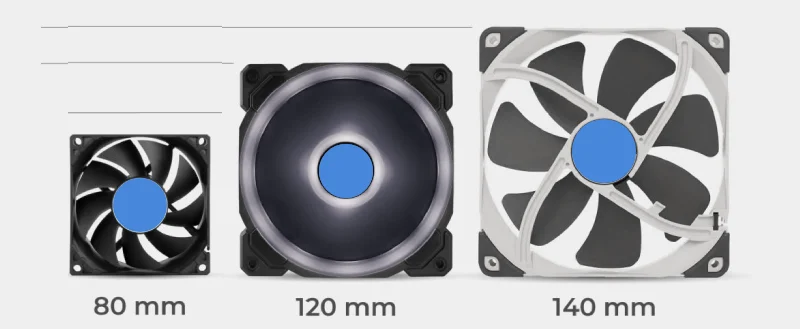
Choosing the right fan size can make a big difference in cooling and noise. People often wonder how 80mm, 120mm, and 140mm fans stack up. Here’s a quick table that shows the main differences in airflow, noise, and size:
| Fan Size | Airflow Characteristics | Noise Levels | Size |
|---|---|---|---|
| 80mm | Effective for compact systems, but less efficient in circulation | Higher RPMs can lead to more noise | Small, designed for tight spaces |
| 120mm | Balanced airflow and noise levels | Moderate noise levels | Medium size, versatile for various builds |
| 140mm | Greater airflow at lower RPMs, quieter operation | Lower noise levels | Larger, ideal for high-performance systems |
Airflow Differences
Airflow is the amount of air a fan moves, usually measured in cfm (cubic feet per minute). The 80mm vs 120mm vs 140mm fans: size plays a big role in airflow capacity. Smaller fans like 80mm move less air because of their size. They work well in tight spots but can’t cool large areas as efficiently. 120mm fans offer a good balance. They push enough air for most PC cases and industrial enclosures. Many 120mm fans from fanacdc deliver over 70 cfm, which is great for both computers and control cabinets.
140mm fans stand out for their airflow. They move more air at lower speeds, which means they cool better and stay quiet. These fans are perfect for high-performance systems or places where heat builds up fast. When airflow matters most, 140mm fans are the top pick.
Noise Levels
Noise can be a big concern, especially in quiet offices or homes. The noise level of a fan depends on its speed and size. Smaller fans like 80mm need to spin faster to move enough air, which makes them louder. 120mm fans run at moderate speeds, so they make less noise. 140mm fans can move a lot of air without spinning fast, so they stay the quietest.
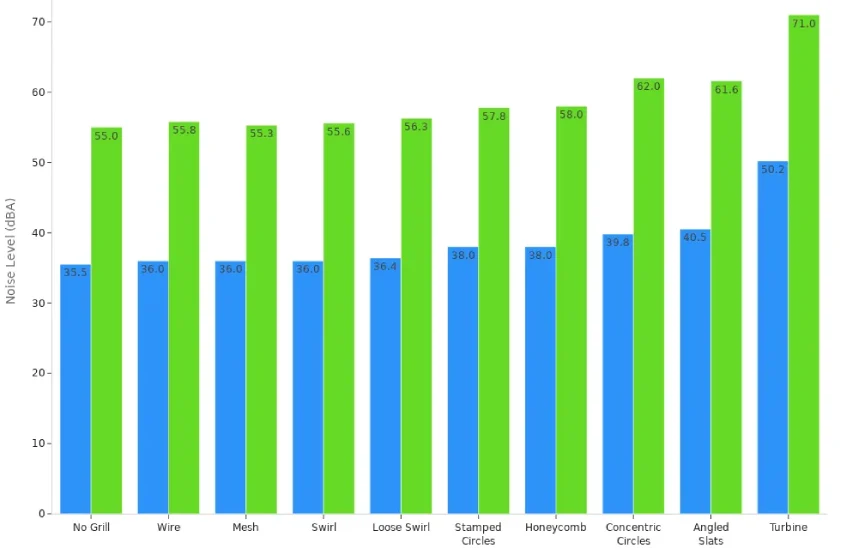
Here’s a look at how different fan types compare in noise:
| Fan Type | Low Speed dBa | High Speed dBa |
|---|---|---|
| No Grill | 35.5 | 55.0 |
| Wire | 36.0 | 55.8 |
| Mesh | 36.0 | 55.3 |
| Swirl | 36.0 | 55.6 |
| Loose Swirl | 36.4 | 56.3 |
| Stamped Circles | 38.0 | 57.8 |
| Honeycomb | 38.0 | 58.0 |
| Concentric Circles | 39.8 | 62.0 |
| Angled Slats | 40.5 | 61.6 |
| Turbine | 50.2 | 71.0 |
People notice that 140mm fans usually have the lowest noise, even when running at higher speeds. 120mm fans stay pretty quiet, too. 80mm fans can get loud, especially in small cases or when running at full speed. For anyone who wants a quiet workspace, 140mm fans are a smart choice.
Space and Installation
Space matters when picking a fan. Not every case or enclosure fits every fan size. Here’s what people need to know about pc fan sizes and installation:
- The size of a fan is measured from one edge of the frame to the other.
- 120mm fans have mounting holes spaced 105mm apart.
- 140mm fans need more room than 120mm fans.
- 80mm fans fit in the smallest spaces, like compact PCs or small control boxes.
People often choose 120mm fans because they fit in most cases and offer a good mix of airflow and noise. 140mm fans need bigger cases but reward users with better cooling and less noise. 80mm fans are the go-to for tight spots where nothing else fits.
When looking at fan sizes explained, it’s clear that each size has its place. The right choice depends on the space, the need for airflow, and how much noise someone can accept. fanacdc’s industrial cooling fans come in all these sizes, so there’s always an option for every project.
Why Fan Size Matters for PC and Industrial Cooling
Airflow and Cooling Efficiency
Fan size plays a huge role in how well a system stays cool. Larger fans move more air, which helps keep temperatures down in both pc cases and industrial equipment. People often think a bigger fan always means better cooling, but that is not always true. The shape of the case, the number of vents, and the placement of the computer fan all affect cooling performance.
The relationship between fan diameter and airflow is nonlinear; airflow is proportional to the cube of the diameter. A smaller fan will move significantly less air unless it spins much faster, which can increase noise and reduce efficiency. Larger fans provide better cooling efficiency due to higher airflow at lower speeds.
fanacdc uses advanced engineering tools to simulate airflow and thermal behavior. This helps them design fans that deliver the right amount of cooling for every application.
Noise and RPM Relationship
Noise can make or break a workspace. Smaller fans need to spin faster to push enough air, which raises the noise level. Larger fans can run at lower speeds and still move plenty of air. This keeps noise down, which is important for quiet pc builds and industrial settings where people work nearby.
fanacdc engineers focus on noise reduction by testing different blade shapes and motor designs. They make sure each fan offers the best balance of airflow and noise for its size.
Static Pressure vs Airflow
Static pressure matters when air needs to move through tight spaces or filters. Some fans push air well in open spaces but struggle when faced with obstacles. Others handle back pressure better, keeping airflow steady even in crowded cases or control cabinets.
Different fans produce varying amounts of back pressure, which affects airflow. A fan’s ability to maintain its designed airflow decreases as back pressure increases, impacting cooling efficiency and power consumption. Understanding this relationship is critical for optimal fan selection in system design.
fanacdc uses simulation and real-world testing to match the right fan to each job. Their fans work well in both open and restricted environments, making them a smart choice for many cooling needs.
80mm vs 120mm Fan Comparison
Airflow in Compact Spaces
People often face a choice between 80mm and 120mm fans when working with limited space. The 80mm fan fits into the smallest cases and tight corners. It works well for mini PCs, small control boxes, and compact industrial equipment. However, the 120mm fan moves more air at lower speeds. This means better cooling for most systems. In the 80mm vs 120mm vs 140mm fans: size debate, the 120mm option stands out for its balance of airflow and versatility. Many users find that 120mm fans keep temperatures lower, even in crowded builds.
Noise Output
Noise matters a lot, especially in quiet offices or home setups. The size of the fan affects the noise level. Smaller fans, like the 80mm, need to spin faster to push enough air. This leads to more noise. Larger fans, such as 120mm fans, can move the same amount of air at lower RPMs, which keeps things quieter.
| Fan Size | Noise Output | RPM | Airflow Characteristics |
|---|---|---|---|
| 80mm | Higher | High | Requires higher RPMs to achieve airflow |
| 120mm | Lower | Low | Operates at lower RPMs for the same airflow |
People notice that 120mm fans are quieter in most situations. They often choose these fans for builds where noise is a concern.
Installation and Use Cases
The 80mm fan fits where space is tight. It works in small form factor PCs, compact control cabinets, and devices with limited room. The 120mm fan fits in most standard cases and enclosures. It offers more flexibility for upgrades and cooling options. Many users pick 120mm fans for both PC and industrial projects because they are easy to install and widely supported.
Best Applications
People use 80mm fans in mini PCs, network switches, and small power supplies. These fans also work well with heatsinks in tight spots. The 120mm fan is the go-to for most PC cases, control cabinets, and industrial enclosures. It handles a wide range of cooling needs. fanacdc offers both 80mm and 120mm options in their industrial cooling fan lineup, making it easy to match the right fan size to any project. When comparing pc fan sizes, users should consider space, airflow, and noise before making a choice.
140mm vs 120mm Fans Performance
Airflow Advantage
140mm fans move more air than 120mm fans. They push higher airflow at lower speeds, which means better cooling performance for both pc cases and industrial enclosures. Many users notice that a 140mm fan can cool a system faster and more efficiently than a smaller computer fan. This makes a big difference when cooling high-end hardware or a dense radiator setup.
Noise Reduction
Noise often becomes a problem in high-performance builds. 140mm fans solve this by running at lower RPMs while still moving plenty of air. Here are some key points:
- 140mm fans provide better airflow at lower speeds, which keeps noise down.
- Lower RPMs mean less vibration and quieter operation.
- 120mm fans need to spin faster to match the airflow, which increases noise.
- Many people choose 140mm fans for quiet pc builds or workspaces where noise level matters.
This makes 140mm fans a top pick for anyone who wants strong cooling without the extra noise.
Compatibility with PC Cases
Compatibility depends on the fan size and the case design. Most modern pc cases support both 120mm and 140mm fans, but not all cases have space for the larger size. Here’s a quick comparison:
| Fan Size | Airflow (CFM) | Noise Level (dBA) | Best Use Case |
|---|---|---|---|
| 120 mm | 50–70 | 20–30 | General cooling, tight spaces, GPU/CPU cooling |
| 140 mm | 60–90 | 18–26 | Better airflow with quieter operation; ideal for intake/exhaust |
People should check their case specs before buying. 120mm fans fit almost everywhere, while 140mm fans need a bit more room but offer better cooling and less noise.
Best Use Cases
140mm fans work best in high-performance systems, quiet workstations, and setups with large radiators. They shine in cases where airflow and low noise are top priorities. 120mm fans remain the go-to for general builds, smaller cases, and spots where space is tight. Both fan sizes appear in fanacdc’s industrial cooling fan lineup, so users can find the right fit for any cooling need.
Tip: For the quietest and most efficient cooling, use 140mm fans for intake and exhaust in larger cases, and 120mm fans for targeted cooling on radiators or GPUs.
80mm vs 120mm vs 140mm Fans: Size and Efficiency
Airflow and Noise Summary
People often compare 80mm vs 120mm vs 140mm fans: size when they want the best cooling performance. Each fan size brings something different to the table. Larger fans usually move more air and make less noise. Smaller fans fit in tight spots but can get loud. Here’s a quick look at how 120mm and 140mm fans stack up:
| Fan Type | Fan Speed (RPM) | Noise Level (dB(A)) | Airflow (CFM) | Air Pressure (mmH₂O) | Input Power (W) |
|---|---|---|---|---|---|
| 120mm | 3000 | 36.9 | 83.9 | 5.31 | 3.6 |
| 140mm | 2400 | 36.8 | 97.41 | 3.64 | 6.0 |
This table shows that a 140mm fan can push more airflow at a lower speed and almost the same noise level as a 120mm fan. People who want quiet and strong cooling often pick the 140mm size.
Installation and Compatibility
Installation depends on the space inside the case or enclosure. Many PC cases and industrial cabinets support 120mm fans because they offer a good balance of size and performance. Some larger cases allow for 140mm fans, which give better airflow and lower noise. Smaller devices or tight control boxes need 80mm fans. Compatibility matters because not every system can fit every fan size. People should always check the mounting holes and available space before choosing a fan.
Efficiency in Different Environments
Efficiency means getting the most cooling with the least energy and noise. In open PC cases, a 140mm fan works well for moving air quietly. In crowded industrial cabinets, a 120mm fan often fits better and still gives strong cooling performance. The 80mm fan shines in small devices where space is limited. fanacdc Industrial Cooling Fan models cover all these sizes. They help users find the right fan for both computers and industrial machines. People can trust these fans to deliver reliable airflow and quiet operation in any environment.
How to Choose the Right Fan Size
Assessing Available Space
Choosing the right fan starts with measuring the space. He should check the area where the fan will go. She needs to make sure the fan fits without blocking other parts. They can look at mounting options to get the best cooling. People often consider airflow needs based on the size of the room and how much heat the equipment makes.
- Measure the available space for compatibility.
- Check mounting options for better thermal performance.
- Think about airflow needs based on room size and heat output.
Determining Airflow Needs
Airflow keeps systems cool and prevents overheating. He can figure out the needed airflow by using a simple formula. She multiplies the room volume by the number of air changes per hour, then divides by sixty. This helps them pick a fan that moves enough air for the space.
Tip: Use the formula CFM = (Room Volume in cubic feet) x (Air Changes per Hour) / 60 to estimate the right airflow.
Noise Sensitivity
Noise matters in many places. He wants quiet fans for bedrooms or offices. She prefers moderate noise in stores or lobbies. They can use louder fans in industrial areas. Larger, slower fans usually make less noise than small, fast fans.
- Quiet spaces need fans rated at 2 sones or lower.
- Moderate spaces can use fans between 2 and 6 sones.
- Industrial areas accept fans above 6 sones.
- Low-sone fans and variable-speed models help reduce noise.
- Placing fans away from people also lowers noise.
Power Type: AC vs DC Fans
The choice between AC and DC fans depends on the application. AC fans work well for larger spaces and offer strong performance. DC fans use less energy and run quieter, thanks to ECM technology. DC fans are easier to install and cause less interference.
| Feature | AC Fans | DC Fans |
|---|---|---|
| Energy Efficiency | Generally less efficient | Consumes up to 70% less energy |
| Noise Levels | Can be noisier | Quieter due to ECM technology |
| Cost | Historically cheaper for larger sizes | Price difference is negligible now |
| Installation Complexity | Typically more complex | Easier to install due to lower voltage |
| Electromagnetic Interference | Higher interference | Minimal interference |
| Voltage | Higher voltage (e.g., 115V) | Lower voltage (e.g., 5V, 12V) |
| Environmental Resistance | Less suitable for harsh conditions | Can be water-resistant |
For unique requirements, fanacdc offers OEM and ODM customization. They help users find the perfect fan for any space, airflow, noise, or power need.
Common Mistakes in Fan Size Selection
Choosing the right fan size can feel tricky. Many people make the same mistakes when picking fans for their PC or industrial setup. Let’s look at the most common pitfalls and how fanacdc helps users avoid them.
Overlooking Airflow Ratings
People often forget to check airflow ratings. This can lead to poor cooling and higher energy bills. When airflow does not match what the manufacturer recommends, even a small 10% drop can lower system efficiency. Here are some things that happen when airflow gets ignored:
- The system works harder and uses more energy.
- Dirty filters block airflow and make cooling less effective.
- Poorly sized ductwork or grilles can cause uneven air distribution.
- Regular maintenance, like changing filters, keeps airflow strong.
fanacdc provides clear airflow data for every fan. Their team helps users match the right fan to their system, so cooling stays efficient.
Ignoring Static Pressure
Static pressure matters, especially in systems with radiators or filters. If someone ignores static pressure, the fan may not push enough air through tight spaces. This leads to weak cooling and higher temperatures. Different fan sizes, like 80mm, 120mm, and 140mm, have different static pressure strengths. Picking the wrong one can hurt performance.
fanacdc uses advanced testing to make sure each fan handles static pressure well. Their experts guide users to the best choice for every setup.
Neglecting Noise Levels
Noise can turn a quiet workspace into a distraction. Some people focus only on airflow and forget about noise. Small fans often spin faster and make more noise. Large fans move more air with less sound. Checking the noise level before buying helps keep the environment comfortable.
fanacdc lists noise ratings for all their fans. They design fans to run quietly, so users enjoy strong cooling without the extra noise.
Not Considering Application Environment
Every space is different. A fan that works in a small PC may not suit a busy factory. Ignoring the environment can lead to overheating or wasted energy. Users should think about heat, dust, and space before picking a fan.
fanacdc offers fans for many environments. Their team helps users find the right fit, whether for a tiny device or a large control cabinet.
Tip: Always check airflow, static pressure, noise, and the environment before choosing a fan. fanacdc’s experts can help with every step.
Industrial Applications of Different Fan Sizes
Industrial environments rely on the right fan size to keep equipment running smoothly. Each size fits a unique role, from tiny devices to large, high-density systems. Here’s how different fans work best in real-world settings.
80mm in Small Devices
The 80mm fan often finds a home in compact devices. It fits into tight spaces where larger fans cannot go. Many engineers use this size in small power supplies, network switches, and mini control boxes. Data centers also use 80mm fans for spot cooling and ventilation. These fans handle wide temperature ranges and keep sensitive electronics safe. Companies like ABB and SIEMENS trust fanacdc’s 80mm models for reliable performance in their equipment.
120mm in Control Cabinets
The 120mm fan stands out as a favorite for control cabinets and medium-sized enclosures. It offers a balance between size and airflow, making it a top pick for industrial automation and data centers. This fan helps reduce energy use while keeping temperatures steady. Many control cabinets in telecom and power electronics use 120mm fans from fanacdc. These fans support stable operation for brands like Tesla and CHNT. The 120mm size also works well with radiator setups, helping to cool high-performance components.
140mm in High-Density Cooling
When systems need strong airflow and quiet operation, the 140mm fan leads the way. High-density cooling setups, such as server racks and large data centers, benefit from this size. The unique blade design of the 140mm fan minimizes backpressure and boosts efficiency. Companies like MINGYANG and Titans New Power use fanacdc’s 140mm fans to keep their equipment cool under heavy loads. These fans deliver efficient airflow and help maintain stable temperatures in demanding environments.
Here’s a quick look at where each fan size fits best in industrial settings:
| Fan Size | Application Environment | Description |
|---|---|---|
| 80mm | Data Centers | Used for cooling and ventilation, designed to operate over a wide temperature range. |
| 120mm | Data Centers | Similar cooling capabilities, effective in reducing energy consumption. |
| 140mm | Data Centers | Provides efficient airflow with a unique blade design to minimize backpressure. |
fanacdc’s industrial cooling fan lineup covers all these sizes, helping industry leaders achieve reliable and efficient cooling for every application.
Manufacturer Insight: fanacdc Industrial Cooling Fan
Beyond Size: Motor, Blade, Bearings
When people look at a computer fan, they often focus on size. However, what goes inside matters just as much. fanacdc stands out by using brushless DC motors in many of their fans. These motors run quietly and allow for precise speed control, which is perfect for electronics and automation. The blades use advanced aerodynamic designs and composite materials. This helps save energy and keeps the fans running efficiently. The blade count and angle are not random—they are carefully chosen to match airflow and static pressure needs for each application. Bearings also play a big role. With brushless motors and durable materials, fanacdc fans last longer and need less maintenance.
| Component | fanacdc Technology and Features | Distinguishing Advantages Compared to Competitors |
|---|---|---|
| Motor | Brushless DC motors in DC fan blades | Quiet operation and precise speed control, ideal for electronics and automation |
| Blade | Aerodynamic design, composite materials, optimized blade count and pitch | 15% energy savings, enhanced efficiency, quiet operation, tailored for industrial needs |
| Bearing | Durable materials, brushless motor technology | Reduced maintenance, longer lifespan |
In-House Production and Quality
fanacdc controls every step of production in-house. This means they can keep a close eye on quality from start to finish. Their team uses advanced engineering tools to test airflow, noise, and durability. Each fan meets strict standards before it leaves the factory. fanacdc holds certifications like UL, CE, and RoHS. These show that their products are safe, reliable, and ready for global markets. Many well-known companies trust fanacdc for their cooling needs.
OEM/ODM Custom Solutions
Every project is different. fanacdc offers OEM and ODM services to help customers get the exact fans they need. Their engineers work with clients to design custom solutions, whether for a unique computer fan or a large industrial system. They can adjust size, voltage, speed, and even special features. This flexibility helps companies solve tough cooling challenges and keep their equipment running smoothly.
Final Recommendation and Contact
80mm for Compact Spaces
People often choose 80mm fans when space is tight. These fans fit inside mini pc cases, small control boxes, and compact devices. The 80mm size works well for spot cooling in electronics or network equipment. He can rely on this fan when nothing larger will fit. She will notice that 80mm fans can get loud because they spin faster to move air. For anyone who needs a small fan for a crowded spot, this size is the answer.
120mm for Versatility
The 120mm fans stand out as the most flexible option. They fit in most pc cases and industrial enclosures. He can use them for intake, exhaust, or even on radiators. She will see that these fans balance airflow and noise better than smaller models. Many users pick 120mm fans for both home and work setups. They offer strong cooling without taking up too much room.
140mm for High Performance
140mm fans lead the way in high-performance builds. These fans move more air at lower speeds, so they stay quiet even under heavy loads. He can use 140mm fans for gaming pcs, workstations, or dense server racks. She will notice less noise and better cooling in large cases. People who want the best airflow and the quietest operation often choose 140mm fans. This size shines in the 80mm vs 120mm vs 140mm fans: size debate.
Contact fanacdc for Solutions
Need help picking the right fan size for your pc or industrial project? fanacdc offers expert advice and custom solutions for every cooling challenge.
He can reach out to fanacdc for OEM or ODM services. She can ask about custom fans for unique requirements. They will find a wide range of fans, from 80mm to 140mm fans, all designed for reliable performance. Visit fanacdc’s official website to get started with a tailored cooling solution today.
Choosing the right fan size makes a big difference. The table below shows how 140mm fans offer the best airflow and lowest noise, while 120mm fans stay versatile for most uses. The 80mm fan fits tight spaces in compact systems.
| Fan Size | Noise Level | Cooling Efficiency | RPM Range | Typical Use Case |
|---|---|---|---|---|
| 80mm | Moderate to High | Fair | 2000–3000 RPM | Compact & older systems |
| 120mm | Low (Whisper-Quiet) | Very Good | 800–1500 RPM | Modern ATX PSUs, gaming |
| 140mm | Very Low (Near-Silent) | Excellent | 600–1200 RPM | Premium PSUs, servers |
fanacdc’s cooling solutions help everyone find the perfect fit. Their team supports custom projects and delivers quality fans for any environment. For expert advice or a custom solution, reach out to fanacdc today.
FAQ
What is the main difference between 80mm, 120mm, and 140mm fans?
The main difference is size. Larger fans like 140mm move more air and stay quieter. Smaller fans like 80mm fit tight spaces but can get loud. 120mm fans offer a balance of airflow, noise, and compatibility.
Do bigger fans always mean better cooling?
Not always. Bigger fans usually move more air at lower speeds, which helps cooling. Case design, airflow path, and obstacles also affect cooling. He should check space and airflow needs before choosing.
How does fan noise change with size?
Fan noise drops as size increases. 140mm fans run slower and stay quiet. 80mm fans spin faster and make more noise. 120mm fans sit in the middle, offering quiet operation for most uses.
Can fanacdc customize fans for special projects?
Yes! fanacdc offers OEM and ODM services. They help design fans for unique sizes, voltages, or noise requirements. Their team works with clients to create the perfect cooling solution.
Conclusion
Choosing between 80mm, 120mm, and 140mm fans depends on your space, airflow needs, and noise expectations. As a factory direct manufacturer, fanacdc delivers tailor-made cooling solutions with OEM/ODM support, high-volume production, and rigorous QC.
Whether for compact devices or high-performance systems, our engineered-for-industry fans ensure reliable, efficient cooling. Partner with a trusted manufacturer to optimize your thermal design and secure long-term performance.

