
Ever wondered how to power a 12V DC fan for your next project? You’ve got options! Use a battery for portability, an AC adapter for convenience, or even a solar panel for eco-friendly setups. Computer power supplies and car power also work well. Universal adapters give you more flexibility.
Just remember—matching the voltage and current keeps your fan running safely. Avoiding mistakes is key. fanacdc offers reliable 12V DC Fan solutions for all these needs, making it easy for beginners and hobbyists to learn how to power a 12V DC Fan the right way.
Key Takeaways
- Choose the right power source for your 12V DC fan. Options include batteries, AC adapters, solar panels, and computer power supplies.
- Always match the voltage and current of your power supply to your fan’s requirements. This ensures safe and efficient operation.
- Use safety devices like fuses and isolation switches to protect your fan and power supply from overloads.
- Double-check all connections before powering up. Loose or reversed wires can cause damage or prevent the fan from working.
- Regular maintenance, such as cleaning dust from vents, helps keep your fan running smoothly and extends its lifespan.
What You Need to Power a 12V DC Fan
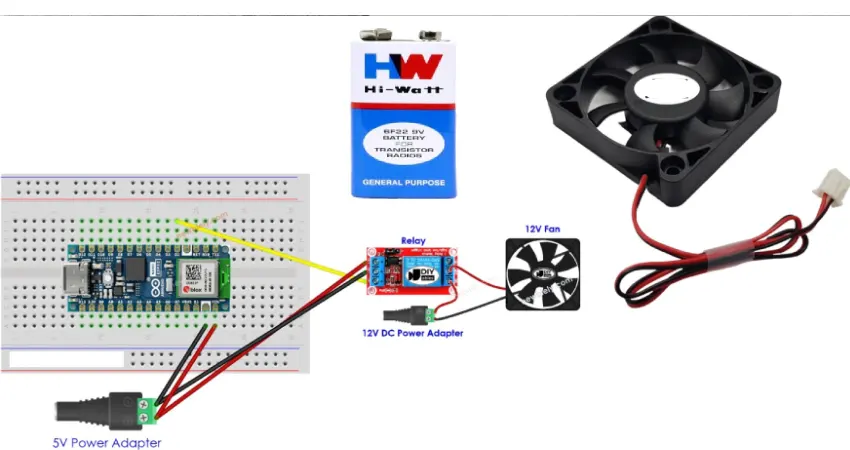
Choosing the Right Power Source
Picking the right power source is the first step. Not all power supplies are created equal, so you want one that fits your fan and your project. Here’s what you should look for:
- DC Input Voltage: Make sure your power supply matches the 12V requirement of your fan.
- Output Voltage: The supply must deliver a steady 12V. Too high or too low can cause problems.
- Output Current: Check your fan’s current needs (measured in amps). Choose a supply that gives at least that much, with a little extra for safety.
- Efficiency: A more efficient supply wastes less energy and helps your fan last longer.
- Size and Form Factor: The power supply should fit your setup.
- Cooling: Some supplies have their own fans, others are fanless. Pick what works for your environment.
- Operating Temperature: Make sure the supply can handle the heat or cold where you’ll use it.
- Environmental Conditions: If you’re working in a tough spot (like outdoors), look for extra protection.
Basic Tools and Materials
You don’t need a ton of fancy gear to get started. Here’s a quick table of what you might use:
| Component | Function |
|---|---|
| 12V DC Fan (fanacdc) | Moves air to cool your device |
| Power Supply | Provides the 12V DC needed for the fan |
| Transformer | Steps down high AC voltage if needed |
| Rectifier | Changes AC to DC |
| Filter | Smooths out the DC voltage |
| Voltage Regulator | Keeps the voltage steady at 12V |
| Protection Features | Guards against over-voltage, over-current, and short circuits |
| Wires & Connectors | Connect everything safely |
| Screwdriver | For securing connections |
Tip: Always double-check your connections before powering up. A simple mistake can cause headaches later!
Voltage and Current Essentials
Standard DC fans come in different voltages, but 12V is the most common for many projects. You’ll often need a converter to turn AC from a wall outlet into the right DC voltage. Matching voltage is key—if you use the wrong voltage, your fan might not work right or could get damaged. Current matters too. If your power supply can’t deliver enough amps, the fan may not spin at full speed or could overheat.
- Using a 12V supply for a 12V fan keeps things safe and efficient.
- Always check the fan’s label for its voltage and current needs.
- Too much current isn’t a problem—the fan only takes what it needs—but too little can cause trouble.
Getting these basics right means your fan will run smoothly and last longer.
How to Power a 12V DC Fan with fanacdc Products
Wondering how to power a 12V DC Fan in different situations? Let’s walk through the most popular methods using fanacdc’s reliable fans. Each setup has its own steps, tools, and safety tips. You’ll see just how flexible these fans can be for your next project.
Using a 12V AC-DC Adapter
This is one of the easiest ways to get your fan spinning. A 12V AC-DC adapter plugs into a wall outlet and gives you the right voltage for your fanacdc 12V DC Fan.
Step-by-Step Instructions:
- Turn off the circuit breaker. Make sure there’s no power before you start.
- Connect the wires. Most adapters have a positive (red) and negative (black) wire. Match these to the fan’s wires.
- Double-check your connections. Make sure everything is tight and in the right place.
- Add safety devices. Use a fuse to protect against overloads and an isolation switch for safe repairs.
- Inspect all connections. Look for loose wires or exposed metal.
- Make sure the fuse and isolation switch are in place.
- Plug in the adapter and turn on the power. Test the fan for smooth operation and listen for any strange noises.
- Check for overheating. The fan should stay cool and run quietly.
Tip: Always use a fuse and isolation switch for extra safety. This protects both you and your equipment.
Safety Table:
| Safety Precaution | Description |
|---|---|
| Prevent Overheating | AC/DC adapters generate heat. Good thermal management is important. |
| Ensure Effective Ventilation | Place the adapter where air can flow freely. |
| Use Fire-Resistant Materials | Choose materials like polycarbonate or aluminum alloys for safety. |
| Regular Maintenance of Vents | Clean vents to prevent dust buildup and overheating. |
fanacdc 12V DC Fans work perfectly with AC-DC adapters. Their wide voltage range (7V to 13.8V) and built-in protection features make them a safe and reliable choice for this setup.
Battery Power Setup
Batteries give you portable power. This is great for mobile projects, backup cooling, or places without easy access to outlets.
Best Battery Types and Runtimes:
| Battery Type | Characteristics | Typical Runtime Example |
|---|---|---|
| Lead-Acid (AGM) | Affordable, maintenance-free, good for stationary setups | 10-50 hours for small fans (1-2A) |
| Lithium-Ion (LiFePO₄) | Lightweight, compact, long-lasting, deep discharge | Longer runtime due to high efficiency |
| Gel Batteries | Sealed, vibration/leak-resistant, slower charging | Varies by capacity and usage |
| Runtime Calculation | Runtime (hours) = Battery Capacity (Ah) ÷ Fan Current Draw (A) | 50Ah battery powers a 5A fan for 10h |
How to Power a 12V DC Fan with a Battery:
- Use the right wire gauge. For most 12V setups, 12ga duplex wire works well.
- Add a fuse to the circuit for safety.
- Connect the positive wire from the battery to the fan’s positive lead.
- Connect the negative wire from the battery to the fan’s negative lead.
- Double-check all connections before turning on the power.
Note: Fuses are important. They protect your fan and battery from short circuits or overloads.
fanacdc 12V DC Fans are efficient and draw low current, so they’re ideal for battery-powered projects. Their brushless motors help extend battery life.
Computer Power Supply Method
Got an old desktop power supply? You can use it to power your 12V DC fan. This is handy for electronics benches or DIY projects.
Steps to Connect:
- Make sure the power supply has a load. You can use a power resistor or a lighted 12V switch.
- Cut the red wire going to the fan. Connect it to a red wire from the power supply (for 5V operation if you want quieter, slower speed).
- For full 12V operation, connect the fan’s positive wire to the yellow 12V wire from the supply and the negative to a black ground wire.
- Be careful with high current draws. If you use many fans, check the power supply’s limits.
fanacdc 12V DC Fans are compatible with computer power supplies. Their low power draw means you can run several fans at once for custom cooling solutions.
Solar Panel Connection
Want to go green? Solar panels can power your fanacdc 12V DC Fan for off-grid or eco-friendly projects.
Minimum Solar Panel Specs:
- Use a 50W solar panel for a 36W load. This gives you a safety margin.
- The panel’s voltage at maximum power (Vmp) should be about 17V.
- Open-circuit voltage (Voc) should be around 20V.
- Use an adjustable buck converter (input: 5.3-32V DC, output: 1.2-32V DC, up to 12A).
How to Power a 12V DC Fan with Solar:
- Use a 12V solar panel, a 12V battery, and a 12V DC solar charge controller.
- Connect the solar panel’s positive and negative wires to the charge controller.
- Connect the battery to the charge controller’s battery terminals.
- Connect the fan to the load terminals on the charge controller.
- During the day, the fan runs from solar power. At night, the battery takes over.
- The solar panel charges the battery while the fan runs.
Note: The fanacdc 12V DC Fan’s wide voltage range and low current draw make it perfect for solar setups. It keeps running smoothly, even if sunlight changes.
Other Power Options
You might have other sources, like universal adapters or car power. Here’s how to power a 12V DC Fan in these cases:
- Universal adapters: Set the output to 12V. Match the current rating to your fan.
- Car power: Use the 12V accessory socket. Add a fuse for safety.
- Custom power supplies: Make sure the voltage is steady and within the fan’s range.
fanacdc 12V DC Fans are versatile. They work with many power sources, thanks to their robust design and built-in protection. You can use them in cars, RVs, or anywhere you need reliable cooling.
Quick Recap:
How to power a 12V DC Fan? Choose your power source, match the voltage and current, and follow safe wiring steps. fanacdc fans make it easy, no matter which method you pick.
Wiring and Connection Guide
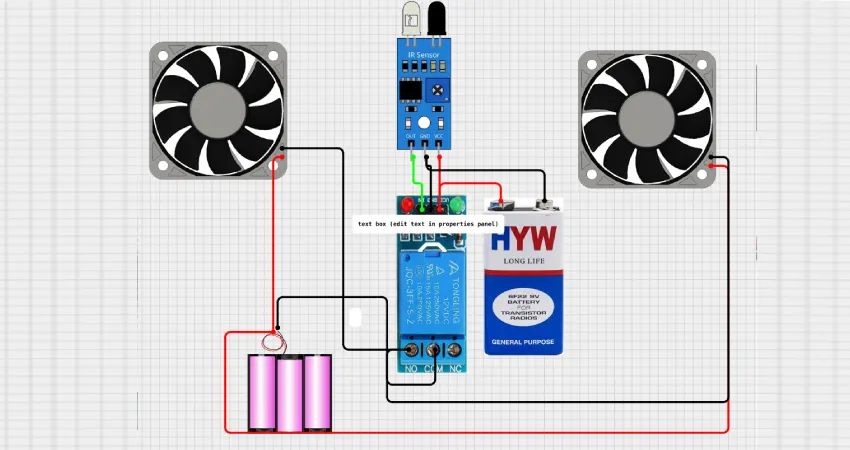
Getting your 12V DC fan wired up right is important for safety and performance. Let’s break down the basics so you can connect your fanacdc fan with confidence.
2-Wire, 3-Wire, and 4-Wire Fans
Not all fans are wired the same way. Here’s a quick look at the differences:
| Type | Speed Control | Speed Feedback | Number of Wires | Typical Use |
|---|---|---|---|---|
| Two-wire | ❌ Fixed speed | ❌ None | 2 | Simple heat dissipation |
| Three-wire | ❌ Fixed speed | ✔ Yes | 3 | Equipment requiring speed monitoring |
| Four-wire | ✔ PWM speed control | ✔ Yes | 4 | High performance |
- 2-wire fans are the simplest. They just need power and ground. You get one speed—full speed.
- 3-wire fans add a tachometer wire. This lets you monitor the fan’s speed, which is handy for electronics or computers.
- 4-wire fans are the most advanced. They include a PWM (Pulse Width Modulation) wire for speed control and a tachometer for feedback. These are great for projects where you want quiet operation or precise cooling.
Polarity and Safe Wiring
Wiring your fan the right way keeps it running safely. Here’s a simple checklist:
| Step | Action |
|---|---|
| 1 | Check the input voltage rating to ensure it matches your power supply (e.g., 12V DC). |
| 2 | Verify polarity using the manufacturer’s wiring diagram. Red is usually Positive (+), Black is Negative (-). |
| 3 | Test the fan after wiring to confirm correct operation before finalizing the installation. |
If you’re not sure, look for a small diagram on the fan label or check the product datasheet.
Using PWM and Tachometer Features
Some fanacdc 12V DC Fans come with smart features. Here’s what they do:
| Feature | Description |
|---|---|
| PWM Control | Lets you adjust fan speed for quieter operation and better energy use. |
| Tachometer | Gives real-time speed feedback, so you know your fan is working right. |
| High-Frequency PWM | Cuts down on noise and boosts reliability. |
- PWM control helps you set the fan speed to match your cooling needs. This saves power and reduces noise.
- Tachometer feedback lets you monitor the fan’s RPM. You can spot problems early if the fan slows down or stops.
- Many modern controllers and motherboards support these features, making setup easy.
For most projects, following the wiring diagram and using the right connectors will keep your fan running smoothly and safely.
Common Issues and Troubleshooting
Even with the best setup, things can go wrong. Let’s look at some common problems you might face with your 12V DC fan and how to fix them fast.
Fan Not Spinning
You turn on the power, but nothing happens. Don’t worry—this is a common issue. Here’s what to check:
- Loose or reversed wires: Make sure all connections are tight and the polarity is correct.
- Blown fuse: If you used a fuse (which you should!), check if it needs replacing.
- Power supply off or faulty: Test your power source with a multimeter.
- Fan blocked: Sometimes dust or debris jams the blades. Gently spin the fan by hand to see if it moves freely.
Overheating or Noise
A fan that gets hot or makes strange noises can be annoying. Here’s what might cause it:
- High ambient temperature: If your fan runs in a hot spot, it can overheat. Try moving it to a cooler place or improve airflow.
- Poor ventilation: Blocked vents trap heat. Clean out dust and make sure nothing blocks the fan.
- Worn bearings: Fans with old or damaged bearings can get noisy. If cleaning doesn’t help, consider replacing the fan.
- Voltage issues: Too much or too little voltage can make the fan run rough or hot. Double-check your power supply.
Regular maintenance, like cleaning vents and checking for dust, helps keep your fan running quietly and cool.
Power Supply Problems
Power supply issues can cause all sorts of trouble for your fan. Here’s a quick table to help you spot and solve the most common ones:
| Problem Type | Description | Quick Fixes |
|---|---|---|
| Overheating | High temperatures or poor airflow around the power supply. | Add cooling, use heat sinks, and check for dust or blockages. |
| Voltage Fluctuations | Unstable voltage from cheap adapters or bad wiring. | Use quality adapters and check all connections for tightness and corrosion. |
If your fan keeps shutting off or acting strange, start by checking the power supply. Reliable components and good ventilation make a big difference.
Stay safe! Always unplug your setup before making any changes or repairs.
Safety Tips for 12V DC Fans
Keeping your 12V DC fan safe and running smoothly isn’t hard, but you do need to pay attention to a few important details. Let’s walk through the basics so you can avoid common mistakes and protect your equipment.
Voltage Verification
Always check the voltage before you connect your fan. If you use the wrong voltage, you might damage the fan or cause it to run poorly. Look at the label on your fanacdc 12V DC Fan. It should say “12V DC.” Use a multimeter to test your power supply. Make sure it reads close to 12 volts. If you see a big difference, stop and fix the problem before you plug in the fan.
Avoiding Reverse Polarity
Reverse polarity means you connect the positive and negative wires the wrong way. This can cause the fan to stop working or even damage the electronics inside. Most fans have color-coded wires—red for positive, black for negative. If you’re not sure, check the wiring diagram or the datasheet. Take your time and match the wires carefully.
Here’s a quick checklist:
- Identify the positive and negative wires.
- Match them to the correct terminals on your power supply.
- Test the fan after wiring, but before final installation.
Using Proper Connectors
Using the right connectors keeps your setup safe and reliable. Loose or exposed wires can cause shorts or sparks. Choose connectors that fit snugly and lock in place. For projects that move or vibrate, use screw terminals or locking connectors. If you need to join wires, use crimp connectors or solder them for a strong bond.
| Connector Type | Best Use | Safety Benefit |
|---|---|---|
| Screw Terminal | Stationary setups | Secure, easy to check |
| Crimp Connector | Portable projects | Strong, vibration-proof |
| Soldered Joint | Permanent installations | Reliable, low resistance |
Good connectors mean fewer problems and longer fan life.
Following these safety tips makes How to Power a 12V DC Fan much easier and safer. Take a few extra minutes to check your setup, and you’ll enjoy reliable cooling for years.
You have lots of choices when it comes to powering your 12V DC fan. Here are the main options:
- 12V DC supply works well for cars, security systems, and telecom gear.
- Higher voltage supplies, like 24V or 48V, help with bigger fans and make wiring easier.
- Batteries, AC adapters, solar panels, and computer power supplies all offer flexibility.
Always match the voltage and current to your fan. Safe wiring keeps everything running smoothly.
fanacdc 12V DC Fans are reliable and fit many setups. Pick the method that suits your project best. If you need advanced solutions, fanacdc can help. Now you know How to Power a 12V DC Fan for any situation!
FAQ
How do I know if my power supply is safe for a 12V DC fan?
Check the label on your power supply. It should say “12V DC” and list the amps. If the numbers match your fan’s needs, you’re good to go. Use a multimeter to double-check.
Can I run multiple 12V DC fans from one power source?
Yes, you can! Just add up the current draw for all fans. Make sure your power supply can handle the total amps. If you’re unsure, start with one fan and test.
What’s the difference between brushless and brushed DC fans?
Brushless fans last longer and use less power. They run quieter and need less maintenance. fanacdc 12V DC Fans use brushless motors for reliable cooling and better efficiency.
Can I customize wire length or connectors for my fanacdc 12V DC Fan?
Absolutely! fanacdc offers custom options for wire length, connector type, and even waterproofing. Just let them know your project needs. You’ll get a fan that fits perfectly.
