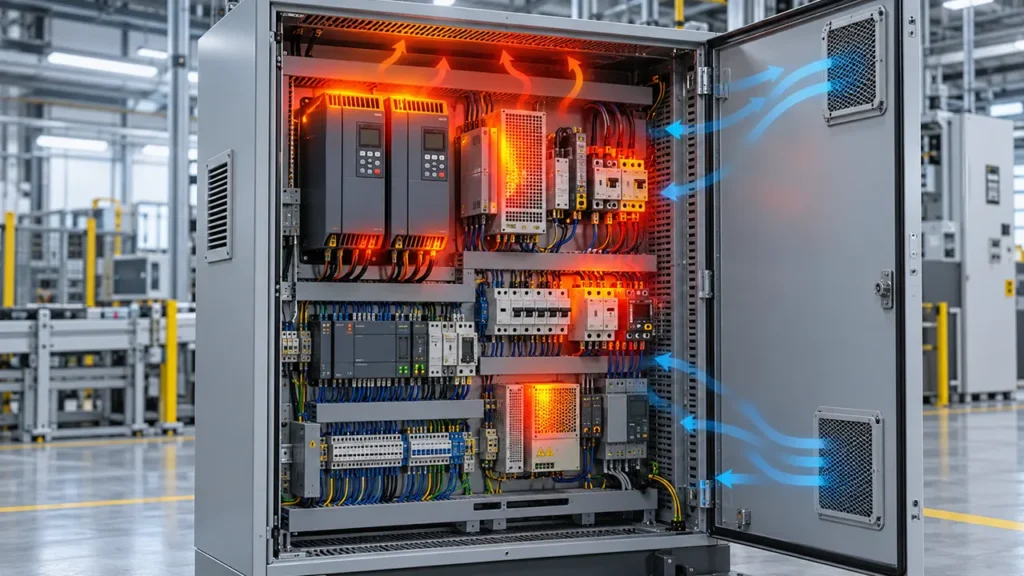
A hot cabinet does not automatically mean you need a larger fan. The useful question is what changed between normal operation and the overheating event. In practice, the cause is usually found in one of four areas: the cabinet is producing more heat, the surrounding air is hotter, the airflow path has deteriorated, or the cooling system is no longer delivering its original performance.
If you check those areas in the right order, you can often separate a maintenance problem from a sizing problem without guessing.
Key Takeaways
- Record ambient, cabinet inlet, cabinet outlet and critical-component temperatures under the same load before changing hardware.
- Restore the existing cooling system first: inspect filters, fan operation, airflow direction, outlets, clearances, thermostats and power supply.
- A spinning fan is not proof of adequate airflow. Filters, grilles, cable bundles and poor inlet clearance can move the fan to a much lower operating point.
- Ventilation cannot cool the enclosure below the temperature of the incoming air. If the target temperature is below ambient, you need a closed-loop cooling method.
- If there is a burning smell, discoloration, repeated tripping or an abnormally hot electrical connection, stop treating the problem as a ventilation issue and have qualified personnel inspect the equipment.
Safety note: Opening or servicing an energized cabinet can expose you to hazardous electrical and stored energy. Follow the equipment manufacturer’s procedure and your site’s energy-control program. OSHA’s lockout/tagout guidance explains the general requirements for controlling hazardous energy during servicing.
First, Confirm That the Cabinet Is Actually Overheating
One temperature reading is rarely enough. Start by comparing measurements taken at the same production load, with the doors closed and the cooling system in its normal state.
Record at least four points:
- ambient air near the cabinet’s air inlet;
- air entering the enclosure;
- air leaving the enclosure; and
- the hottest safety-critical component or the cabinet’s known hot spot.
Then check whether the alarm value comes from the same sensor and location used in your historical baseline. A loose probe, a sensor moved into a hot exhaust stream or a changed alarm setpoint can create an apparent overheating problem even when the cabinet’s thermal condition has not changed.
If several components are hotter than usual, suspect a cabinet-level problem. If only one terminal, contactor or power device is unusually hot, investigate that component, its loading and its connections before increasing cabinet airflow.
What to Check First: A Practical Troubleshooting Order
1. Ask What Changed
Start with the event history. Was a drive, power supply or controller added? Did the machine cycle time increase? Has the cabinet been moved closer to a furnace, wall or window? Did the problem begin during hotter weather or after a maintenance shutdown?
These questions matter because cooling capacity may not have failed at all. The heat load or ambient condition may simply have moved beyond the original design point.
- Higher electrical load: drives, transformers, power supplies and switching devices usually dissipate more heat as loading increases.
- Higher ambient temperature: a fan can only exchange cabinet air with the surrounding air. As the temperature difference shrinks, sensible cooling capacity falls.
- Solar exposure: a cabinet near a window or outdoors may receive a heat load that is absent from the electrical drawings.
- Production or software changes: longer duty cycles and higher switching frequency can increase internal losses without any visible hardware change.
2. Restore the Existing Airflow Before Resizing It
Inspect both sides of the air path. A clean inlet filter does not help if the exhaust grille is blocked, and a new fan cannot overcome a sealed cable bundle pressed against its inlet.
Check the following:
- filter media for dust loading, oil mist, moisture or collapse;
- exhaust filters and louvers, not only the powered inlet;
- fan rotation, airflow direction, unusual noise and bearing condition;
- the fan’s actual supply voltage, frequency and control signal;
- thermostat, relay, fuse and controller output;
- clearance between the fan inlet and nearby panels, cable ducts or walls; and
- external recirculation between the warm exhaust and the cabinet intake.
For a condition-based replacement method, see when to replace a cabinet fan filter. If airflow is still weak after maintenance, the fan system effect guide explains why real installed airflow can be lower than a catalog free-air value.
3. Verify the Airflow Direction and Path
Air needs a defined route through the heat-producing equipment. If the inlet and outlet are close together, air can take the easy path and leave remote components in a stagnant zone. If internal component fans discharge against the cabinet flow, hot air may circulate locally instead of reaching the outlet.
A low intake and high outlet on opposite sides is a useful starting arrangement for many cabinets, but it is not a universal rule. The right layout depends on the location of the heat sources, the airflow direction through drives and power supplies, contamination control and the space around the enclosure.
Use the cabinet fan airflow direction guide to compare intake and exhaust arrangements. When clean-air control is important, also review positive versus negative enclosure pressure.
4. Decide Whether the Cooling Method Has Reached Its Limit
Once the original airflow has been restored, compare the required internal temperature with the worst-case ambient temperature. If the cabinet only needs to remain a reasonable amount above ambient and the surrounding air is clean enough, filtered forced-air cooling may still be appropriate.
If the required internal temperature is at or below ambient, or if dust, moisture or corrosive contaminants cannot be admitted, adding ventilation fans will not solve the architectural problem. Compare closed-loop options such as air-to-air heat exchangers, air-to-water heat exchangers and enclosure air conditioners. The enclosure fan versus air conditioner guide covers this decision in more detail.
Match the Symptom to the Likely Cause
| Observed symptom | Likely causes to check first | Useful next check |
|---|---|---|
| Cabinet was stable until hot weather | Higher ambient temperature, solar load, warm-air recirculation | Measure intake air at the cabinet during the event, not at a distant room sensor |
| Fan runs but outlet airflow is weak | Loaded filters, blocked grille, poor inlet clearance, system resistance | Compare airflow or cabinet temperature with a clean-filter baseline |
| One component is hot while the rest of the cabinet is normal | Local overload, loose connection, blocked component fan, stagnant pocket | Inspect the component and its local air path; do not assume a larger cabinet fan is the cure |
| Temperature rises after a retrofit | Added heat load, changed cable routing, blocked path, reversed component airflow | Update the heat-loss estimate and inspect the route from inlet to outlet |
| Temperature cycles sharply | Thermostat location or hysteresis, intermittent fan, control relay problem | Trend the fan command, cabinet temperature and load together |
| Filters become dirty unusually fast | Wrong pressure strategy, high dust concentration, undersized filter area | Review intake location, filter area and maintenance interval |
When a Larger Fan Helps—and When It Does Not
A larger fan helps only when the cabinet can accept more outside air and the installed operating point delivers enough extra flow through the actual resistance. It will not correct a blocked outlet, a short-circuited air path, an internal electrical fault or an ambient temperature above the allowed internal target.
Do not select from free-air flow alone. Estimate the heat load, define the allowable temperature rise and account for filter, grille and enclosure resistance. This electrical cabinet fan sizing guide shows the information you need before selecting a fan.
Tip: Keep a commissioning record of ambient temperature, cabinet temperature, production load and filter condition. The next time an alarm occurs, that baseline will tell you whether the problem is load, environment or airflow.
How to Prevent Repeat Overheating
- Trend cabinet temperature against ambient temperature and machine load, rather than watching a single alarm value.
- Use condition-based filter inspection where dust loading varies with season or production.
- Keep replacement filters consistent with the specified media and pressure-drop requirements.
- Maintain external inlet and outlet clearance after cabinets or nearby equipment are moved.
- Recalculate the heat load whenever power electronics are added or operating duty changes.
- Test fan alarms, thermostats and cooling controls during planned maintenance.
- Verify the completed enclosure still meets the environmental protection required for its location. NEMA notes that enclosure protection applies to a completely and properly installed enclosure; field openings and accessories must be considered as part of the finished assembly.
The Emerson paper on heat and airflow inside an enclosure also discusses the relationship between cabinet heat, airflow and equipment reliability.
Conclusion
Electrical cabinet overheating is best treated as a sequence, not a fan-shopping problem. Confirm the temperature, identify what changed, restore the existing airflow, inspect the internal air path and only then decide whether the fan or cooling method is undersized.
When a new forced-air solution is appropriate, LINKWELL manufactures AC, DC and EC cooling fans for electrical and electronic equipment. A useful selection request should include the cabinet heat load, maximum ambient temperature, target internal temperature, supply voltage, expected system resistance, environmental conditions and available mounting space. Those inputs make it possible to select an operating point instead of guessing from fan diameter.
Frequently Asked Questions
Why is my control cabinet overheating even though the fan is running?
The fan may be spinning while installed airflow is low. Check dirty inlet and outlet filters, blocked grilles, poor inlet clearance, incorrect rotation, reduced supply voltage and internal short-circuiting of air between inlet and outlet.
Can I solve electrical enclosure overheating by adding another fan?
Only if more ventilation air is permitted and the existing problem is insufficient airflow. Another fan will not fix an ambient temperature above the target, a sealed-enclosure requirement, a local electrical fault or a badly arranged air path.
What temperature should an electrical cabinet run at?
There is no universal cabinet temperature that suits every component. Use the lowest allowable operating limit among the installed devices, include the sensor location and measurement uncertainty, and maintain a design margin for worst-case ambient and load.
Should the enclosure fan blow air in or pull air out?
Both arrangements can work. Filtered positive-pressure intake is often useful where dust entry through unsealed gaps must be reduced. Exhaust arrangements may suit other layouts. The deciding factor is whether the completed path moves air through the heat sources without recirculation and maintains the required enclosure protection.