A CNC machine can run normally during a short setup cycle and then begin producing drive alarms, controller resets or position errors after several hours of production. When the faults disappear after the cabinet door is opened, heat is an obvious suspect. The difficult part is deciding whether the cabinet needs more airflow, a better airflow path, improved filtration or a completely different cooling method.
The right fan is not simply the model with the highest free-air CFM. CNC control cabinet cooling depends on the heat released by drives, power supplies and control electronics, the temperature and cleanliness of the surrounding shop, and the resistance created by filters, grilles and internal components.
What Creates Heat Inside a CNC Control Cabinet?
The spindle drive, servo drives, transformers, power supplies, braking components, contactors, PLC or CNC controller and communication hardware all release heat. Their nameplate electrical input is not the same as their cabinet heat loss. Use manufacturer loss data at the real duty cycle wherever possible.
Heat also enters through the cabinet walls when the shop is hotter than the desired internal temperature or when the enclosure is exposed to sunlight, a furnace or another machine. If the ambient air is cooler than the target cabinet temperature, the enclosure surface can reject some heat. If the ambient is hotter, the walls add heat instead.
Do not size the fan from the machine’s total connected power. A 15 kW spindle motor does not normally release 15 kW inside the control cabinet. Build a heat-loss list for the devices physically inside the enclosure, include expected simultaneity and add only justified design margin.
When Is Fan Ventilation the Right Cooling Method?
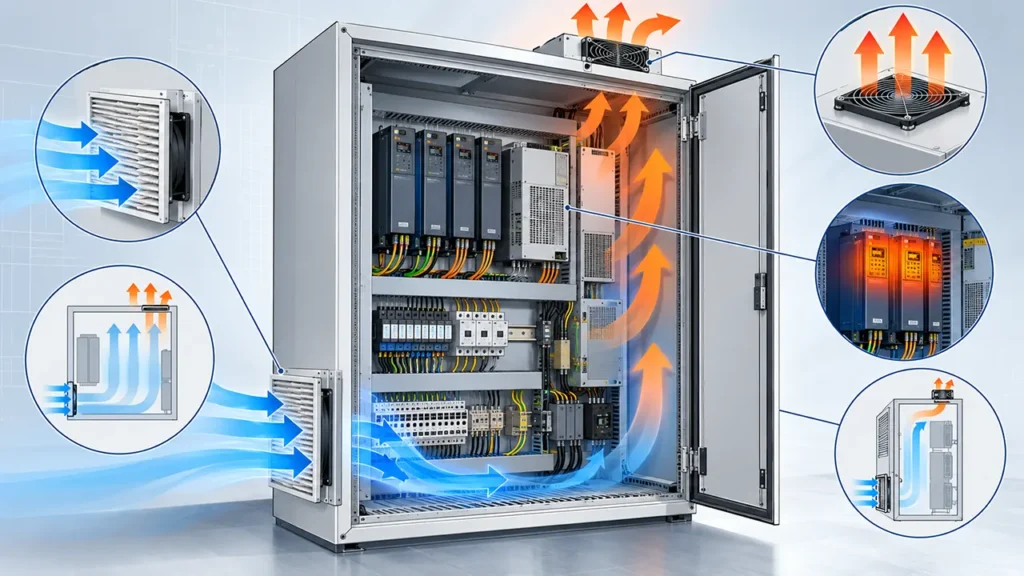
Open-loop fan ventilation works when the surrounding air is cool enough, reasonably clean or can be filtered, and direct exchange with the cabinet does not violate the required environmental protection. The fan brings ambient air through the electrical components and sends the absorbed heat back to the shop.
A fan cannot cool the cabinet below the temperature of the incoming air. If the shop can be hotter than the maximum permitted cabinet temperature, more airflow will not solve the problem. A sealed air-to-air heat exchanger, air conditioner or another closed-loop method may be needed. The same applies when conductive dust, heavy oil mist, moisture or corrosive vapor makes ambient-air exchange unacceptable.
| Application condition | Likely starting point | Main check |
|---|---|---|
| Ambient cooler than cabinet target; air can be filtered | Filter fan or ducted fan ventilation | Loaded-filter airflow and dust path |
| Ambient near or above cabinet target | Closed-loop cooling or conditioned air | Required cooling capacity at worst ambient |
| Heavy oil mist, conductive dust or corrosive atmosphere | Closed-loop solution or isolated clean-air supply | Ingress protection and contamination risk |
| Localized drive hot spot but acceptable cabinet average | Air-path correction or internal circulation | Flow through the hot component |
Note: Opening the cabinet door may lower temperature during troubleshooting, but it bypasses the enclosure’s protection strategy and is not a production cooling solution.
How to Estimate the Required Cabinet Airflow
For a first estimate, sensible heat removal by ventilation can be written as:
Airflow (m3/h) = 3.0 x internal heat load (W) / allowable air temperature rise (C)
The constant is an approximation for air near typical room conditions. Suppose the equipment releases 800 W inside the cabinet and the design allows the exhaust air to be 10 C warmer than the inlet air. The ideal estimate is:
Airflow = 3.0 x 800 / 10 = 240 m3/h
This is not yet the fan selection value. It assumes that all measured airflow passes through the heat-producing zone and that air properties remain close to the assumed condition. It does not include filter loading, grille losses, air recirculation, altitude effects or an uneven internal flow path.
Use the calculation to define the cooling task, then select the fan at the pressure created by the complete cabinet. The enclosure cooling fan calculation guide explains the heat-load inputs and unit conversions in more detail.
Why Free-Air CFM Is Not the Installed Airflow
Free-air airflow is measured with very little external resistance. A CNC cabinet normally includes an inlet filter, protective grille, outlet grille, louvers, cable bundles and narrow passages around drives. Each item consumes pressure. As the filter loads with shop dust or oil, its pressure drop rises further.
The working airflow is found where the fan curve intersects the cabinet system curve. A fan with an impressive free-air value may deliver too little air once the filter is installed. Compare candidates at the estimated system pressure, and use a loaded-filter condition for the maintenance limit.
Ask for the pressure-airflow curve of the exact model. Fan performance tested in standardized airways, such as the procedures described by ISO 5801, is a reference for comparing products; the finished CNC cabinet still requires installed verification.
Review fan filter pressure drop and how to read a fan curve before choosing only from a maximum airflow number.
How to Arrange the Airflow Path
Many cabinets bring filtered air in near the lower part of the enclosure and exhaust warmer air higher up. That layout can support natural buoyancy, but the component arrangement matters more than the rule of thumb. The cool air must pass through or across the drives and power components before it reaches the outlet.
Keep the inlet and outlet far enough apart to prevent short-circuit recirculation. Seal large bypass gaps where air can travel directly from the fan to the exhaust without cooling the equipment. Avoid placing a drive, wiring duct or mounting plate immediately against the fan inlet or outlet.
Drives often have their own internal airflow direction. Align cabinet flow with those paths rather than forcing hot exhaust into another device’s intake. If the cabinet contains separated zones, one large fan may not distribute air as effectively as a planned combination of supply, exhaust or internal circulation.
The articles on air recirculation in electrical enclosures and fan inlet clearance can help diagnose a cabinet that has enough theoretical airflow but persistent hot spots.
Positive or Negative Pressure for a CNC Cabinet?
A filtered intake fan normally creates slight positive pressure when the controlled inlet airflow exceeds the powered exhaust airflow. This can reduce the amount of unfiltered air drawn through door gaps and cable entries. It does not make the cabinet sealed, and the benefit disappears if the filter is blocked or the outlet is too restrictive.
An exhaust fan creates negative pressure and can be easy to arrange, but replacement air then enters through every available opening unless the cabinet provides a deliberate filtered inlet. In a dusty machine shop, that can deposit contamination around door seals and cable openings.
Choose pressure strategy from the contamination path and the equipment layout, not from fan count alone. The complete comparison is covered in positive versus negative pressure in electrical enclosures.
How Dust, Oil Mist and Filters Change Fan Selection
CNC environments may contain metal dust, abrasive particles, coolant aerosol and oil mist. A standard filter can capture some particles, but its media, sealing and maintenance interval must match the contamination. A filter that becomes wet with oil can develop a much higher pressure drop than expected from dry-dust data.
Do not assume that adding a fan and grille preserves the cabinet’s original IP or NEMA rating. The assembled filter-fan system, cutout, seals and mounting method determine the resulting protection. If the machine requires washdown protection or must exclude conductive contamination, an open-loop fan may be the wrong architecture.
Provide a differential-pressure indicator, airflow switch, maintenance timer or practical inspection interval when filter blockage can cause a damaging temperature rise. The alarm threshold should be verified against component temperature, not selected only because the filter looks dirty.
AC, DC or EC Fan for CNC Control Cabinet Cooling?
| Fan type | Useful when | Selection questions |
|---|---|---|
| AC axial fan | AC power is readily available and simple fixed-speed operation is acceptable | Voltage, frequency, current, noise and protection method |
| DC axial fan | The cabinet has a DC control supply or needs compact control and feedback | Supply range, startup current, PWM, FG or RD options |
| EC fan | Wide input, efficiency or integrated speed control is important | Input specification, control interface, EMC and minimum speed |
The label AC, DC or EC does not determine whether a fan can meet the pressure requirement. Compare the exact curve, electrical interface, operating temperature, bearing system and approved protection features of each model.
For variable-speed operation, use temperature control to reduce unnecessary noise and filter loading during light duty. Confirm the minimum reliable starting condition and define what happens if the temperature sensor or control signal fails.
Control, Monitoring and Failure Response
A cabinet thermostat can switch a fixed-speed fan, while a controller can vary a compatible fan’s speed from measured temperature. The sensor should represent the critical thermal zone. A sensor mounted next to the cool-air inlet may report a safe temperature while the upper drive compartment overheats.
FG tachometer feedback confirms rotational speed when correctly interpreted. RD or alarm outputs may report a locked or stopped condition on supported models. Neither signal proves that the filter is clear or that useful airflow reaches the drives. Combine fan status with cabinet temperature or airflow monitoring when loss of cooling can stop production or damage equipment.
Check startup current and power-supply capacity, especially when several DC fans start together. Define the response to a failed fan: alarm only, controlled machine stop, redundant fan operation or continued operation at reduced load.
Mechanical, Electrical and Maintenance Checks
Confirm fan size, depth, mounting orientation, guard clearance and cable bend space. Use an even mounting surface so screw torque does not distort the frame. Keep high-voltage wiring and motor cables from blocking the inlet or transferring electrical noise into low-level feedback wiring.
The machine electrical design must be assessed as a complete system. IEC 60204-1:2016 with Amendment 1:2021 applies to electrical, electronic and programmable electronic equipment of machines, but a fan component alone does not establish machine compliance.
Make the filter serviceable without exposing personnel to moving blades or live conductors. Record the filter part, replacement interval and temperature or pressure condition that triggers maintenance. If access is difficult, a theoretically efficient filter may not remain effective in production.
CNC Cabinet Fan Selection Checklist
- List the worst-case heat loss of every component inside the cabinet.
- Define maximum shop temperature and maximum permitted component or cabinet temperature.
- Decide whether open-loop ventilation is acceptable for the dust, oil mist, moisture and enclosure rating.
- Calculate the first airflow target from heat load and allowable temperature rise.
- Estimate clean and loaded filter pressure drop plus grille and internal passage losses.
- Compare complete fan curves at the required operating point.
- Check voltage, frequency, startup current, control input and alarm output.
- Lay out a directed path through the hot components without recirculation.
- Verify noise, vibration, ingress protection and service access.
- Run a full-duty thermal test at worst ambient and the maintenance-limit filter condition.
LINKWELL supplies AC, DC and EC cooling fan options for industrial equipment. For a model review, provide the cabinet drawing, heat-loss estimate, ambient range, required airflow, estimated static pressure, voltage, control method, contamination level and available mounting space. The final recommendation should reference the approved model datasheet rather than a generic frame-size assumption.
Frequently Asked Questions
How do I calculate airflow for a CNC control cabinet?
Start with the internal heat loss and allowable air temperature rise. A useful first estimate in metric units is airflow in m3/h = 3.0 x heat load in W / temperature rise in C, then correct the selection for real system resistance and test the cabinet.
Can a fan cool a CNC cabinet below ambient temperature?
No. Open-loop ventilation approaches the incoming-air temperature but cannot cool below it. Use a refrigeration or heat-exchange solution when the target requires it.
Should the fan blow into or exhaust from the cabinet?
A filtered intake is often chosen for slight positive pressure in dusty environments, but the correct direction depends on the enclosure, contamination path and component airflow.
Why does the cabinet overheat even though the fan is running?
Common causes include a loaded filter, excessive system resistance, recirculation, blocked clearance, reversed airflow, a hot ambient or an underestimated heat load.
How often should a CNC cabinet fan filter be replaced?
There is no universal interval. Base it on the shop contamination, filter pressure drop, measured cabinet temperature and the machine’s maintenance history.
Is a higher-CFM fan always better?
No. Compare airflow at the cabinet’s operating pressure, along with noise, power, filter life and the actual path through the hot components.